
Crest: The Mac Notch App That Also Answers Claude Code
Most notch apps stop at music, a file tray and a calendar. Most coding-agent notch apps stop at agent sessions. Crest, a native Mac app from an independent developer, does both: pages of everyday widgets that grow out of the MacBook notch, plus the allow and deny prompts of Claude Code, Codex and GitHub Copilot CLI. This piece covers what it shows, which parts are a one-time purchase and which are not, and which notch apps cost less.

OneTimePay.app
6 min read
Is there a Mac notch app that also handles Claude Code permission prompts?
Yes. Crest ($14.99 once for 2 Macs, macOS 14+, Apple silicon or Intel) keeps music, a file shelf and a clipboard in the notch and shows Claude Code, Codex and Copilot CLI permission prompts there with the full command and Allow or Deny. NotchNook Pro does Claude Code and Codex approvals too, on Apple silicon only.
On this page
What Crest puts in the notch
In short
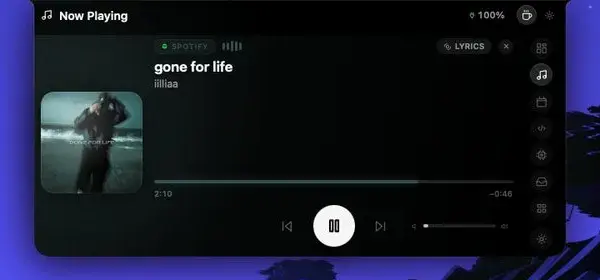
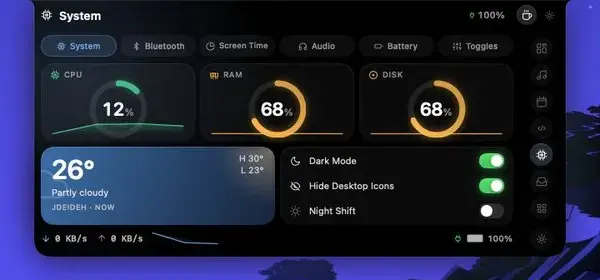
Crest 6 grows one island out of the notch. Hover it for a peek; click it and it opens into a row of pages (Now, Home, Work and Code) that you move through with a two-finger swipe, the arrow keys or the dots. Each page holds widgets you add from a gallery, resize and drag around. There are 22 today.
Media: Now Playing on the closed notch (album-art bubbles with a moving equaliser, or wings inside the notch), and scroll on the notch to change the volume.
Day to day: Calendar with a Join button and a camera check before a call, Reminders, Notes, a focus timer and weather.
The Mac itself: System (CPU, memory, disk, network and the apps using the most memory), Batteries for the Mac and every Bluetooth device, and Controls for switches, speakers and mics.
Developer widgets: Agents (every running session, with one click to its terminal), pull requests, saved SSH hosts and the ones in
~/.ssh/config.Window snapping: drag any window up to the notch and hold, and a palette of twelve layouts opens (halves, quarters, thirds, centre, full).
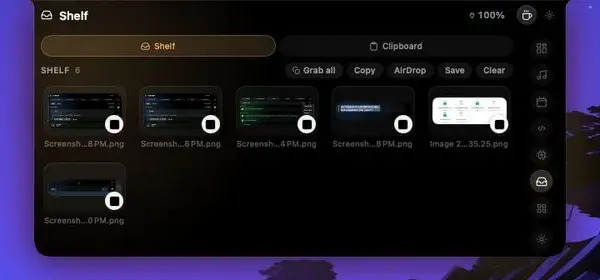
Notch file shelf and clipboard
Drop a file on the notch and the Shelf keeps it for later, with Grab all, Copy, AirDrop, Save and Clear. The Clipboard sits next to it as its own tab. In Crest 6 the drop opens a menu that also offers Edit, Ask Claude, Send with Drop and Keep in Cloud.
Is there a Mac notch app that also handles Claude Code permission prompts?
In short
Yes, and this is where Crest differs from most music-and-shelf notch apps. When Claude Code, Codex or GitHub Copilot CLI wants to run a command or edit a file, a pill waits on the notch. Rest the pointer on it and the allow sheet opens with the whole command (or the file and the lines it changes), where it runs, Deny, Allow, and a switch to allow the rest of that session.
Claude Code notch prompts, Codex and Copilot CLI
Questions, not just permissions: Claude Code's questions arrive as one-question cards you tap through or answer in your own words, and you check your answers before they are sent.
Fallback built in: if Crest is quit or does not answer within about a second, the agent shows its own prompt in the terminal as usual.
Codex needs one step: Codex runs Crest's hook only after you trust it once in
/hooks.Three agents, not thirty: the prompts cover Claude Code, Codex and Copilot CLI. Cursor, Aider and other agents are not answered from the notch.
Widgets
22
Agents answered
3
macOS
14 or later
Runs on
Apple silicon, Intel
Price
$14.99 once
Trial
7 days
Passwords, 2FA codes, Drop and the screenshot editor
In short
Crest also bundles a password filler, a two-factor authenticator, encrypted file sending and a screenshot blur tool. Some of these are in the one-time Pro; two of them turn into a subscription after the first month. Here is the split, plainly.
In Crest Pro ($14.99 once): every widget, the agent prompts, the Shelf and Clipboard, window snapping, the screenshot editor (beta) and Drop sending up to 2 GB per file and 20 GB a month, with links that last 1 hour.
Subscription after month one: filling passwords (Touch ID, Safari or the Chrome extension) and typing in 2FA codes needs Crest Passwords at $2.99 a month or $24.99 a year. Reading, copying and exporting what you saved never pauses.
Optional storage: Crest Cloud is $5.99 a month or $49.99 a year for 50 GB, or $8.99 a month or $89.99 a year for 200 GB, and includes Passwords.
The screenshot editor reads text on the Mac with Apple's Vision framework, outlines passwords, card numbers, codes, emails, phone numbers and faces, and blurs them in one click. Nothing is uploaded. Drop and Cloud files are encrypted on the Mac before they leave it.
You may not need the password add-on
Apple's own Passwords app on macOS Sequoia or later stores two-factor verification codes and fills them for free. Buy Crest Pro for the notch and the agent prompts; treat Crest Passwords as optional.
Crest vs NotchNook, Boring Notch and Alcove
In short
Boring Notch is free and open source, and Alcove is cheaper at $12.99 once. Neither answers coding-agent prompts. NotchNook Pro does approve Claude Code and Codex, for $19 lifetime or $3 a month, but only on Apple silicon. Crest is $14.99 once, runs on Intel too, and adds Copilot CLI.
| App | Price | Runs on | Everyday widgets | Coding-agent prompts |
|---|---|---|---|---|
Crest this one this article | $14.99 once (2 Macs), 7-day trial; Passwords and Cloud are subscriptions | macOS 14+, Apple silicon and Intel | 22 widgets, shelf, clipboard, window snapping | Claude Code, Codex, Copilot CLI |
NotchNook Pro Classic: $15, no agents | $19 lifetime or $3/month (2 Macs), 48-hour trial | macOS 14.6+, Apple silicon only | Music, lyrics, tray, clipboard, calendar, to-dos | Claude Code, Codex |
Boring Notch open source | Free (GPL-3.0) | macOS 14+, Apple silicon and Intel | Music with visualizer, file shelf with AirDrop | None |
Alcove closed source | $12.99 once (3 devices), 72-hour trial | macOS 15+ | Live Activities, notifications, HUDs, Lock Screen widgets | None |
A NotchNook alternative, or a Boring Notch alternative?
If you only want music and a file tray, start with Boring Notch: it costs nothing. If you want polished Live Activities and Lock Screen widgets on macOS 15, Alcove is the cheaper paid pick. NotchNook Pro is the closest match to Crest on an Apple silicon Mac. Crest fits the developer on any Mac from macOS 14 who wants widgets and agent prompts in one app.
Running many agents at once? Our AgentPeek spotlight covers a notch app built only for agents, with far more of them. For music and Lock Screen lyrics, see the DynamicHorizon spotlight.
What Crest does not do
In short
It is not free after the trial, it answers only three coding agents, and its password and 2FA filling is a subscription after the first month. It is also not on the Mac App Store: you download it from the site or install it with Homebrew.
No free tier: 7 days of everything with no account and no card, then Crest pauses until you buy, apart from receiving Drop files and reading saved passwords, codes and notes.
Accounts for some features: the trial needs none, but Drop, Cloud, sync and checkout use an account (Google, Apple or email).
Fast-moving app: version 6.9.5 shipped on 15 November 2026, and the developer counts 119 releases since June 2026. Expect the layout to keep changing. Our screenshots are from the June build.
Refunds: within 7 days, and a reason must be given.
Who should skip it
Anyone who only wants music and a file tray in the notch (Boring Notch is free), and anyone running many agents beyond Claude Code, Codex and Copilot CLI, who will want a dedicated agent monitor instead.
Frequently asked questions
Is there a NotchNook alternative that runs on Intel Macs?
Yes. Crest is a universal app for Apple silicon and Intel on macOS 14 or later, and it keeps the Claude Code, Codex and Copilot CLI prompts on Intel too. Boring Notch is free and also runs on Intel. NotchNook Classic runs on Intel, but NotchNook Pro, the version with agent approvals, needs Apple silicon.
Which notch apps can you buy once instead of paying monthly?
Crest Pro ($14.99 for 2 Macs), Alcove ($12.99) and NotchNook (lifetime $15 for Classic or $19 for Pro) are one-time purchases, and Boring Notch is free. Be aware that Crest charges a subscription for its optional extras: filling passwords and 2FA codes after the first month ($2.99 a month or $24.99 a year) and Crest Cloud storage.
Does Crest work on a Mac without a notch?
Yes. On an iMac, a Mac mini, an older MacBook or an external display, Crest sits in a small pill at the top of the screen. Hover it for the peek and click it for the same widget pages.
Does Crest replace Claude Code’s own permission prompts?
No, it sits in front of them. If Crest is quit or does not answer within about a second, Claude Code, Codex and Copilot CLI fall back to their own prompts in the terminal. Codex runs Crest’s hook only after you trust it once in /hooks.
What happens when the Crest trial ends?
The trial runs 7 days with no account and no card. After that Crest pauses until you buy Crest Pro. Two things keep working: receiving files with Drop, and reading, copying and exporting the passwords, codes and notes you saved.
Sources
- 1
The official site: widgets, coding-agent prompts, Drop, Passwords, macOS 14+ on Apple silicon and Intel, version 6.9.5 of 15 November 2026. Read on 16 November 2026.
- 2
Crest Pro $14.99 once for 2 Macs; 7-day trial; Crest Passwords $2.99/month or $24.99/year; Cloud 50 GB $5.99/month or $49.99/year, 200 GB $8.99/month or $89.99/year; 7-day refunds.
- 3
The plain-facts ledger: the 22 widgets, how the allow sheet works, the one-second fallback to native prompts, the Codex /hooks trust step, and what keeps working after the trial.
- 4
How a PermissionRequest hook lets an outside app allow or deny a tool call, which is the mechanism notch apps use.
- 5
Pro $19 lifetime or $3/month (Apple silicon, Claude Code and Codex approvals); Classic $15 lifetime or $2/month (Apple silicon and Intel); 48-hour trial; 2 Macs; macOS 14.6+.
- 6
Free and open source (GPL-3.0); macOS 14+, Apple silicon or Intel; music controls with a visualizer and a file shelf with AirDrop.
- 7
$12.99, one-time with future updates (per its FAQ), up to 3 devices, 72-hour trial, 14-day refund, macOS 15 or later.
- 8
Apple Passwords: verification codes
The built-in Passwords app (macOS Sequoia or later) stores two-factor verification codes at no cost.

Crest
Turns your MacBook's notch into a hub for Now Playing, system stats, calendar, tasks, and translation.
once
macOS
More apps worth a look: browse the desktop