
Coding Agent Monitor for Mac: AgentPeek in the Notch
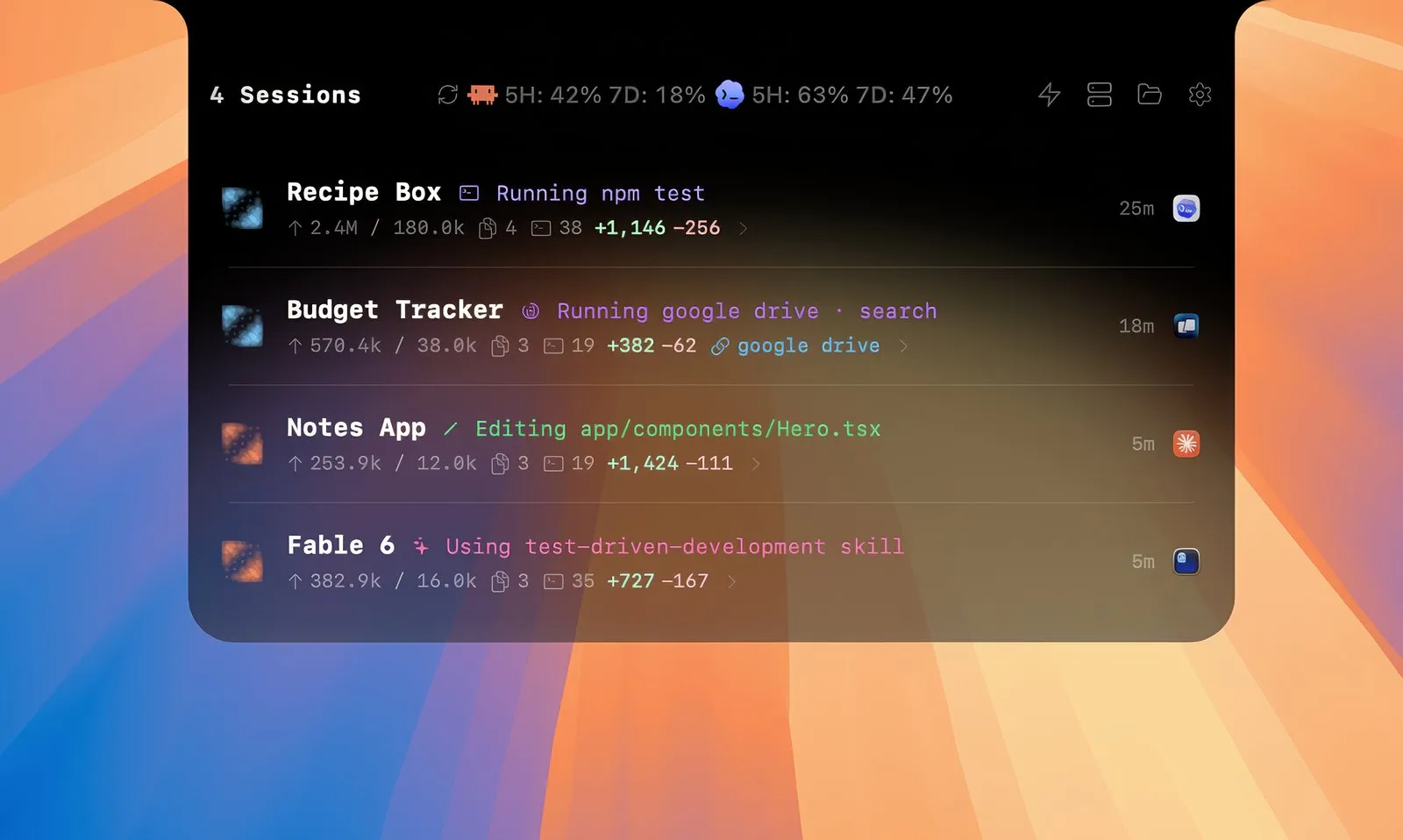
You start three Claude Code sessions, switch to the browser, and come back ten minutes later to find one of them stuck on “Allow this edit?” since minute two. AgentPeek is a small native Mac app that moves those sessions, their permission prompts and your usage limits into the MacBook notch. This piece covers what it shows, which agents you can actually answer from it, and which free or cheaper notch apps do part of the job.

OneTimePay.app
6 min read
How can I approve Claude Code permission prompts without switching back to the terminal?
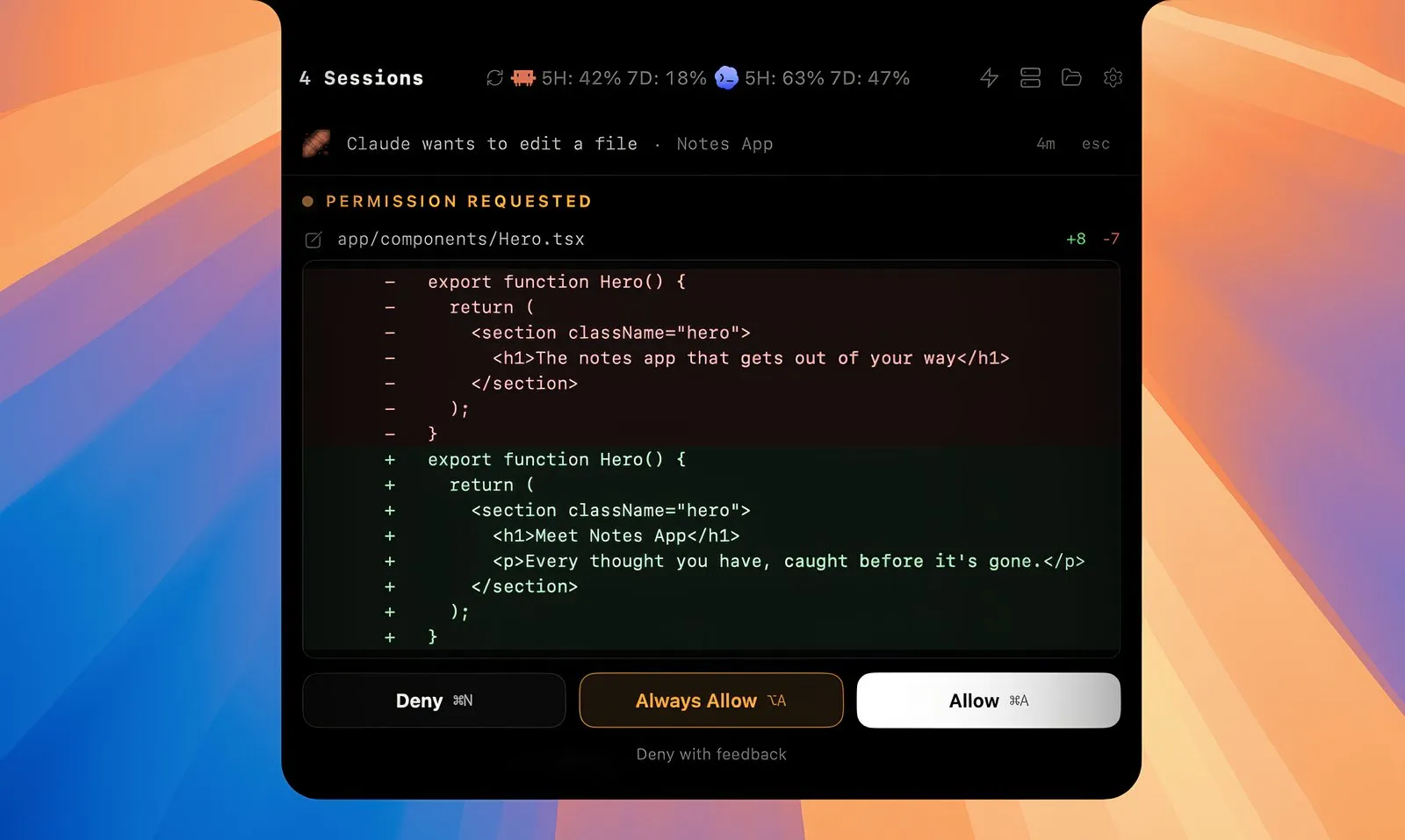
Use a notch monitor that hooks into Claude Code. AgentPeek ($14.99 once, Apple silicon Macs) shows each permission request in the MacBook notch with the file diff and Allow, Always Allow, Deny or Deny with feedback buttons. A free Claude Code Notification hook can alert you instead, but you still answer in the terminal.
On this page
How can I approve Claude Code permission prompts without switching back to the terminal?
In short
AgentPeek installs local hooks, so when Claude Code wants to edit a file or run a command, the request drops out of the notch with the diff or command in view. Allow, Always Allow and Deny each have a keyboard shortcut, and Deny with feedback sends Claude a reason. Questions and plan reviews arrive the same way.
Approve Claude Code permissions from the notch, and other agents too
Always Allow passes the rule back to Claude Code, which saves it in its own permission settings, so the same request stops asking.
Codex approvals, questions and plans are answerable too, as are prompts from OpenCode, GitHub Copilot CLI, Pi and the Cursor CLI (shell and MCP requests).
Direct Chat opens a session in its own window and lets you reply to it, for agents with a resume or ACP path. It continues the existing session; it is not a hosted agent.
Agents recognized
27
Runs on
Apple silicon
macOS
14 or later
Account
None
Price
$14.99 once
Trial
3 days
Every running session at a glance
In short
The collapsed notch pill shows activity and a session count. Expanded, it lists each live session with its project, current action, tokens in and out, files touched, commands run and lines added or removed. Click one for a timeline of tool calls. A menu bar mode runs on its own or alongside the notch.
Full control or view-only, depending on the agent
AgentPeek is upfront that seeing a session is not the same as controlling it. Claude Code and Codex get the most: permissions, questions, plans, subagents, session continuation and usage windows. Several agents are watch-only or keep approvals in their own terminal, where an Open Terminal button takes you.
Answer in the notch: Claude Code, Codex, Cursor CLI, OpenCode, GitHub Copilot CLI, Kilo Code, CodeBuddy, Pi, Devin CLI, and supported mutating tool calls in Antigravity, Factory Droid, Qoder and Cline.
Watch only: Cursor IDE-hosted sessions, Aider, Devin desktop, monitored Cline sessions, and native approvals in Grok Build, Kimi Code, Hermes and Command Code.
Usage limits, dev servers and shortcuts
In short
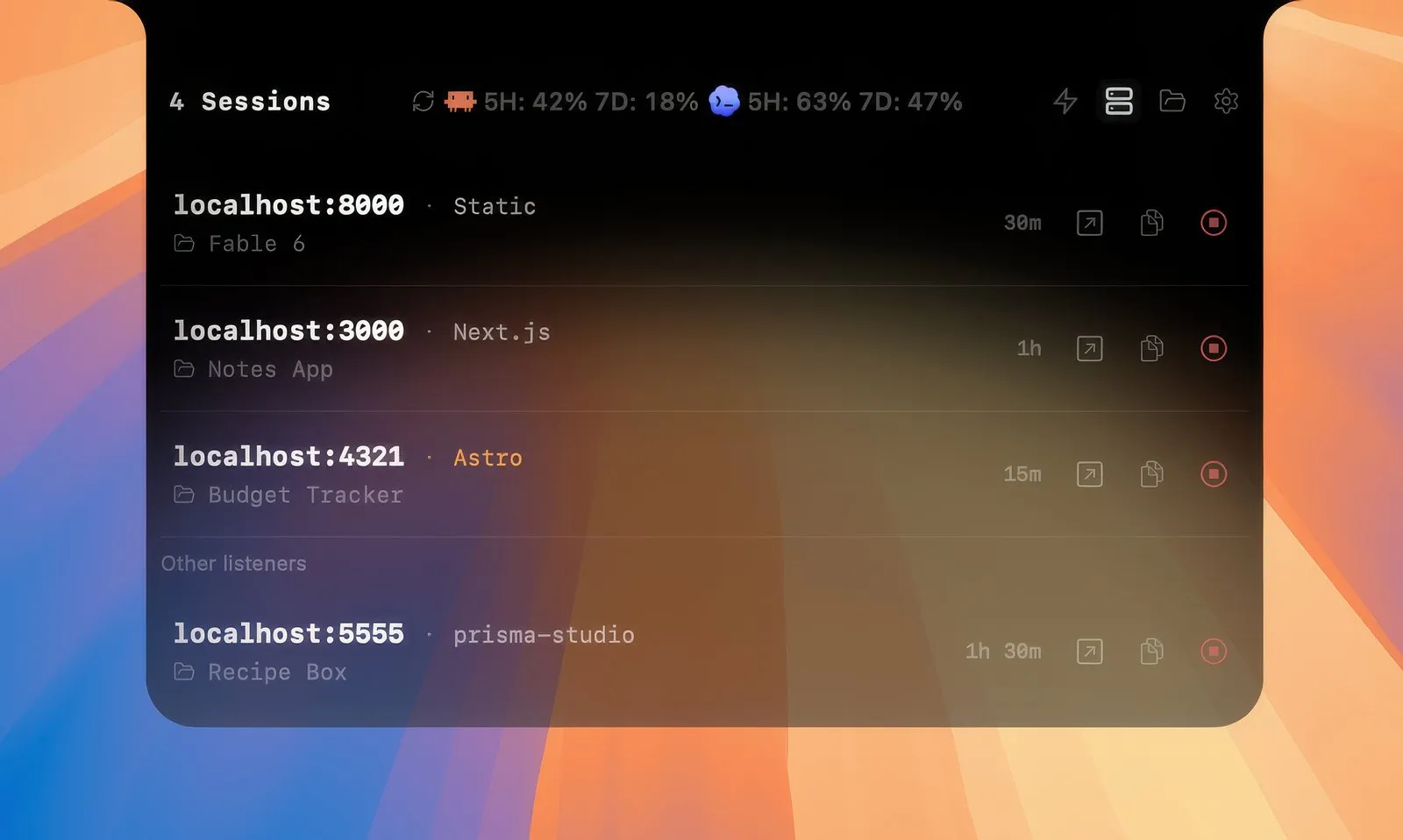
The header carries your provider limits: Claude Code's 5-hour and 7-day windows, Codex's 7-day window and Cursor's monthly usage, each with its reset time. A Local Servers page lists every port your projects are listening on, and Quick Routes open an agent's skills, plugins, config and logs folders in one click.
Claude Code usage limit in the menu bar
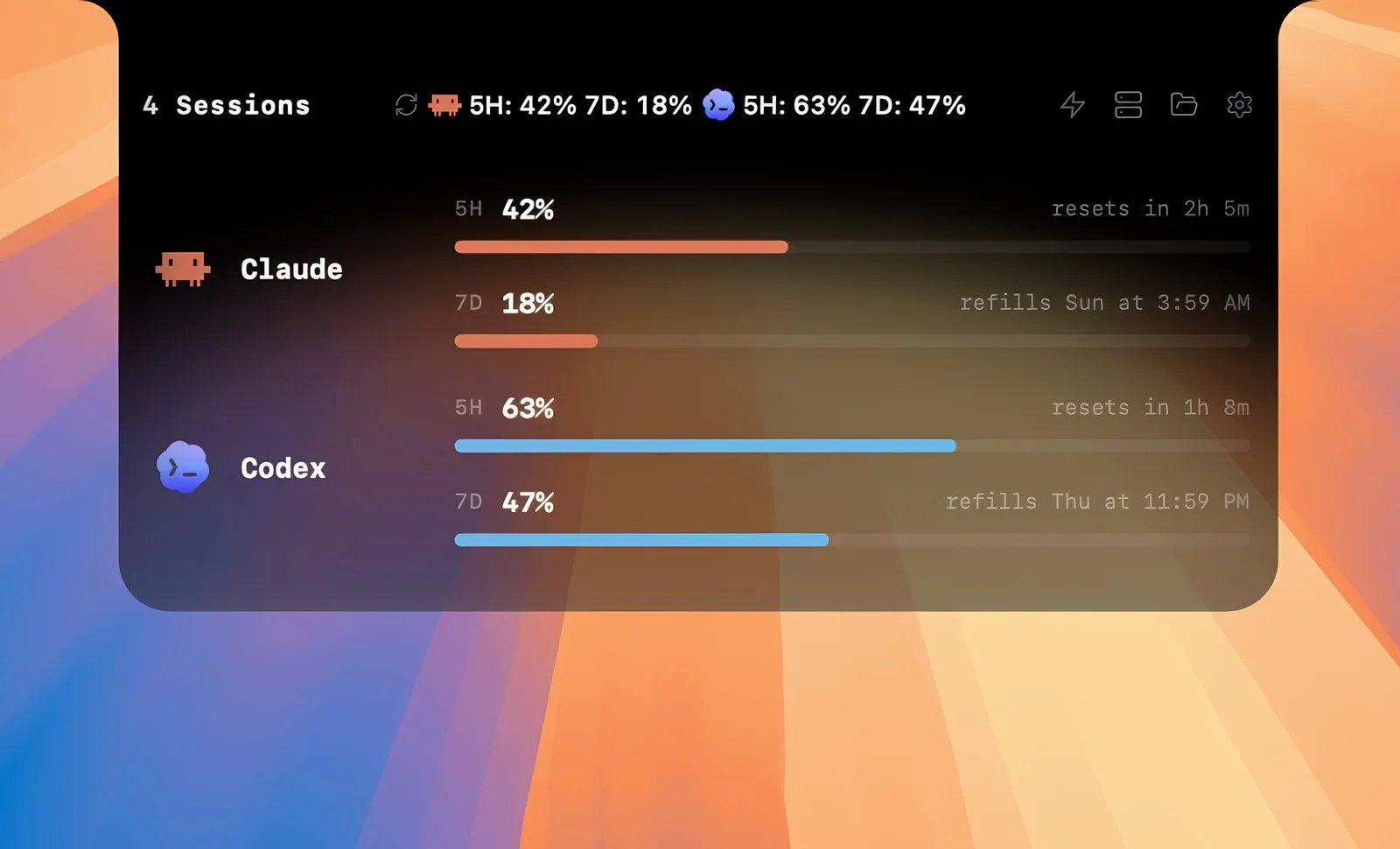
Percentages appear only where the provider reports them. For agents with local logs only, such as Kilo Code, Goose or Cline, AgentPeek shows raw monthly token and cost totals and does not invent a quota.
AgentPeek vs Vibe Island, CrewTower and free notch apps
In short
CrewTower is cheaper at $9.99 once (early-bird), and Code Island and Chimlo are free and open source. Vibe Island costs $19.99 once with a year of updates. Claude Code's own Notification hook alerts you for nothing. AgentPeek is $14.99 once and covers the widest answerable set alongside usage and dev servers.
| App | Price | Runs on | Agents | Answer prompts in the notch |
|---|---|---|---|---|
AgentPeek this one this article | $14.99 once (1 Mac), 3-day trial | Apple silicon, macOS 14+ | 27 recognized | Yes, for Claude Code, Codex and about a dozen more |
Vibe Island closed source | $19.99 once, 1 year of updates | Apple silicon | 30 listed | Yes (Allow and Deny documented for Claude Code) |
CrewTower early-bird price | $9.99 once (from $14.99), 3-day trial | macOS 15+ | 6 with responses, more tracked | Yes, once, per session or as a rule |
Code Island open source | Free (GPLv3) | macOS 14+ | 17 | Yes, options vary by agent |
Chimlo open source | Free (GPL-3.0) | macOS 15+ | Claude Code, Codex | Claude Code only; Codex stays in Codex |
Claude Code hook built in | Free | Any Mac | Claude Code | No, a banner only; answer in the terminal |
A Vibe Island alternative, or a free one?
If you only run Claude Code and just want to know when it is waiting, the free Notification hook with a permission_prompt matcher is enough. If you want to answer from the notch at no cost, try Code Island first. CrewTower is the cheapest paid pick, but needs macOS 15. AgentPeek fits the developer who mixes several agents on macOS 14 or later and wants prompts, usage windows and dev servers in one place.
Running Claude Code on more than one account? Our Claude Sessions Pro spotlight covers switching between them.
What AgentPeek does not do
In short
It is a monitor and control surface, not a terminal, editor or hosted agent: your agents still run where they always did. It needs an Apple silicon Mac on macOS 14 or later, and for many of the 27 agents it can watch but not answer.
No Intel build: older Intel Macs are out. A notch is optional; menu bar mode works on any supported Mac.
Local, mostly offline: no account and no in-app telemetry. It makes licence and update checks, and Direct Chat talks through the agent you chose.
Young app: version 0.2.120 at the time of writing, built by one developer and launched in mid 2026. The 3-day trial lets you check your agents work before you pay.
Who should skip it
Anyone running a single Claude Code session who only needs a nudge when it waits, or anyone on an Intel Mac. The built-in Notification hook or a free notch app covers that.
Frequently asked questions
Is there a notch app that works with Claude Code, Codex and Cursor at the same time?
Yes. AgentPeek recognizes 27 coding agents and lists Claude Code, Codex and Cursor sessions side by side, and several other notch apps cover the same three (see the comparison above). How much you can do varies by agent: in AgentPeek, Claude Code and Codex prompts are answerable in the notch, the Cursor CLI gets shell and MCP approvals, and sessions hosted inside the Cursor IDE stay view-only.
Can I see my Claude Code 5-hour usage limit from the Mac menu bar?
Yes. AgentPeek shows Claude Code's 5-hour and 7-day windows with their reset times, Codex's 7-day window and Cursor's monthly usage, in the notch pill or a menu bar popover. It only shows a percentage where the provider reports one; local token counts are never turned into a quota guess.
Does AgentPeek send my code or prompts anywhere?
Not during ordinary monitoring. It needs no account, has no in-app analytics or telemetry, and does not upload code, prompts, transcripts, diffs or token usage. It does make licence and update checks, and Direct Chat replies go through the agent you picked, the same way they would from the terminal.
Does it work on an Intel Mac or a Mac without a notch?
It needs an Apple silicon Mac on macOS 14 or later; there is no Intel build. A notch is not required: menu bar mode and an external-display surface work on any supported Mac, and notch and menu bar modes can run together.
Is AgentPeek a subscription?
No. It is $14.99 once for one Mac, $24.99 for two or $34.99 for three, with a 3-day free trial per Mac and future updates included. CrewTower costs less ($9.99 early-bird), and Code Island and Chimlo are free and open source.
Sources
- 1
The official site: features, the 27 supported agents, $14.99 / $24.99 / $34.99 one-time pricing, 3-day trial, Apple silicon and macOS 14+, privacy notes. Read on 14 November 2026.
- 2
The per-agent capability ledger (which agents can be answered, continued or only watched), usage sources and version 0.2.120.
- 3
The Notification event (permission_prompt, idle_prompt matchers) and the PermissionRequest event that can allow or deny a tool call.
- 4
$19.99 one-time for one Mac with 1 year of updates; 30 agents listed; Allow and Deny for Claude Code.
- 5
$9.99 early-bird one-time (from $14.99) for one Mac; macOS 15+; 3-day trial; responses for six agents.
- 6
Free and open source (GPLv3); 17 agents; approve or deny from the notch; macOS 14+.
- 7
Free and open source (GPL-3.0); Claude Code and Codex; Claude permissions in the notch, Codex approvals stay in Codex; macOS 15+.

AgentPeek
Your coding agents, in the Mac notch.
once
macOS
More apps worth a look: browse the desktop