
Route Audio Between Mac Apps and Set Each Source's Volume
macOS keeps every app's audio in its own lane. There is no built-in way to send one app's sound into another, or to mix a few sources into a single input a recorder or a video call can hear. The usual fixes are a free driver you wire up by hand in Audio MIDI Setup, or a pro router that costs about as much as a small interface. SoundPipe takes a third route: draw the connections as wires, put a volume slider on every source, and sell it once for $10. This piece covers how that works and how it stacks up against the other Mac routers.

OneTimePay.app
8 min read
Driver loaded, routing live
System audio
2 ch
Spotify
app
USB mic
input
Virtual mic
the mix, as one device
Channel 1 (L)
Channel 2 (R)
Any app can select it
How do I route audio between Mac apps and control each source's volume?
Install a virtual audio device, route each app into it as its own source, then use a router with a volume slider on every channel. SoundPipe does this on a wired three-column board: add your sources, drag them to one output, and set each level independently, with live meters and under 15 ms of latency.
On this page
How do I route audio between Mac apps and control each source's volume?
In short
Install a virtual audio driver, then route each app into it as a separate source. A dedicated router like SoundPipe draws every connection as a wire on a three-column board, gives each source its own volume slider and mute, and shows live meters, so you balance every app independently in real time.
The board has three columns: Sources on the left, Output Channels in the middle, and Monitors on the right. You add a source (a running app, system audio, or a hardware input), create an output, and draw a wire between them. Because the routing is visible, there is no guessing which device feeds which app. Each source row carries its own meter and a volume slider, so when a video call is too loud over your music you drag one fader instead of hunting through system settings.
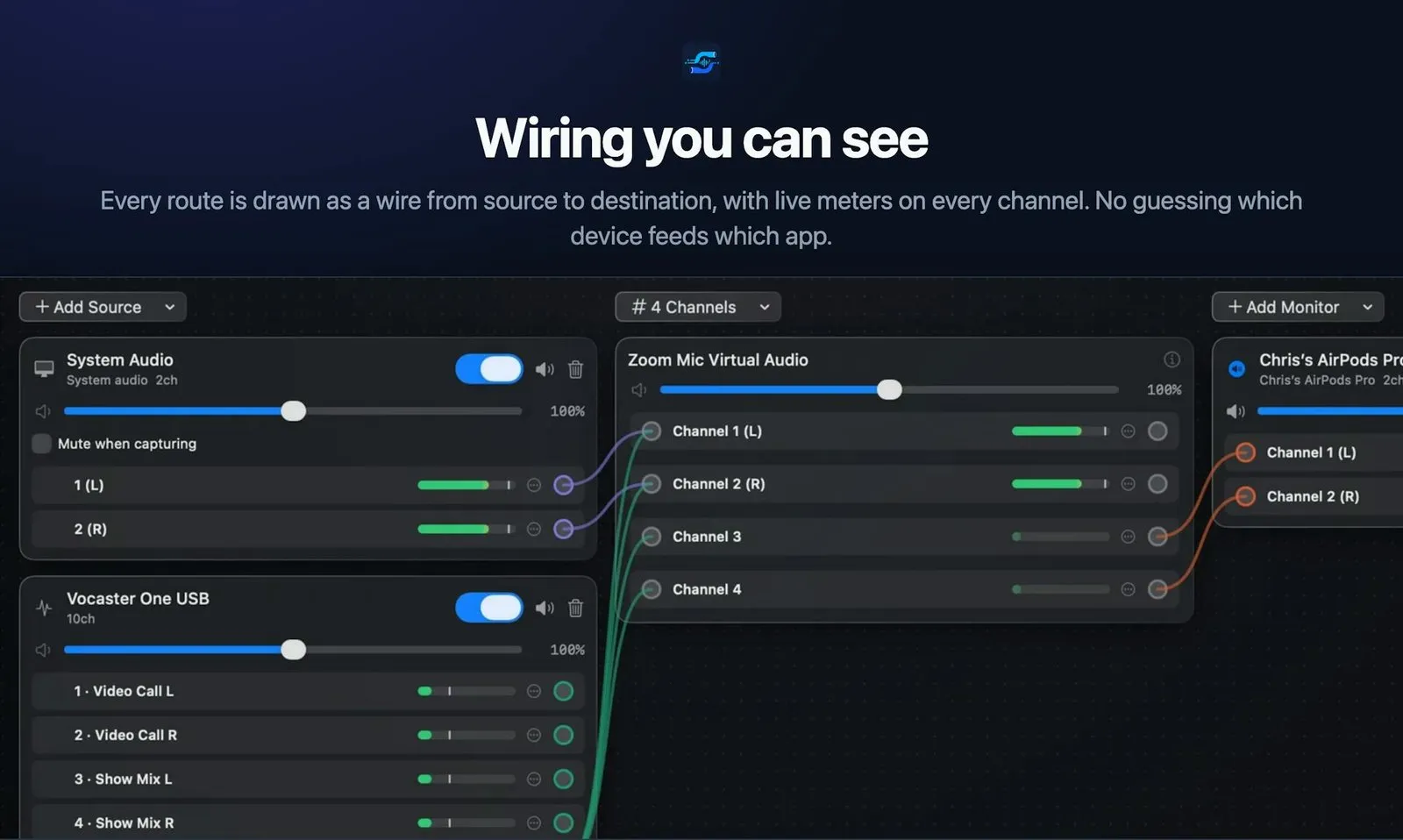
Route each app as its own source, then balance with per-channel volume
Each source stays on its own channel with its own level, so the mix is yours to shape. Mute one source without touching the others, ride a fader while you record, or watch the meters to catch a source that is clipping. This is the part the free driver route leaves out: BlackHole passes audio through with no mixer, so balancing is on you and your system settings.
Creating a system-wide virtual audio device on Mac
In short
A virtual audio device is software that macOS treats like a real mic or speaker. Apps can output to it and other apps can listen to it. SoundPipe installs one with a single click, no Terminal, creating system-wide devices that any running app can select as input or output.
This is what makes routing possible at all. macOS has no built-in audio router, a capability Windows has had since Vista, so you need a virtual audio device to stand in as the bridge. Set it as one app's output and another app's input, and sound flows between them. SoundPipe installs its driver in one click and shows Driver Loaded, Service On when it is ready, with no kernel extension dance and no Audio MIDI Setup required.
Mixing multiple sources and sending system audio to a virtual mic
In short
Point several apps, plus system audio and hardware inputs, at the same virtual device and they mix into one stream. That combined stream shows up as a virtual mic any conferencing or recording app can pick. SoundPipe merges every source into a single output while keeping each one on its own channel.
The Add Source menu pulls from everything the Mac can hear: audio devices like your USB interface, special sources like system audio and a pass-through, and any running application by name. Choose a few and they land on the board ready to wire. Send them all to one output and you have turned an ad-hoc pile of apps into a clean system audio to virtual mic path that Zoom, OBS, or a recorder treats as a normal microphone.
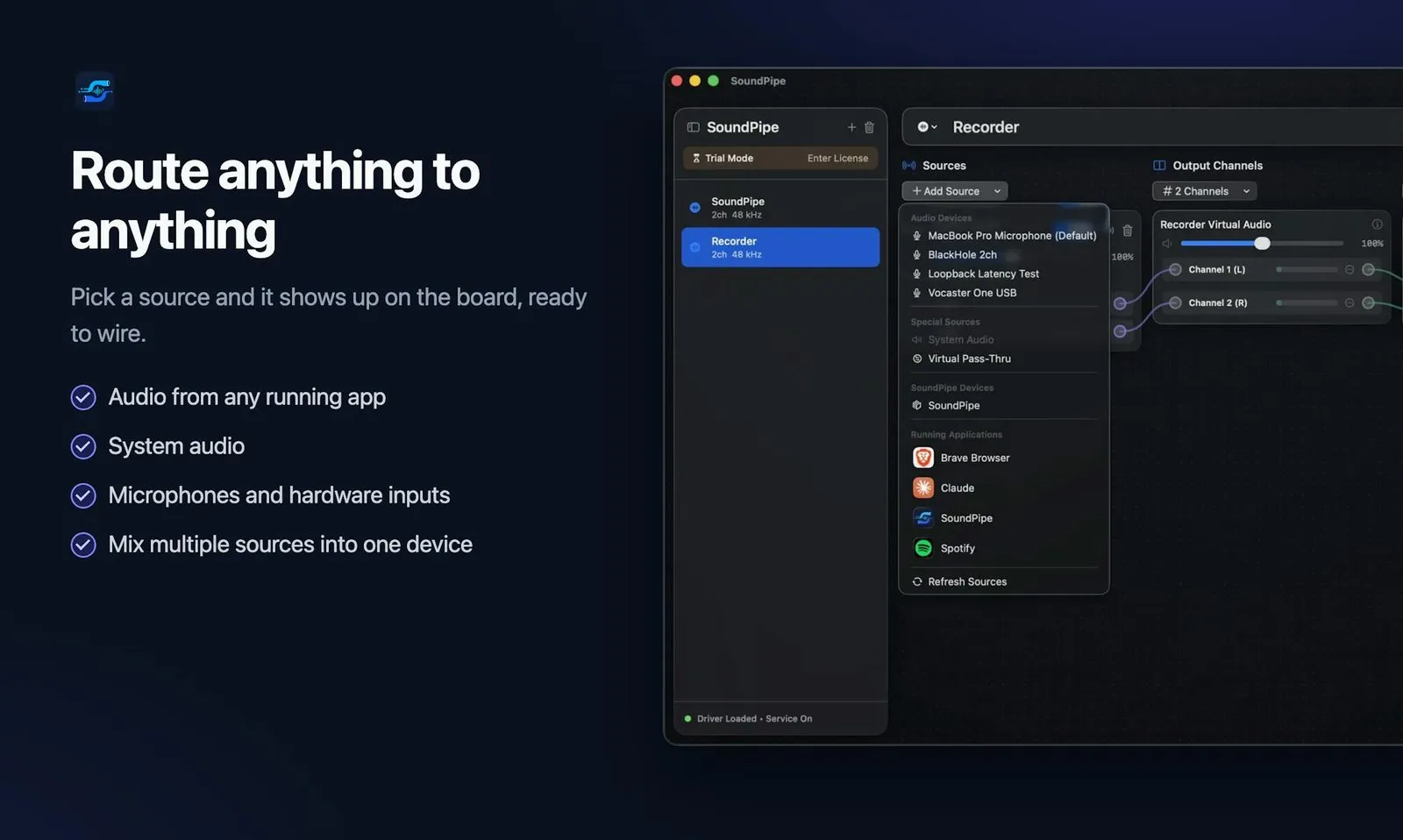
Per-channel volume, mute, and monitoring without Audio MIDI Setup
In short
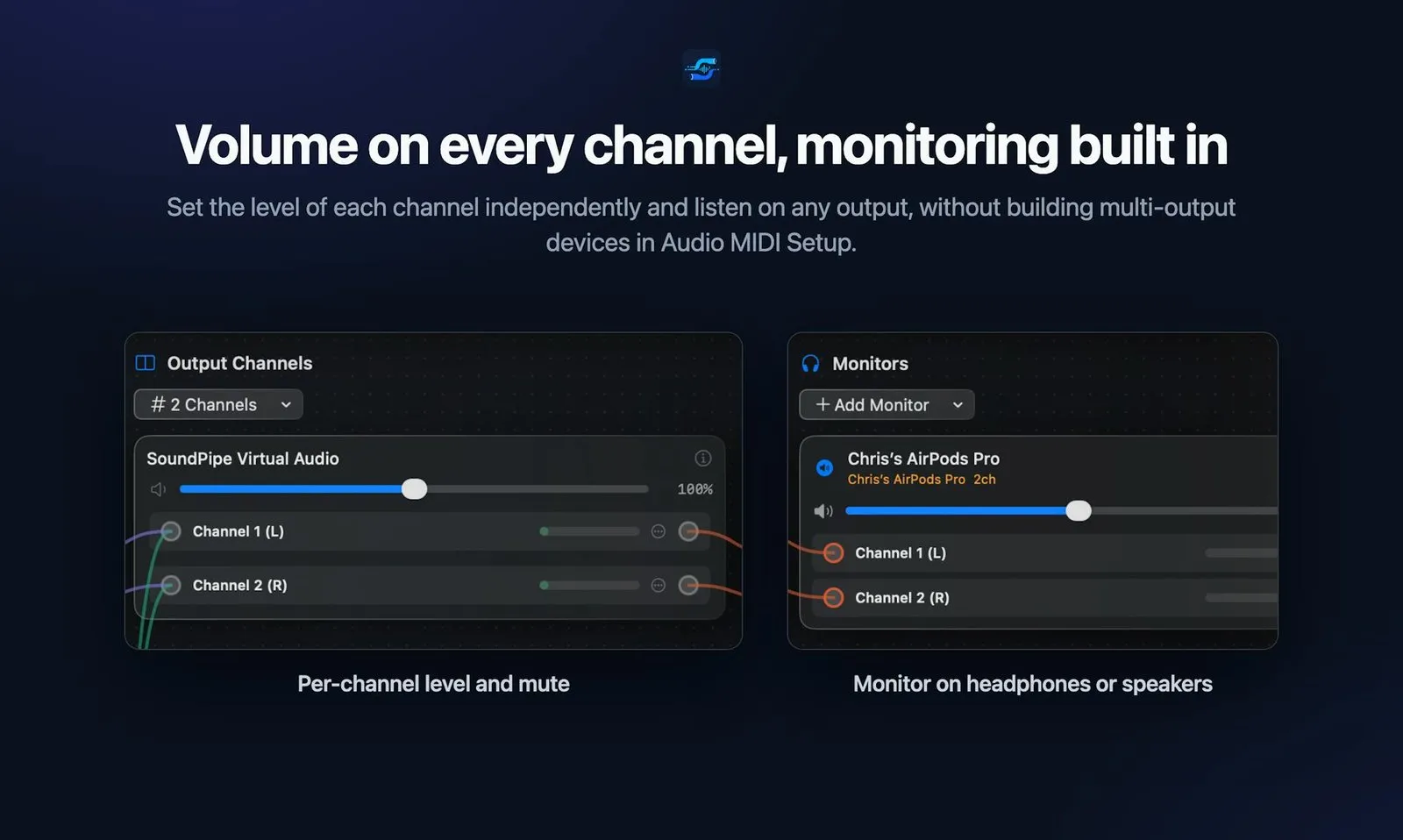
Every channel gets its own volume slider, a mute button, and a live meter, so you can duck one app while another stays loud. You can also monitor any output on headphones or speakers directly, without building a Multi-Output Device in Audio MIDI Setup, which cannot even change its own volume.
This is where the built-in tools give out. A Multi-Output Device in Audio MIDI Setup sends one source to several outputs, but you cannot set its volume, and it does no mixing of separate sources. SoundPipe keeps a fader and a mute on every channel and adds a Monitors column so you can hear the result on your AirPods or speakers while the mix goes out to the virtual device. That is one window instead of three.
Low latency audio routing on Mac: what under 15 ms means live
In short
Latency is the delay between sound leaving one app and reaching the next. High delay makes live monitoring and streaming feel off. SoundPipe holds under 15 ms at any sample rate, low enough that talent hears themselves in near real time while you route and mix on the same machine.
For a podcast or a stream, the number that matters is round-trip delay on the monitoring path. Too much and a guest hears their own voice a beat late, which is distracting enough to change how they speak. SoundPipe's low latency audio routing on Mac stays under 15 ms whatever sample rate your devices run at, so live monitoring feels immediate. A free driver like BlackHole adds no latency of its own, but you still assemble the whole path by hand, which is where the real time goes.
How it compares: a Mac audio routing app comparison
In short
SoundPipe is not the cheapest way to move audio, and it does not need to be. BlackHole is free and SoundShine is $7.99, while Loopback does the same multi-source mixing for $99. The case for SoundPipe is the middle ground: a visible routing board with per-channel volume and under-15 ms latency, bought once for $10.
| App | Price | Purchase model | Routing board | Per-source volume | Latency | Platform |
|---|---|---|---|---|---|---|
SoundPipe this one visible wire board | $10 | Buy once | Under 15 ms | macOS 14.4+ | ||
Loopback Rogue Amoeba | $99 | Buy once | Low | macOS | ||
BlackHole open source | Free | Open source | Zero added | macOS | ||
SoundShine system audio only | $7.99 | Buy once | Low | macOS | ||
SoundSource per-app control | $49 | Buy once | Low | macOS | ||
Audio MIDI Setup built in | Free | Built in | — | macOS |
BlackHole (free) and Loopback ($99)
BlackHole is the free, open-source floor. It adds zero latency and is rock-solid as a driver, but it is only a driver: no board, no mixer, no per-source volume, so every session is a trip through Audio MIDI Setup. Loopback is the ceiling. At $99 it gives you a full routing graph, up to 64 channels, and nestable devices, and it is the right call for complex studio setups. SoundPipe sits between them: more than BlackHole gives, less than Loopback asks.
SoundShine ($7.99) and SoundSource ($49)
SoundShine is cheaper at $7.99, but it does one narrower job well: it shares your system audio as a microphone for calls. It is a menu bar tool, not a multi-source board, so there is no wiring several apps into one mix. SoundSource ($49) controls the volume, EQ, and output of apps you already run, which is useful, but it shapes existing audio rather than routing sources into a new virtual device. Different jobs, worth naming so you do not overpay for the wrong one.
Price
$10 once
Macs
Up to 3
Latency
Under 15 ms
Install
One click
Platform
macOS 14.4+
Product Hunt
158 upvotes
Confirm the price before you buy
Prices vary and rivals change theirs often. The figures here come from each maker's own site in July 2026: SoundPipe at $10 one-time, BlackHole free, SoundShine $7.99, SoundSource $49, and Loopback $99. Check the current price on the store page before you commit.
Installing the driver and building your first route
In short
Install takes one click and no Terminal on macOS 14.4 or later. Open the board, add your source apps in the left column, create an output channel in the middle, and drag a wire between them. Set each source's volume, pick a monitor, and your route is live in minutes.
Install the driver. One click, no Terminal. SoundPipe reports the driver as loaded and the service as on when it is ready.
Add your sources. Pick running apps, system audio, or a hardware input from the Add Source menu; each lands on the left column with its own meter.
Wire and balance. Create an output, drag a wire from each source, set each fader, choose a monitor, then select the virtual device as the mic in your call or recorder.
You can try the whole thing first: the free trial runs in 20-minute sessions with every feature unlocked and unlimited restarts, no account and no card. If it fits your workflow, $10 covers up to 3 Macs with free updates, and there is a 14-day refund window if it does not.
Frequently asked questions
What Mac audio routing app gives the lowest latency for live streaming?
On paper a bare driver wins: BlackHole adds zero latency because it only passes audio through, with no mixer. The catch is it does no routing or volume control on its own, so each session means configuring Audio MIDI Setup by hand. If you need to mix and balance sources live, SoundPipe stays under 15 ms at any sample rate while giving you per-channel volume and live meters in one window.
How do I isolate one app’s sound to record it while screen recording on Mac?
Create a virtual audio device, set it as that one app’s output, then record from it as a virtual mic while your screen recorder runs. macOS cannot capture app audio on its own. SoundPipe routes a single app to its own channel, so you record just that source, cleanly separated from notifications and everything else on the system.
Is SoundPipe the cheapest Mac audio routing app?
No, and it does not claim to be. BlackHole is free and SoundShine is $7.99, both cheaper than SoundPipe at $10. What the $10 buys is the part they skip: visible multi-source mixing on a wired board, a volume slider and mute on every channel, and under 15 ms latency, without editing Audio MIDI Setup each session. Loopback does the same mixing but costs $99.
Do I need Terminal or Audio MIDI Setup to route audio with SoundPipe?
No. SoundPipe installs its driver in one click, with no Terminal commands, and does all routing on its own three-column board. You never build a Multi-Output Device in Audio MIDI Setup, and you can monitor any output on headphones or speakers directly. It requires macOS 14.4 or later and works at any sample rate your devices support.
Can I try SoundPipe before I buy it?
Yes. The free trial runs in 20-minute sessions with every feature unlocked and unlimited restarts, with no account and no card. It is session-limited rather than time-limited, so you can keep restarting to test a full setup. After you buy, one $10 license covers up to 3 Macs with free updates, and there is a 14-day refund window if it is not right for you.
What do I need to run SoundPipe?
SoundPipe needs macOS 14.4 or later. Install is a single click with no Terminal, and one license activates on up to 3 Macs. It creates system-wide virtual audio devices, so any running app, system audio, or hardware input can be routed the moment the driver is in place, and mixed into a single virtual mic that conferencing and recording apps can select.
Sources
- 1
The maker’s own site: system-wide virtual audio devices, one-click driver install with no Terminal, under 15 ms latency at any sample rate, and a $10 one-time price covering up to 3 Macs with a 20-minute free-session trial. The source for every SoundPipe fact here.
- 2
The incumbent GUI router: combines multiple app and hardware sources into one system-wide virtual device, supports up to 64 channels, and is nestable. Sold as a one-time license; the purchase page lists $99. The basis for the comparison against a full-featured paid router.
- 3
BlackHole by Existential Audio
The free, open-source virtual audio loopback driver, with zero added latency and 2, 16, and 64-channel builds for Intel and Apple Silicon. It is a driver only, with no GUI or mixer, which is why routing it means configuring Audio MIDI Setup by hand.
- 4
How to route audio on Mac (SoundShine)
A three-tier rundown (SoundShine $7.99, BlackHole free, Loopback $99) that explains virtual audio devices as software mics and speakers. The source for the rival prices and the note that SoundShine is a system-audio-to-mic menu bar tool rather than a full router.
- 5
Per-app volume, EQ, and output control on macOS, sold one-time at $49. Included to show a related but different tool: it controls existing apps’ audio rather than routing sources into a new virtual device.
- 6
Apple: play audio through multiple devices at once
Apple’s own Audio MIDI Setup documentation, confirming that a Multi-Output Device sends one source to several outputs and that its volume cannot be changed. The basis for the claim that the built-in tools stop short of per-source mixing and volume.
More apps you buy once: browse the desktop