
Parallel AI Coding Agents in One Free App: ADE
You give Claude Code a refactor and Codex a bug fix in the same repo, and five minutes later both have edited the same file and neither knows. ADE is a free, open source desktop app that puts each task in its own git worktree and runs Claude Code, Codex, Cursor, Factory Droid or OpenCode inside it. This piece covers how its lanes work, what you can do from the desktop, terminal, browser and phone, and which other parallel-agent tools fit better for some setups.

OneTimePay.app
6 min read
How do I run several Claude Code and Codex agents at once without them clashing?
Give each agent its own git worktree so no two edit the same files. ADE (free, open source, Mac, Windows and Linux) does that per task: each “lane” is a worktree with its own chats, commits and diff, and Claude Code, Codex, Cursor or OpenCode can run in separate lanes side by side.
On this page
How do I run several Claude Code and Codex agents at once without them clashing?
In short
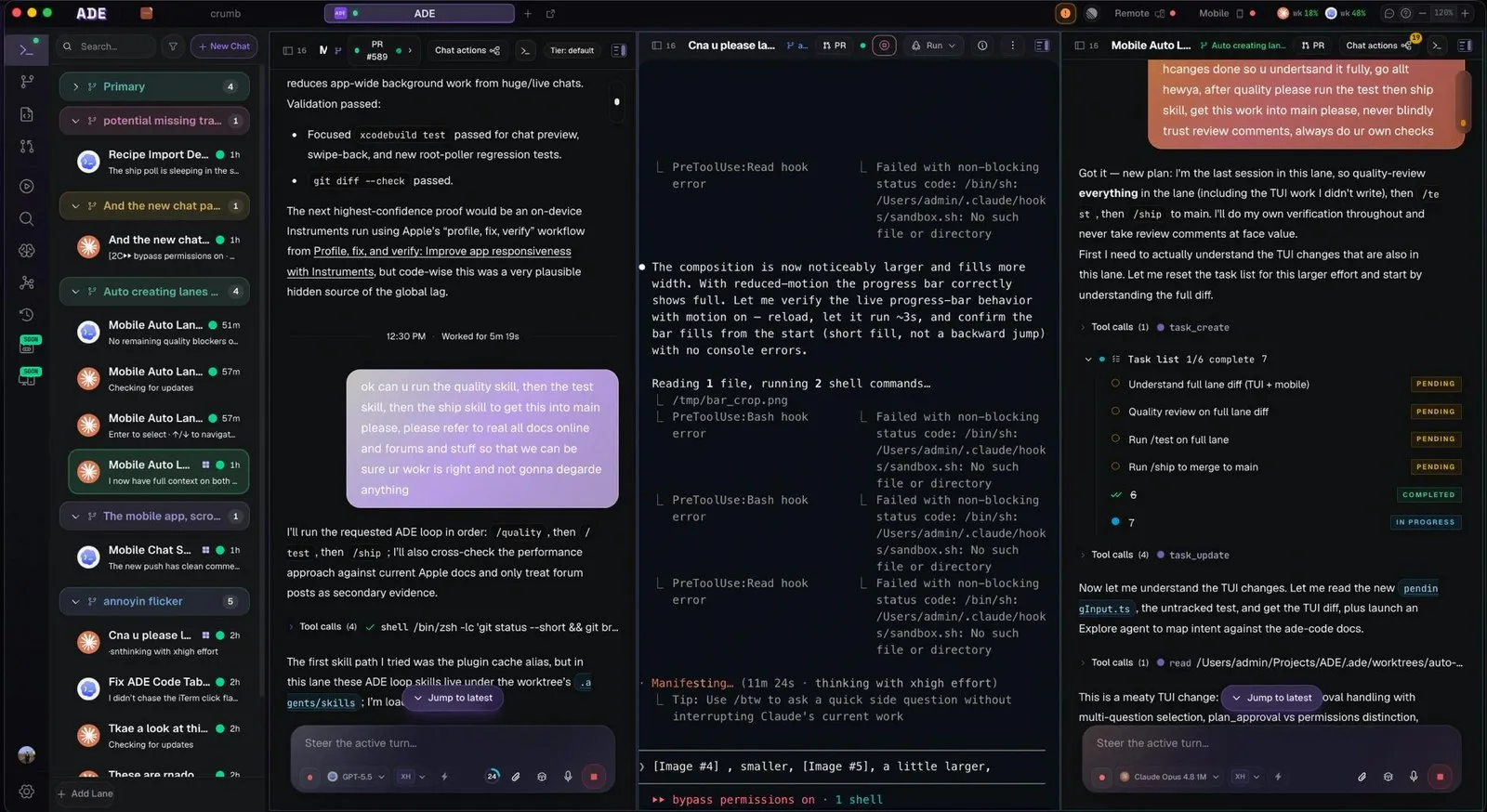
Two agents in one folder overwrite each other. ADE's answer is the lane: a git worktree and branch for one task, with that task's chats, commits and changes kept together. You start a lane from your primary branch, stack it on another lane, or adopt a worktree that already exists on disk, then point any agent at it.
One git worktree per agent, managed for you
Lanes sidebar: every lane lists its chats with status and age, so you can see which task is running, waiting or done.
Several chats per lane: a lane can hold more than one chat, for example one agent writing code and another reviewing it on the same branch.
Automations and tools: the site lists automation rules and 35+ built-in tools so agents can run tests and check their own work.
Agents
5 built in
Desktop
Mac, Windows, Linux
Licence
AGPL-3.0
Account
Optional
App price
Free
Cloud
Optional, from $5/mo
Every agent you already pay for, in one window
In short
ADE runs Claude Code, Codex, Cursor, Factory Droid and OpenCode. You sign in with the Claude, ChatGPT, Cursor or Factory plan you already have, or paste an API key for Anthropic, OpenAI, Google, DeepSeek, xAI, Mistral, OpenRouter and others. You do not install the agents yourself: ADE downloads each one the first time a machine needs it.
Claude Code and Codex together, plus subagents on other models
You can switch model inside any chat, and one agent can hand jobs to others: the README shows Claude handing three subtasks to GPT, Claude Haiku and DeepSeek, which report back. Under Advanced settings you can add any OpenAI- or Anthropic-compatible provider, so you can, for example, run DeepSeek inside Claude Code. OpenCode reaches 160+ more providers.
Model calls go straight from your machine to the provider, not through ADE, so your usage and bills stay with the plan you already pay for.
Review, stack and merge without leaving the lane
In short
Next to each chat sits a git panel: staged and unstaged files with line counts, commit, amend, merge or rebase, pull and push, branch stashes and the commit history. Pull request checks, reviews and merge happen in the app too, and lanes can be stacked so their PRs merge in order.
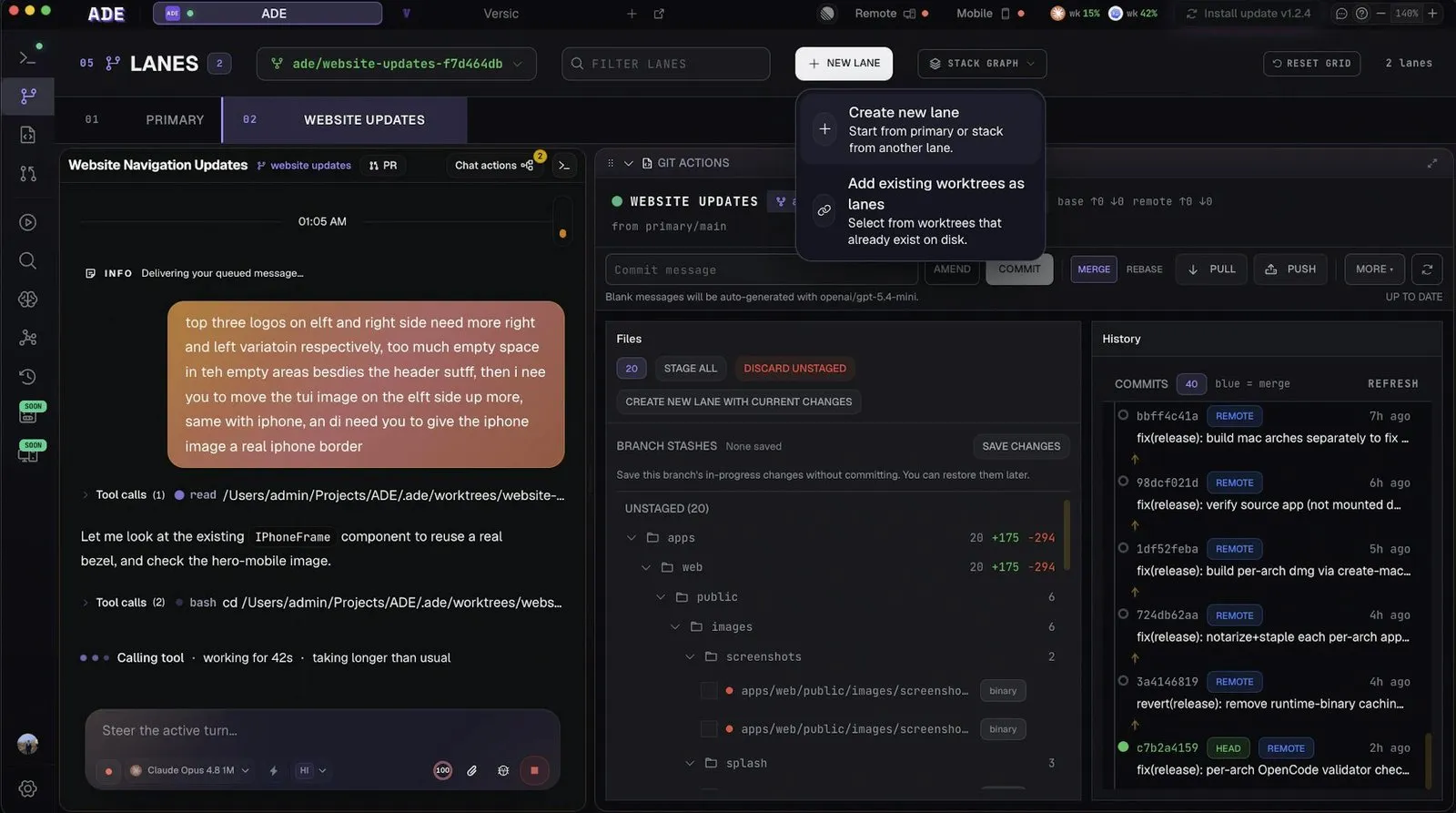
Blank commit messages can be generated by a small model, and a lane's changes can be spun into a new lane when a task splits in two. Linear, Jira and GitHub issues can start a lane directly.
Same sessions on desktop, terminal, browser and phone
In short
ADE installs a background service it calls the Brain, plus an ade command. Sign in on each machine (a laptop, a desktop at home, a headless Linux server) and every chat and terminal session syncs across the desktop app, the terminal UI, the web client at app.ade-app.dev and the iPhone app.
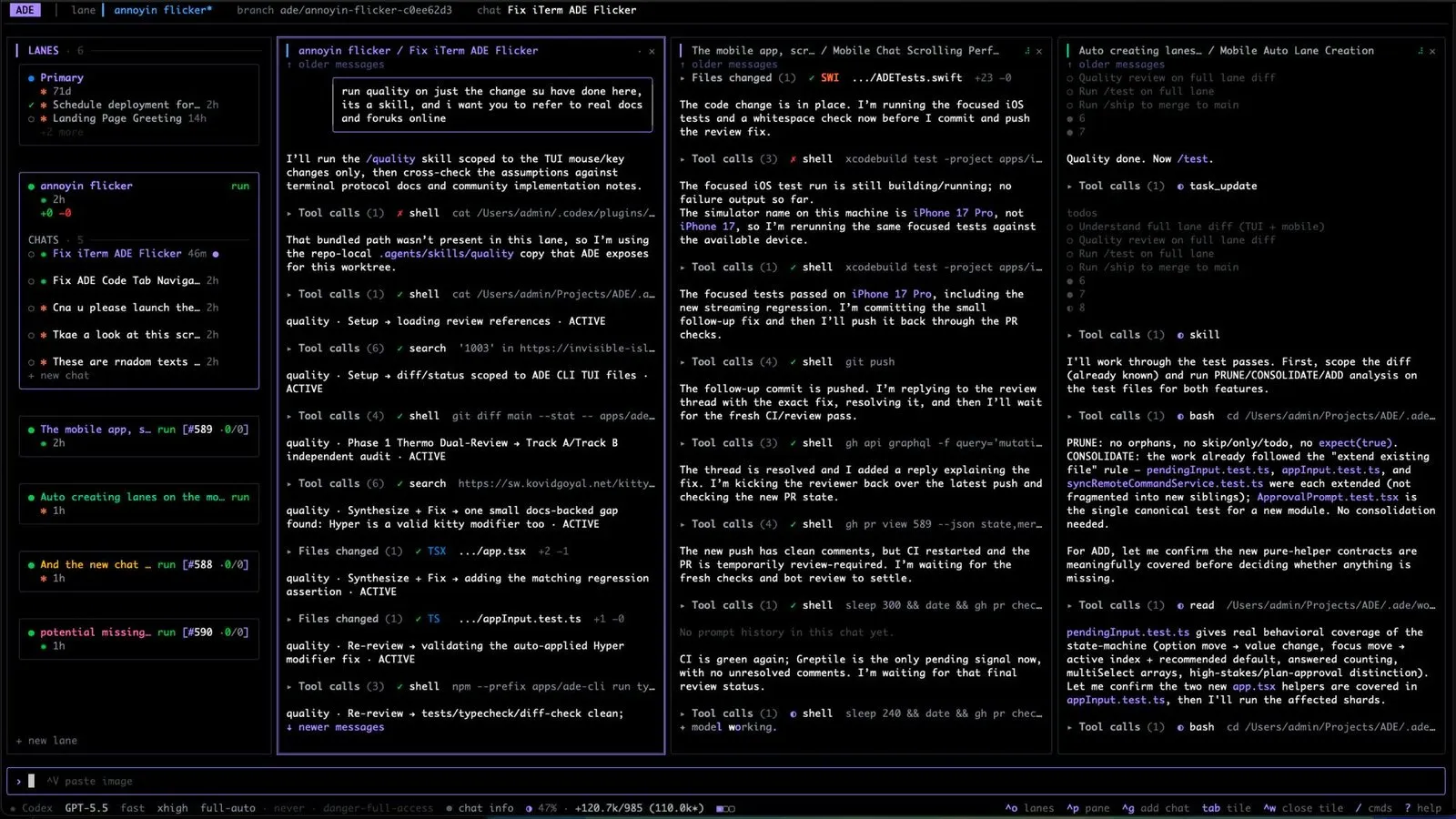
The account is optional. Without it ADE works on that one machine; with it, a chat can move to another machine or model mid-task. On a machine with no browser, ADE shows a QR code you scan with your phone to sign in.
ADE vs Conductor, Claude Squad and other parallel-agent tools
In short
ADE is not the only free option. Conductor is free but runs on Macs only. Claude Squad is a free terminal tool. Paradev and AgentsRoom have free tiers with paid monthly plans. ADE's app is free with no paid tier; its optional ADE Cloud is a subscription at $5, $20 or $50 a month.
| App | Price | Runs on | Agents | Isolation |
|---|---|---|---|---|
ADE this one this article | Free app (AGPL-3.0); optional cloud $5 to $50/mo | macOS 13+, Windows, Linux, web, iPhone beta | Claude Code, Codex, Cursor, Factory Droid, OpenCode | Git worktree per lane; optional cloud computer per lane |
Conductor closed source | Free | macOS only | Claude Code, Codex, Cursor | Git worktree per workspace |
Claude Squad open source | Free (AGPL-3.0) | Terminal (tmux) | Claude Code, Codex, Gemini, Aider and more | tmux session plus git worktree |
Paradev formerly Superset | Free plan; Pro $20/mo | macOS, experimental Linux, iPhone | Any CLI agent | Git worktree per task |
AgentsRoom freemium | Free (2 projects, 6 agents); Pro €7.99/mo | macOS, Windows, Linux, phone | Multiple CLI agents | Per-project agents; cloud minutes on Free |
A Conductor alternative for Windows and Linux
On a Mac, Conductor is a polished free choice for Claude Code, Codex and Cursor; it briefly announced a wind-down after joining Meta on 4 November 2026, then said on 13 November that it is not shutting down. If you live in the terminal, Claude Squad does the worktree juggling with nothing but tmux. ADE fits the developer on Windows or Linux, or across several machines, who wants a desktop app, a browser client and a phone view of the same sessions.
Want a lighter view of running sessions on a Mac? Our AgentPeek spotlight covers watching agents from the notch.
What ADE does not do
In short
ADE organises agents; it does not pay for them or sandbox them. Worktrees keep files apart, but every lane still shares your machine's ports, databases and credentials. Your model usage is billed by your provider, and the phone app is still a beta.
Not a sandbox: an agent that runs a migration or deletes a cache in one lane can affect the others. Use separate ports and test databases, or an ADE Cloud computer per lane.
Uneven platforms: the README notes a few Mac features are not on Windows or Linux yet. iPhone is TestFlight only; the App Store and Android are listed as coming soon.
Young project: about 144 GitHub stars and one main author at the time of writing. The site says features and APIs may change as it evolves.
Who should skip it
Anyone who runs one agent at a time, or who already has a terminal workflow with tmux and worktrees they like. ADE earns its place once you juggle several tasks or several machines.
Frequently asked questions
Is there a free Conductor alternative that works on Windows and Linux?
Yes. ADE is free and open source (AGPL-3.0) and ships desktop builds for macOS 13 or later, Windows 10 and 11 (x64) and Linux (x64 and arm64, AppImage or .deb). Claude Squad is another free option on Linux, but it is a terminal tool built on tmux rather than a desktop app. Conductor itself runs on Macs only.
Can I check on my coding agents from my phone?
With ADE, yes. Sign each machine in with the same account and the same chats and terminal sessions show up in the web client at app.ade-app.dev and in the iPhone app. The iPhone app is a TestFlight beta for now; the App Store and Android versions are listed as coming soon.
Is ADE really free, or is there a subscription?
The app is free with no paid tier: desktop, CLI, web and iPhone clients are all AGPL-3.0. There is an optional subscription for ADE Cloud, which gives lanes their own cloud computer: 100 hours a month are free, and Plus, Pro and Max cost $5, $20 and $50 a month. You also pay your model provider as usual.
Do git worktrees fully isolate parallel agents?
No. A worktree gives each agent its own folder and branch, so they stop overwriting each other’s files. They still share your machine: the same ports, databases, caches and credentials. Use separate ports and test databases per lane, or a cloud computer per lane, when agents run servers or migrations.
Does ADE send my code or prompts through its servers?
Model calls go straight from your machine to the provider you picked, not through ADE. An account is optional: without one ADE works on that single machine, and with one it links your machines so other clients can reach them. Review the privacy page if you plan to turn on remote access.
Sources
- 1
The official site: lanes, automations, 35+ built-in tools, the free and open source licence, and ADE Cloud plans (100 free hours a month; Plus $5, Pro $20, Max $50 a month). Read on 15 November 2026.
- 2
README: supported agents, providers, platforms (macOS 13+, Windows 10/11 x64, Linux x64 and arm64, web, iOS TestFlight), AGPL-3.0 licence, the optional account.
- 3
What a linked worktree is: a separate working tree and branch that shares one repository.
- 4
Mac app for Claude Code, Codex and Cursor. 0.93.0 (4 November 2026) announced joining Meta; 0.94.2 (13 November 2026) says Conductor is not shutting down.
- 5
Free AGPL-3.0 terminal app using tmux sessions and git worktrees; Claude Code, Codex, Gemini, Aider and more.
- 6
Formerly Superset. Free plan with local workspaces; Pro $20 a month ($16 billed yearly). macOS, experimental Linux AppImage, no Windows yet.
- 7
Free plan with 2 projects and 6 agents in parallel; Pro €7.99 a month or €79.90 a year. macOS, Windows, Linux.
ADE
Every AI coding tool. One app that runs everywhere.
macOS · Windows · Linux
More apps worth a look: browse the desktop