
Yap: Open Source Dictation App for Mac That Stays Local
Talking is faster than typing for prompts, emails and chat replies, but most dictation apps either upload your audio or make you download a speech model of several hundred megabytes. Yap does neither. It hands your voice to the speech model macOS 26 already ships, then pastes the text into whatever app you were using. This piece covers how it works, what it needs, its limits, and how it compares.
OneTimePay.app
7 min read
Is there a Mac dictation app that doesn't send my voice to the cloud?
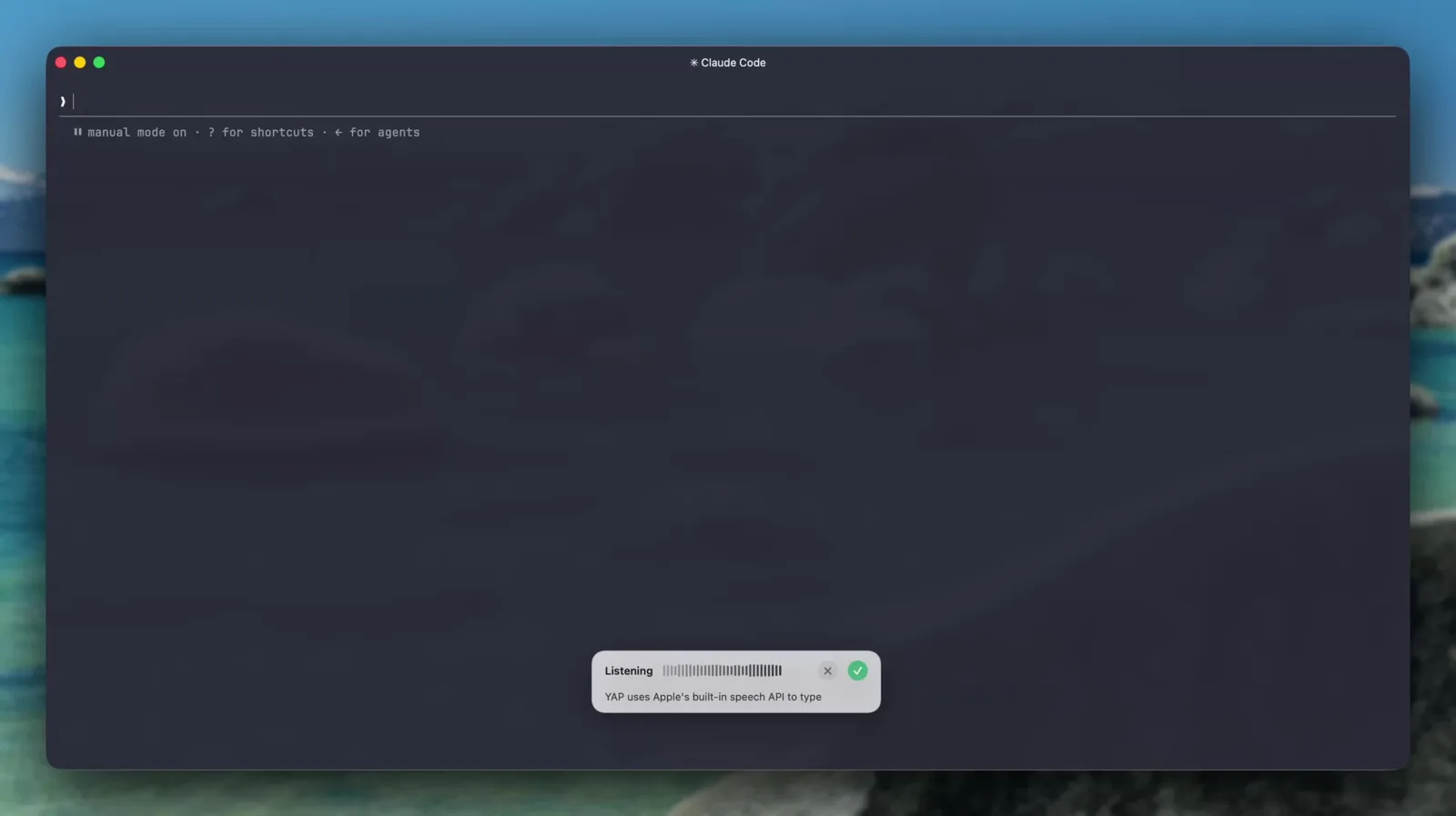
Yes. Yap transcribes on your Mac with the speech model macOS 26 already ships, so there is no model to download and no network code. Press one shortcut, speak, press again, and the text lands in any app. It is free and MIT licensed.
On this page
Is there a Mac dictation app that doesn't send my voice to the cloud?
In short
Yes. Yap uses Apple's SpeechAnalyzer API, which on Apple Silicon runs on the device with speech models that macOS 26 downloads and manages. The app has no network code, no account and no telemetry. If your language has no on-device model, Yap stops rather than falling back to a server. Transcripts stay on the Mac.
What happens when you press the shortcut
Press Cmd-Shift-D: a small panel appears near the bottom of the screen with a live waveform and a running preview of what you have said so far.
Press it again: the text is pasted into the field you were typing in, in whichever app that was.
Changed your mind: press Escape twice and the take is discarded before anything is inserted.
Recording starts before the speech engine has finished loading, and the README says the audio from that gap is buffered and fed in once the transcriber is ready, so the first word of a sentence is not clipped.
Offline dictation on Mac, with no model download
Most private dictation apps bundle or download a Whisper model, often hundreds of megabytes, and keep it in memory. Yap ships none. The developers describe it as about 3,000 lines of Swift in a 4 MB app that idles at roughly 60 MB of memory. Once macOS has the speech model for your language, it works with no connection at all.
Is Apple's model good enough? The README points to a July 2026 benchmark by Lyonesse, which makes a transcription app: across 5,559 LibriSpeech clips, SpeechAnalyzer scored a 2.12% word error rate on clean audio and 4.56% on noisy audio, against 3.74% and 7.95% for Whisper Small, and ran about three times faster. That is one vendor's test on read-aloud English, not a guarantee for your accent or microphone.
Dictating into terminals, browsers and chat apps
In short
Yap pastes through the clipboard: it copies the text, sends Cmd-V, then puts back what was on your clipboard before. It waits before restoring, because Chromium-based apps read the clipboard more than once. That detail is why it works in terminals, Electron apps and browsers, not only in native text fields.
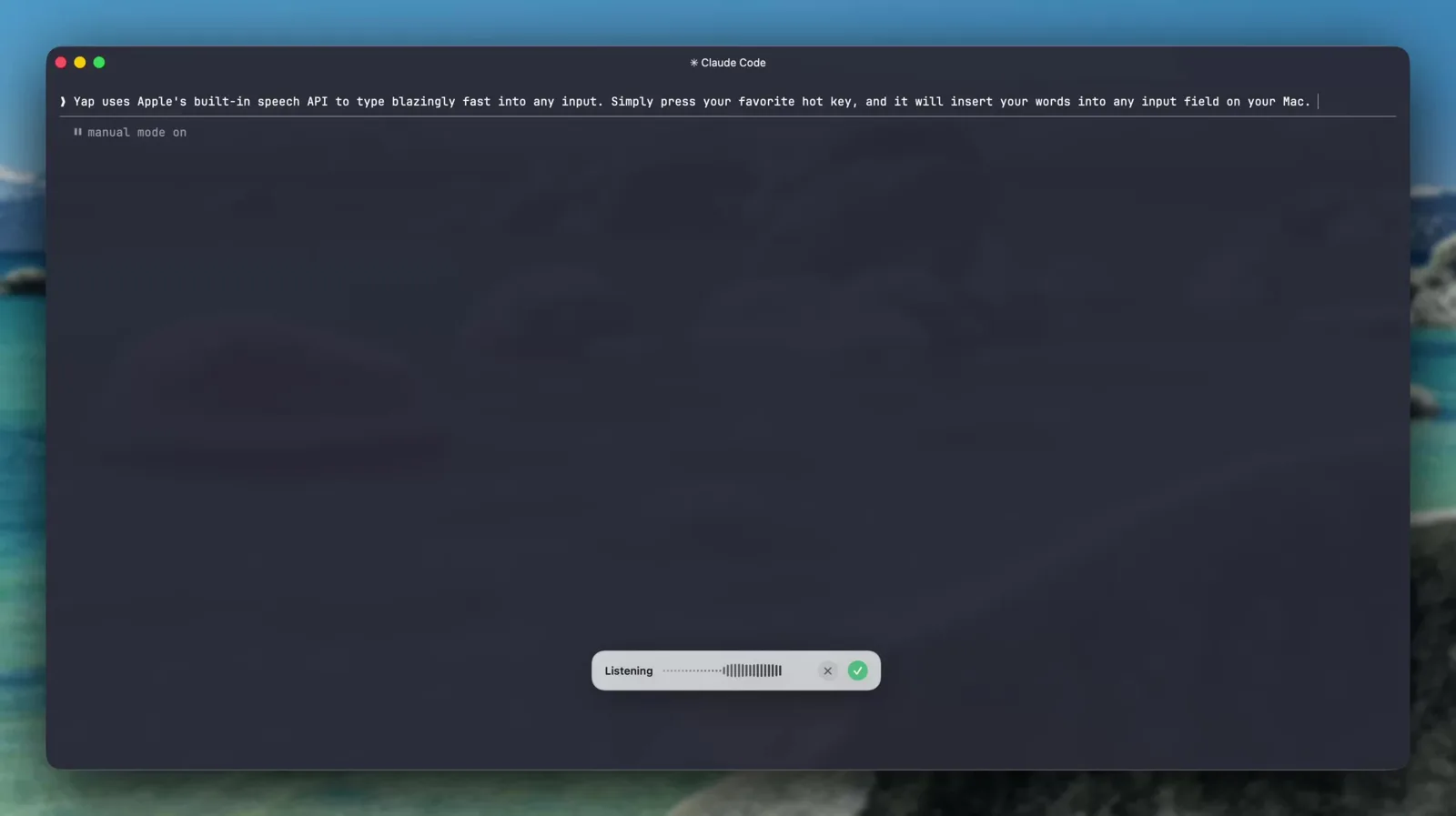
The Frigade team says it uses Yap mostly for prompting coding agents, writing emails and sending Slack messages. Several recent releases target exactly those places: 0.1.13 fixed pasting into Electron-based terminals, 0.1.15 fixed silent recordings while a meeting app held the microphone, and 0.1.12 releases the mic after each take so Bluetooth headsets leave their low-quality call mode.
Four permissions on first launch
Yap asks for Microphone, Speech Recognition, Accessibility (to see which app you are in) and Automation (to send the paste). Accessibility has to be switched on by hand in System Settings, as with any app that types for you. Released builds are signed and notarized.
History, shortcuts and settings
In short
Every transcript is saved on the Mac in a history you can search, copy from again, or delete. The shortcut is rebindable, including a single modifier such as right Shift. Yap can sit in the menu bar, the Dock, both, or neither, and it follows your default microphone even when that changes mid-session.
Local history: stored with SwiftData on the Mac; nothing is synced or uploaded.
Launch at login: available, and off by default.
Install: a signed DMG from the site, or
brew install --cask frigadehq/tap/yap.Language: follows your system locale; a language picker is the roadmap's most likely next addition.
Price
Free (MIT)
Runs on
macOS 26, Apple Silicon
App size
~4 MB (developer)
Model download
None
Latest version
0.1.17, Nov 2026
Network calls
None
Small, young and actively fixed, with real limits
Yap is still at version 0.1.x: six releases shipped between 15 September and 19 November 2026, and the site shows 484 GitHub stars. It needs macOS 26 on Apple Silicon, it has no AI rewrite step, and it only dictates in your system language for now. We did not run it on a Mac; everything here was checked on 23 November 2026.
Free dictation apps for Mac, compared
In short
Yap and Handy are free and open source, and Apple Dictation is free and built in. MacWhisper and VoiceInk are one-time purchases. Superwhisper has a free tier and a Pro plan at $8.49 a month, $84.99 a year or $249.99 lifetime. Wispr Flow transcribes in the cloud and costs $15 a month, or $12 a month billed yearly.
| App | Price | Where speech is processed | Model download | Source |
|---|---|---|---|---|
Yap this one this article | Free | On device (Apple) | None | Open (MIT) |
Apple Dictation built in | Free | Depends on settings | Managed by macOS | Closed |
Handy Mac, Windows, Linux | Free | On device | Whisper or Parakeet | Open |
MacWhisper Gumroad | Free; Pro €65 once | On device | Whisper | Closed |
VoiceInk direct | $25 to $49 once | On device or cloud | Local, or Apple Speech | Open |
Superwhisper direct | Free; $8.49/mo, $84.99/yr or $249.99 lifetime | On device or cloud | Whisper | Closed |
Wispr Flow direct | Free (weekly cap); $15/mo or $12/mo yearly | Cloud only | None | Closed |
Apple Dictation is the obvious free baseline. Yap's README notes that Apple's own disclosure says Dictation can send voice input to Apple, and that its type-as-you-talk style is awkward in a terminal, where a half-finished sentence lands at a live prompt. Handy is the closest open-source rival and the one to pick on Windows or Linux. MacWhisper shines at transcribing recordings and video files, which Yap does not do at all.
Wispr Flow alternative: when Yap fits and when it does not
Wispr Flow's own data-controls page says transcription always happens in the cloud, and its draw is AI that rewrites what you said into tidy text. Yap is the opposite trade: nothing leaves the Mac and nothing is rewritten. If you mostly dictate prompts and short messages and care where your audio goes, Yap covers the job for free. If you want your rambling turned into polished email, Wispr Flow, Superwhisper or VoiceInk's AI enhancement do what Yap deliberately leaves out.
Who Yap suits, and who should skip it
In short
People on an Apple Silicon Mac running macOS 26 who dictate prompts, email and chat, and anyone who wants to read the code that handles their audio. Skip it on an Intel Mac or an older macOS, if you dictate in a language other than your system one, or if you want AI to rewrite your words.
Because it is free, the test costs nothing but the permissions dialog: install it, keep the default shortcut for a day of chat and email, then move it to a single modifier key if you end up using it constantly. If what you want is spoken notes saved as files rather than text typed into another app, our spotlight on turning voice into Markdown, fully local covers that side.
Frequently asked questions
Does Yap work on Intel Macs?
No. Yap needs macOS 26 Tahoe on an Apple Silicon Mac, because Apple’s on-device SpeechAnalyzer only runs locally on Apple Silicon. The developers dropped Intel on purpose: version 0.1.4 and earlier still run on Intel, but the README warns that those builds send audio to Apple through the older speech API.
How is Yap different from the dictation built into macOS?
Both use Apple’s speech technology, but Yap calls the on-device SpeechAnalyzer API directly and contains no network code. It also works press-to-start, press-to-stop with a live preview, so you can cancel a bad take with Escape before anything is pasted, and it keeps a searchable history of past transcripts. Built-in Dictation types as you talk and does not keep a transcript history.
Is Yap really free?
Yes. Yap is free to download and use, with no paid tier, account or API key, and its source code is on GitHub under the MIT licence. It is made by Frigade, a company that sells in-product onboarding software, and released as a side project the team uses itself.
Which languages does Yap support?
Yap follows your Mac’s system language and has no language picker yet; the README names one as the most likely next addition. If Apple’s on-device model does not cover your language, Yap stops instead of sending audio to a server.
Does Yap rewrite or tidy up what I say with AI?
No. Yap is a transcriber, not an AI writing assistant: there is no language-model rewrite step. A November 2026 release mentions filler-word removal, but if you want dictation reformatted into polished prose or emails, Superwhisper, VoiceInk or Wispr Flow are built for that.
Is Yap the best free dictation app for a Mac?
Not for every Mac. On an Apple Silicon Mac running macOS 26 it is the lightest private option we found: a 4 MB app that downloads no speech model. Handy is also free and open source, runs on Windows and Linux too, and uses Whisper or Parakeet models you download. VoiceInk can also use Apple’s on-device speech on macOS 26, but costs $25 or more once. Apple Dictation is free and built in. MacWhisper is free, with a one-time Pro licence, and is strongest at transcribing audio files.
Sources
- 1
Free to use, MIT licensed; on-device transcription with Apple’s Speech framework; one shortcut (Cmd-Shift-D); pastes anywhere; no account, API key or telemetry; local history; works offline; macOS 26 on Apple Silicon; 22-second demo video.
- 2
SpeechAnalyzer and SpeechTranscriber only; about 3,000 lines of Swift, a 4 MB app, about 60 MB idle memory; clipboard paste with delayed restore for Chromium apps; four permissions; Escape twice to discard; Intel dropped after 0.1.4; language follows the system locale; Homebrew cask.
- 3
0.1.12 (15 September 2026) to 0.1.17 (19 November 2026): Bluetooth mic release, Electron terminal paste fix, recording crash fix, echo-cancelling mic fix, URL capitalisation after filler-word removal, overlay edge fix.
- 4
Lyonesse: Apple Speech API benchmark
July 2026, 5,559 LibriSpeech clips on an M2 Pro: SpeechAnalyzer 2.12% WER clean and 4.56% noisy, against 3.74% and 7.95% for Whisper Small, about 3x faster. Published by a transcription-app maker.
- 5
Apple Support: Use Dictation on Mac
How to set the Dictation shortcut, and that settings show whether input is processed on the device; availability varies by language and region.
- 6
Free tier with unlimited Whisper models; Pro $8.49 a month, $84.99 a year or $249.99 lifetime (the page’s JSON-LD offers); works offline; Mac, Windows, iOS and Android.
- 7
Free version; one Pro licence for personal use shown at €65 as a one-time purchase on 23 November 2026.
- 8
One-time $25 (1 Mac), $39 (2 Macs) or $49 (3 Macs); open source on GitHub; local or cloud models; macOS 15 or later, Apple Speech on macOS 26.
- 9
Free and open source; works offline with Whisper or Parakeet V3 models; macOS, Windows and Linux (README).
- 10
Wispr Flow pricing and data controls
“Transcription always occurs on the cloud.” Pricing page: Free with a weekly word limit, Pro $15 a month or $12 a month billed yearly.
- 11
AssemblyAI: best open source dictation apps for Mac
Roundup of Blurt, Handy, OpenWhispr, FluidVoice, TypeWhisper and VoiceInk; does not cover SpeechAnalyzer-based apps.
Yap
Fast, private, open-source dictation for macOS
macOS
More apps worth a look: browse the desktop