
Voice to Markdown, Fully Local: Speech-to-Markdown
Most dictation apps hand you a wall of text. Speech-to-Markdown hands you a document: you ramble, and a language model on your own machine sorts your words into headings, lists and paragraphs while you talk. This piece covers how that works on a Mac and on an iPhone, what each version needs, and when a paid dictation app is the better pick.

OneTimePay.app
7 min read
How can I dictate notes and get clean Markdown without sending my voice to the cloud?
Use Speech-to-Markdown. On a Mac it transcribes with whisper.cpp and a local language model you run restructures your words into headings and lists as you talk; on iPhone and iPad Apple's on-device models do both with no setup. It is free, needs no account, and nothing leaves your device.
On this page
How can I dictate notes and get clean Markdown without sending my voice to the cloud?
In short
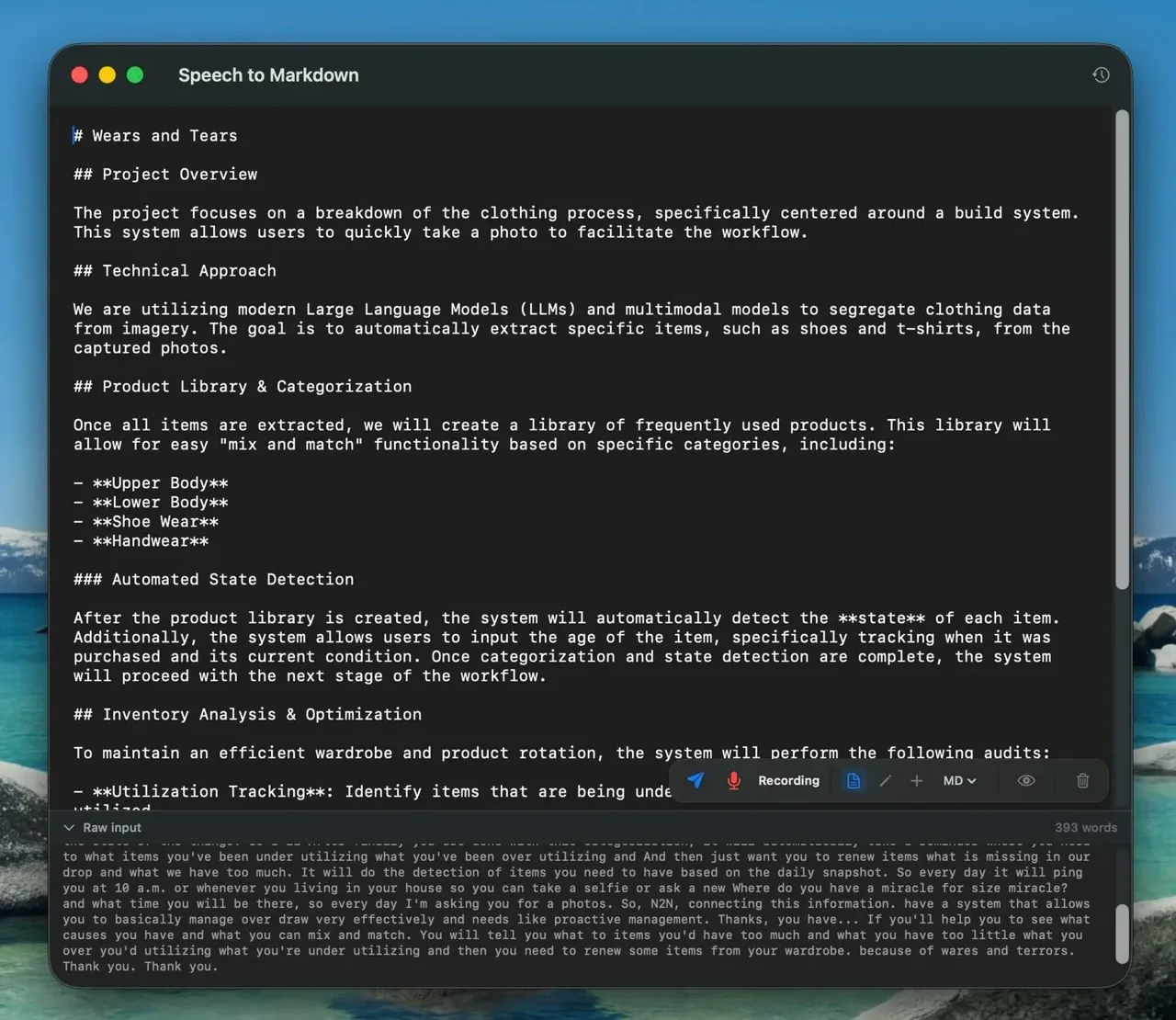
Speech-to-Markdown keeps every step on your device. Audio is transcribed locally, a local model turns the rambling transcript into a structured document, and the file on disk is updated after every pass. The raw transcript stays one click away in a panel under the editor, so you can always check what you actually said.
What happens when you talk
You speak. On the Mac, whisper.cpp transcribes your audio in roughly four-second chunks.
Words pile up. The buffer is sent to the model once it reaches about 30 words, after a five-second pause, or the moment you press Send (Cmd+Return).
The model restructures. The current mode and output format pick the prompt, and the reply streams token by token into the editor.
The file saves itself. The session document (.md, .txt or .html) is rewritten on disk after every flush, and Session History lets you reopen an old one and keep dictating into it.
Price
Free
Account
None
Mac
macOS 13+
iPhone
iOS 26+
Output
MD, TXT, HTML
Cloud
None
Two Mac modes: type anywhere, or build a document
In short
The Mac app lives in the menu bar. Global Dictation types your words at the cursor in any app when you press Cmd+Option+]. Agent Mode opens an editor where a local language model formats your speech as you go, with three ways to apply your voice and a choice of Markdown, plain text or HTML.
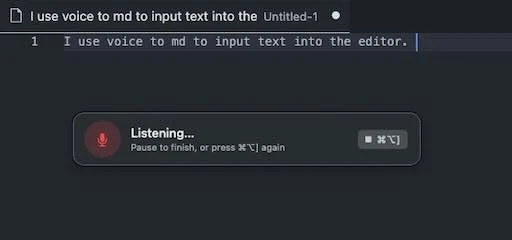
Format (default): the whole document plus your new words go to the model, which returns the complete restructured document. Good for free-form thinking out loud.
Edit: your voice becomes an instruction, such as “change the subtitle to Weekly Notes” or “turn that list into a table”. Select text first and the edit applies only there.
Append: only the last three sentences plus your new words are sent, and the model returns just the new part. Latency stays flat as the file grows.
Extras: Preview opens the file in its default app, Read aloud sends the selection to the macOS voice, and Clear wipes the session after a confirmation.
Local LLM dictation: what the Mac needs
Global Dictation only needs whisper.cpp, which the installer sets up. Agent Mode also needs a language model server running on your Mac that speaks the OpenAI request format. That is a shared API shape, not a link to OpenAI. The default is omlx on port 8000; Ollama, LM Studio and llama.cpp work on their own ports. The project recommends Qwen3.5 27B at 4-bit for formatting quality, or Gemma 26B at 8-bit for speed. The Whisper Base speech model is about 150 MB.
Where to start
Install, grant Microphone and Accessibility access, download the Base Whisper model from Settings, and try Global Dictation first. Add a local model server once you want Agent Mode, and pick a model size your Mac's memory can hold comfortably.
Offline voice notes on iPhone and iPad
In short
The iOS app runs the same Agent Mode with zero setup. Apple's SpeechAnalyzer transcribes on the device and Apple Intelligence's on-device Foundation Models format the document. There is no server, no model download and no settings screen, and it works in airplane mode.
Same three modes: Format, Edit and Append, with Markdown, plain text or HTML output and a live raw-transcript panel.
Session history: recent sessions are listed by date with a preview, and the files are visible in the Files app.
Hardware gate: it needs iOS 26 or later and an iPhone 15 Pro or newer, or an Apple-silicon iPad, with Apple Intelligence turned on. Older iPhones cannot run it.
Brand new: version 1.0 shipped on 23 July 2026 and had no App Store ratings yet on 10 November 2026.
Speech-to-Markdown vs VoiceInk, Superwhisper and other dictation apps
In short
VoiceInk is a $25 one-time Mac app. Superwhisper is free for local dictation, with Pro at $8.49 a month or $249.99 lifetime. MacWhisper Pro is €64 once. Wispr Flow transcribes in the cloud from $12 a month billed yearly. Apple Dictation is free and built in. Speech-to-Markdown is free and the only one here built around a structured document.
| App | Price | Where it runs | Structured document | Platforms |
|---|---|---|---|---|
Speech-to-Markdown this one this article | Free | On device; Mac uses your own local model | Yes: live Markdown, TXT or HTML editor, voice edits | macOS 13+ (build from source), iOS 26+ |
VoiceInk Mac dictation | $25 / $39 / $49 one-time (1 / 2 / 3 Macs) | Local transcription; optional cloud enhancement | No; cleans up and inserts text, notes to a journal file | Apple-silicon Macs, macOS 14.4+ |
Superwhisper power-user dictation | Free local plan; Pro $8.49/mo, $84.99/yr or $249.99 lifetime | Local Whisper free; AI modes and cloud models in Pro | No; AI modes rewrite text into the app you are in | Mac, Windows, iPhone, Android |
MacWhisper file transcription | Free tier; Pro €64 once | Local; optional cloud AI with your own keys | No; transcripts and subtitle exports | Mac |
Wispr Flow cloud dictation | Free weekly word cap; Pro $15/mo or $12/mo yearly | Cloud only, no offline transcription | No; polished text into any app | Mac, Windows, iPhone, Android |
Apple Dictation built in | Free | On device on supported Macs | No; plain text | Mac, iPhone, iPad |
Offline dictation app for Mac: which to pick
If you want fast, polished dictation into other apps and a signed download, VoiceInk and Superwhisper's free plan are easier to start with. If you mostly transcribe recordings, MacWhisper is built for that. If you think out loud and want the result to be a document you can keep editing by voice, Speech-to-Markdown is the one that does it, as long as you are fine building it and running a local model.
Setup cost, privacy and who should skip it
In short
The Mac app has no signed download: a script builds it from source. Agent Mode needs a local model server you install. The privacy policy says the app has no account, no analytics and no backend. The source is public on GitHub, though we found no license file in the repository.
Install: one Terminal command downloads an install script that uses Homebrew to fetch xcodegen, whisper-cpp and ffmpeg, builds the app with Apple's developer tools and copies it to Applications. Updates mean re-running it.
Permissions: builds are signed with your Apple Development identity if you have one; otherwise they are signed ad hoc and macOS asks for Microphone and Accessibility again after each update.
Privacy: no analytics SDKs, crash reporters or trackers; recordings and documents stay in local files (under ~/.stmd on macOS). If you point the Mac app at a remote model server, your transcript goes to that server.
Quality depends on you: on the Mac, formatting is only as good and as fast as the model you run. We did not benchmark it.
Skip it if you want a notarized app you can download and drag in, you do not want to run a local model server, or your iPhone is older than the 15 Pro.
Frequently asked questions
Is Speech-to-Markdown really free, and what do I need to install?
Yes. The iPhone and iPad app is free on the App Store and needs nothing else. The Mac app is free too, but you build it yourself: a one-line install script uses Homebrew to fetch xcodegen, whisper-cpp and ffmpeg, compiles the app and copies it to Applications. Agent Mode on the Mac also needs a local LLM server such as omlx, Ollama, LM Studio or llama.cpp.
Does Speech-to-Markdown work offline on iPhone?
Yes. On iPhone and iPad it transcribes with Apple's on-device SpeechAnalyzer and formats with Apple Intelligence's on-device Foundation Models, so it works in airplane mode. It needs iOS 26 or later and an iPhone 15 Pro or newer, or an Apple-silicon iPad, with Apple Intelligence turned on.
Which local model should I run for Agent Mode on the Mac?
The project recommends Qwen3.5 27B at 4-bit for the best formatting and Gemma 26B at 8-bit for speed. Any server that speaks the OpenAI request format works; omlx on port 8000 is the zero-config default. Bigger models need more memory, and formatting speed depends on your Mac.
Can I edit the document by voice?
Yes. Switch the capsule to Edit and your speech becomes an instruction instead of content, for example "turn that list into a table". If you select text first, the change applies only to the selection.
Is Speech-to-Markdown the best dictation app for Mac?
Not for everyone. It is the one in our comparison built around turning speech into a structured document, and it is free. VoiceInk ($25 one-time) and Superwhisper (free local dictation, Pro from $8.49 a month) are signed downloads with more polish for plain dictation, MacWhisper Pro (€64 once) is stronger at transcribing files, and Wispr Flow needs the cloud.
Sources
- 1
The official site: the two Mac modes, the Agent Mode control panel, the pipeline timings, the local LLM options and the iOS requirements. Read on 10 November 2026.
- 2
Speech-to-Markdown privacy policy
Effective 22 July 2026: no account, no analytics, no backend; files stay under ~/.stmd on macOS.
- 3
Speech-to-Markdown source and README (GitHub)
Install script, macOS 13+ requirement, signing behavior, recommended models and the Append-mode details. We found no LICENSE file at the repository root on 10 November 2026.
- 4
SpeechToMarkdown on the App Store
Free, version 1.0 released 23 July 2026, iOS 26.0 minimum, seller Igor Steblii.
- 5
The open-source C/C++ port of OpenAI's Whisper speech model that the Mac app runs on-device.
- 6
Apple Foundation Models framework
Apple's on-device language model API, which formats documents in the iOS app.
- 7
One-time $25 (1 Mac), $39 (2) or $49 (3); local transcription; Apple silicon and macOS 14.4 or later.
- 8
Free plan with unlimited local Whisper dictation and no AI processing; Pro $8.49 a month, $84.99 a year or $249.99 lifetime.
- 9
Free tier; Pro €64 pay once with lifetime updates; system-wide dictation; local models via Ollama and LM Studio.
- 10
Free tier with a weekly word cap; Pro $15 a month or $12 a month billed yearly.
- 11
Wispr Flow: accuracy and known limitations
Flow transcribes in the cloud; there is no offline transcription.
Speech-to-Markdown
Talk. Get clean markdown. 100% local.
macOS · iOS · iPadOS
More apps worth a look: browse the desktop