
What Plane Is Flying Over Me? Overflight Says Where to Look
A jet rumbles over the house and you want to know what it is. Most flight trackers answer with a world map full of yellow dots, and you still have to work out which dot is above you. Overflight starts from where you stand instead. It shows only the aircraft you could actually see, names the one overhead, and tells you which way to look. This piece covers how it works, what is free, what the one-time Pro price buys, and where the big trackers do the same job.

OneTimePay.app
7 min read
Is there an app that tells me what plane is flying over me right now?
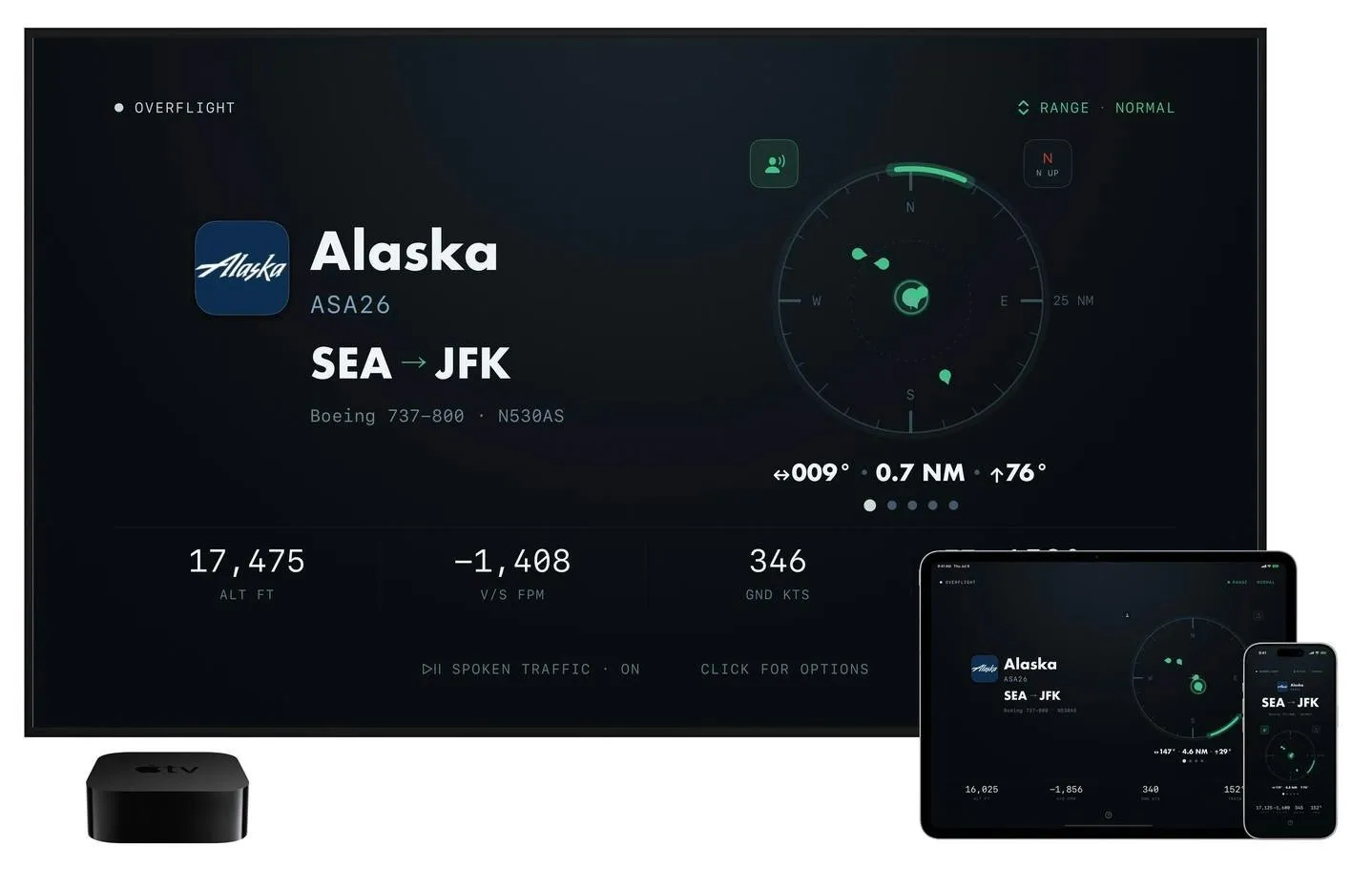
Yes. Overflight for iPhone, iPad and Apple TV shows a radar scope of the aircraft you can actually see from where you stand and names the one overhead: airline, flight number, type and altitude, plus the compass bearing and the angle to look. It is free to use; Pro adds routes and alerts for $69.99 once, or by subscription.
On this page
Is there an app that tells me what plane is flying over me right now?
In short
Yes. Overflight reads your position and fetches the live ADS-B traffic around you every few seconds. It drops the aircraft you could not plausibly see, highlights the most prominent one, and shows its airline, flight number, aircraft type, altitude, vertical speed, ground speed and track. The rest of your sky waits in a ranked carousel you swipe through.
A plane overhead app, not a world map
The scope is centred on you. There is no map of the country to pan, no search box and no flight history. The question it answers is the one you have when you look up: what is that? To decide what counts as visible, it uses slant range and the kind of aircraft. A widebody at cruise is visible from much farther away than a Cessna in the airport pattern, and the model also knows how high you are standing, from your GPS altitude or a terrain lookup. A RANGE switch (Overhead, Near, Normal, Far) makes it stricter or more generous.
Which way to look
For the aircraft in focus, the card gives a look line: compass bearing, distance and degrees above the horizon, such as 040°, 11 nautical miles, 11° up. You can run the scope north-up or heading-up. With spoken traffic on, the app reads it out in air traffic control style: “Traffic, two o'clock, twelve miles”, then the type, altitude, flight and route. VoiceOver is fully supported.
Emergencies first: an aircraft squawking 7700 or declaring an emergency wins the card with an amber chip.
Interesting inbound: military or unusual traffic closing on your position on a steady track turns the screen amber, with a countdown to overhead.
Route Withheld: private aircraft whose owners joined the FAA's LADD privacy program still show, but without origin and destination.
No account: nothing to sign in to. Your coordinates leave the device only to query nearby aircraft and terrain height.
What stays free, and what Pro adds
In short
The free app is a working instrument: the live scope, aircraft identity, type, altitude, speed and military highlighting. Overflight Pro adds four things: the route of every aircraft, spoken traffic calls, inbound alerts, and always-on running with no idle timeout. Pro costs $3.99 a month, $19.99 a year or $69.99 once.
You get a taste of Pro before paying. Every install gets its first aircraft route and its first inbound alert free, and the free route waits for an aircraft that actually has a published route. The yearly plan starts with a 7-day free trial. Buying Pro on an iPhone or iPad also unlocks it on Apple TV.
Flight tracker lifetime purchase: the break-even
The one-time price is why Overflight is in this directory, so here is the plain maths. $69.99 once equals 3.5 years of the $19.99 yearly plan, or about 17.5 months of the $3.99 monthly plan. If you expect to keep it on a TV or check the sky for years, the lifetime purchase wins. If you are curious for a summer, pay monthly or stay free.
Free tier
Scope and identity
Pro, once
$69.99
Pro, yearly
$19.99
Runs on
iPhone, iPad, Apple TV
Needs
iOS or tvOS 17+
Account
None
A flight tracker for Apple TV
In short
On Apple TV, Overflight is a native app built to be read from across the room. It locks onto one aircraft and tracks it until it leaves your sky, then hands off to the next. The Siri Remote changes range, browses aircraft and toggles spoken traffic. When the sky is empty it drops to a standby sweep.
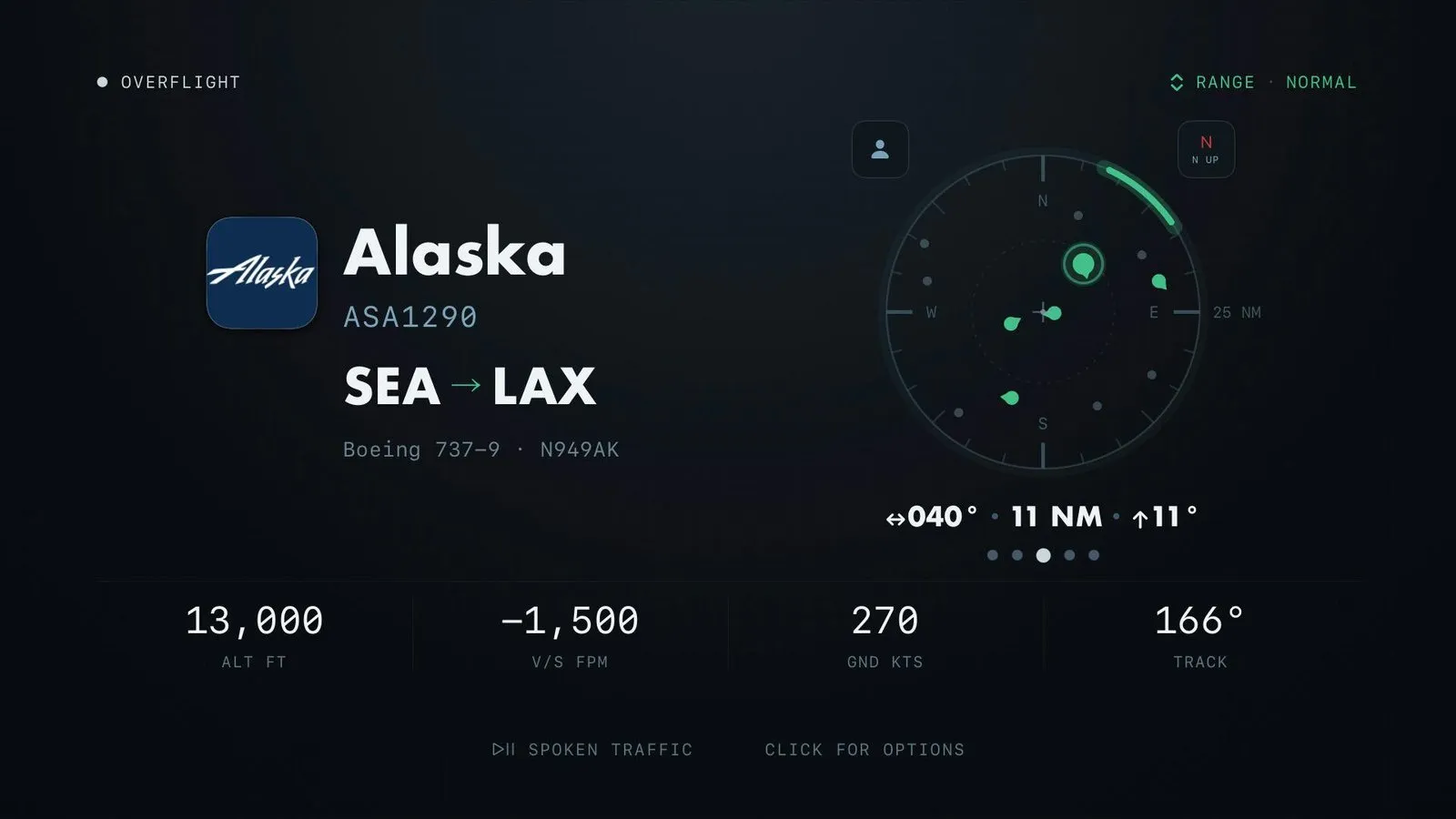
The TV's own rough location is enough to start. For exact bearings, choose Pin exact location and direction from the Options menu and scan the QR code with your iPhone. The phone sends one precise position through a pairing server that deletes it within minutes, and it can record which way the room faces, so up on the scope matches the wall you are looking at. To avoid burn-in, the whole interface drifts in a slow orbit, one lap every 16 minutes. Always-on mode, spoken traffic and inbound alerts on the TV are Pro features.
Overflight vs Flightradar24, Plane Finder, FlightAware and Zephy
In short
Overflight is not the only app that can name the plane above you. Flightradar24's free app identifies a flight when you point your phone at the sky, and Plane Finder has a live AR mode. Overflight's differences are a scope of only the visible sky, a spoken look line, a native Apple TV app, and the only one-time price in this group.
| App | Price | Buy once? | How you find the plane | Apple TV app |
|---|---|---|---|---|
Overflight this one this article | Free; Pro $3.99/mo, $19.99/yr | Yes, Pro $69.99 | Scope of your visible sky, bearing and angle | Yes, native |
Flightradar24 Silver and Gold plans | Free; Silver from $2.99/mo, Gold up to $39.99/yr | No | World map, or point the phone at the sky | Not listed |
Plane Finder Premium plan | Free; Premium $3.49/mo or $19.99/yr | No | World map, live AR camera mode | Not listed |
FlightAware free app | Free; ad removal $1.49/mo or $8.99/yr | No | World map and flight search | Not listed |
Zephy indie app | Free, no in-app purchases listed | Nothing to buy | Compass radar, Track Closest Plane | Not listed |
If you want to look up any flight anywhere, see history, airport boards or weather layers, Flightradar24 is the stronger tool, and its free tier already identifies planes overhead. FlightAware is the pick for tracking a specific flight you are meeting. Zephy is the free, simple choice if a compass and a nearest-plane button are enough. Overflight earns its place if you want a glanceable answer without reading a map, a spoken callout, a TV display, or a price you pay once instead of every year.
Who Overflight suits, and who should skip it
In short
It suits aviation fans, people who live under a flight path, parents of plane-mad kids, and flight schools or private-aviation lounges that want a live display on the wall. Skip it if you need a world map, flight search, history or airport boards, or an Android app.
Like every ADS-B app, it only shows what is broadcast and received. Some small private aircraft, gliders and military traffic with transponders off will not appear, and coverage over oceans and remote areas is thinner because it relies on volunteer receivers. Overflight is young: it launched in July 2026 from DGR Labs, and on 27 October 2026 it had 23 App Store ratings averaging 4.7 stars. Routes are checked against where the aircraft actually is, and a route that does not fit is shown as unknown rather than wrong.
Before you buy Pro
Use the free first route and first inbound alert, and try the yearly plan's 7-day trial, before deciding on the $69.99 lifetime option. Prices were verified on 27 October 2026.
Frequently asked questions
Is the Overflight Pro lifetime purchase worth it?
Only if you will use Pro for more than about three and a half years. Pro costs $69.99 once, $19.99 a year or $3.99 a month, so the one-time price equals 3.5 years of the yearly plan or about 17.5 months of the monthly one. Every install gets one free route and one free inbound alert, and the yearly plan starts with a 7-day trial, so you can test Pro before paying. If you mainly want the free scope and aircraft identity, you do not need Pro at all.
Can I show the planes overhead on my TV?
Yes, if you have an Apple TV. Overflight has a native tvOS app that locks onto one aircraft until it leaves your sky, then picks the next, with optional spoken traffic calls. The TV’s coarse location is enough to start; scanning a QR code with your iPhone pins the exact spot and the direction the room faces. Always-on running with no idle timeout is a Pro feature, and buying Pro on an iPhone or iPad unlocks the Apple TV too.
Why does Overflight not show a plane I can see?
Almost always the plane is not broadcasting ADS-B, or no receiver near you heard it. Some small private aircraft, gliders and military traffic with transponders off fall into that gap, and no ADS-B app can show them. Sometimes the visibility model decided the aircraft is too far away to see; setting RANGE to FAR makes it more generous.
Does Overflight show military aircraft?
Yes, when they broadcast. Military and unusual aircraft are scored separately, and one that is closing on your position on a steady track turns the screen amber with a countdown to overhead. An aircraft squawking 7700 for an emergency outranks everything else. The inbound alert is a Pro feature, but the first one is free on every install.
Does Overflight work outside the US?
Yes. Positions come from airplanes.live, a worldwide network of volunteer ADS-B receivers, so coverage follows how many receivers are near you: strong around cities, thinner over oceans and remote areas. Route names come from AeroDataBox, and some private US aircraft show Route Withheld because their owners joined the FAA’s LADD privacy program.
Is Overflight the only app that can identify the plane overhead?
No. Flightradar24’s free app identifies a flight when you point your phone at the sky, and Plane Finder has a live AR mode that does the same. Zephy is a free compass-style radar with a Track Closest Plane button. Overflight’s difference is a scope that shows only the aircraft you could plausibly see, a spoken look line in ATC phrasing, a native Apple TV app, and a one-time price for Pro.
Sources
- 1
Product page: radar scope of the visible sky, card details, interesting inbound alerts, spoken traffic, data sources, no account, and the price line ($3.99/month, $19.99/year, $69.99 once).
- 2
ADS-B from a volunteer receiver pool every few seconds, the slant-range visibility model, Open-Meteo terrain, the look line, AeroDataBox routes with adsbdb fallback, LADD handling, emergency priority.
- 3
Native tvOS app, unattended tracking, standby sweep, the 16-minute burn-in orbit, QR-code position pinning; always-on, spoken traffic and inbounds are Pro.
- 4
airplanes.live network, iOS, iPadOS and tvOS 17 or later, free vs Pro split, first route and first inbound free, Pro on iPhone unlocks Apple TV, worldwide coverage, July 2026 launch.
- 5
The developer’s own comparison: no map, search or history in Overflight, on purpose.
- 6
Free; in-app purchases Overflight Pro Monthly $3.99, Yearly $19.99, Lifetime $69.99; 4.7 stars from 23 ratings on 27 October 2026; developer DGR Labs, LLC.
- 7
Flightradar24 on the App Store
Free app identifies flights overhead by pointing the device at the sky; Silver and Gold subscriptions, US in-app prices from $2.99 a month up to $39.99 a year.
- 8
Live AR mode; Plane Finder Premium $3.49 a month or $19.99 a year.
- 9
Free; Ad Remove $1.49 a month or $8.99 a year; Aviator plans from $9.99 a month.
- 10
Free compass-style radar of planes overhead with filters and a Track Closest Plane button; no in-app purchases listed.
- 11
FAA: Limiting Aircraft Data Displayed (LADD)
Lets private aircraft owners have their flight data filtered from public display.
- 12
ADS-B Out is required to fly in the airspace defined in 14 CFR 91.225.
Overflight
Identify every aircraft in your sky.
once
iOS · iPadOS · tvOS
More apps worth a look: browse the desktop