
A Swift Regex Tester for Mac That Stays Local: Regex
A pattern that passes in regex101 has passed in PCRE or JavaScript, not in the Swift code you are about to ship. Regex is a small native Mac app that runs your pattern through Swift Regex itself, shows the matches and capture groups as you type, previews a replacement, and keeps the whole test for next time. This piece covers what it does, what it leaves out, and which free tools cover the same ground.

OneTimePay.app
6 min read
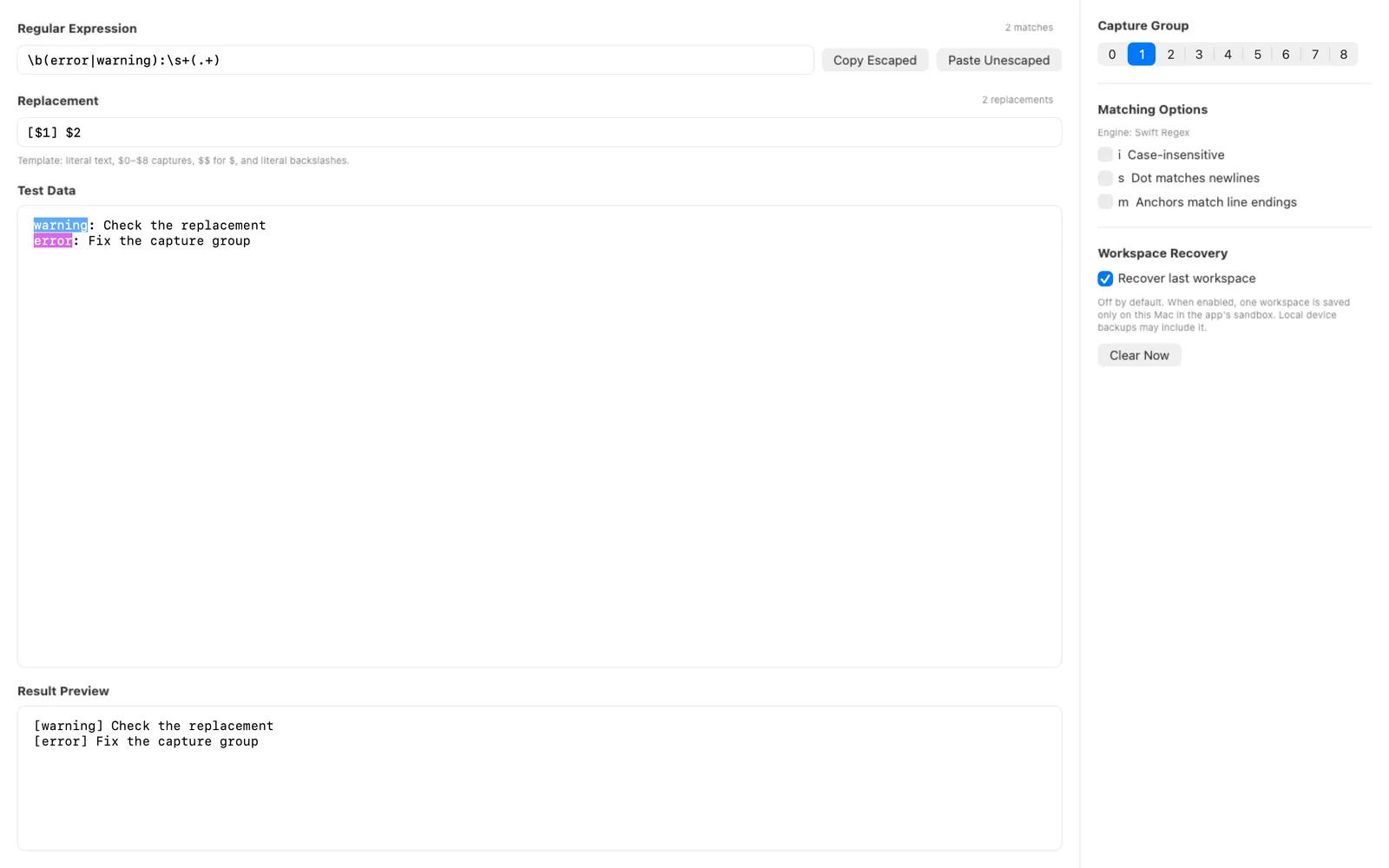
Is there a regex tester like regex101 that uses Swift Regex?
Yes. regex101 has no Swift flavor, but Regex for Mac tests patterns with Swift Regex itself: live match states, captures 0 to 8, a read-only replacement preview and saved tests, all local with no account. It costs $13.99 once. It is not the only Swift Regex tester, and free options exist (compared below).
On this page
Is there a regex tester like regex101 that uses Swift Regex?
In short
Regex is a native Mac scratchpad for Swift Regex. Type a pattern, paste Test Data, and it tells you whether the pattern is empty, invalid, valid with zero matches, or matching, and highlights every match or one chosen capture group. regex101 runs PCRE, JavaScript, Python, Go, Java, .NET, Rust and POSIX engines, but not Swift.
What one test looks like
Four explicit states: an empty field, a syntax error, a valid pattern with zero matches and a matching pattern each look different, so “no highlight” never hides a typo.
Captures 0 to 8: pick a group and only its text lights up in the test data, with a live match count.
Three options:
icase-insensitive,sdot matches newlines,manchors match line endings.Replacement preview: a template with
$0to$8and$$for a literal dollar sign renders in a read-only result. The text you pasted is never changed.Swift string escaping: Copy Escaped puts the pattern on the clipboard with backslashes and quotes escaped for a Swift string, and Paste Unescaped reverses it when you bring a pattern back from code.
Engine
Swift Regex
Captures
0 to 8
Needs
macOS 14.2+
Price
$13.99 once
Account
None
Network
None
Why Swift Regex results differ from PCRE and JavaScript
In short
Swift Regex matches by grapheme cluster by default: a dot or a character class consumes one user-perceived character, and comparisons use canonical equivalence, the same way Swift compares strings. ICU-based NSRegularExpression and PCRE match Unicode scalars or code units instead. The same pattern can return different matches in each.
A concrete case: an “é” stored as the letter e plus a combining accent is two Unicode scalars. In PCRE a single dot matches only the e; in Swift Regex the dot matches the whole “é”. An emoji with a skin-tone modifier behaves the same way. Flags, replacement tokens and the escaping a pattern needs inside a Swift string literal add further gaps between a browser tester and your code.
NSRegularExpression vs Swift Regex
Older Swift and Objective-C code often uses NSRegularExpression, which runs ICU. Regex does not test that engine: it tests the Swift Regex type introduced in Swift 5.7. If your code calls NSRegularExpression, use an ICU-based tester instead.
Saved tests keep the whole setup
In short
Version 2.5 (August 2026) saves the pattern, Test Data, replacement, selected capture group and the i, s and m options as one named test. Opening it gives you a working copy, and the saved test changes only when you explicitly overwrite it. Duplicate first to try a variant and keep the original.
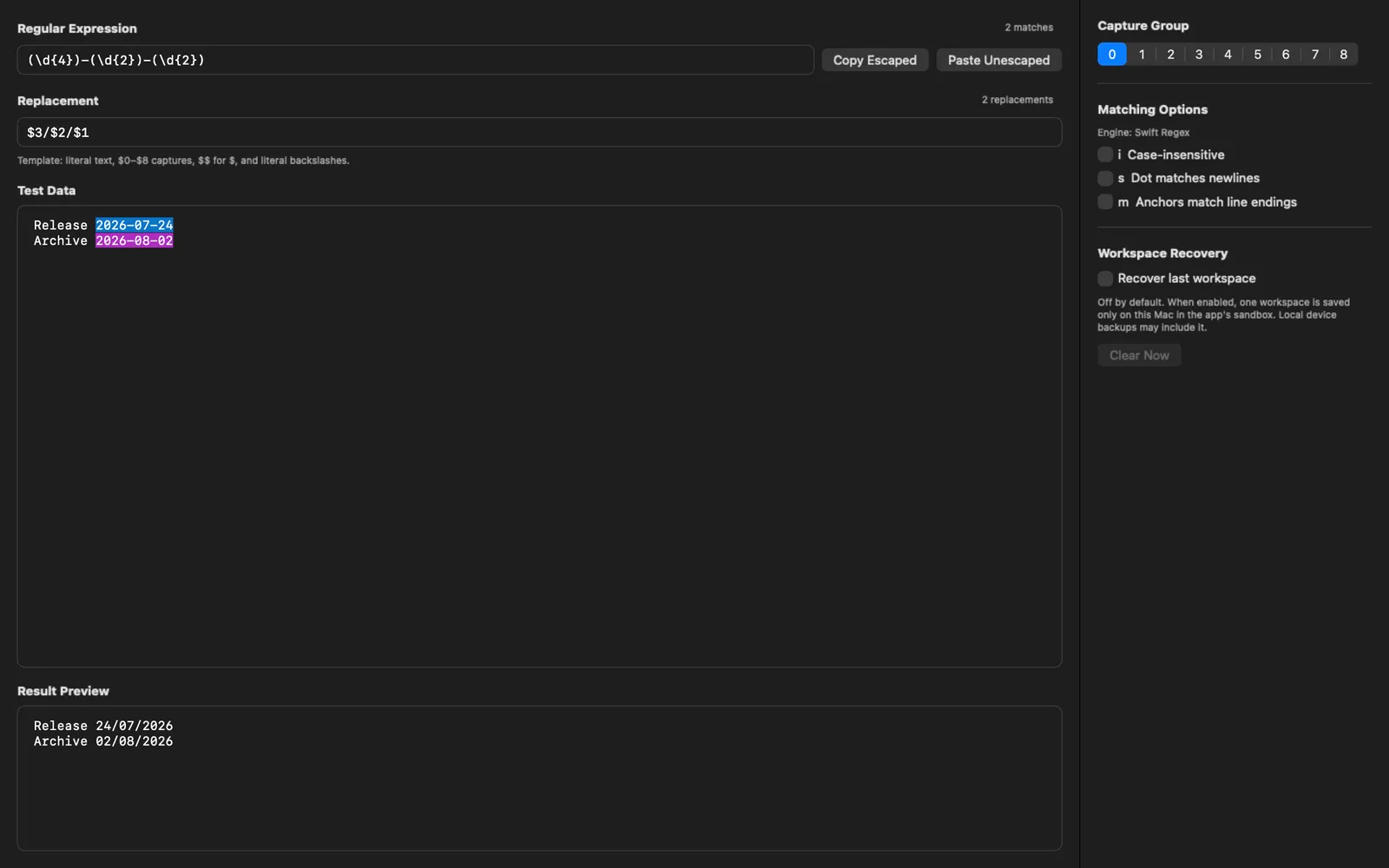
Save As, Open, Duplicate, Overwrite: also rename and delete. A regression case you fixed last month is one click away instead of re-pasted from a chat log.
Stored as files: each test is a JSON file under Application Support inside the app sandbox on that Mac.
Workspace recovery: separately, Regex can restore one unsaved workspace at the next launch. It is off by default and can be cleared at any time.
Test Swift Regex offline, with nothing uploaded
Regex has no account, uploads, network service, cloud sync, third-party SDK or app analytics, and its App Store privacy label reads “Data Not Collected”. That makes it fine for log lines or customer data you would rather not paste into a website. One caveat from the developer: local device backups may include the sandbox, and the MotionObj website itself (not the app) uses analytics.
Regex vs regex101, swiftregex.com, RegExp, Expressions and Patterns
In short
Two free options also test Swift Regex: swiftregex.com in a browser, and RegExp, a free Mac, iPhone and iPad app with a $2.99 one-time Pro that needs macOS 15.1. regex101 is free but has no Swift flavor. Expressions ($7.99) runs ICU and Patterns ($2.99) runs other engines. Regex is $13.99 once and Swift only.
| App | Price | Engine(s) | Runs on | Saving tests |
|---|---|---|---|---|
Regex this one this article | $13.99 once | Swift Regex only | Mac app, macOS 14.2+ | Named saved tests, local JSON; no sync |
regex101 the default | Free; Pro subscription (price shown at checkout) | PCRE2, PCRE, JavaScript, Python, Go, Java, .NET, Rust, POSIX; no Swift | Browser | Saved to regex101 servers, shareable links |
swiftregex.com open source | Free | Swift Regex, with grapheme or scalar semantics toggle | Browser | Not listed |
RegExp Loshadki | Free; Pro $2.99 once | Swift Regex, NSRegularExpression, JavaScript, PCRE2, Go | Mac 15.1+, iPhone, iPad | Sessions and folders, iCloud sync |
Expressions Apptorium | $7.99 once | ICU (NSRegularExpression) | Mac 12+ | Not listed |
Patterns last updated 2023 | $2.99 once | Oniguruma, PCRE, POSIX, Java, Ruby and more; no Swift | Mac | Not listed |
Which one to pick
For a quick check of a Swift pattern at no cost, swiftregex.com does the job and adds a debugger and the semantics toggle Regex lacks. If you test several engines, want iPhone and iPad too, or want sessions synced over iCloud, RegExp covers more for less, provided your Mac runs macOS 15.1. Regex fits a narrower brief: a native, Swift-only tester on macOS 14.2 or later, with named saved tests that never leave the Mac.
What Regex leaves out
In short
The developer lists the gaps himself: no explanation panel, debugger, unit-test suite, code generator, benchmark, sharing link, AI pattern writing, multi-engine mode, batch replacement or free trial. Matching options stop at i, s and m, with no grapheme vs scalar switch.
Final check still needed: Regex proves Swift Regex behavior, nothing more. Run the pattern once in the receiving Swift code with cases that must and must not match.
Name on the store: the Mac App Store lists it as “Regex Tester/Builder”, sold by Hwee Boon Yar since 2011. It does not generate patterns from sample data.
No ratings yet: the US store shows too few ratings for a score, and there is no trial, so watch the 26-second demo on the developer's page before buying.
Who should skip it
Anyone who writes patterns for JavaScript, Python, PHP or grep and only occasionally for Swift. regex101 serves them better, and swiftregex.com covers the odd Swift check.
Frequently asked questions
Why does my regex work on regex101 but not in Swift?
Because regex101 never ran it in Swift. Its flavors are PCRE, JavaScript, Python, Go, Java, .NET, Rust and POSIX, and none is Swift Regex. Swift Regex matches by grapheme cluster by default, so a dot treats an accented letter stored as two code points, or an emoji with a skin tone, as one character. Escaping a pattern inside a Swift string adds a second layer of difference. Test the pattern in a Swift Regex tester, then in your own code.
Can I save regex tests on my Mac without an account or cloud sync?
Yes. Regex 2.5 saves the pattern, test text, replacement, selected capture group and matching options as a named test, stored as a JSON file in the app sandbox on that Mac. There is no account, upload, cloud sync or app analytics. Local device backups may include the sandbox.
Is Regex the cheapest way to test Swift Regex?
No. swiftregex.com tests Swift Regex for free in a browser, and RegExp is a free Mac, iPhone and iPad app with a Swift Regex mode and a $2.99 one-time Pro. Regex costs $13.99 once and is the narrower tool: Swift only, native, local, and built around saved tests. It also runs on macOS 14.2, where RegExp needs 15.1.
Does Regex test NSRegularExpression or grep patterns?
No. It tests Swift Regex only. NSRegularExpression uses the ICU engine, and grep, sed and nginx use their own engines. The developer recommends a final check in the real destination before using a pattern on important data.
Is Regex a subscription?
No. It is a one-time purchase of $13.99 on the US Mac App Store, with no in-app purchases listed. There is no free trial, so check the demo video on the developer's site first.
Sources
- 1
The official page for Regex 2.5: saved tests, the four pattern states, local JSON storage, no account or network service, macOS 14.2+. Read on 12 November 2026.
- 2
A regex101 alternative for testing Swift Regex on a Mac
The developer's own comparison, including the list of things Regex does not do (explanation, debugger, test suite, sharing, multi-engine mode, trial).
- 3
Listed as "Regex Tester/Builder": $13.99, version 2.5.0 (19 August 2026), requires macOS 14.2, "Data Not Collected", not enough ratings for a score.
- 4
SE-0363: Unicode for String Processing
The Swift Evolution proposal that makes grapheme cluster semantics the default for Swift Regex and contrasts it with ICU-based NSRegularExpression.
- 5
The engines regex101 runs: PCRE2, PCRE, JavaScript, Python, Go, Java, .NET, Rust and POSIX ERE/BRE. No Swift.
- 6
regex101 docs: Privacy and local processing
Matching runs in the browser; saving or publishing a workspace sends the pattern and test strings to regex101.
- 7
Swift Regex tester (swiftregex.com)
Free browser tester for Swift Regex with grapheme cluster vs Unicode scalar semantics, a debugger and Regex Builder output.
- 8
Free on Mac, iPhone and iPad; Swift Regex, NSRegularExpression, JavaScript, PCRE2 and Go; RegExp Pro $2.99 one-time; requires macOS 15.1.
- 9
Expressions on the Mac App Store
$7.99; uses the ICU engine (the one behind NSRegularExpression); requires macOS 12.
- 10
$2.99; flavors include Oniguruma, PCRE, POSIX, Java and Ruby, not Swift; last updated February 2023.
More apps worth a look: browse the desktop