
A Splitwise Alternative With No Daily Limit: SuperSplit
Splitwise's free plan now caps how many expenses you can add per day and shows ads. SuperSplit does the same core job with neither: log every shared cost on a trip, in a flat or at dinner, split it the way it was actually spent, and get a short list of who pays whom. This piece covers what the free plan includes, where it stops, and which free rival fits better for some groups.

OneTimePay.app
6 min read
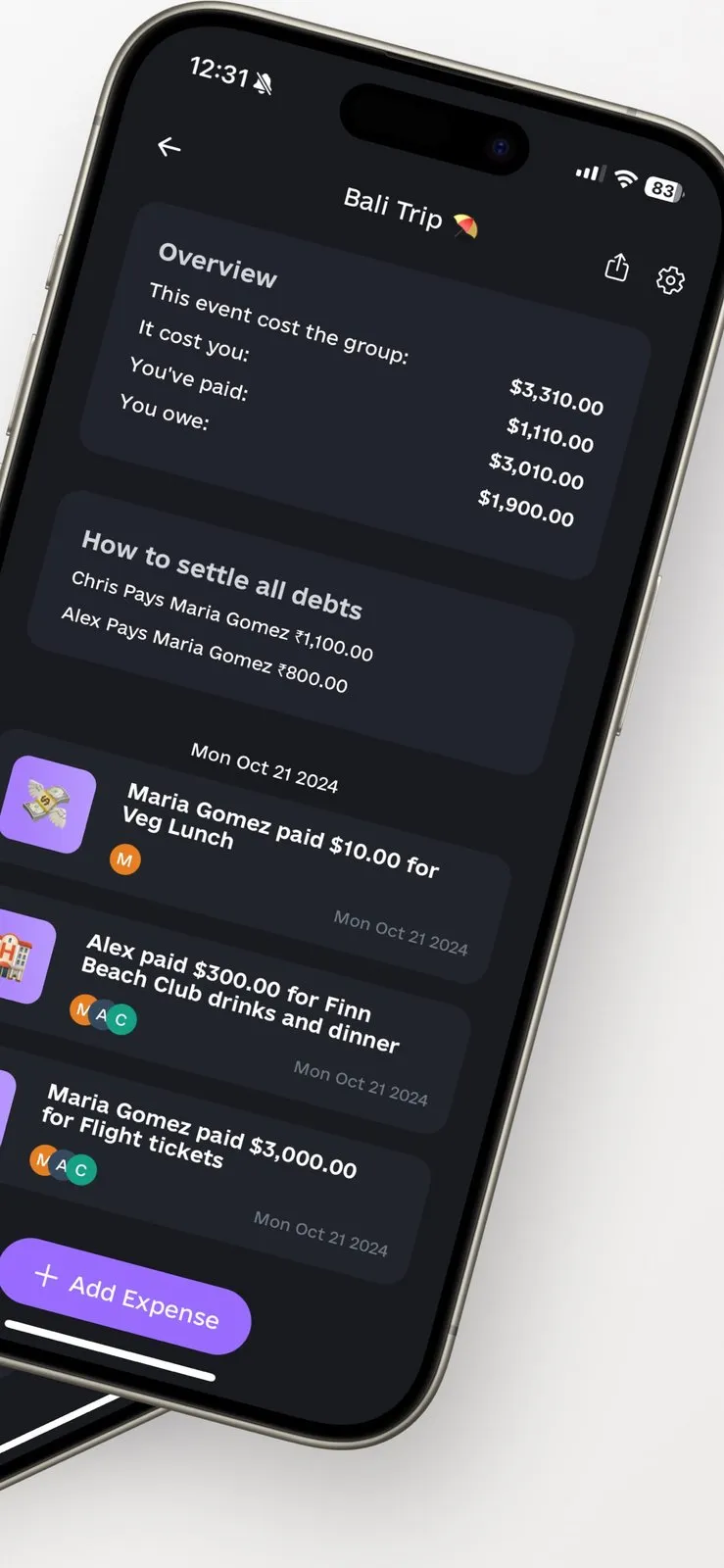
What can I use instead of Splitwise now that the free version limits expenses per day?
Try SuperSplit. Its free plan has no daily expense cap and no ads, splits four ways (equal, exact amounts, shares, percentages) and works out the shortest list of payments to settle the group. Currency conversion and receipt scanning need Pro, which you can buy once for $34.99 instead of subscribing.
On this page
What can I use instead of Splitwise now that the free version limits expenses per day?
In short
SuperSplit covers the core Splitwise job for free: unlimited groups, expenses and history, no ads, four split types and suggested payments to settle up. The flow is the familiar one: create a group, add people, log expenses as they happen, settle at the end. Its one honest free-plan limit is currency: each group has a single currency.
What stays free
No caps: unlimited groups, expenses and history, with no daily limit and no ads. The free plan is not a trial.
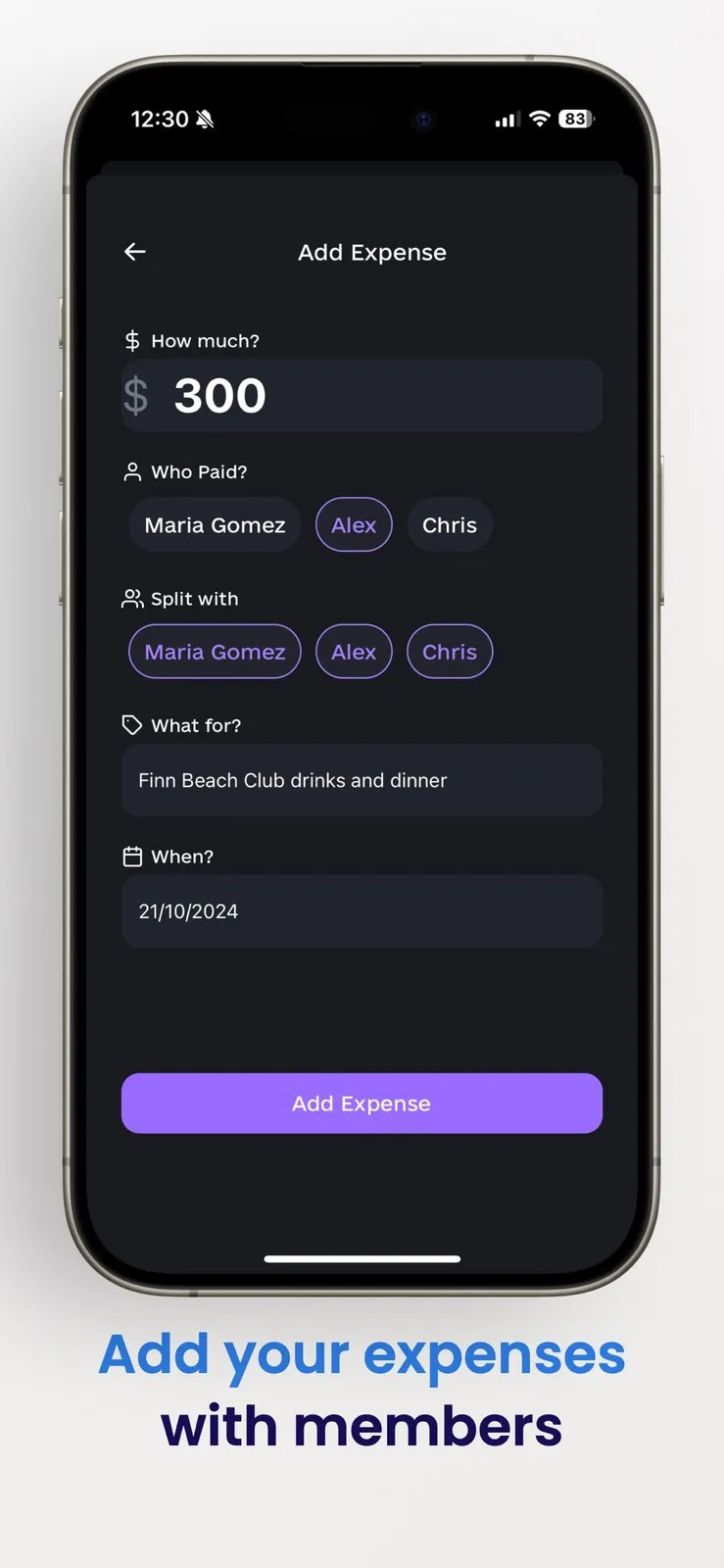
Four ways to split: equally, by exact amounts, by shares (one family of four, one couple) or by percentage (a 60/40 rent split).
Balances and payment records: see what each person paid and owes, and mark a payment once it has been made.
Invites: links, QR codes, people added by name, and balances shared to a group chat as an image or text.
Free plan
No daily cap
Ads
None
Split types
4
Pro, once
$34.99
Apps
iOS, Android
Web
Read-only
How SuperSplit settles a group in fewer payments
In short
SuperSplit works out each person's net balance (what they paid minus their share). Then the person who owes the most pays the person who is owed the most, and it repeats until everyone is at zero. A group of n people needs at most n − 1 payments, instead of everyone paying back everyone for each bill.
Take five friends on a weekend away with a dozen receipts between them. Paid back bill by bill, that can mean a transfer for every person on every receipt. Netted out, it is four payments at most, and fewer when someone ends up even. The app lists those payments; the money itself moves through your bank, a payment app or cash, and you record each one in SuperSplit so the balance updates.
Settle up group expenses outside the app
SuperSplit does not hold or send money. That keeps it out of your bank details, but it also means nobody gets paid until someone actually opens their banking app.
Inviting people who do not have the app
In short
You can add a friend by name before they install anything, so their share is tracked from the first expense. When they join through the invite link or QR code, they pick their existing name and the earlier expenses stay with them. Members can also read the group on the web after signing in.
Web view: signed-in members see expenses, balances and the summary at supersplit.app without installing an app. It is read-only: adding expenses and recording payments happen in the iPhone, iPad or Android app.
Accounts: the organiser signs in, and anyone who wants to see the group themselves signs in too. People added only by name do not need an account.
Platforms: iPhone and iPad (iOS 17 or later) and Android; the same account shows the same groups everywhere.
SuperSplit vs Splitwise, Tricount, Splid and Spliit
In short
Splitwise caps free daily expenses and shows ads; Pro is a monthly or yearly subscription ($2.99 to $39.99 in the US App Store). Tricount, Splid and Spliit are free with no cap, and Tricount and Splid include currency conversion. SuperSplit is free with no cap and sells Pro for $34.99 once or as a subscription.
| App | Price | Free plan limits and ads | Currency conversion | Account needed |
|---|---|---|---|---|
SuperSplit this one this article | Free; Pro $34.99 once, $19.99/yr or $2.99/mo | No daily cap, no ads | Pro only, 148 currencies; one currency per group free | Organiser and viewers sign in; others added by name |
Splitwise the incumbent | Free; Pro subscription, $2.99 to $39.99 in-app | Daily expense limit (number not published), ads | Pro only | Yes, sign-up |
Tricount owned by bunq | Free | "No ads. No limits." | Included | Can try without signing up |
Splid offline-friendly | Free; optional in-app purchases (Excel export, extras) | No cap stated | Included, 150+ currencies | No sign-up required |
Spliit open source | Free, donation-funded | "No ads. No account. No limitation." | Not stated on its site | No account |
Which free splitter fits your group
For a trip across currencies on a zero budget, Tricount or Splid is the better free pick, because both convert currencies at no cost. If nobody wants an account, Splid and Spliit ask for none. If you want unlimited, ad-free splitting in native apps and are fine paying once for conversion and receipt scanning later, SuperSplit fits. And if your group rarely logs more than a few expenses a day, staying on Splitwise is reasonable: moving a group has its own cost.
SuperSplit Pro: subscribe or buy once
In short
Pro is optional and adds the admin-saving features. It costs $19.99 a year, $2.99 a month, or $34.99 once for lifetime access (US App Store; other countries differ). Against the yearly plan, the lifetime purchase pays for itself in under two years.
Receipt scanning: fills in the amount, date and title from a photo.
Currency conversion: expenses in any of 148 currencies, converted into the group's currency at a daily rate that is saved with the expense.
Repeating bills: rent, internet and subscriptions entered once.
Reminders and insights: push and email reminders, spending insights, and export as PDF or CSV on iPhone, CSV on Android.
Pro is sold through the App Store and Google Play, and the app shows your local price, and any free trial, before you buy. Subscriptions are cancelled in your phone's subscription settings; the lifetime purchase has nothing to cancel.
Who should skip Pro
A flat that splits in one currency and types receipts in by hand gets everything it needs from the free plan. Pro earns its keep on frequent multi-currency trips or a household with many recurring bills.
Frequently asked questions
Is SuperSplit really free, and what does the $34.99 lifetime Pro add?
Yes, the core is free: unlimited groups, expenses and history, four split types and settle-up suggestions, with no daily limit and no ads. Pro adds receipt scanning, expenses in 148 currencies with automatic conversion, repeating bills, push and email reminders, and spending insights with export. It costs $34.99 once for lifetime access, or $19.99 a year or $2.99 a month (US App Store prices; other countries differ).
Does everyone in the group need to install SuperSplit?
No. You can add people by name before they have the app and share balances to your group chat as an image or text. To see the group themselves, a friend opens the invite link and signs in, either on the web without installing anything or in the app. Adding expenses and recording payments happens in the iPhone, iPad or Android app.
Can I send money through SuperSplit?
No. SuperSplit works out who should pay whom and lets you record a payment once it is made. The money itself moves through your bank, a payment app or cash.
Can I use different currencies in one group for free?
No. Each group has one currency, chosen when you create it. Adding an expense in another currency is a Pro feature that converts it at a daily rate saved with the expense. If you want free conversion on a trip, Tricount and Splid include it.
Is SuperSplit the best free Splitwise alternative?
It depends on the group. SuperSplit is a strong pick for unlimited, ad-free splitting in native iPhone and Android apps with an optional one-time Pro. Tricount and Splid are free with no cap and include currency conversion, Splid and Spliit need no account, and Spliit is open source. Splitwise itself is fine if your group rarely hits its daily limit.
Sources
- 1
The official site: split types, settle-up, invitations, platforms and the free vs Pro feature lists. Read on 11 November 2026.
- 2
Free plan contents; Pro at $19.99 a year, $2.99 a month or $34.99 once (vendor: US App Store, confirmed 15 October 2026); the one-currency-per-group limit.
- 3
How smart settle-up works (at most n − 1 payments), who needs to sign in, 148 currencies in Pro, and account deletion.
- 4
Seller Adee Labs LLP; requires iOS 17 or later; in-app purchases include SuperSplit Lifetime at $34.99; not enough ratings to show a score on 11 November 2026.
- 5
Splitwise sells Pro as "No limits and no ads": unlimited expenses, currency conversion, receipt itemization, charts.
- 6
Pro renews monthly or yearly; US in-app prices from $2.99 to $39.99; 4.0 stars from about 29.5K ratings on 11 November 2026.
- 7
"Free. No ads. No limits."; currency conversion included; try it without signing up; iOS and Android.
- 8
Free; no sign-up required; offline groups; 150+ currencies converted automatically; Excel export and extras via in-app purchase.
- 9
Open source, "No ads. No account. No limitation."; web app and iPhone app; hosting paid for by donations.

SuperSplit
Split bills. Track expenses. Settle up easily.
once
iOS · Android
More apps worth a look: browse the desktop