
The Free Face Aligned Selfie Timelapse App for iPhone
Most daily-selfie projects fall apart in playback. You take a photo a day for months, stitch them together, and your head bounces around the frame because no two shots are framed the same. SelfieStory fixes that at capture: it centers and aligns your face in every selfie, so the finished timelapse holds steady while everything else about you changes. This piece covers how the alignment works, where your photos are kept, and how it stacks up against the other iPhone selfie timelapse apps, including one that is also free.

OneTimePay.app
7 min read
One selfie a day, auto-aligned
Day 1
Day 90
Day 180
Day 270
Day 365
Is there an iPhone app that turns daily selfies into a timelapse without my face jumping around?
Yes. SelfieStory is a free iOS app that takes one daily selfie, automatically aligns and centers your face for a steady timelapse, keeps every photo on your device, and reminds you daily. Nothing is uploaded, and there is no paid tier.
On this page
Is there an iPhone app that turns daily selfies into a timelapse without my face jumping around?
In short
Yes. SelfieStory is a free iPhone app built around one daily selfie. It centers and aligns your face in each shot so the sequence stays steady, then compiles the photos into a time-lapse video with no manual editing. Every photo stays on the device, and a daily reminder keeps the streak going.
The jitter you get from a naive photo-a-day project comes from framing drift: your face lands a little higher, lower, or more to one side each day, and played back fast that reads as shaking. SelfieStory is a face aligned selfie timelapse app, which means it does the lining-up for you. It anchors your face to the same position in every frame, so when the photos run together the head barely moves and the change you actually want to see (aging, a beard filling in, weight coming off, a pregnancy, a kid getting taller) is what stands out. It launched on iOS, carries 254 upvotes on Product Hunt, and is listed in the Photography category.
How the face alignment keeps your timelapse steady
In short
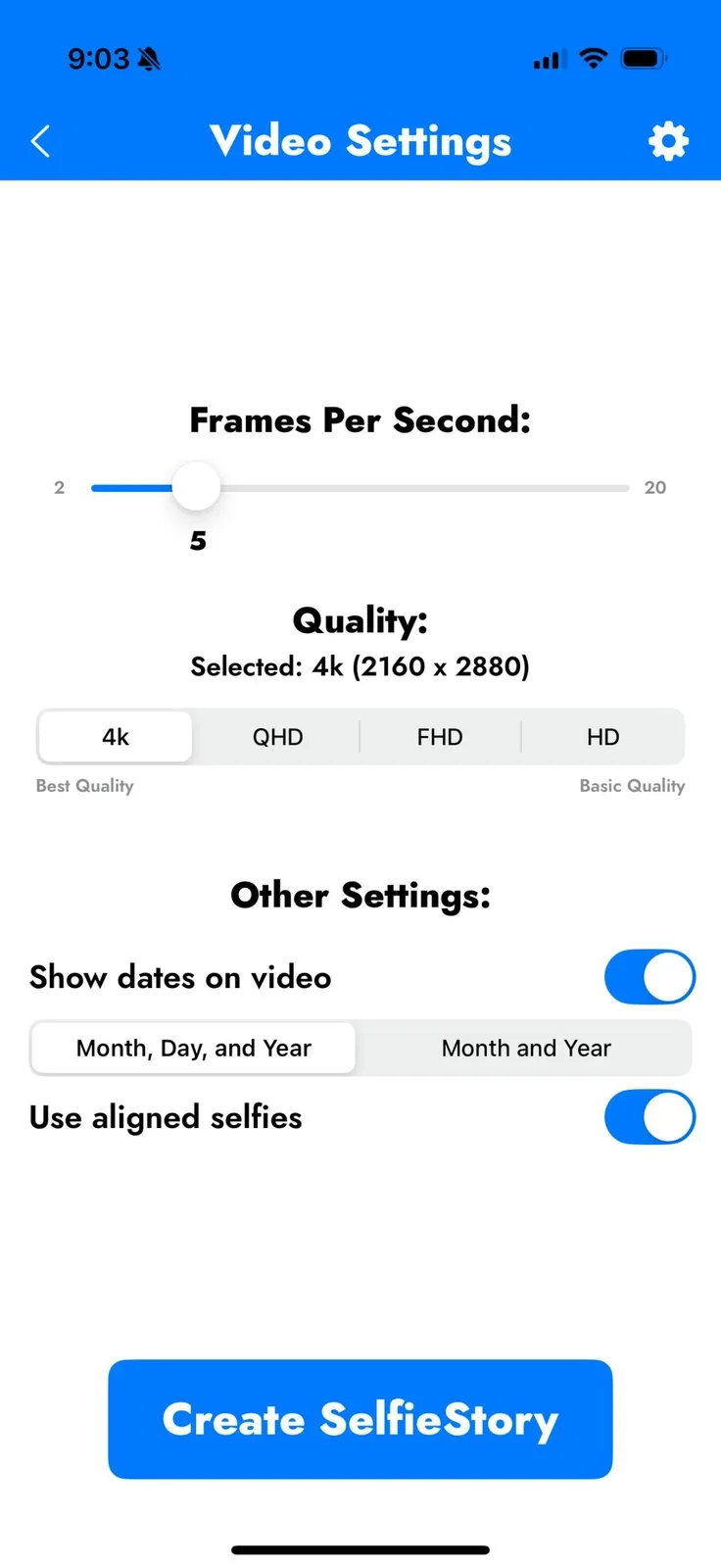
SelfieStory aligns each selfie on your face rather than the frame edges. When you build the video, an explicit “Use aligned selfies” option feeds the corrected frames into the render, so the sequence plays smoothly. You control the frame rate and the export quality, up to 4K.
Capture is a two-tap loop. You take the selfie, the app shows an Approve This Selfie? preview, and you keep it or retake. Because the alignment is computed from your face, you do not have to nail the framing yourself; a rough, arm's-length selfie is enough, and the app pulls it into line with the rest. That is the difference between SelfieStory and apps that only give you a faint ghost overlay of yesterday's photo and leave the lining-up to your own eye.
What “face aligned” actually means for a daily selfie
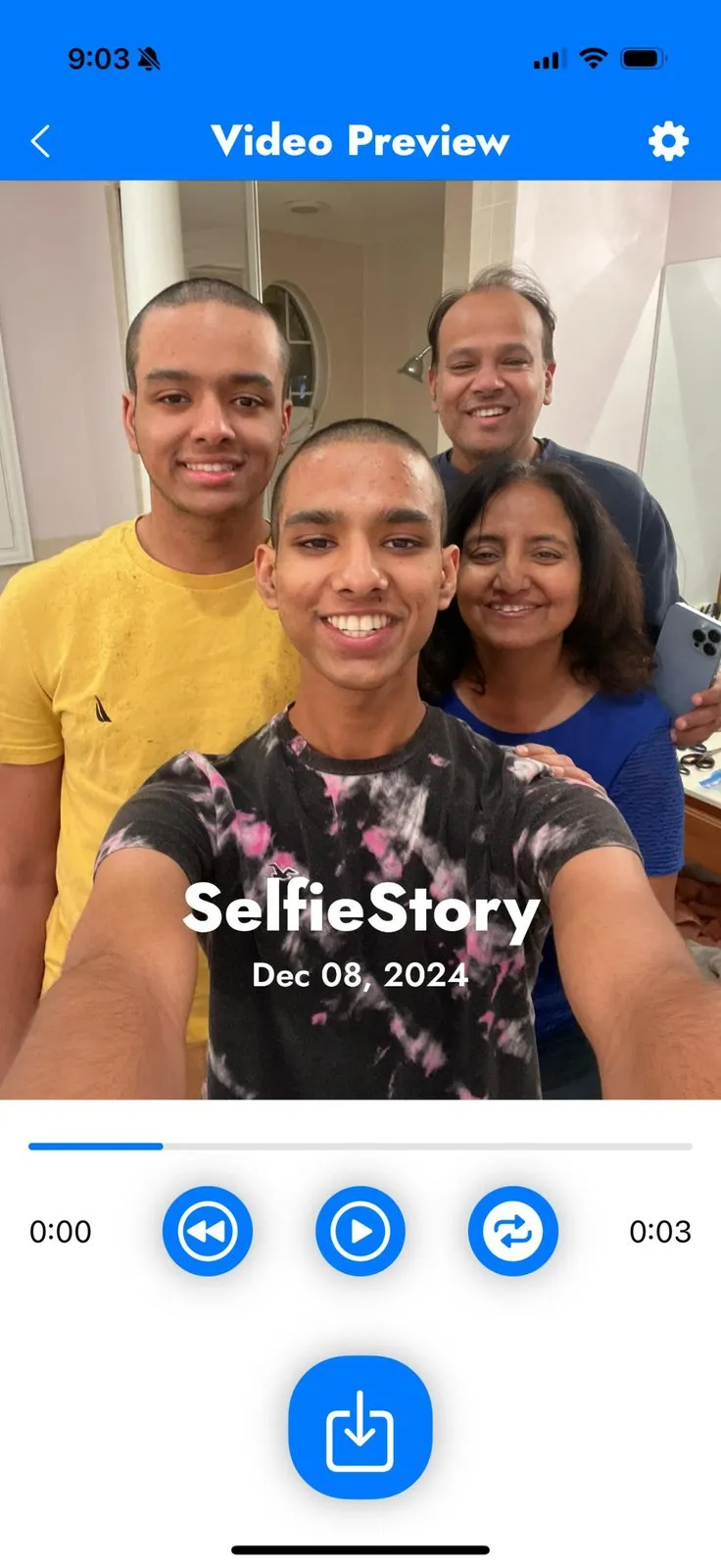
Alignment here is not a filter or an AI guess about your future face. It is a geometric correction: the app finds your face in each photo and transforms the image so that face sits in a consistent spot, at a consistent scale, across the whole set. The payoff shows up in the finished clip, where a date can be burned into the corner and the face stays put from the first frame to the last.
Where your photos live: on device, nothing uploaded
In short
SelfieStory keeps every selfie in local storage on your iPhone. Its App Store privacy label reads “Data Not Collected,” and both the alignment and the video rendering happen on the device, so you can build the whole timelapse offline.
Daily face photos are about as personal as a photo gets, which makes on device selfie timelapse privacy worth checking rather than assuming. On Apple's App Privacy panel, SelfieStory is marked “Data Not Collected,” meaning the developer states it gathers nothing from the app, and the product site puts it plainly: your photos stay on your device, never shared or uploaded. That is a stronger position than several rivals that also say “local storage” in their marketing while their own privacy labels disclose usage or advertising data, a gap the comparison below spells out.
Build your story: a daily selfie plus your old photos
In short
You take one selfie a day, and SelfieStory sends a daily reminder so you do not break the streak. To reach further back, you import past photos from your library and the app auto-aligns them, extending the timelapse backward from before you installed it.
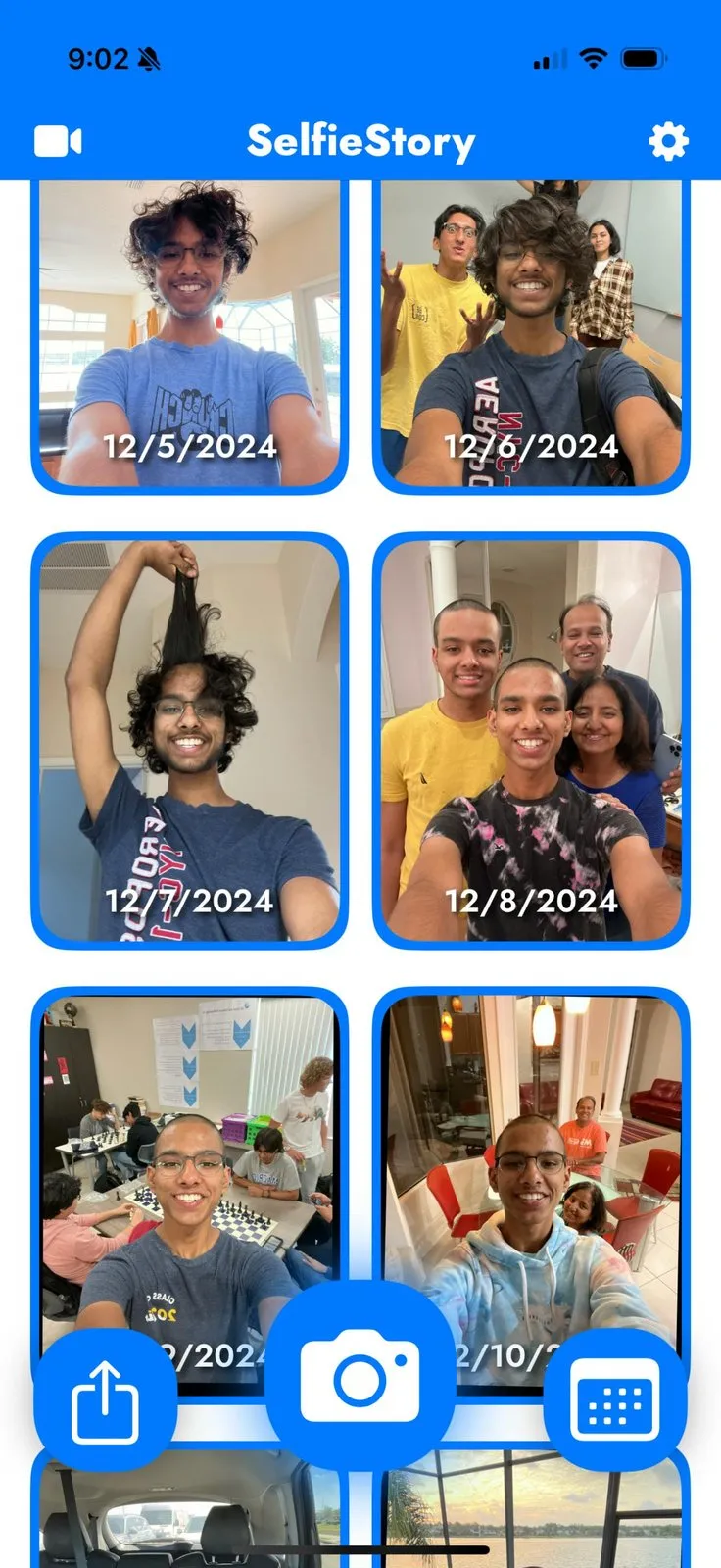
The home screen is a dated grid of your captures, so the habit is visible at a glance and the calendar becomes the motivation. The import path matters just as much: if you already have years of front-facing photos in your camera roll, SelfieStory can pull them in and align them to the same face position as your new daily shots, so your story can start years ago instead of on install day. It aligns the imports; it does not claim to auto-sort them by date, so treat ordering as something you may still guide.
Who SelfieStory is for
In short
SelfieStory fits anyone who wants to watch themselves change over a long stretch and cares that the result is steady, private, and free. If you have ever started a photo-a-day project and given up because the playback looked jumpy, this removes that failure mode.
Long-haul self-documenters tracking aging, hair or beard growth, or a body transformation over months and years, where alignment is what makes the difference visible.
Privacy-conscious users who want a face-photo habit that never leaves the phone, with a “Data Not Collected” label to back it up.
People with a back-catalog of selfies who want to fold years of existing photos into one continuous timelapse rather than starting from zero.
It is a weaker fit if you are on Android today, since the app is iOS only with an Android waitlist, or if you specifically want AI age-progression art rather than a real record of your own face. SelfieStory documents what actually happened, one day at a time; it does not invent a future you.
How SelfieStory compares to other selfie timelapse apps
In short
Most of these apps align faces well, so the real split in a free vs paid selfie timelapse app decision is price and privacy. SelfieStory is free with no paid tier. AgeLapse is free and open source. FaceLapse, Dayloop, and Daily Selfie are free to download but charge for the useful parts, and TimeShutter is a small one-time purchase. Here is the whole set in one place.
| App | Price | Purchase model | Auto face-align | App Privacy label | Imports old photos |
|---|---|---|---|---|---|
SelfieStory this one this piece | Free | No paid tier | Data Not Collected | ||
AgeLapse open source | Free | Open source | Data Not Collected | ||
FaceLapse free tier watermarked | Free + Pro | $4.99/mo · $14.99 once | Ad + usage data | ||
Dayloop one sequence free | Free + PRO | $2.99/wk · $59.99 once | Tracking data | ||
Daily Selfie ad-supported | Free + Pro | $3.99/mo | Third-party ads | ||
TimeShutter manual overlay | $0.99 | Buy once | Not disclosed |
Where AgeLapse fits (free and open source)
AgeLapse is the honest alternative to name up front. It is free with no ads and no paywall, its code is public on GitHub, it auto-stabilizes on the eyes, and it is also labeled “Data Not Collected.” If open source is a requirement for you, it is the pick, and this article will happily point you there. SelfieStory's case against it is not price, since both cost nothing. It is the rest of the package: a simple capture-and- approve daily loop, daily reminders, date-stamped 4K export, and one-tap import of your old photos, in an app aimed at people who want the habit more than the internals.
The free apps that quietly collect data
The rest are worth a caveat. FaceLapse is free to download but watermarks the free export and charges $4.99 a month or $14.99 once to remove it, and its privacy label lists advertising and usage data. Dayloop lets you make one sequence free, then asks for a PRO subscription that runs from $2.99 a week to $59.99 lifetime, and it discloses tracking. Daily Selfie is free with a $3.99 a month tier and, per its own privacy panel, collects data used to track you across other companies' apps for third-party advertising, which sits awkwardly next to its local-storage pitch. TimeShutter avoids all of that with a straight $0.99 buy-once price, but it lines shots up with a manual guideline overlay rather than aligning them for you.
Price
Free
In-app purchases
None
Platform
iOS
Alignment
Automatic
Export
Up to 4K
Privacy
Data Not Collected
Confirm the details before you download
App Store prices and privacy labels change, and they vary by region. The figures here come from each maker's own App Store page in August 2026: SelfieStory free with no in-app purchases, AgeLapse free and open source, FaceLapse $4.99/month or $14.99 once, Dayloop free with a $2.99/week to $59.99 PRO tier, Daily Selfie free with a $3.99/month tier, and TimeShutter $0.99 once. Check the current listing before you commit.
Frequently asked questions
Is there an open-source selfie timelapse app that's completely free with no paid tier?
Yes. AgeLapse is a free, open-source iPhone app (its code is on GitHub) with no ads and no paywall, and it stabilizes each selfie locally on the eyes. SelfieStory is also completely free with no paid tier and no in-app purchases, but it is not open source. If open source is your priority, pick AgeLapse. If you want daily reminders, a one-tap capture-and-approve flow, and 4K export, SelfieStory covers those.
Can I import old photos and auto-align them into a selfie timelapse on iPhone?
Yes. SelfieStory imports past photos from your library and auto-aligns each one to the same face position, so a back-catalog of selfies extends your timelapse backward from before you installed the app. That lets your story start years ago instead of today, without re-shooting a single frame.
Does the app work without uploading my photos to the cloud?
Yes. SelfieStory keeps every selfie in local storage on your iPhone, and its App Store privacy label is "Data Not Collected", meaning the developer gathers no data from the app. Both the alignment and the video rendering happen on the device. That is different from browser-based makers, which need you to upload your photos to a website before they build anything.
Is SelfieStory really free, or is there a catch?
It is genuinely free: the App Store lists it at $0 with no in-app purchases and no subscription, so there is no Pro tier to hit later. The honest trade-offs: it is not open source the way AgeLapse is, and a few paid apps add extra styling or music options. For a free, private, automatically face-aligned daily selfie timelapse with 4K export, it does the core job without asking for money.
What is the difference between a selfie timelapse and an AI aging filter?
A selfie timelapse stitches your own real daily photos into a video that shows how you actually changed over time. An AI aging filter, common in free aging apps, predicts what one uploaded photo might look like older. Only a real timelapse documents the actual you, day by day, and SelfieStory builds one without uploading anything.
Sources
- 1
The product site: daily selfies that automatically align for a time-lapse video, import and auto-align of past photos, daily reminders, local storage with the line "your photos stay on your device, never shared or uploaded", and an Android waitlist.
- 2
The maker’s listing: price "Free" with no In-App Purchases section, an App Privacy panel of "Data Not Collected", and developer Rohil Agarwal. The source for the free price, no-paywall, and privacy claims.
- 3
The free, open-source rival: no ads or paywall, auto-stabilizes on the eyes, all processing local, "Data Not Collected". Its code is public at github.com/hugocornellier/agelapse. The basis for the open-source FAQ and the comparison row.
- 4
Free to download with a Pro tier at $4.99/month or $14.99 lifetime; the free tier watermarks the export. Its App Privacy panel discloses Identifiers, Usage, and Advertising data. Used for the free-versus-paid comparison.
- 5
Dayloop and Daily Selfie on the App Store
Dayloop is free but gates more than one sequence behind a PRO subscription ($2.99/week up to $59.99 lifetime) and discloses tracking data; Daily Selfie (id6756184981) is free with a $3.99/month Pro tier and discloses data used to track you for third-party advertising. Both anchor the "free apps that collect data" point.
- 6
A $0.99 buy-once daily-selfie app that lines shots up with a manual guideline overlay rather than automatic alignment; the developer has provided no privacy details to Apple. The one-time-purchase point of comparison.

SelfieStory
Turn selfies into a perfectly aligned timelapse of your life
iOS
More apps you buy once: browse the desktop