
SmoothCut: A Screen Recorder With Auto Zoom, Mac and PC
A raw screen recording is a small window, a jittery pointer and three seconds of silence before you start talking. SmoothCut records your screen the normal way, then does the editing pass for you: it zooms where you clicked, redraws the cursor smoothly, cuts the pauses and filler words, and writes the captions on your own computer. It runs on Windows as well as macOS. This piece covers what it automates, what each licence includes, and how it compares with the other auto-zoom recorders.

OneTimePay.app
7 min read
Is there a screen recorder like Screen Studio for Windows?
Yes. SmoothCut runs on Windows and macOS and does the same editing pass: automatic zooms where you click, a smoothed and restyled cursor, camera layouts and wallpaper frames, plus captions, silence and filler-word cuts made on your own computer. It costs $79 once for one computer.
On this page
Is there a screen recorder like Screen Studio for Windows?
In short
Screen Studio made the polished demo look popular, but it only runs on macOS. SmoothCut records on Windows and on Macs with Apple Silicon or Intel, and applies the same kind of polish after you press stop. Every automatic change lands on the timeline, where you can move, resize or delete it.
Screen recorder with auto zoom
SmoothCut watches where you click and work, and zooms the recording there with the depth, timing and easing already set. If a zoom lands in the wrong place, drag it on the zoom lane or delete it, and add your own with ⌥Z. Fast pans stay smooth, and optional motion blur keeps quick movement readable.
A cursor recorded as data
The pointer is saved separately from the video, so after recording you can smooth its path, make it bigger, change its style and add click effects without recording again. The recorder bar, countdown and area selector never appear in the recording, and keystrokes are never captured, so a password field stays private.
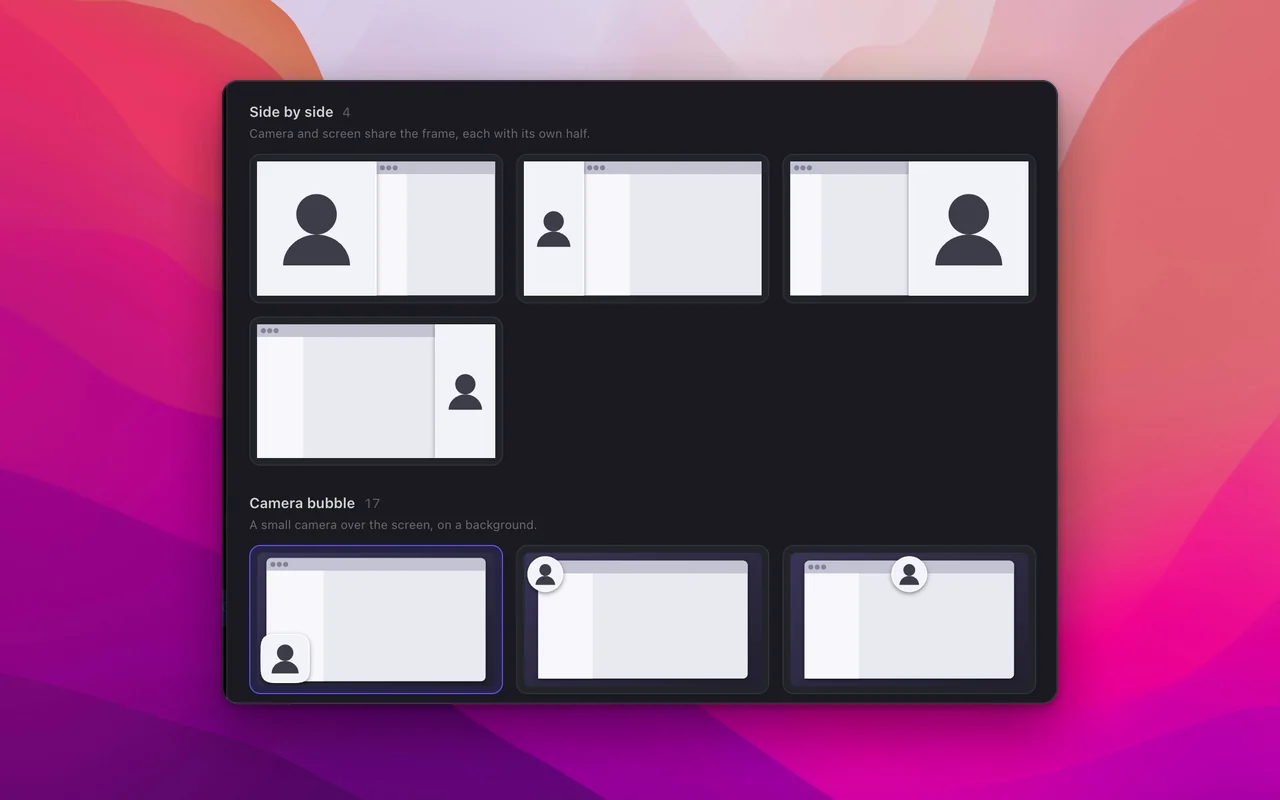
Camera layouts: picture-in-picture bubble, side by side, stacked for vertical video, or camera fullscreen, switchable in the middle of a clip.
Frames: wallpapers, gradients, a colour or your own image, with padding, rounded corners and a shadow.
Privacy blur: blur or mosaic an API key, an email or a name, and it stays hidden through every zoom.
Export: MP4 or GIF in 16:9, 9:16 or 1:1, up to 4K at 60 fps with a licence.
The editing pass it does for you
In short
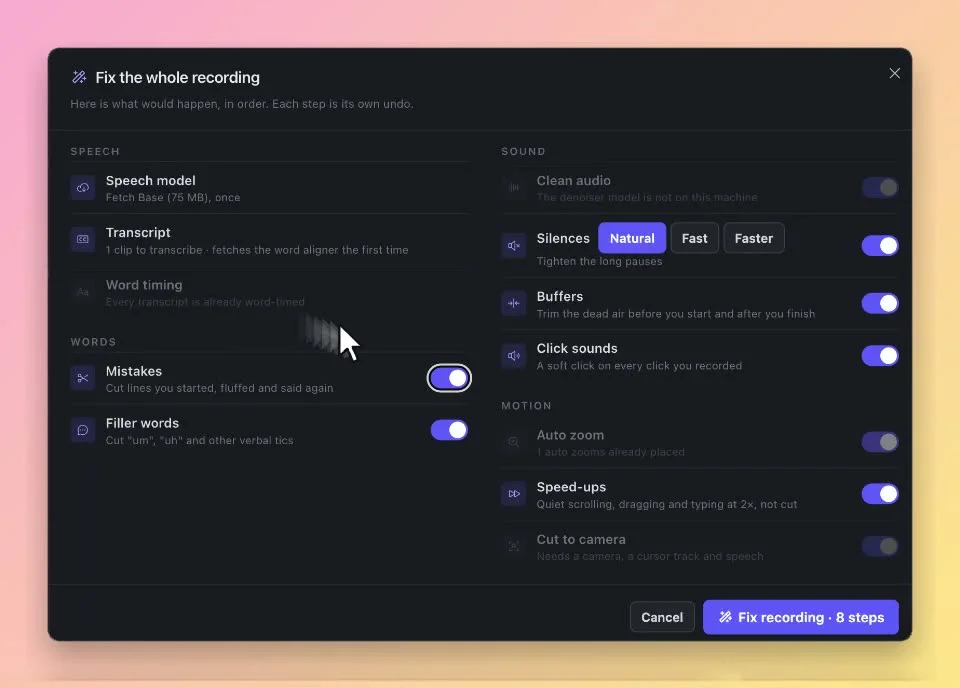
Auto Fix plans the cleanup and shows each step before it runs: cut mistakes and retakes, remove filler words, tighten silences, trim dead air at the start and end, add click sounds, and speed up quiet scrolling and typing to 2× instead of cutting it. Each step is its own undo.
Remove filler words from screen recording
SmoothCut transcribes what you say, then offers cuts for the “um” and “uh” and for lines you started, fluffed and said again. Silences can be tightened at three strengths. Studio voice removes fans, hum and room noise on your computer at three strengths, and microphone and system audio are recorded on separate channels so music and voice-over can sit underneath and duck when you speak.
On-device captions
Captions come from a speech model downloaded once (the recommended Base model is 75 MB, with four other models to choose from), and the language is detected automatically. Nothing is sent anywhere to transcribe it. The only upload in the app is a share link, and only when you press Share: viewers can then react and comment at a timestamp, and links can carry a password or an expiry.
Personal
$79 once, 1 computer
Pro
$169 once, 5 computers
Platforms
macOS and Windows
Free version
720p, 30 fps, mark
Latest version
1.15.2 (Sep 2026)
Refund
14 days
Analytics are on by default
Since version 1.10.0 SmoothCut sends usage analytics by default: which feature you used, formats, counts and errors, never file names, paths or anything inside a recording. With a licence active, your email and edition are attached. Turn it off in Settings, Privacy, or during onboarding.
Screen recorders with auto zoom, compared
In short
SmoothCut is one of several recorders you can buy once, and it is not the cheapest. Cursorful Pro is also $79 once, covers two desktop activations and includes lifetime offline updates. Cap sells a $58 lifetime licence for an open-source app. Screen Studio and Camtasia are subscriptions.
| App | Price | Computers | Updates | Windows | Free tier |
|---|---|---|---|---|---|
SmoothCut Personal this one this article | $79 once | 1 | 1 year | 720p, mark | |
SmoothCut Pro this one this article | $169 once | 5 | Lifetime | 720p, mark | |
Cursorful Pro free browser extension too | $79 once | 2 desktop | Lifetime, offline features | Browser only | |
Cap Desktop open source, AGPLv3 | $58 once or $29/yr | 1 user | Not stated | Personal use | |
FocuSee Lifetime also monthly and yearly | $199.99 once | 5 | Version 2.x | 1 export | |
Screen Studio subscription | $29/mo or $9/mo yearly | Not checked | While subscribed | Not stated | |
Camtasia Essentials subscription | $179.88/yr | 1 user | While subscribed | Not checked |
Screen recorder without subscription
Read what “once” buys. SmoothCut Personal stops receiving updates after a year, though the version you have keeps working; Pro and Cursorful Pro promise lifetime updates, and FocuSee's lifetime plan covers version 2.x only. Cursorful's free tier records only inside Chrome, Edge or Brave. SmoothCut's edge is the automatic cleanup (retake, filler-word and silence cuts, noise removal) running on your own machine. Screen Studio no longer sells new one-time licences, and SmoothCut's own comparison page admits Screen Studio is still the pick for recording an iPhone or iPad through a Mac.
What you pay
SmoothCut Personal
$79
once
SmoothCut Pro
$169
once
Cursorful Pro
$79
once
Cap Desktop
$58
once
FocuSee Lifetime
$199.99
once
Screen Studio
$108
per year
Camtasia Essentials
$179.88
per year
US dollar prices on 24 October 2026. Screen Studio and Camtasia renew every year; the others are paid once.
Who SmoothCut suits, and who should skip it
In short
It suits people on Windows, or on a mix of Mac and Windows, who make product demos, tutorials, courses and bug reports and want the cleanup done for them. Skip it if you need to record an iPhone through a Mac, want lifetime updates for $79, or are happy editing by hand in a free tool.
SmoothCut is a very young app. The changelog calls version 1.7.0, released on 11 September 2026, its first release, and the latest is 1.15.2 from 25 September 2026. The developer does not publish a minimum macOS or Windows version, so use the free version to check it runs on your machine. The licence is verified on your computer and checks in every couple of weeks, with a month of grace, so it works offline.
Before you buy
Record and edit one real demo in the free version; only the export is limited (720p, 30 fps, a small mark). Decide whether a year of updates on one computer is enough, or whether Pro's five computers and lifetime updates are worth $90 more. Everything here was verified on 24 October 2026.
Frequently asked questions
Does SmoothCut upload my recordings to the cloud?
No. Recording, editing, captions and export all run on your computer, and nothing is uploaded unless you press Share; then only that export goes up for the share link. One thing to know: usage analytics have been on by default since version 1.10.0. They describe which features you used, never file names, paths or recording content, and you can turn them off in Settings, Privacy.
Should I buy SmoothCut Personal or Pro?
Personal ($79 once) covers one computer and one year of updates; after that year the app keeps working, but new versions need Pro. Pro ($169 once) covers up to five computers with lifetime updates and priority email support. If you record on one machine and are happy to stay on the version you have, Personal is enough. You can upgrade later by paying the difference.
Can I try SmoothCut for free?
Yes. The free version has every feature, needs no account and has no time limit, so you can edit your own recordings in full. Exports are capped at 720p and 30 fps and carry a small Made with SmoothCut mark. A licence removes the mark and unlocks 4K, 60 fps and share links. There is also a 14-day refund after purchase.
Does SmoothCut work offline?
Yes. The licence is verified on your machine and checks in roughly every couple of weeks when a connection is available, with a one-month grace period. Captions need a one-time speech model download (the Base model is 75 MB), after which they also run offline.
Is SmoothCut the cheapest screen recorder with auto zoom?
No, and on paper it is not the best value at $79 either. Cursorful Pro also costs $79 once, covers two desktop activations and includes lifetime offline updates, and Cap sells a $58 lifetime desktop licence for an open-source app. SmoothCut’s case is its automatic cleanup: Auto Fix cuts retakes, filler words and silences, and Studio voice removes noise, all on your computer.
What minimum macOS or Windows version does SmoothCut need?
The developer does not publish one. The download page offers separate Mac builds for Apple Silicon and Intel and one Windows build, all version 1.15.2. Use the free version to check it runs on your machine before you buy.
Sources
- 1
Features, macOS and Windows support, on-device processing, export up to 4K at 60 fps in 16:9, 9:16 and 1:1 as MP4 or GIF. Developer credited as SS Enterprises.
- 2
Personal $79 once (one computer, one year of updates), Pro $169 once (five computers, lifetime updates). Free exports at 720p and 30 fps with a mark. Checkout by Dodo Payments, 14-day refund.
- 3
v1.7.0 "the first release of SmoothCut" on 11 September 2026; usage analytics on by default from v1.10.0; free 720p exports from v1.14.0; latest v1.15.2 on 25 September 2026.
- 4
Recordings, audio and captions stay on the computer. Licence check-ins send the key and a hashed hardware ID. PostHog analytics can be turned off in Settings, Privacy.
- 5
The developer’s own comparison; says Screen Studio is still the right choice for recording an iPhone or iPad through a Mac.
- 6
$29 per month, or $9 per month billed yearly. macOS only. One-time licences no longer sold to new buyers.
- 7
Free Chrome extension; Pro $79 once per seat with Mac and Windows desktop apps, two desktop activations and lifetime access to offline features.
- 8
Free for personal use; Desktop Licence $58 once or $29 a year; Cap Pro $12 per user per month.
- 9
Open source, mostly AGPLv3; runs on macOS and Windows.
- 10
Standard $19.99 per month or $49.99 per year; Advanced Lifetime $199.99 once for up to five computers, version 2.x.
- 11
Individual plans billed yearly: Essentials $179.88, Create $249, Pro $599. No perpetual licence listed.
SmoothCut
Screen recordings that zoom, smooth and caption themselves
once
macOS · Windows
More apps you buy once: browse the desktop