
Kap: An Open-Source GIF Screen Recorder for Mac
macOS can record your screen, but only as a .mov file, and a bug report, a pull request or a docs page usually wants a small looping GIF. Kap closes that gap from the menu bar: drag a box over part of the screen, record, trim, and export as a GIF or one of five video formats. This piece covers what it records, the settings that shape the file, the real risk of running a 2022 release on a current Mac, and how it compares with the other ways to make a screen GIF.

OneTimePay.app
7 min read
Is there a free app to record my Mac screen as a GIF?
Yes. Kap is free and open source: click its menu bar icon, drag over the part of the screen you want, record, then trim and export as a GIF, MP4, WebM or APNG, or copy it to the clipboard. Its last release is from October 2022, so test it on your Mac first.
On this page
Is there a free app to record my Mac screen as a GIF?
In short
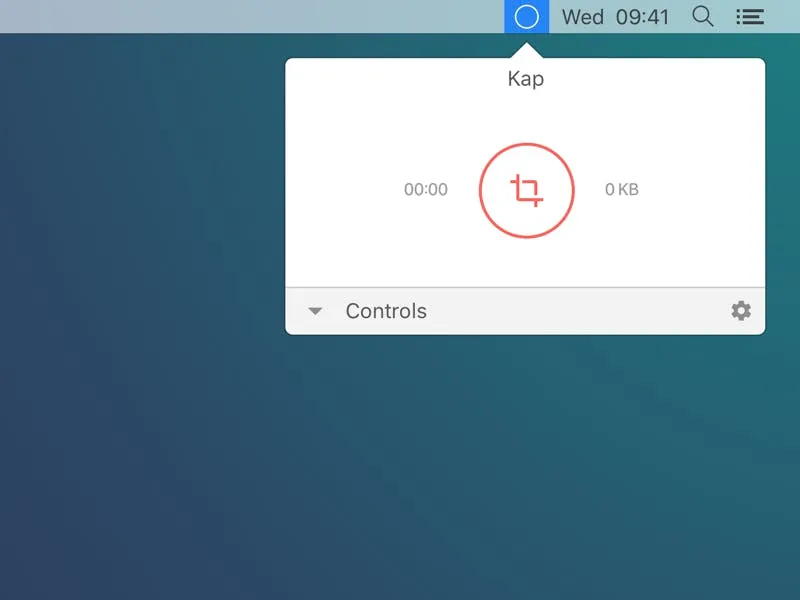
Yes. Kap lives in the menu bar. Click it, drag a box over the area you want, and press record; click the icon again to stop. The take opens in an editor where you trim it, set the width, height and frame rate, and export it as a GIF or a video. It costs nothing, has no paid tier and adds no watermark.
Record screen as GIF on Mac in three steps
Select: click the menu bar icon and drag over a window, a panel or the whole screen.
Record: press record, and click the menu bar icon again to stop. Option-click it to pause mid-take, or right-click for more options.
Export: trim the clip, pick GIF as the format and choose where it goes, such as Save to Disk or Copy to Clipboard, ready to paste into GitHub, Slack or a doc.
Kap screen recorder: what the editor does
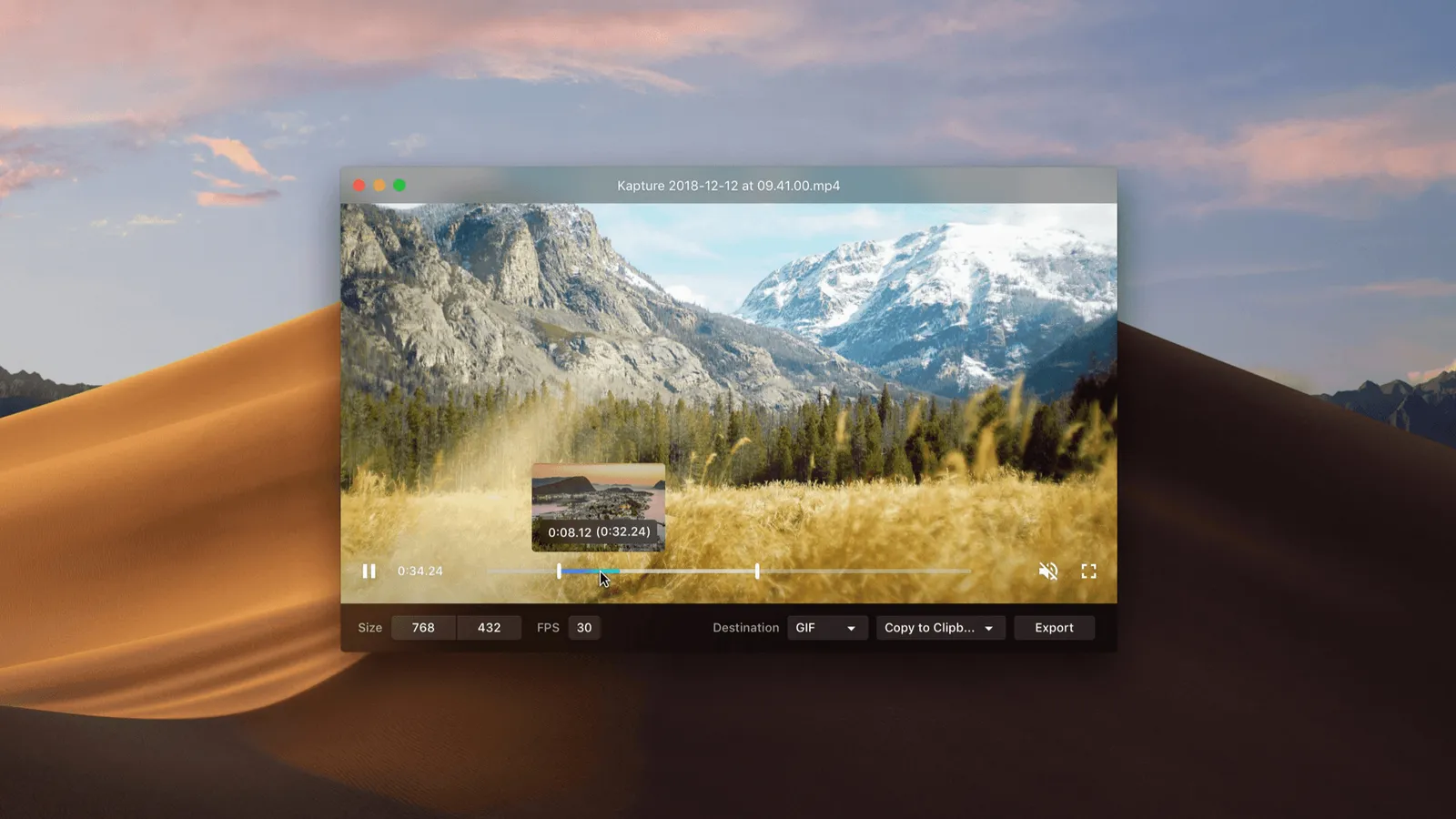
The editor is deliberately small. You get two trim handles, width and height fields, a frame-rate field, a format menu and a destination menu. Shrinking a GIF from full Retina size to something like 768 by 432 at 30 fps is how you keep a clip small enough to attach to an issue. There are no annotations, arrows, text or blur, and no zoom effects.
What Kap exports, and the settings that change the file
In short
Six formats: GIF, APNG, WebM, MP4 (H.264), HEVC and AV1. Preferences add click highlighting, a 60 fps mode, a hidden cursor, looping GIFs, lossy GIF compression and microphone audio. Kap also opens existing .mp4, .mov and .m4v files, so it doubles as a converter.
Frame rate: recording at 60 fps is a preference that ships switched off, so takes are 30 fps unless you turn it on.
Cursor and clicks: the cursor is shown by default; click highlighting is off until you enable it.
GIF size: exports loop by default, and an optional lossy compression setting trades some quality for smaller GIFs.
Destinations: Save to Disk, Copy to Clipboard (GIF, APNG or MP4) and Open With another app are built in; plugins add GIPHY, Vercel and Streamable.
Convert MOV to GIF on Mac with Open Video
Already recorded something with Shift-Command-5? Choose Open Video… in Kap's menu, pick the .mov, .mp4 or .m4v file, and it opens in the same editor. Trim it, set the size and frame rate, and export a GIF. An Export History window keeps track of past exports.
Audio, crash reports and where files go
Audio recording is off by default. Switch it on and Kap records from an input device, your Mac's default microphone unless you pick another. It does not capture the sound your Mac plays, such as a video's soundtrack, without a virtual audio device that routes system sound into an input. GIF and APNG exports are silent by nature.
The analytics preference is on out of the box, and while it is on Kap sends crash reports to Sentry. The usage-tracking code in the current source is commented out. The default save location is a Kaptures folder inside Movies, and both settings live in Preferences.
Price
Free, MIT license
Runs on
macOS 12 or later
Exports
GIF, APNG, WebM, MP4
Also
HEVC, AV1
Latest release
3.6.0, Oct 2022
Audio
Mic, off by default
Before you install: a 2022 app on a 2026 Mac
In short
Kap's newest version, 3.6.0, shipped on 27 October 2022. The site still offers it for Apple silicon and Intel and asks for macOS 12 or later. Open issues report screen-recording permission trouble on Sequoia and a failure on an M4 Pro Mac, and a community fork exists. Test a short clip before you rely on it.
The project is not abandoned in the archived sense: the repository is open, has about 19.4k stars, and Homebrew still lists 3.6.0 as current and not deprecated. But four years is a long gap for a screen recorder, because Apple changes screen-recording permissions often. The open issues include “Can't give access to screen recording on macOS Sequoia” (July 2024), “Unable to stop recording” (April 2025) and “Not working on Apple (M4 Pro)” (December 2025). In March 2026 a user announced a community-maintained fork with Sonoma and Sequoia fixes; we have not reviewed it.
A two-minute test
We did not run Kap on a Mac for this article. After installing, grant it Screen & System Audio Recording in System Settings, Privacy & Security, then record ten seconds and export a GIF. If that works, the rest of the app will too. Everything here was checked on 17 November 2026.
Free and paid GIF screen recorders for Mac, compared
In short
Kap has the widest set of export formats among the free options and sets no length cap. GIPHY Capture is simpler but caps clips at 30 seconds, LICEcap is GIF-only, and the built-in Screenshot tool saves .mov only. Gifox and CleanShot X are paid apps with one-time prices and more editing.
| App | Price | GIF output | Other formats | Updates |
|---|---|---|---|---|
Kap this one this article | Free, MIT | Yes, no length cap | APNG, WebM, MP4, HEVC, AV1 | Last release Oct 2022 |
GIPHY Capture Mac App Store | Free | Yes, up to 30 s | MP4 | Version 4.3.2 |
LICEcap Cockos | Free, GPL | Yes | LCF only | Last release Jun 2022 |
Gifox Basic and Pro | Free 10 s, Pro $14.99 once | Yes | GIF-focused | Minor versions included |
CleanShot X Basic | $35 once | Yes | MP4 | 1 year, then $19/yr optional |
Cap open source | Free personal, $58 once | Yes | MP4, MOV | Active changelog |
Mac Screenshot Shift-Command-5 | Built into macOS | No | .mov | With macOS |
Open source screen recorder Mac options
Three apps here publish their code: Kap (MIT), LICEcap (GPL) and Cap. LICEcap is GIF only and lists support up to macOS 12. Cap is actively developed and records full videos with a camera and share links, with GIF export as an extra; its free plan covers personal use and a desktop licence is $58 once. If you want an actively sold app and are happy to pay once, Gifox at $14.99 is GIF-focused and CleanShot X at $35 adds screenshots, annotations and system audio. GIPHY Capture is the simplest free pick for clips under 30 seconds.
Who Kap suits, and who should skip it
In short
Developers, designers and docs writers who need short, silent clips of a screen region as GIFs or small videos, and who accept an app that is no longer updated. Skip it if you need system audio, annotations, cloud links, or a recorder with active support.
Kap is at its best for the 5 to 20 second clip: a UI bug, a hover state, a new feature for a changelog. The format range is its real edge over the other free tools, since the same take can go out as a GIF for a README and an MP4 or WebM for a website. Because the code is public under MIT, you can also read exactly what it does, which matters if your screen shows client work.
The trade-off is time. Kap is an Electron app by Wulkano, and its newest release came out in the same week as macOS 13 Ventura, and several macOS releases have followed. If the two-minute test fails on your Mac, one of the actively sold apps in the table is the safer choice.
Frequently asked questions
Does Kap still work on new versions of macOS?
Possibly, but nobody guarantees it. The newest release, 3.6.0, is from 27 October 2022, and the open issues include reports that Kap cannot be given screen-recording access on macOS Sequoia and that it does not work on an M4 Pro Mac. We did not run it on a Mac for this article. Install it, record a 10-second clip and export it before you rely on it for real work.
Can Kap record audio with the screen?
Yes, from a microphone or another audio input, once you switch audio recording on in Preferences (it is off by default). Kap does not capture the sound your Mac itself plays; that needs a virtual audio device that routes system sound into an input. Audio only ends up in video exports such as MP4 or WebM, because GIF and APNG files carry no sound.
Is Kap safe to use?
Its source code is public on GitHub under the MIT license, so anyone can read what it does. One default to know: while the analytics preference is on, which it is out of the box, Kap sends crash reports to Sentry. The usage-tracking code in the current source is switched off. You can turn the preference off in Kap’s settings.
Is Kap the best GIF screen recorder for Mac?
Not for everyone. Kap is the free option with the most export formats and no length cap, but it has not been updated since 2022. Gifox ($14.99 once) and CleanShot X ($35 once, with a year of updates) are actively sold paid apps with more editing tools, and GIPHY Capture is free but caps clips at 30 seconds.
Can Kap turn an existing video into a GIF?
Yes. Choose Open Video… from Kap’s menu and pick an .mp4, .mov or .m4v file, such as a recording made with the Mac’s Shift-Command-5 tool. It opens in the same editor, where you trim it, set the size and frame rate, and export it as a GIF or another format.
Where does Kap save recordings?
Kap’s default save location is a Kaptures folder inside your Movies folder, and you can change it in Preferences. When you export, the destination menu decides what happens to the file: Save to Disk asks where to put it, Copy to Clipboard puts it on the clipboard (GIF, APNG or MP4), Open With hands it to another app, and plugins send it to services such as GIPHY.
Sources
- 1
Export as GIF, MP4, WebM or APNG with optional audio, click highlighting and trimming; macOS 12 or later; Apple silicon and Intel downloads, which redirect to the v3.6.0 DMGs; GIPHY, Vercel and Streamable plugins.
- 2
MIT license, about 19.4k stars and 901 forks. Settings defaults, the six export formats, Open Video…, the built-in Save to Disk, Copy to Clipboard and Open With destinations, and Sentry crash reporting tied to the analytics preference.
- 3
v3.6.0, 27 October 2022: pause and resume a recording. Option-click the menu bar icon to pause, right-click for more options.
- 4
Kap open issues mentioning Sequoia
#1222 cannot grant screen-recording access on macOS Sequoia (July 2024); #1263 not working on an M4 Pro (December 2025); #1270 a community-maintained fork (March 2026).
- 5
Version 3.6.0, not deprecated; brew install --cask kap.
- 6
GIPHY Capture on the Mac App Store
Free; recordings of up to 30 seconds turned into GIFs; requires macOS 10.13 or later.
- 7
Free GPL software; records to GIF or its own LCF format; v1.32 released 8 June 2022; macOS 10.7 to 12.x listed.
- 8
Basic free with 10-second screen recording; Pro $14.99 per licence, one-time, with unlimited recording and a removable watermark.
- 9
Basic $35, pay once, one year of updates, optional renewal at $19 a year; Cloud Pro $10 per user a month billed annually.
- 10
Free for personal use; $58 once for a desktop licence that never renews; Pro $12 per user a month.
- 11
Apple: take a screenshot or screen recording on Mac
Shift-Command-5 opens the Screenshot tools; screen recordings are saved as .mov files.
More apps worth a look: browse the desktop