
Save Web Recipes Without Ads on iPhone and Mac
You find a recipe online and it is buried: a banner ad, a cookie prompt, a newsletter pop-up, and a thousand words about someone's grandmother before you reach the four ingredients you came for. Recipe Catcher takes the opposite approach. Share the link and it keeps only the title, ingredients, and steps as a clean card, then lets you plan the week and build a grocery list from what you saved. This piece covers how it works, what it costs, and how it stacks up against the better-known recipe apps.

OneTimePay.app
8 min read
A recipe page on the web
grandmas-best-blog.example/french-toast
Ad
Cookie banner
Pop-up
Import
A clean card in Recipe Catcher
French Toast
Ingredients
4 large eggs
2/3 cup milk
1 tsp cinnamon
8 thick slices bread
Steps
1
Whisk the eggs, milk, and cinnamon.
2
Dip each slice, then griddle until golden.
Is there a recipe app for iPhone and Mac that's a one-time purchase with no ads?
Yes. Recipe Catcher is a $2.99 one-time purchase with no ads, no subscription, and no in-app purchases. One payment covers iPhone, iPad, Mac, and Apple Vision. It clips web recipes into clean cards, syncs them over iCloud, and its developer collects no data.
On this page
Is there a recipe app for iPhone and Mac that's a one-time purchase with no ads?
In short
Yes. Recipe Catcher is a $2.99 one-time purchase with no ads, no subscription, and no in-app purchases. One payment covers iPhone, iPad, Mac, and Apple Vision. It imports web recipes into clean cards, syncs them over iCloud, and never collects your data.
Most recipe apps that call themselves ad-free are still subscriptions: they drop the banner ads and charge you every month instead. Recipe Catcher is the other kind. You pay once, in the App Store, and that is the end of it. There is no account to create, no upsell inside the app, and the privacy label says the developer collects no data. The app is a 6.6 MB download that runs on iOS and iPadOS 17.6, macOS 14.6, and visionOS 1.3 or later, and the same purchase covers all of them. Recipe Catcher is built to save web recipes without ads and then get out of your way.
Turn any recipe URL into a clean card
In short
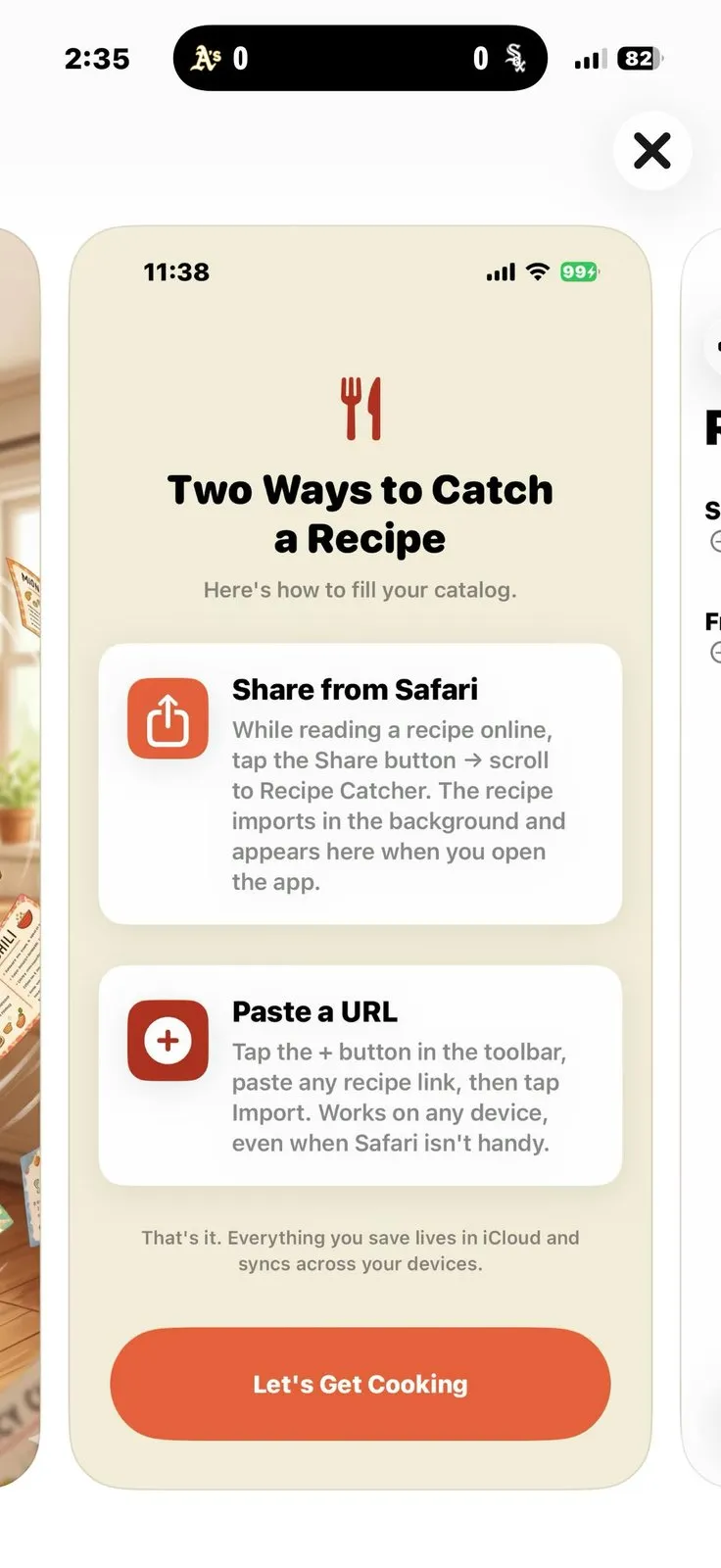
Share a link from Safari or Chrome, or paste a URL and tap Import. Recipe Catcher strips the ads, pop-ups, and life story, then parses the title, ingredients, and steps into a clean card. It also captures cook time, servings, a description, and a Source link back to the original.
Import from the Safari or Chrome share sheet
The fastest way in is the share sheet. While you are reading a recipe in Safari or Chrome, tap Share and pick Recipe Catcher. The recipe imports in the background and is waiting in your library the next time you open the app. There is a second route for the moments when the share sheet is awkward: tap the plus button, paste any recipe link, and tap Import. That path works on any device, even when the browser is not handy, which is the practical way to turn a recipe URL into a card from your Mac.
What each card captures
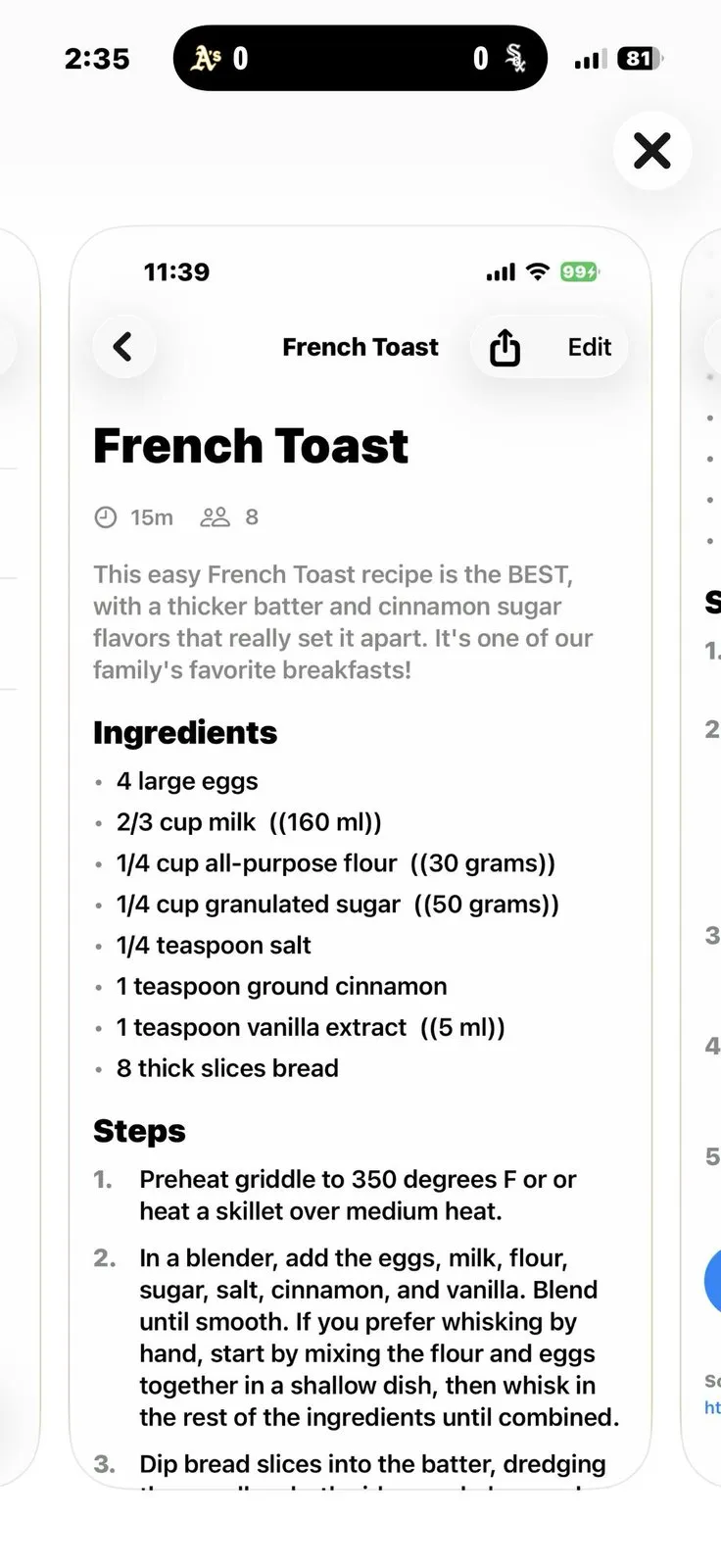
A saved card is just the recipe. Recipe Catcher pulls out the title, the ingredient list, and the numbered steps, and it keeps the useful metadata around them: the cook time, the number of servings, a short description, and a Source link so you can always jump back to the page you saved it from. If the parser gets a line wrong, every field is editable by hand, so a stray ingredient or a missing step is a quick fix rather than a reason to retype the whole thing.
An organized library that sorts itself
In short
Every saved recipe is auto-filed into a category. Search or sort by name, date saved, or category. Rate recipes, mark favorites with visual stickers, and edit any field by hand when a parsed card needs a fix, so the library stays tidy without much effort from you.
Recipe Catcher sorts new saves into nine categories on its own: Breakfast, Lunch, Dinner, Sides, Soups & Stews, Sauces, Snacks, Drinks, and Desserts. That means a recipe you clipped at lunch is already in the right place when you go looking for it at dinner, with no folders to maintain. On top of the auto-sorting you can search by name, reorder by the date you saved something, filter to a single category, give a recipe a rating, and tag the keepers with a sticker so your go-to meals rise to the top.
Plan the week and shop from your recipes
In short
The weekly planner gives every day a breakfast, lunch, and dinner slot. Build a grocery list straight from your saved recipes, tap Add to Cart, and send it to Apple Reminders sorted by store aisle, with each item tagged to the recipe it came from.
This is where saving recipes turns into cooking them. Drop recipes into the weekly planner across breakfast, lunch, and dinner, and the plan becomes the input for your shopping. Recipe Catcher rolls the ingredients from your planned meals into a grocery list, and the Add to Cart action compiles it for you. The part that other apps skip is the handoff to Apple Reminders sorted by aisle: the list arrives grouped the way you walk a store, and each item is tagged with the recipe it belongs to, so if you drop a dish you know which items to drop with it.
Why the Reminders handoff matters
Because the list lands in Apple Reminders, it is on every device you own and shareable with whoever else is shopping, even if they do not have Recipe Catcher installed. You plan in one app and check items off in the app your household already uses.
Sync recipes across iPhone and Mac without a subscription
In short
Recipe Catcher syncs over iCloud Drive, so a recipe you save on your iPhone shows up on your iPad and Mac. Everything is stored as plain JSON files you can read and move, not locked in a proprietary format. You can also share any recipe with friends as an HTML card.
The sync runs through your own iCloud Drive rather than a company server, which is why the developer can honestly say it keeps none of your data. It also has a quiet benefit: syncing recipes across iPhone and Mac here means your library is a folder of plain JSON files you can open, back up, or move yourself. If you ever stop using the app, your recipes are not trapped inside it. When you want to pass a recipe along, Recipe Catcher can share it as a self-contained HTML card that opens in any browser, no app required on the other end.
How Recipe Catcher compares on price and features
In short
Recipe Catcher is one of the cheapest ways to keep recipes on Apple devices, and unusually it is the aisle-sorting one too. Paprika and Mela are more established and also avoid subscriptions, but they cost more to run across two devices, and neither hands Apple Reminders a list sorted by aisle. Here is the whole picture in one place.
| App | Price for iPhone + Mac | No subscription | Aisle-sorted list in Reminders | Meal planner |
|---|---|---|---|---|
Recipe Catcher this one one purchase, all Apple devices | $2.99 once | |||
Paprika 3 priced per platform | ~$35 | |||
Mela free + $6.99 unlock | $6.99 |
Paprika 3's per-platform price math
Paprika 3 is the long-standing favorite and a genuinely deep app, with a strong importer, a meal planner, and an in-app grocery list that groups by aisle. It is also subscription-free, which puts it in the same camp as Recipe Catcher. The difference is how you pay: Paprika is priced per platform, about $4.99 on iPhone and iPad and about $29.99 on the Mac, so covering both comes to roughly $35. That is money well spent if you want its depth and track record. If you mainly want clean cards and an aisle-sorted list on your phone and Mac, Recipe Catcher does that for $2.99 in one purchase.
Mela, and the subscription apps
Mela is free to download with a one-time $6.99 unlock, no subscription, and it is one of the most polished recipe apps on Apple platforms. It manages its grocery list through Apple Reminders too, but it does not sort that list by aisle, and its full version still costs more than twice what Recipe Catcher does. Beyond those two, most of the well-known options are subscriptions: Crouton puts its cloud and AI-import features behind a membership, Pestle gates its extras behind a Pro plan (about $24.99 a year or $49.99 for a lifetime unlock), and ReciMe runs about $59.99 a year with a free plan capped at five recipes. If a monthly or yearly bill for a recipe keeper is the thing you want to avoid, that narrows the field quickly.
Price
$2.99 once
Devices
iPhone · iPad · Mac
Grocery list
Aisle-sorted
Planner
Weekly
Sync
iCloud Drive
App Store
5.0 (5 ratings)
Who it fits, and who should look elsewhere
Recipe Catcher fits an Apple-household cook who saves recipes from the web, wants them clean and organized, and would rather pay $2.99 once than subscribe. The honest caveat is track record: it is a new, small app with a 5.0 rating from just five reviews, so it has far less history than Paprika or Mela. If you need a decade of proven reliability, deep import coverage for messy social-media recipes, or Android and Windows versions, one of the older apps is the safer pick. If the pitch is a cheap, private, no-subscription keeper that lands an aisle-sorted list in Reminders, this is the one to try first.
Confirm the price before you buy
App Store prices vary by region and change over time. The figures here come from each maker's own listing in August 2026: Recipe Catcher at $2.99 one-time, Paprika 3 at about $4.99 on iOS and $29.99 on Mac, and Mela free with a $6.99 unlock. Check the current price on the store page before you commit.
Frequently asked questions
What recipe keeper sends my grocery list to Apple Reminders sorted by store aisle?
Recipe Catcher does. It builds a grocery list from your saved recipes and pushes the items to Apple Reminders sorted by store aisle, with each ingredient tagged to the recipe it came from. Mela exports to Reminders too, but it does not sort the list by aisle, so Recipe Catcher is the one that hands you an aisle-ordered list to walk the store with.
Can one app plan my weekly meals and build the grocery list from my saved recipes?
Yes. Recipe Catcher has a weekly meal planner with breakfast, lunch, and dinner slots, and it builds a grocery list directly from the recipes you save. Tap Add to Cart to compile the list, then send it to Apple Reminders. Saving, planning, and shopping all stay inside the one $2.99 app, with no separate grocery app to buy.
Do I have to pay separately for the iPhone and Mac versions?
No. One $2.99 purchase covers iPhone, iPad, Mac, and Apple Vision. That is the main price gap with Paprika 3, which is also subscription-free but charges per platform: about $4.99 on iOS and about $29.99 on Mac, so covering an iPhone and a Mac runs roughly $35 total against Recipe Catcher’s single $2.99.
Will my recipes get locked into the app if I stop using it?
No. Recipe Catcher stores every recipe as a plain JSON file synced through your own iCloud Drive. You can read, back up, and move those files yourself, so your library is not trapped in a proprietary database or held behind a required account. Each saved card also keeps a Source link back to the original page.
Is Recipe Catcher the cheapest recipe app, and what is the catch?
At $2.99 it is among the cheapest full recipe keepers, and it undercuts Mela’s $6.99 unlock and Paprika’s roughly $35 across two devices. Free tiers do exist (Crouton and Mela both download for free) but they limit recipes or charge to unlock everything. The real catch is track record: Recipe Catcher is a new, small app with a 5.0 rating from just 5 reviews, so it has far less history than Paprika or Mela.
Does Recipe Catcher show ads or collect my data?
No. The App Store privacy label states the developer collects no data, and your recipes sync through your personal iCloud Drive rather than a third-party server. There are no ads and no in-app purchases, so nothing inside the app tracks you or upsells you after the one-time purchase.
Sources
- 1
Recipe Catcher on the App Store
The maker’s own listing: a $2.99 one-time purchase with no in-app purchases, the privacy label stating the developer collects no data, and the platform requirements (iOS and iPadOS 17.6, macOS 14.6, visionOS 1.3). Source for the price, the feature list, the 6.6 MB size, and the 5.0 rating from 5 ratings.
- 2
Paprika Recipe Manager 3 (Mac) on the App Store
Paprika’s Mac listing at $29.99, a one-time purchase with no subscription (developer Hindsight Labs). The iOS and iPadOS app is a separate $4.99 purchase, which is where the roughly $35 to cover an iPhone and a Mac comes from.
- 3
Mela – Recipe Manager on the App Store
Mela is free to download with a one-time $6.99 Mela+ unlock (no subscription) and manages its grocery list through Apple Reminders. The basis for the honest note that Mela avoids subscriptions too, but costs more than Recipe Catcher and does not sort the Reminders list by aisle.
- 4
An independent review confirming Mela pushes grocery ingredients to the native Reminders app, with quantities in the Notes field, and does not group the list by store aisle. Used to keep the aisle-sorting comparison accurate.
Recipe Catcher
Clip recipes into clean, organized cards
once
iOS · iPadOS · macOS
More apps you buy once: browse the desktop