
Offline AI Voiceover on Your Mac, No Character Limit
Voiceover is the one production cost that never stops. You write a script, you paste it into a cloud tool, and a counter somewhere decides how much of it you are allowed to say this month. txt2mp3 moves the whole thing onto your Mac: the model runs locally, so there is no character meter, no account and no upload, and you pay for the app once instead of every month. This piece covers what it does, what it costs over two years against ElevenLabs, and the caveats worth knowing first, including the one that matters most: it is neither the cheapest nor the only Mac app you can buy once.

OneTimePay.app
9 min read
Runs on your Mac, 0 bytes uploaded
Source text
18,432 chars
no cap
Voice
Harper
American · Female · Conversational
1 of 14 presets
or clone
or design
Caption timestamps
chapter-04.mp3
18:41 · 48.0 kHz
Is there a text to speech app for Mac I can just pay for once?
Yes. txt2mp3 is a one-time macOS app ($29 for the launch batch, $99 later) that generates unlimited voiceover offline on Apple silicon: 14 voices, voice cloning, caption timestamps. Cheaper one-time rivals also exist.
On this page
Is there a text to speech app for Mac I can just pay for once?
In short
Yes. txt2mp3 is a macOS app you buy once and run offline on Apple silicon. It generates unlimited speech from 14 preset voices, clones a voice from a short recording, and writes caption timestamps. There is no character meter, no account, and no monthly bill. Apple silicon only.
The category has been subscription-shaped for years, which is why the question keeps getting asked and rarely answered. Every big roundup of Mac text-to-speech tools ranks cloud plans against other cloud plans. txt2mp3 is the plain version of the thing people actually ask for: a one time purchase voiceover app that installs on your machine, does the generation there, and stops asking for money afterwards.
What one payment covers
The licence covers every voice, unlimited generation, and all version 1 updates, across up to five Macs on one key. The key is personal and non-transferable. There is no account to make and no seat to manage. What it does not promise is version 2: the vendor says nothing about whether a future major version is a paid upgrade, so treat the purchase as buying version 1 outright.
What it does not do
It is a production tool, not a reader. You paste a script and get a file. It does not read selected text in other apps, it does not open PDFs or EPUBs, and it is not an accessibility replacement for macOS Read & Speak. If what you want is your documents read aloud on a commute, this is the wrong shape of app and a cheaper reader will serve you better.
Unlimited text to speech on a Mac, without a character meter
In short
txt2mp3 runs the speech model on your own machine, so nothing is metered per character. Paste a full chapter of a script and it renders all of it in one take. Generation runs at a real-time factor of 0.99, so roughly ten minutes of finished audio takes roughly ten minutes of Mac time.
No credits, no monthly character quota
This is the practical difference. On a metered plan, a long project turns into arithmetic: a full audiobook runs roughly 500,000 to 800,000 characters, which is more than four months of ElevenLabs Creator credits at 121,000 a month. Locally there is no such budget. The only limits on unlimited text to speech mac work are your disk and your patience, which is a very different way to plan a project.
What a real-time factor of 0.99 means for a 45 minute chapter
Be realistic about speed. A real-time factor of 0.99 means about 1x: ten minutes of audio in about ten minutes, and a 45 minute chapter in about 45 minutes. That is the vendor figure, there is no independent benchmark, and it is not broken out per chip, so an M1 Air and an M4 Max are not distinguished. A hosted API will hand you a ten minute render far faster. The trade is that the local one costs nothing per run, so long jobs go overnight rather than onto a bill.
History, re-takes and 48.0 kHz output
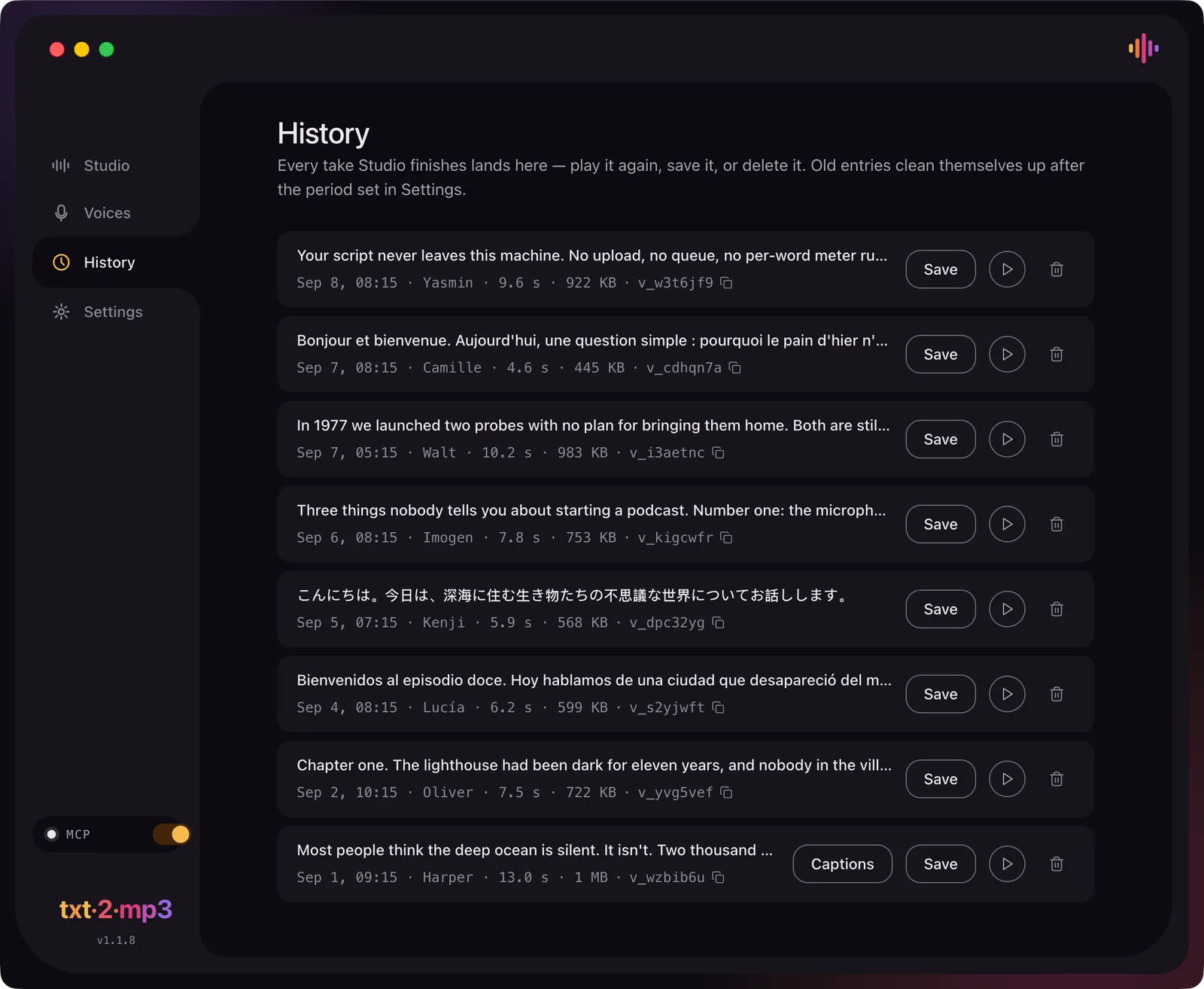
Output is 48.0 kHz, which is the standard sample rate for video work, so takes drop straight into a timeline without resampling. Every finished take lands in History with its voice, duration and file size, ready to replay or save. History cleans itself up after a window you set, and the default is two weeks, so anything you want to keep needs exporting before then.
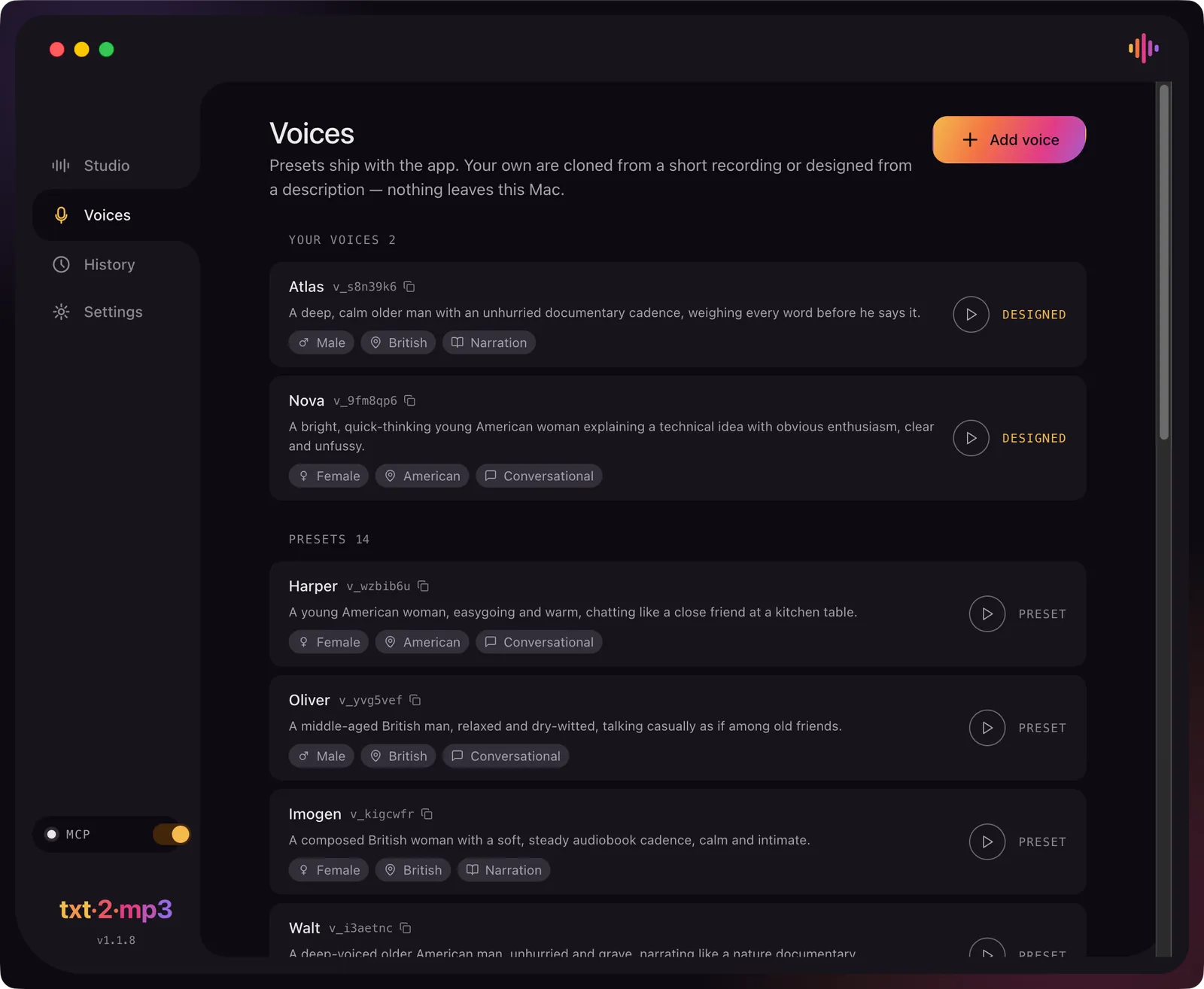
14 preset voices, plus cloning and voice design
In short
txt2mp3 ships 14 preset voices across seven accents: American, British, Spanish, French, Arabic, Eastern European and East Asian. You can add two kinds of your own. Clone one from a clean voice memo of up to 40 seconds, or describe a voice in words by age, origin and character.
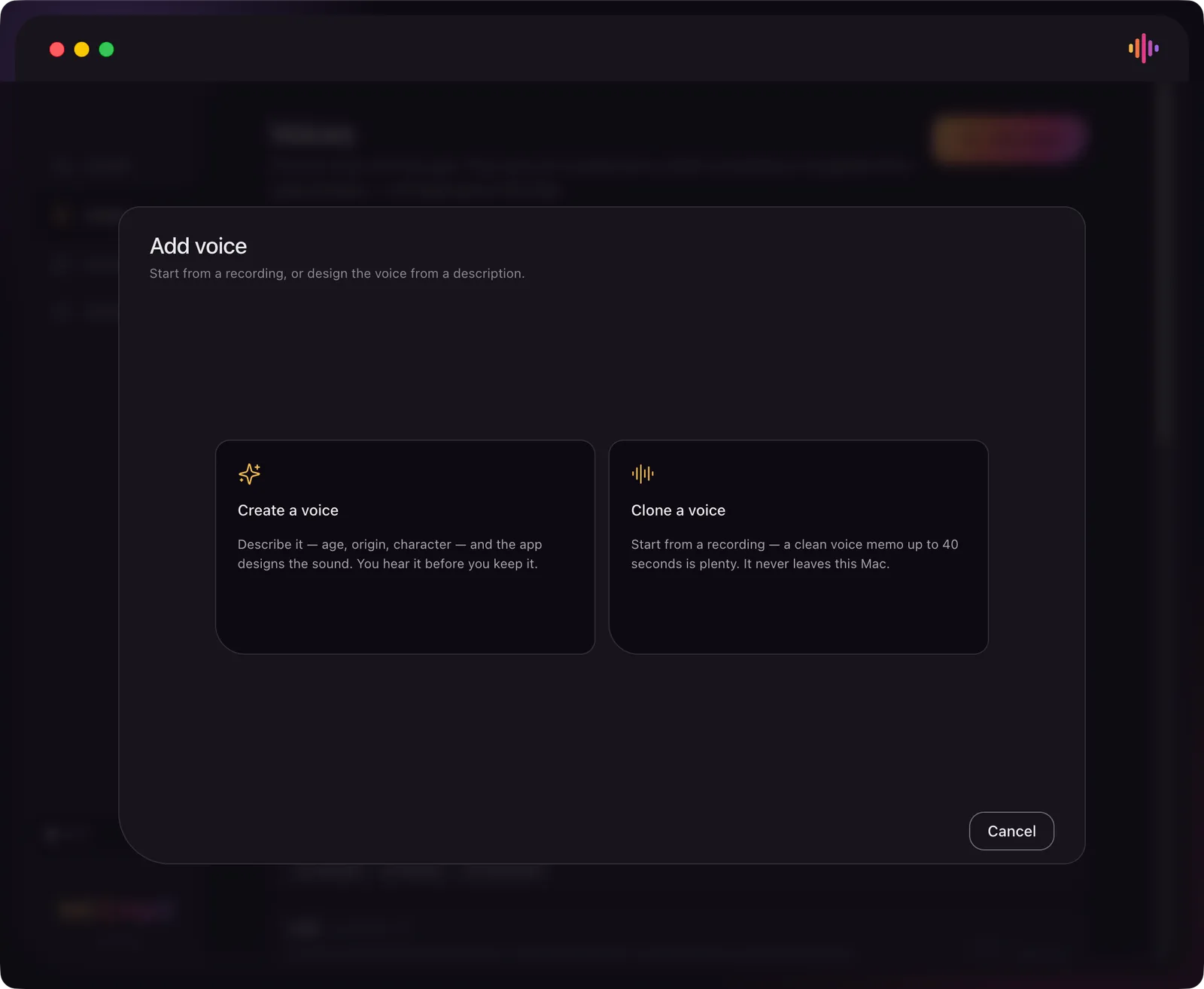
Clone a voice from a short recording
Cloning takes a clean recording and nothing else. The app's own dialog says a voice memo of up to 40 seconds is plenty, while the website describes it as a few seconds, so expect the useful range to be short either way. The recording never leaves the Mac. The rule on whose voice you may use is the vendor's own and it is the right one: your own, or someone who has given you informed, documented consent.
Create a voice from a written description
The more unusual feature is the other button. Instead of supplying audio, you describe a voice in words, its age, origin and character, and the app designs it. The two custom voices in the screenshot above were made this way: “A deep, calm older man with an unhurried documentary cadence” and “A bright, quick-thinking young American woman explaining a technical idea”. It is a genuine answer to the consent problem, because a designed voice belongs to nobody.
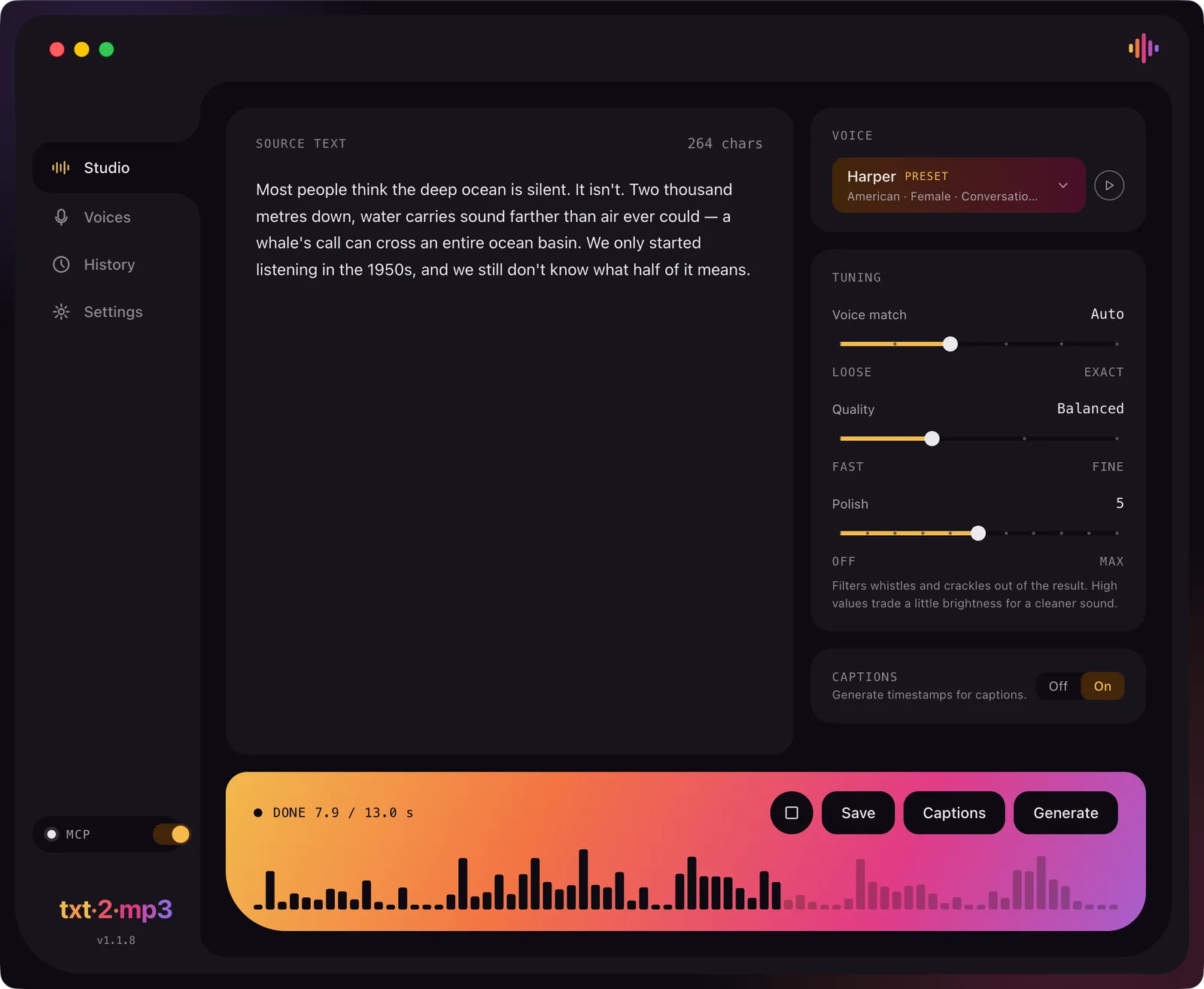
The three tuning sliders: voice match, quality, polish
Generation is not a single button. Voice match runs from loose to exact, quality from fast to fine, and polish from off to max, described in the app as filtering whistles and crackles out of the result, with high values trading a little brightness for a cleaner sound. Those are the knobs that decide whether a take is usable, and having them locally means re-rendering a line costs time rather than credits.
Captions with word-level timestamps
In short
Turn the Captions switch on and txt2mp3 returns timing data alongside the audio, at character level and word level, from a second model that downloads on first run. That keeps burned-in captions in sync without a separate transcription pass. The exact caption file format is not documented, so verify it before you commit a workflow.
Character level and word level timing
This is the feature the cheap end of the one-time market mostly skips. Because the app already knows the script, the timing comes from generation rather than from running speech recognition over the finished audio, which is the usual source of drift. Word-level timing is what lets captions land on the word instead of near it.
Text to speech SRT export: what is confirmed and what is not
Be careful here, because this is the one gap in the documentation. The vendor confirms character and word timestamps and shows a Captions button beside Generate and Save. It never states what that button writes. If your edit depends on dropping a real .srt or .vtt into Premiere, Resolve or CapCut, treat text to speech srt export as unverified and check it in the trial before paying. The trial does not expire, so this costs nothing but a few minutes.
Why cloud tools are not weak here
It would be easy to frame captions as something subscriptions do badly. They do not. ElevenLabs, Murf, WellSaid Labs and Descript all export genuine SRT and VTT files today. On this specific point a subscription tool is currently the more predictable choice, and the honest position is that txt2mp3 produces the timing data but has not documented the container.
Offline by default: what leaves your Mac and what does not
In short
There is no account and no upload. Your script and the generated audio stay on the machine. The app touches the network three times: the 5.5 GB first-run download, licence activation and update checks. An optional local MCP server on 127.0.0.1:3062 lets Claude or Cursor generate speech, and it is off until you turn it on.
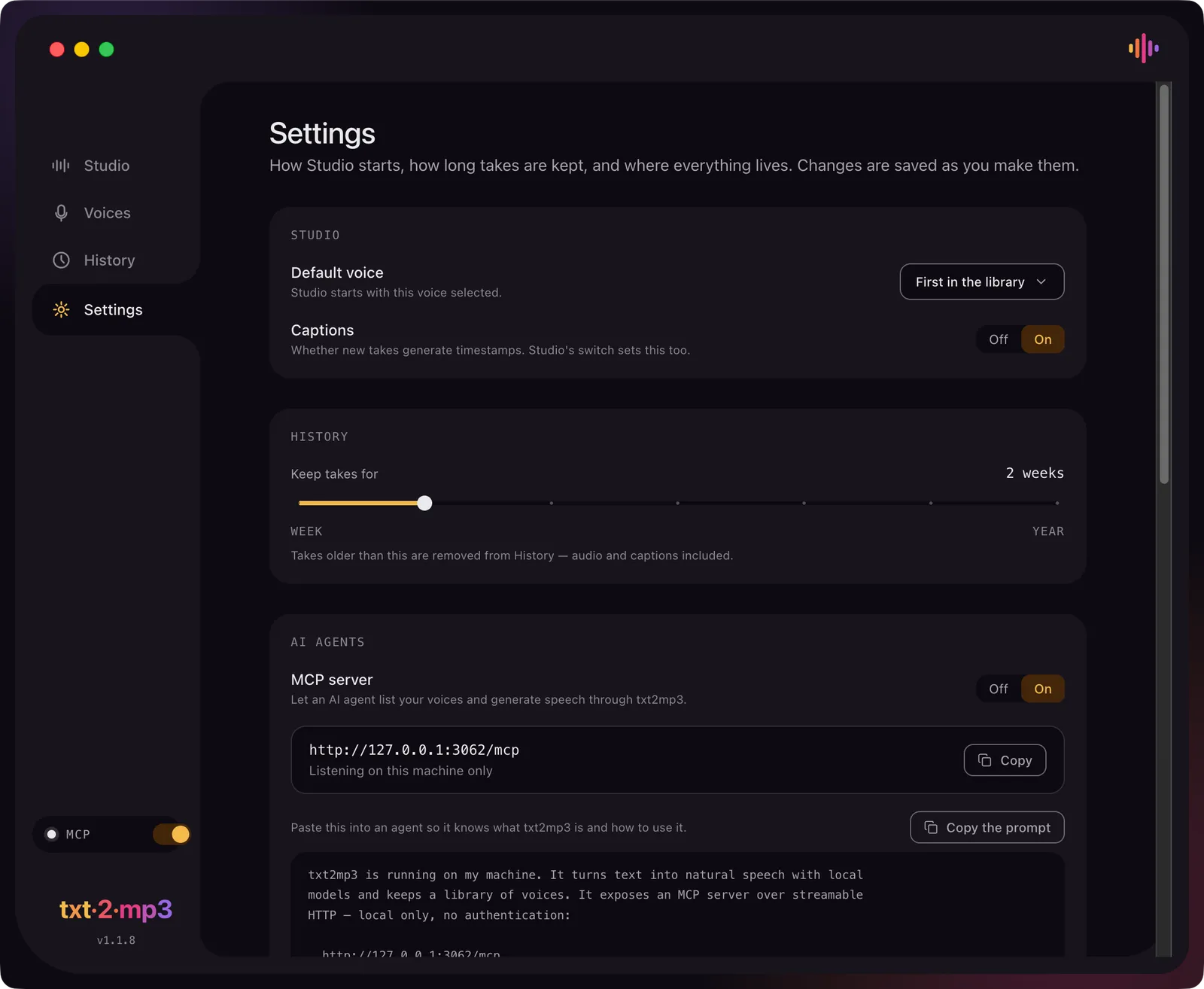
The three moments it uses the network
The first run pulls about 5.5 GB: the speech model, the caption model and a Python runtime. After that the app reaches out only to activate your licence key and to check for updates. No account, no telemetry, no copy of your audio anywhere. That is the substance behind offline ai voiceover mac as a claim rather than a slogan, and it is checkable: pull the network after setup and the app keeps generating.
The local MCP server for Claude and Cursor, and its missing authentication
The MCP server is the most interesting thing here and also the one to think about. Switched on, it lets an AI agent list your voices, generate speech and write MP3 files to disk, so a coding agent can narrate its own release notes. It is off by default and listens only on 127.0.0.1. It also has no authentication, which the vendor states plainly, so while it is on, anything already running on your Mac that can reach loopback can call it. Turn it on when you want it, not permanently.
Client scripts, NDAs and unreleased product copy
This is where local generation stops being a preference and starts being a requirement. If your script is a client deliverable under NDA, or copy for a product that has not shipped, a cloud tool means a third party holds it. Worth knowing for contrast: ElevenLabs' terms grant it a perpetual, irrevocable licence over voice data you supply. With txt2mp3 there is no upload to reason about, so there is no cloud copy to disclose.
How txt2mp3 compares with ElevenLabs, cheaper one-time Mac apps and free local models
In short
ElevenLabs has no perpetual licence at any tier, and its cheapest commercial-use plan is Starter at $60 a year. At least eleven one-time local Mac TTS apps exist, and six of them cost less than $29. Free local models like Kokoro and Chatterbox are Python projects with no packaged Mac app.
| App | Price | Offline on Mac | Cloning | Caption files | Commercial use |
|---|---|---|---|---|---|
txt2mp3 this one this article | $29 once, $99 later | Timestamps, format unstated | |||
ElevenLabs Starter cheapest legal for work | $60/yr | SRT, VTT | |||
ElevenLabs Creator subscription | $220/yr | SRT, VTT | |||
Murf Creator subscription | $228/yr | SRT, VTT | |||
Speechify Premium reader, not a studio | $139/yr | Studio only | |||
OpenVox cheaper one-time rival | $19.99 once | Unverified | |||
Spokio dearer one-time rival | $49.99 once | Unverified | |||
Kokoro free, Python only | Free (Apache-2.0) | None | |||
Chatterbox free, Python only | Free (MIT) | None | Yes, watermarked |
txt2mp3 as an ElevenLabs alternative for Mac, with the two-year math
The comparison people actually want is over time. ElevenLabs has no one-time option at any tier, and its free plan carries no commercial licence, so the cheapest tier a working creator can legally use is Starter. Two years of that is $120 billed yearly, or $144 billed monthly. Creator, the tier most narration work lands on, is $440 over two years. As an ElevenLabs alternative for mac, txt2mp3 costs less over that span even at its $99 standing price.
txt2mp3
$29
once, launch price
txt2mp3 later
$99
once, standing price
ElevenLabs Starter
$120
2 years
ElevenLabs Creator
$440
2 years
ElevenLabs Pro
$1,980
2 years
Two years of voiceover, billed yearly, against one payment. The honest asterisk: a subscription keeps shipping new models and voices over those two years, while the txt2mp3 licence covers version 1 updates and says nothing about version 2.
One time purchase voiceover apps that cost less than this one
Here is the part a spotlight is tempted to skip. txt2mp3 is not the only Mac app you can buy once, and it is not the cheapest. The category filled up during 2025 and 2026, mostly with small App Store apps riding the same open models. Six undercut it: Utterly at $3.99, Voco Speech at $9.90, Aura Reader at $9.99, Sento at $17.99, OpenVox at $19.99 and Text to Speech Universal at $19.99. Above it sit Katha Narrate at $29.99, Speaklone at $39.99, Murmur at $49, Spokio at $49.99 and Voice Creator Pro at $59.99. Several of those clone voices too.
What separates txt2mp3 from the cheaper end is a specific list, not a vibe: word-level caption timestamps, the local MCP server for AI agents, designing a voice from a written description rather than only cloning one, five Macs on a single licence, and explicit quality tuning. Whether that list is worth the difference depends entirely on whether you need captions and agent access. One thing to watch while shopping: Kokori advertises a “licence” for a local Kokoro Mac app, but its checkout bills a monthly subscription.
Price now
$29 (first 20)
Standing price
$99
Cheaper rivals
6 under $29
Platform
Apple silicon
First download
~5.5 GB
Speed
~1x real time
Free local models: Kokoro, Chatterbox, F5-TTS and XTTS-v2
If you are comfortable in a terminal you can run this class of model for nothing, but the licences are where people get caught. Kokoro is Apache-2.0 for both code and weights and is fully commercial-safe, but it cannot clone a voice at all: it ships 54 fixed presets. Chatterbox is MIT and does clone, from about six to ten seconds of reference audio, but it watermarks every single output and there is no parameter to disable it. F5-TTS has MIT code and CC-BY-NC-4.0 base weights, so the official checkpoints are not commercially usable. XTTS-v2 is worse for commercial work: its weights are under the Coqui Public Model License, which is strictly non-commercial with no revenue threshold, and Coqui shut down in January 2024, so there is nobody left to grant an exception. None of the four ships an official Mac app.
What macOS already does for free, and where it stops
Check the free option before spending anything. macOS Read & Speak and VoiceOver will speak text aloud but not export it, though the built-in say command will write an AIFF file and the “Add to Music as a Spoken Track” Service still exists. For plain narration in a system voice, that genuinely is enough for some people. Apple's Personal Voice is a different story: it is free and entirely on-device, but apps cannot capture its speech, and Apple restricts it to your own personal, non-commercial use. It is a dead end for producing a voiceover file.
What to check before you buy
In short
Five things. The $29 price covers only the first 20 copies, then it rises to $69 and settles at $99. The first run downloads about 5.5 GB. It needs Apple silicon. The vendor does not name the speech model. The licence covers all version 1 updates, with nothing said about version 2.
The price ladder: $29, then $69, then $99
This is the detail most likely to catch someone out. The $29 is a launch tier for the first 20 copies. Copies 21 to 100 are $69, and from copy 101 the price settles at $99, which the vendor calls the standing price and which is still a single payment. So the number you see on the listing may already have moved by the time you read this, and the honest comparison against a subscription should be run at $99, not $29.
5.5 GB, Apple silicon only, undisclosed engine
Three hard constraints. It needs a Mac with Apple silicon, so Intel machines are out entirely. The first run pulls about 5.5 GB before you can generate anything, which is worth knowing on a tethered connection or a small SSD. And the vendor does not say which speech model it uses, so you cannot check the model's own licence or benchmarks yourself. For a local-first tool that is a fair thing to want disclosed.
Try it first: the trial does not expire
The trial is the best answer to all of this. It never expires, has no feature restrictions, and every voice works. The only limit is how much text it reads in one go, and that cap is not published. Use it for the two things the documentation leaves open: generate a take with Captions on and look at what the Captions button actually writes to disk, then judge the voice quality on your own script rather than on a demo clip.
Check the price and the caption format before you commit
txt2mp3 is $29 for the first 20 copies only, then $69, then $99 as the standing price, all one-time. It is Apple silicon only, downloads about 5.5 GB on first run, and generates at roughly 1x real time. Two things are genuinely unverified: the caption file format, and the quality of the many cheaper one-time rivals, most of which are small App Store apps with almost no independent review. Rival prices and licences here were checked in September 2026, and this category moves fast, so confirm before you buy.
Frequently asked questions
Can I use voiceover I generate offline on my Mac commercially without a subscription?
With txt2mp3, yes. The vendor states it verbatim: "The speech you generate is yours. We claim no ownership of it and never receive a copy, because it is made on your machine." That is not true everywhere. The ElevenLabs free tier forbids commercial use and requires attribution, so commercial rights start at Starter, $5 a month billed yearly. Murf's free tier grants no commercial rights and no downloads. Speechify's consumer reader does not export audio at all, and commercial rights sit in the separate Studio subscription from $100 a year. Among free local models, Kokoro (Apache-2.0) and Chatterbox (MIT) are commercial-safe, while F5-TTS base weights (CC-BY-NC-4.0) and XTTS-v2 weights (Coqui Public Model License) are not. Two duties stay yours whatever you use: rights to the script, and documented consent for any cloned voice.
How much does a one-time purchase voiceover app cost compared to two years of ElevenLabs?
txt2mp3 is $29 today and $99 at its standing price, paid once. Two years of ElevenLabs billed yearly comes to $120 on Starter, $440 on Creator and $1,980 on Pro. Billed monthly it is worse: $144 and $528. Starter is the cheapest tier that allows commercial use, so even the $99 standing price lands below two years of the cheapest ElevenLabs plan a working creator can legally use. The comparison is not clean, though. ElevenLabs ships new models and voices under that fee, while the txt2mp3 licence covers version 1 updates and says nothing about version 2. And a subscription buys capacity you may not need: Starter's 30,000 credits a month is roughly 20 minutes of speech.
Is txt2mp3 the cheapest one-time voiceover app for Mac, or the only one?
No, and it is neither. The one-time local Mac text-to-speech category is crowded in 2026. Six apps cost less than $29: Utterly at $3.99, Voco Speech at $9.90, Aura Reader at $9.99, Sento at $17.99, OpenVox at $19.99 and Text to Speech Universal at $19.99. Above it sit Katha Narrate at $29.99, Speaklone at $39.99, Murmur at $49, Spokio at $49.99 and Voice Creator Pro at $59.99. Most are small App Store apps with almost no independent review, so the listed price is the only thing you can verify without buying. What txt2mp3 has that the cheaper ones do not advertise: word-level caption timestamps, a local MCP server for AI agents, voice design from a written description rather than only cloning, five Macs on one licence, and explicit quality tuning. One warning while you shop: Kokori markets a "licence" for a local Kokoro Mac app but bills a monthly subscription at checkout.
Does txt2mp3 export SRT or VTT subtitle files?
Unverified, and do not assume it does. What the vendor documents is that the Captions switch produces character-level and word-level timestamps, and that there is a Captions button beside Generate and Save. The file format that button writes is not stated on the site or in the app. If your edit depends on dropping a real .srt or .vtt into Premiere, Resolve or CapCut, run the free trial and inspect the output before you pay. For contrast, ElevenLabs, Murf, WellSaid Labs and Descript all export genuine SRT and VTT, so this is one area where a subscription tool is currently more predictable.
Does it really work with no internet connection?
After setup, yes. The first run downloads about 5.5 GB: the speech model, the caption model and a Python runtime. After that, generation happens entirely on your Mac. The app still reaches the network for licence activation and update checks, and nothing else. There is no account, no upload of your text or audio, and no telemetry. That is what matters for client work under NDA and for unreleased product demos: the script never leaves the machine. The one thing to check in Settings is the local MCP server. It is off by default and binds to 127.0.0.1 only, but it has no authentication, so anything on your Mac that can reach loopback can call it while it is on.
How fast is generation on Apple silicon, and how much disk does it need?
The vendor gives a real-time factor of 0.99, which means roughly 1x: about 10 minutes of audio in about 10 minutes, and a 45 minute audiobook chapter in about 45 minutes. There is no independent benchmark, and the figure is not broken out by chip, so an M1 Air and an M4 Max are not distinguished. Plan for at least 5.5 GB of disk for the first-run download plus room for your takes. The app is Apple silicon only, so an Intel Mac is out. Batch long work overnight rather than expecting cloud turnaround, because a hosted API returns a 10 minute render in well under 10 minutes.
What are the rules on cloning someone else’s voice?
Get documented consent in writing before you record anyone. The vendor’s own policy is limited to "Your own, or the voice of someone who has given you informed, documented consent." The law has caught up: at least 8 US states now have AI digital-replica or voice-consent statutes, including Tennessee’s ELVIS Act (effective 1 July 2024), California’s AB 1836 and AB 2602 (effective 1 January 2025) and Illinois HB 4875 (effective 1 January 2025). If you publish into the EU, Article 50 of the AI Act has applied since 2 August 2026, and deployers of deepfake audio must disclose that it is AI-generated. Running the model on your own Mac does not exempt you from either duty. This is general information, not legal advice.
Can I test it before paying?
Yes, and the trial is unusually generous: it does not expire and has no feature restrictions. The single limit is how much text it will read in one go, and that character cap is not published. That is still enough to answer the two questions the documentation leaves open: what the Captions button actually writes to disk, and whether the voice quality holds up on your own script at your own settings. Check both before the price moves, because $29 covers the first 20 copies only, then $69 through copy 100, then $99.
Sources
- 1
The app itself. Source for the price ladder ($29 for the first 20 copies, $69 through copy 100, then $99), the 5.5 GB first-run download, 48.0 kHz output, the 0.99 real-time factor, the 14 preset voices across 7 accents, the local MCP server, the 5-Mac licence, the commercial-use and voice-cloning policies, and the non-expiring trial. It does not name the underlying speech model, and it does not state the caption file format.
- 2
Primary source for every ElevenLabs figure used in the cost math: Free (10k credits, no commercial use), Starter $6/mo or $5/mo billed yearly, Creator $22/mo or $18.33/mo yearly, Pro $99/mo or $82.50/mo yearly. Also the source for the absence of any perpetual or one-time option at any tier.
- 3
ElevenLabs: can I publish the content I generate?
The commercial-rights rule, verbatim: the free plan carries no commercial licence and cannot be used for any commercial purpose, while all paid plans include one. This is what puts the cheapest legal-for-work ElevenLabs tier at Starter.
- 4
Murf pricing and its voice-cloning help page
Murf Creator at $29/mo, or $19/mo billed annually ($228/yr), for 24 hours of generation a year; the free tier is 10 minutes with no downloads and no commercial rights. Murf’s own help centre confirms voice cloning is enterprise-only and not self-serve, which several third-party roundups get wrong.
- 5
Speechify pricing (reader and Studio)
Premium at $29/mo or $139/yr, and the confirmation that Speechify Studio is a separate subscription (Starter $100/yr adds cloning and commercial rights). Speechify’s own pages disagree about whether the consumer reader downloads audio; what both support is that the reader plays and caches while Studio exports files.
- 6
Starter at $10/mo billed $120/yr for 240 downloaded minutes a year, and the SRT and VTT caption export listed from Starter upward. Used as the counterweight to any suggestion that caption files are a cloud weakness.
- 7
Kokoro-82M model card (Apache-2.0)
The licence check for the best-known free local model: Apache-2.0 for both code and weights, so it is commercially safe. It also confirms the fixed preset voice packs, which is why Kokoro cannot clone a voice at all.
- 8
MIT for code and weights, and cloning from a few seconds of reference audio. The caveat that matters for commercial work is in the source: every generation is watermarked through Resemble’s Perth watermarker, with no parameter to switch it off.
- 9
XTTS-v2 and the Coqui Public Model License
The licence text itself, which allows only non-commercial use of the model and its outputs, with no revenue threshold. The widely repeated "$1M revenue" exemption came from Coqui’s discontinued paid licence, and Coqui Inc. shut down in January 2024, so there is no licensor left to ask.
- 10
Confirms Personal Voice is processed on device and free, and states the two limits that rule it out for voiceover work: apps cannot capture speech from Personal Voice, and Apple restricts it to your own personal, non-commercial use.
- 11
EU AI Act, Article 50 (transparency obligations)
The disclosure duty for AI-generated audio, applicable from 2 August 2026. The 2026 omnibus that delayed other AI Act deadlines moved the high-risk timelines, not these transparency rules.
- 12
The first of the state voice-consent statutes, signed 21 March 2024 and effective 1 July 2024. Cited alongside California AB 1836 and AB 2602 and Illinois HB 4875 for the "at least 8 states" figure.
txt2mp3: Unlimited Voiceover on Mac
ElevenLabs-quality voices, bought once, no character limit.
once
macOS
More apps you buy once: browse the desktop