
The Ad-Free iPhone and iPad IPTV Player You Buy Once
iOS does not read an M3U or Xtream Codes playlist on its own, so watching IPTV on an iPhone or iPad means picking a player app. Most of them come with a catch: banner ads over the channel list, a monthly fee for the app itself on top of whatever you pay your provider, or a cross-platform shell that never quite feels like an Apple app. PixelPlay takes the plainer route. It is native, shows no ads, and Pro is one payment of $9.99 with nothing to renew. This piece covers what it does and how it stacks up against the other iOS players, including the ones that cost less.

OneTimePay.app
9 min read
Multi-View, 4 streams live, no ads
LIVE
Sports 1
Live match
LIVE
News 24
Top of the hour
LIVE
Cinema
Feature film
LIVE
Music
Night playlist
PiP
What's the best ad-free IPTV player for iPhone and iPad?
For a buyer who wants native playback without a subscription, PixelPlay is a strong pick. It plays your own M3U or Xtream streams with no ads and no tracking, and the free tier covers core playback and one source. Pro is a one-time $9.99 purchase that adds Multi-View, Face ID channel locks, and a full EPG. It is not the cheapest, so the comparison chapter below names the ones that are.
On this page
What's the best ad-free IPTV player for iPhone and iPad?
In short
PixelPlay is the best ad-free IPTV player for iPhone and iPad for buyers who want native playback without a subscription. It plays your own M3U or Xtream streams, shows no ads, and never tracks you. The free tier covers core playback; Pro is a one-time $9.99 purchase with no renewal.
"Best" depends on what you value, so be clear about the trade. If your only concern is the lowest price, PixelPlay is not it, and this article will point you at the cheaper apps. If you want an ad-free player that is genuinely native to iOS, plays your own playlists, and unlocks its full feature set for one payment instead of a recurring bill, PixelPlay makes the strongest case in this set. It is a media player only: you bring the content, from your own M3U or Xtream login or a free catalog of legal public channels, and the app never hosts, sells, or rebroadcasts a single channel.
A native iOS player, not a cross-platform shell
In short
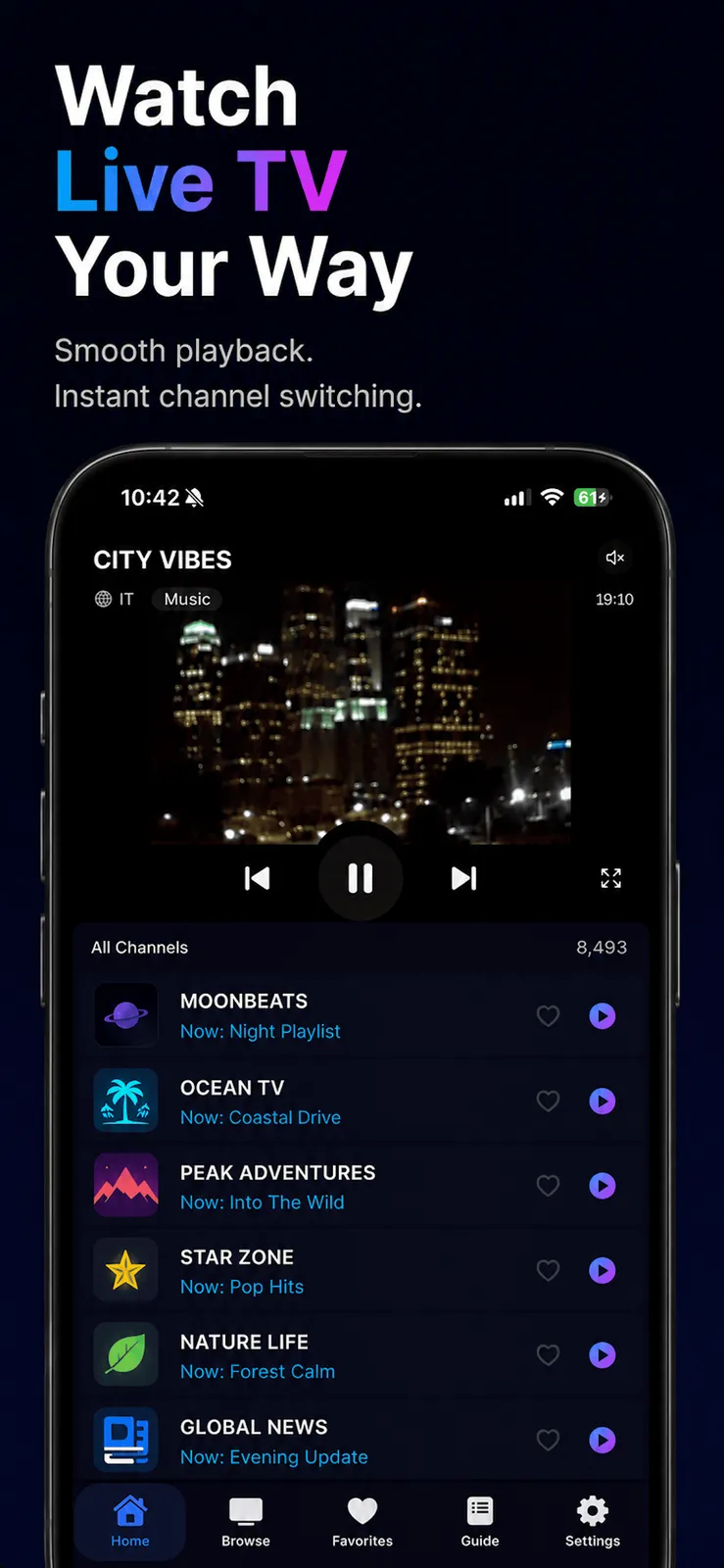
PixelPlay is built with SwiftUI, AVKit, StoreKit 2, and SwiftData, so it behaves like an Apple app rather than a web view wrapped in a shell. Native AVPlayer decoding gives you HLS, MPEG-TS, and MP4 playback, Control Center integration, background audio, and hardware-accelerated picture-in-picture on iPhone, iPad, and Mac.
The difference shows up in the small things. Because playback runs on Apple's own AVPlayer, the picture switches between fit and fill with a pinch, audio keeps playing when you lock the screen, and casting to a Chromecast or AirPlaying to an Apple TV works the way it does in Apple's own apps. A cross-platform shell has to reimplement each of those, and usually stops short. PixelPlay also indexes channels you have played into iOS Spotlight, so a channel can surface in system search alongside your apps and contacts, something only a native app can reach.
Bring your own M3U or Xtream Codes playlist
In short
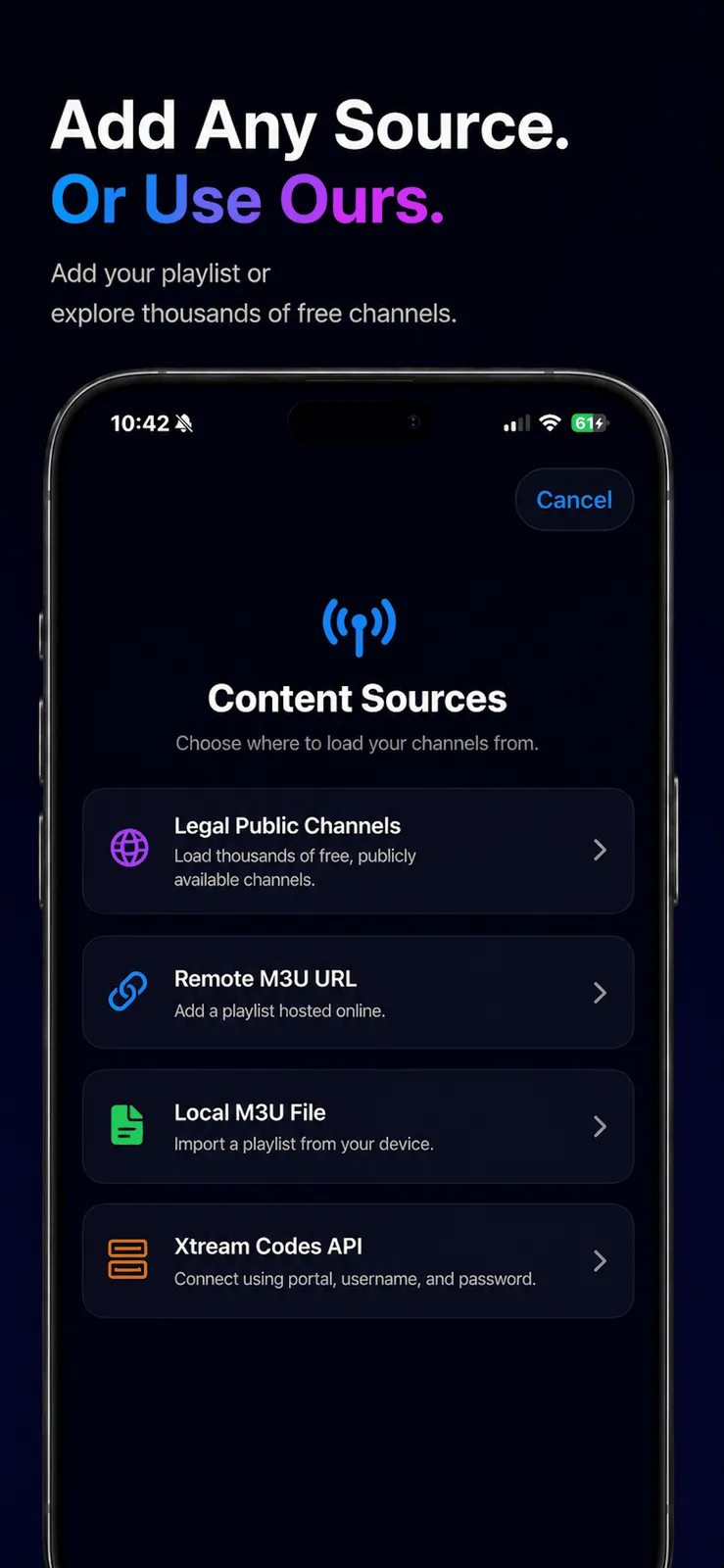
You supply the content. PixelPlay loads an M3U URL, an M3U file, or an Xtream Codes API login, and the free tier includes one source of any type plus a free Public Catalog of legal public channels. Favorites, Recents, and Spotlight search index your played channels into iOS system search.
The Content Sources screen lists four ways in: a Remote M3U URL hosted online, a Local M3U file imported from your device, an Xtream Codes API login with portal, username, and password, and a Legal Public Channels catalog for people who do not have a provider yet. That last option matters: it means you can install the app and watch something legal immediately, without hunting for a playlist first. As an Xtream Codes IPTV player for iOS, it authenticates against the panel the same way desktop players do, which keeps large catalogs and their EPG data organised.
The free Public Catalog of legal streams
PixelPlay draws a firm line about what it is. It does not provide, host, sell, or rebroadcast any channels or films. Everything you watch comes from a playlist you supply or from the optional Public Catalog of openly published, legal streams. You are responsible for making sure the content you load is lawful where you are. That framing is worth reading before you buy any IPTV player, because the app is the tool, not the service.
Multi-View and picture-in-picture: four streams at once
In short
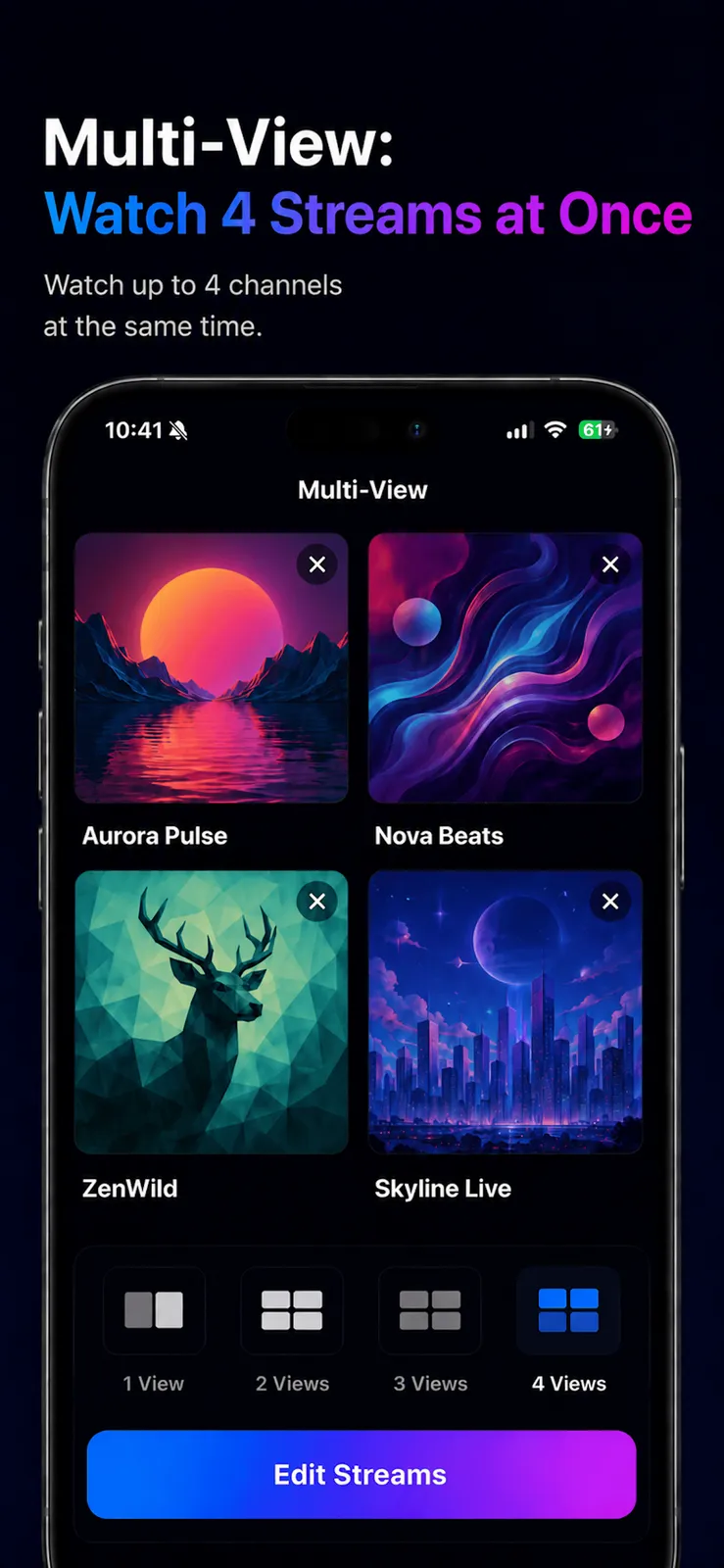
PixelPlay Pro adds Multi-View, so you can watch up to four IPTV streams at once on an iPhone or iPad, plus system picture-in-picture that floats a stream over other apps. Multi-View and PiP are separate features here: use the grid for a sports slate, PiP to keep one game visible while you multitask.
The Multi-View screen lays out a 2-by-2 grid with a 1, 2, 3, or 4 View selector, and one tile stays audible while the rest run muted, which is how a mosaic has to work when four feeds share one speaker. Tap a different tile to move the sound. This is the feature people mean when they ask for multiview IPTV picture-in-picture, though the two are not the same thing: PiP is one floating window over another app, while Multi-View is several feeds on one screen. PixelPlay does both.
Four simultaneous 1080p streams are as much a network question as an app one. Plan for roughly 20 to 40 Mbps of bandwidth, about 5 to 10 Mbps per stream, before headroom. On a phone the grid is best for glancing across several live events; on an iPad it has room to breathe. If your connection cannot feed four HD feeds, drop to two or three views rather than fighting buffering.
Face ID channel lock and a full EPG TV guide
In short
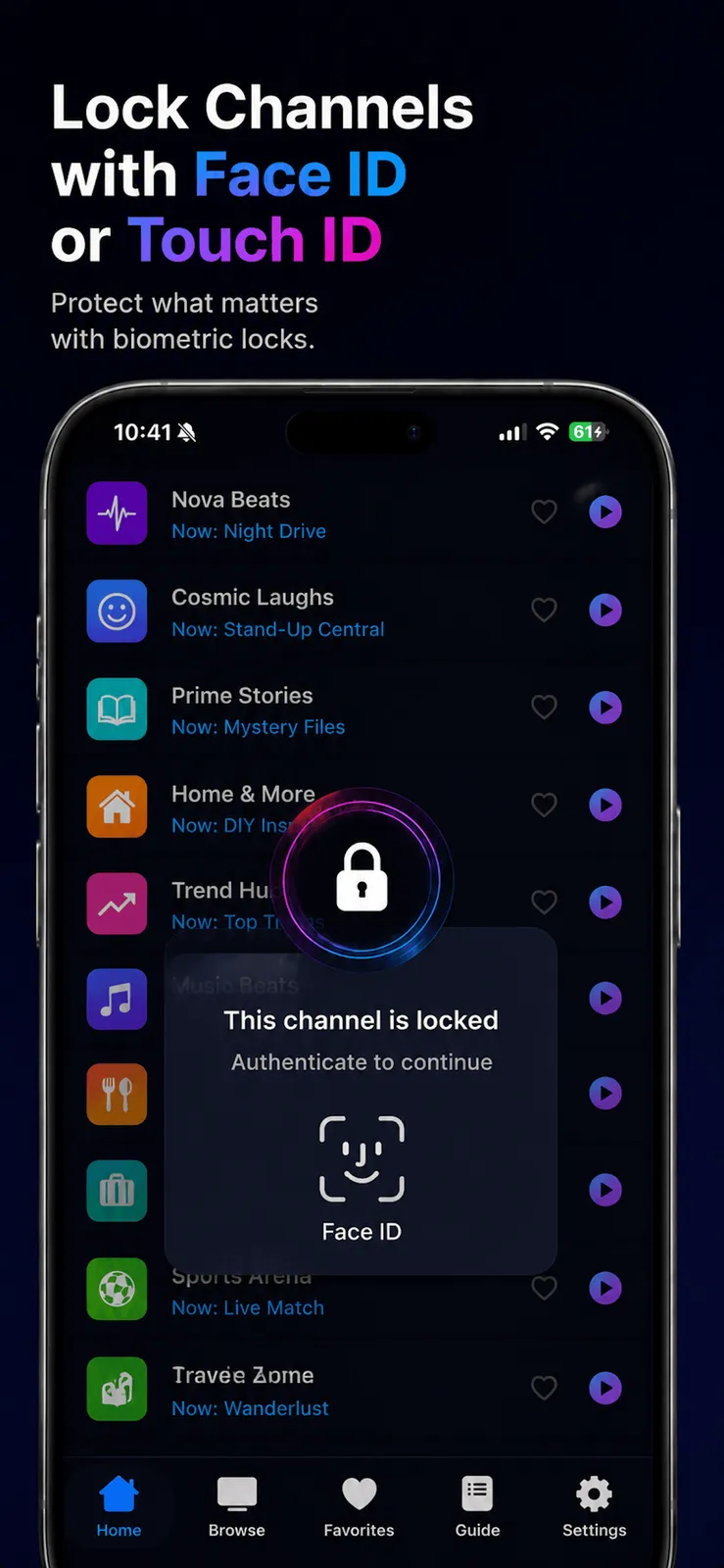
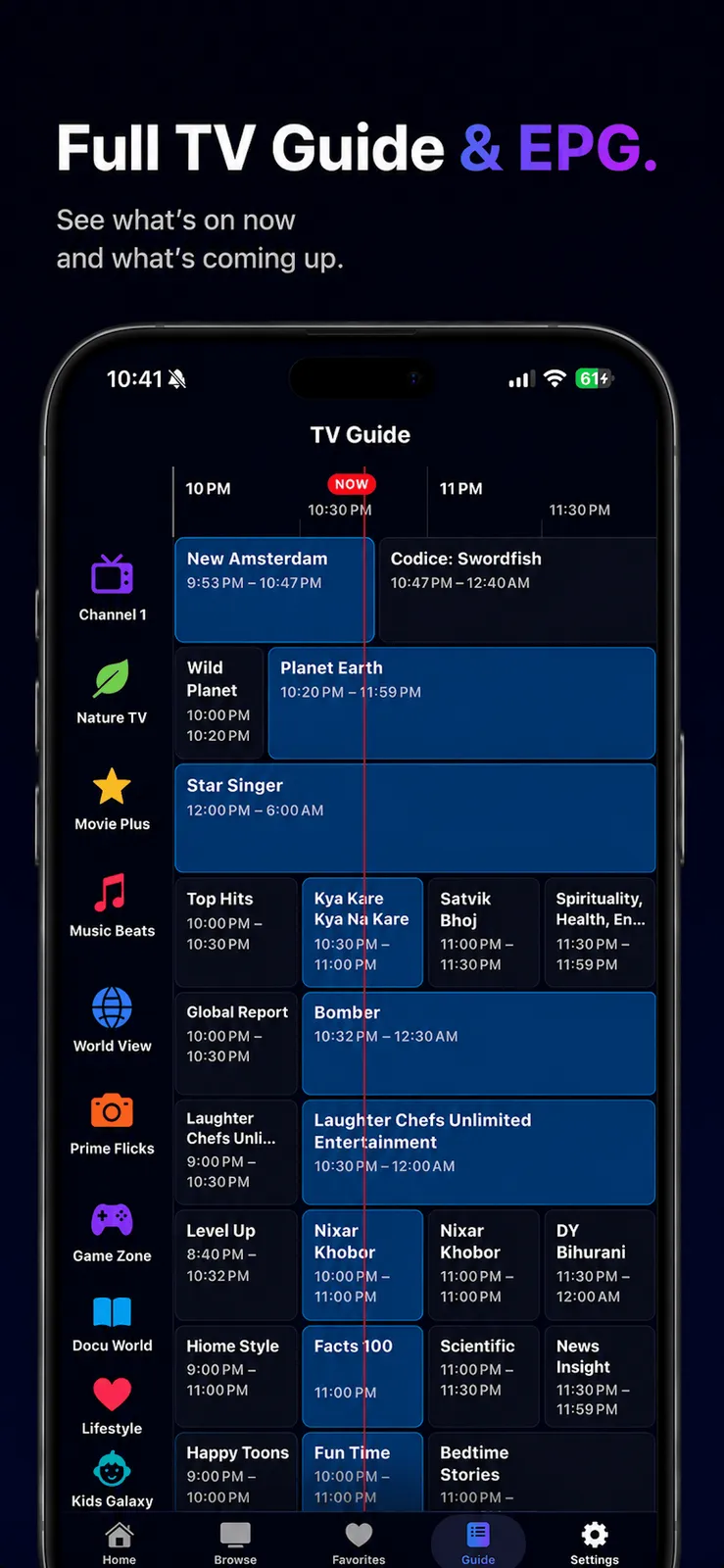
PixelPlay Pro locks individual channels or whole categories behind Face ID or Touch ID, not a 4-digit PIN, so kids cannot open flagged content. Pro also includes the Advanced TV Guide, a full EPG grid across time and channels, and unlimited content sources instead of the free tier's single source.
Biometric locking is the feature that actually separates PixelPlay from the pack. Plenty of players offer parental controls, but most guard a channel with a PIN you can shoulder-surf or share. PixelPlay ties Channel Lock and Category Lock to Face ID or Touch ID, so opening a locked channel needs the device owner's face or fingerprint. Among the players compared here, it is the one that does this; iPlayTV, Kanalo, and IPTVX rely on a PIN.
Advanced TV Guide across time and channels
The Advanced TV Guide is a real EPG grid: channels down the side, a time axis across the top, a marker on the current moment, and what is on now and next in each cell. It is the layout desktop and set-top IPTV users expect, rendered natively so it scrolls smoothly on an iPad. The free tier plays channels and shows the basics; the full grid, along with Multi-View, PiP, Face ID locks, and unlimited sources, is what the $9.99 Pro unlock adds.
Ad-free and no tracking, by design
In short
PixelPlay shows no ads and does no cross-app or website tracking. The app states its privacy manifest declares NSPrivacyTracking false, it collects only anonymous analytics not linked to your identity, and an email only if you sign in. Your playlists and stream URLs stay on device and are never sold or shared.
This is the quiet reason to prefer a paid player. A free IPTV app has to make money somewhere, and that usually means ads over the channel list and an SDK that reports your behaviour to a network. PixelPlay's answer is to charge once and skip both. It says its App Store privacy shows no tracking, keeps your playlist and stream URLs on the device, and treats the optional sign-in as exactly that, optional and only for syncing your favorites. For an app that sees which channels you watch, that posture is the product.
One-time vs subscription: what iOS IPTV players cost
In short
PixelPlay Pro is one payment of $9.99 with no renewal, but it is not the cheapest and it is not the only one-time app. iProTV ($6.99) also plays four streams at once, and Kanalo ($4.99) and iPlayTV ($5.99) are cheaper ad-free one-time players. What $9.99 buys over them is the Face ID lock plus the free public-channel catalog.
| App | Price | Model | Ad-free + no tracking | Multi-View (4) | Face ID lock |
|---|---|---|---|---|---|
PixelPlay this one native iOS | $9.99 | Buy once | |||
iProTV buy once, 4-up | $6.99 | Buy once | |||
iPlayTV buy once | $5.99 | Buy once | |||
Kanalo buy once, ad-free | $4.99 | Buy once | |||
IPTVX rented | from $3.99/mo | Subscription | |||
GSE Smart IPTV free, ads | Free | Free + ads |
The cheaper one-time rivals, honestly
If price is the whole question, three apps undercut PixelPlay. Kanalo is about $4.99 and markets itself as an ad-free iPhone and iPad player, but it has no Multi-View and no Face ID lock. iPlayTV is about $5.99, a long-standing native player with a full EPG, and also lacks four-stream Multi-View and biometric locks. iProTV is the closest match at about $6.99: it is a one-time purchase that does play four channels at once and supports Xtream, M3U, and PiP. If four-up viewing is all you want, iProTV does it for three dollars less. PixelPlay's answer is the Face ID channel lock, the free public catalog, and the wider native feature set in one app.
The lifetime cost of a rented player
At the other end are the players that keep charging. IPTVX is subscription only, from about $3.99 a month, which passes $9.99 before your third month and keeps going. SNPlayer advertises a $29.99 lifetime unlock but still sells $2.99 monthly and $14.99 yearly plans and gives you only a 24-hour trial, so "lifetime" sits next to a subscription. GSE Smart IPTV is free to install but runs ads and leans on subscription tiers. Against those, a single $9.99 payment that never renews is the plainer deal, and Restore Purchase brings Pro back on any device signed in to your Apple ID.
Price
$9.99 once
Free tier
Yes
Multi-View
Up to 4
Channel lock
Face ID
Sources
Unlimited (Pro)
Platforms
iPhone · iPad · Mac
Confirm the price before you buy
Prices vary and apps change theirs often. The figures here come from each app's US App Store page in July 2026: PixelPlay $9.99 once, iProTV about $6.99 once, iPlayTV about $5.99 once, Kanalo about $4.99 once, IPTVX from about $3.99 per month, and GSE Smart IPTV free with ads. Check the current price on the store page before you commit.
How to start with PixelPlay on the free tier
In short
Download PixelPlay from the App Store and add one source on the free tier: paste an M3U URL, import an M3U file, enter Xtream Codes credentials, or open the Public Catalog. Favorites and Recents work immediately. When you want Multi-View, PiP, Face ID lock, and the EPG, buy Pro once for $9.99.
Install the free app. The base app is a free download; there is nothing to pay to try core playback of HLS, MPEG-TS, and MP4 streams.
Add one source. On the free tier you get a single source of any type: a remote M3U URL, a local M3U file, an Xtream Codes login, or the free Public Catalog of legal channels.
Unlock Pro when you need it. One $9.99 purchase adds Multi-View, Picture-in-Picture, Face ID and Touch ID channel locks, the Advanced TV Guide, and unlimited sources, with no subscription and Restore Purchase across your devices.
Because the free tier is genuinely usable, you can confirm your playlist plays and the interface suits you before spending anything. If it does, Pro is the one-time step up, and if it does not, you have lost nothing. That is the shape of a buy-once app: try the base, pay once for the rest, keep it.
Frequently asked questions
Can any iPhone IPTV app play four streams at once with picture-in-picture?
Yes. PixelPlay Pro includes Multi-View, which plays up to four streams at once on iPhone or iPad, and it also supports system picture-in-picture. They are separate tools: use the four-tile grid to watch several games together, and PiP to float one stream over other apps while you multitask. iProTV ($6.99 once) also plays four channels at once, so PixelPlay is not the only one.
Which iPad IPTV player has a real TV guide and Face ID channel lock?
PixelPlay. PixelPlay Pro includes the Advanced TV Guide, a full EPG grid across time and channels, and Channel Lock and Category Lock secured by Face ID or Touch ID rather than a 4-digit PIN. Both run natively on iPad with SwiftUI and AVKit. Many rivals ship an EPG, but most (iPlayTV, Kanalo, IPTVX) lock content with a PIN, not biometrics.
Does PixelPlay show ads or track me?
No. PixelPlay shows no ads and does no cross-app or website tracking. The app states its privacy manifest declares NSPrivacyTracking as false. It collects only anonymous analytics that are not linked to your identity, and an email only if you choose to sign in. Your playlists and stream URLs stay on your device.
Is PixelPlay the cheapest IPTV player for iPhone?
No, and it does not claim to be. Kanalo is about $4.99, iPlayTV and Flex IPTV Pro about $5.99, and iProTV about $6.99, all cheaper one-time apps. PixelPlay Pro is $9.99 once and adds Face ID channel lock, Multi-View, the Advanced EPG, and a free public-channel catalog, so you pay a little more for a broader native feature set.
Does PixelPlay include IPTV channels or a subscription?
No. PixelPlay is a media player only. It does not provide, host, sell, or rebroadcast any channels. You bring your own M3U or Xtream Codes playlist, or use the optional free Public Catalog of openly published legal streams. There is no channel subscription to buy inside the app, and Pro itself is a one-time purchase.
Why buy a one-time IPTV player instead of a monthly one?
A subscription player like IPTVX keeps billing you for the same software, and some apps that advertise a lifetime tier, such as SNPlayer, still sell monthly and yearly plans alongside it. PixelPlay Pro is a single $9.99 payment with no renewal, and Restore Purchase reactivates it on any device on your Apple ID.
What formats and casting does PixelPlay support?
PixelPlay uses AVPlayer, so it plays HLS, MPEG-TS, MP4, and other formats AVPlayer can decode. It supports Chromecast (Google Cast) and AirPlay, background audio, and pinch to switch between fit and fill. The free tier covers core HLS, MPEG-TS, and MP4 playback with one content source.
Sources
- 1
The maker’s own page: a native iPhone and iPad IPTV player, a free tier plus a one-time $9.99 Pro unlock, and the "No ads. No tracking. No subscriptions." positioning. The source for every PixelPlay feature and price stated here.
- 2
The live App Store listing, confirming the free download, the PixelPlay Pro one-time unlock, and the Pro feature set (Multi-View, Picture-in-Picture, Face ID or Touch ID locks, Advanced TV Guide, unlimited sources).
- 3
A one-time purchase (about $6.99) that also plays up to four live channels at once and supports Xtream Codes API, M3U, and PiP. The basis for the honest note that Multi-View is not unique to PixelPlay.
- 4
A single paid Apple-ecosystem player (about $5.99) supporting M3U, remote, and Xtream Codes playlists with a full EPG. Included as a cheaper one-time rival that has no four-stream Multi-View and no Face ID lock.
- 5
Markets itself as an "ad-free IPTV player for iPhone and iPad" with a one-time Pro unlock (about $4.99) supporting M3U and Xtream. Confirmed to have no Multi-View and no Face ID lock, so it is the cheaper-but-narrower ad-free option.
- 6
Lists a $29.99 lifetime purchase alongside monthly and yearly subscriptions, with a 24-hour trial and no permanent free tier. The example for "lifetime" apps that still sell subscriptions.
- 7
A subscription-only iOS player (from about $3.99 per month) with a TV Guide grid and PIN-based playlist protection rather than biometric channel locks. The rented-player contrast in the comparison chapter.
- 8
Apple’s framework for video playback and hardware-accelerated Picture-in-Picture on iOS and iPadOS, which a native player like PixelPlay builds on rather than reimplementing in a cross-platform shell.

More apps you buy once: browse the desktop