
Multiple Tailnets at Once Without Switching: TailMux
Your laptop sits in your employer's tailnet, a client's tailnet and your own home lab. The Tailscale app lets one of them be active at a time, so you switch accounts every time you move from a work dashboard to your NAS. TailMux keeps all of them reachable at once on a Mac or Linux machine by routing each connection on its hostname. This piece covers how it works, what it cannot carry, what it costs, and when another route fits better.

OneTimePay.app
6 min read
How do I stay connected to two Tailscale tailnets at the same time?
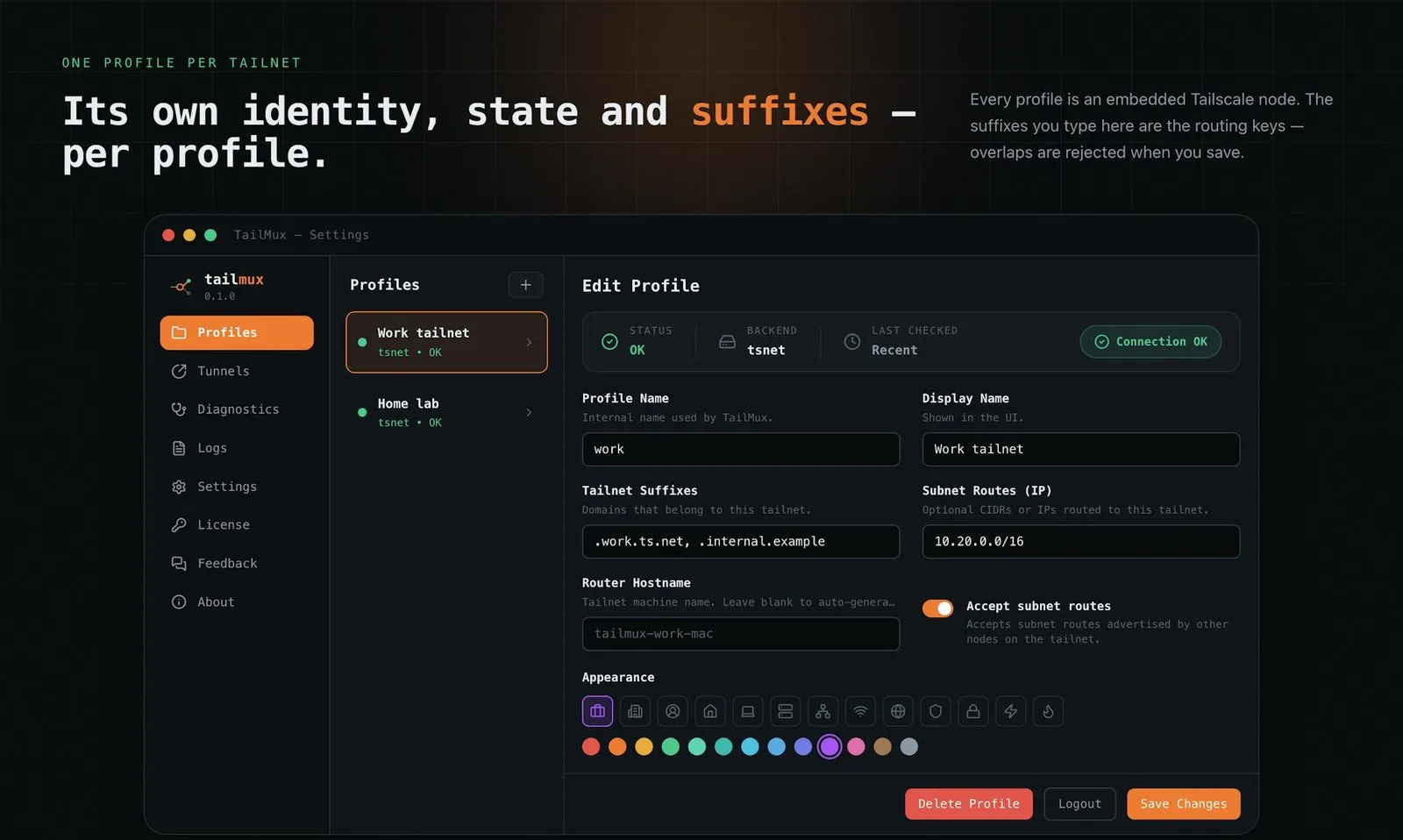
The official client cannot: fast user switching keeps one tailnet active. TailMux runs one embedded Tailscale node per tailnet on a Mac or Linux machine and routes each connection by its hostname suffix, so both stay reachable for browser, SSH, command-line and TCP-tunnel traffic. It is a one-time €4.99 purchase.
On this page
How do I stay connected to two Tailscale tailnets at the same time?
In short
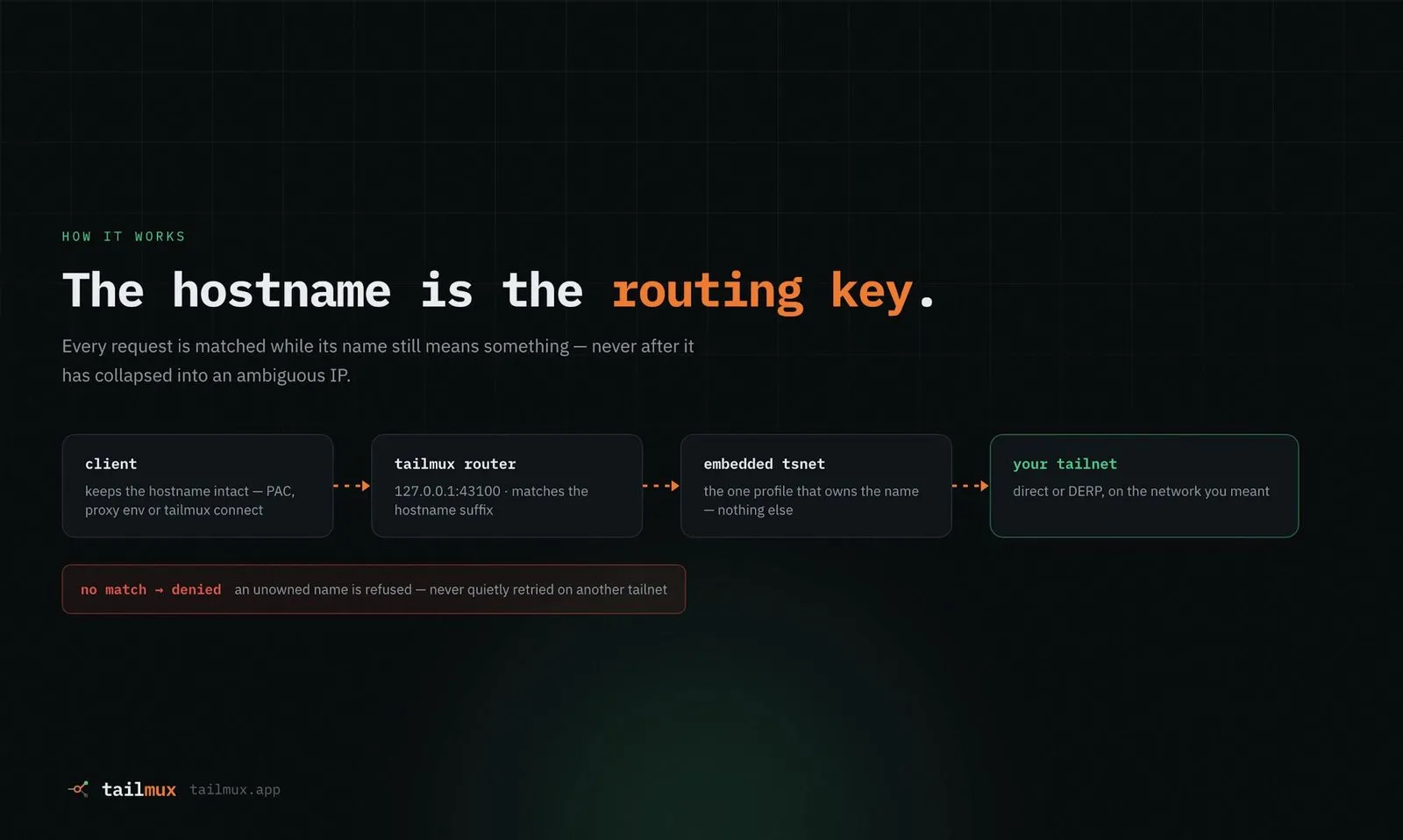
Give each tailnet a TailMux profile and the hostname suffixes it owns, such as .work.ts.net for work and .home-lab.ts.net for home. A router on 127.0.0.1:43100 reads the name of each connection and dials it through the one profile that owns that suffix. A name no profile owns is denied, and a failed connection is never retried through another tailnet.
Each profile is a full embedded Tailscale node with its own machine name, key, state, sockets and logs. Overlapping suffixes are rejected when you save the configuration, not at runtime. The official Tailscale app keeps running with its own account, untouched.
Set up a work and personal tailnet in four steps
1. Install. The macOS app (Apple Silicon and Intel) carries the CLI; Fedora 44 and later gets a GTK4 app; any other Linux gets the CLI as a .deb, .rpm or archive. Homebrew works on both.
2. Add a profile per tailnet. Name it and list the suffixes it owns.
3. Sign in. Start the router and log each profile in to its tailnet once, with tailmux profile login or from the app.
4. Check a name. tailmux test nas.home-lab.ts.net shows which profile owns a host before you connect.
The four ways traffic reaches TailMux
Browser: a generated proxy file (PAC) sends only your tailnet suffixes through TailMux and leaves everything else direct. The macOS app sets it on launch, so Safari works; on Linux it configures GNOME and KDE.
SSH: tailmux ssh admin@host.work.ts.net opens a shell through the owning profile.
Command-line tools: tailmux run curl, git or npm, or tailmux env to export the proxy settings into your shell.
Tunnels: pin a database, RDP or SMB service to a fixed 127.0.0.1 port through one profile, so a GUI client like a database app or Finder connects to localhost. An SSH-bastion mode covers hosts only a jump box can reach.
Price
€4.99 once
Updates
1 year included
Devices
Up to 5
Runs on
macOS, Linux
Tailnets
No fixed limit
Traffic
TCP only
What TailMux will not carry
In short
TailMux is an application-layer TCP proxy, not a second VPN interface. Anything that is not TCP, or that drops the hostname before the connection leaves your app, cannot be routed. The docs list these limits up front, and they decide whether it fits your work.
No ping, no UDP: ICMP ping, generic UDP, mDNS and DNS sent straight to a tailnet resolver do not pass. tailmux diag path runs a tailnet-level ping from inside the owning profile and reports direct or relayed (DERP) paths instead.
Raw IPs are denied by default: an address does not say which tailnet it belongs to. You can declare explicit, non-overlapping CIDR routes for a profile when you need them.
No system-wide routing: no exit node, no route advertisement, and apps that ignore proxy settings need a tunnel.
Restart to apply: routing changes take effect when the router restarts.
Version 0.3.0 (12 October 2026) also added Publications: point one at a local dev server and it becomes reachable from one profile's tailnet only, with a note on which devices the tailnet's access policy actually lets in.
TailMux vs fast user switching, node sharing, tailmix and a VM
In short
TailMux is not the cheapest route. Tailscale's own fast user switching and node sharing are free, and tailmix is a free, open-source client that connects several tailnets at once system-wide. TailMux costs €4.99 ($5.99) once; its case is that it leaves the official client alone and needs no root daemon.
| App | Price | Both at once | Scope | Official client | Platforms |
|---|---|---|---|---|---|
TailMux this one this article | €4.99 / $5.99 once, 1 year of updates | Yes, routed by hostname | Browser, SSH, CLI tools, TCP tunnels | Keeps running, untouched | macOS, Linux |
Tailscale fast user switching built in | Free, all plans | No, one active at a time | Whole device | Is the official client | macOS, Windows, Linux, iOS, Android |
Tailscale node sharing built in | Free, all plans | One shared machine | That machine only, inbound by default | Is the official client | All Tailscale clients |
tailmix open source | Free (BSD 3-Clause) | Yes | System-wide, subnet routes, one exit node | Replaced; disconnect it first | macOS, Linux with systemd |
Second VM or container e.g. OrbStack, Lima | OrbStack free personal, $8/user/mo commercial; Lima free | Yes, one tailnet per VM | Whatever runs in the VM | Keeps running on the host | Depends on the VM |
Tailscale fast user switching is still switching
Tailscale's docs are explicit: a device cannot send packets on several tailnets at once, so switching drops your path to the other one. Node sharing helps when one server needs to be visible in a second tailnet, but it shares that one machine, quarantined to inbound connections by default. tailmix does more than TailMux at the network level (subnet routes, an exit node, remapped overlapping addresses), at the cost of replacing the Tailscale client and installing a root daemon. TailMux trades that reach for staying out of the system network stack.
Who it suits, and who should skip it
In short
It suits contractors and developers who open web dashboards, SSH hosts, databases and file shares in two or more tailnets every day from a Mac or Linux workstation. Skip it on Windows, for UDP or game traffic, when you need an exit node per tailnet, or when apps must reach peers by raw IP.
No trial: the pricing page points you to the docs before buying and handles refunds through the Polar receipt.
Young product: launched in 2026 by CQ Fabrication; version 0.3.0 shipped on 12 October 2026, and the Product Hunt page had 107 points and no reviews on 5 November 2026.
Independent: not affiliated with Tailscale Inc., and not related to tailmix despite the similar name.
A quick first test
Before buying, list the hosts you open in each tailnet and how you open them (browser, SSH, a database app). If every one is a named TCP service, TailMux covers it. If one needs ping, UDP or an exit node, look at tailmix or a VM. Facts were verified on 5 November 2026.
Frequently asked questions
Does TailMux replace the official Tailscale app?
No. It runs next to it. Each TailMux profile is its own embedded Tailscale node with its own key and state, and TailMux never changes the official app, its account or its session. According to the maker, it runs as a normal user process with no root daemon, kernel extension or Network Extension.
Can TailMux ping hosts or carry UDP traffic?
No. TailMux is a TCP proxy, so ICMP ping, generic UDP, mDNS and DNS sent straight to a tailnet resolver do not go through it. To check that a host is reachable, run tailmux diag path with a URL, which does a tailnet-level ping from inside the owning profile, or tailmux connect with a host and port.
Is TailMux a subscription?
No. It is a one-time purchase of €4.99 (or $5.99) with a perpetual license for up to 5 of your own machines on macOS and Linux. It includes a year of updates. After that you keep the last version released in that year, and renewing for more updates is optional.
How many tailnets can TailMux connect at once?
There is no fixed limit. The maker says on Product Hunt that the practical ceiling is your machine's resources, since each profile runs its own embedded Tailscale node. Each profile needs hostname suffixes that no other profile uses.
What happens if two tailnets use the same IP addresses?
TailMux routes by hostname, not by address, so two tailnets that hand out the same 100.x address do not collide as long as you connect by name. Raw IP destinations are denied by default. You can declare explicit, non-overlapping CIDR routes for a profile when you need raw TCP to a subnet.
Is TailMux the cheapest way to use two tailnets?
No, and several routes cost nothing. Tailscale fast user switching and node sharing are free on every plan but are not simultaneous membership. tailmix is free and open source but replaces the Tailscale client. A VM works too; OrbStack is free for personal use and $8 per user a month for commercial use.
Sources
- 1
Features, isolation rules, platforms and FAQ; the site's structured data lists offers of €4.99 and $5.99.
- 2
One-time purchase, perpetual license, 1 year of updates, up to 5 devices, checkout via Polar.
- 3
TailMux limitations and routing model
Supported access paths, TCP only, no ICMP ping, raw IPs denied by default, the official client left untouched.
- 4
Version 0.3.0 on 12 October 2026 (Publications, clearer connection errors); Linux app since 0.2.0 on 17 August 2026.
- 5
Maker Claudio Quaglia (CQ Fabrication) on permissions, overlapping addresses and profile limits; 107 points and no reviews on 5 November 2026.
- 6
Fast user switching (Tailscale docs)
"A device is not able to transmit packets on multiple tailnets simultaneously." Available on all plans.
- 7
Share your machines with other users (Tailscale docs)
Shares one machine into another tailnet; quarantined by default, reachable by full domain name, tagged machines cannot be shared.
- 8
BSD 3-Clause; replaces the Tailscale client, installs with sudo, per-tailnet subnet routes, one exit node, remapped overlapping addresses.
- 9
A tale of two tailnets (exe.dev blog)
Maisem Ali's 24 July 2026 introduction of tailmix.
- 10
Free for personal use; Pro $8 per user a month or $96 a year for commercial use.
- 11
How to connect two Tailscale tailnets (SSD Nodes)
Background survey of node sharing, switching, a two-daemon bridge and tailmix.

TailMux
Run multiple Tailscale tailnets at once, no switching
once
macOS · Linux
More apps worth a look: browse the desktop