
Mountain Duck: Mount SFTP and S3 as a Drive in Finder
Editing a file on a web server usually means download, edit, re-upload, and hope you grabbed the latest copy. Mountain Duck skips that loop: your SFTP servers, S3 buckets and cloud drives appear in Finder and File Explorer like any other drive, and every app saves straight back to them. This piece covers how it mounts, which of its three connect modes to use, what the $49 licence covers, the App Store catch, and when ExpanDrive, CloudMounter, SteadyMount or rclone is the better pick.

OneTimePay.app
7 min read
How do I mount an SFTP server or S3 bucket as a drive in Finder on my Mac?
Finder cannot do it on its own: Connect to Server handles SMB, NFS and WebDAV, and FTP only read-only. Mountain Duck adds SFTP, S3, cloud drives and more as Finder locations, and on Windows as File Explorer drives. Files stay online until you open one. A licence is $49 once per major version, after a 14-day trial.
On this page
How do I mount an SFTP server or S3 bucket as a drive in Finder on my Mac?
In short
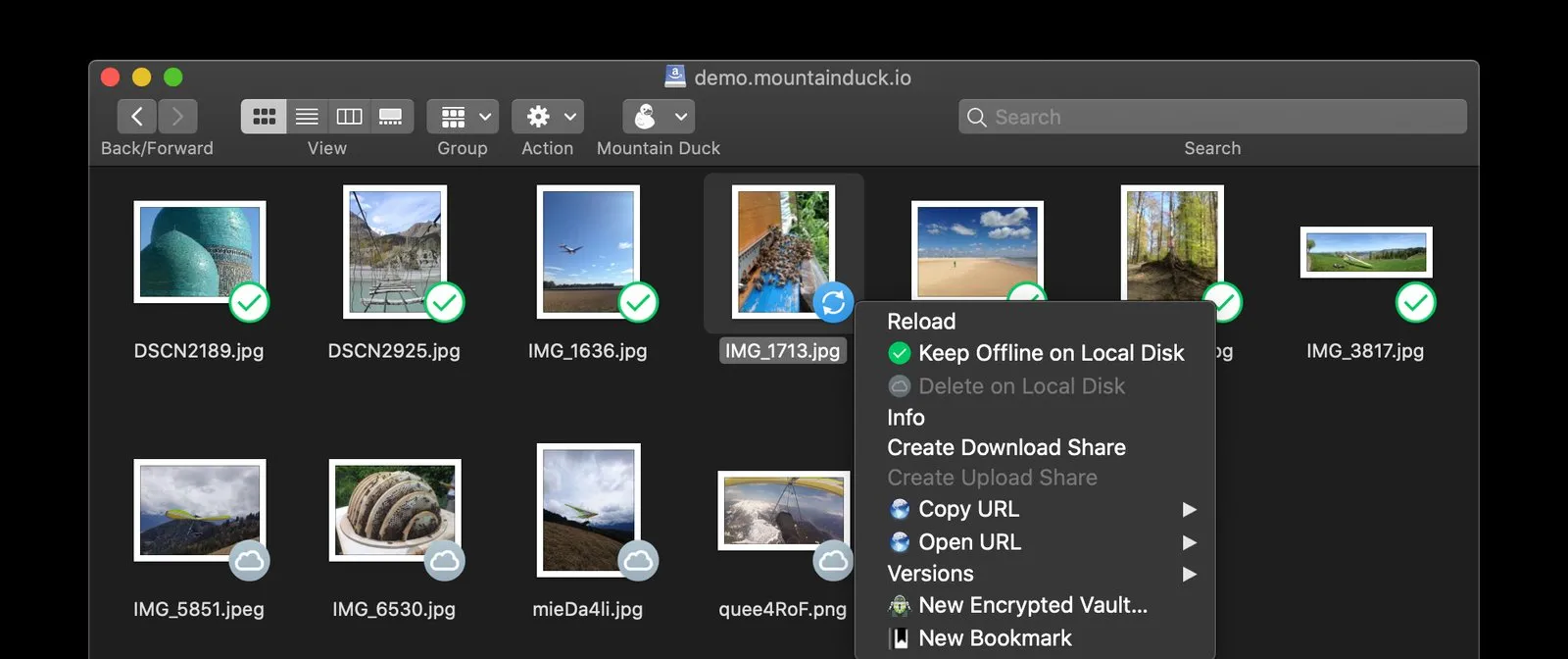
Add a bookmark in Mountain Duck with the server address and your login or key, and connect. The server shows up as a location in the Finder sidebar, and on Windows as a drive in File Explorer. From there it behaves like a folder: open a PHP file in your editor, a photo in Photoshop, or a spreadsheet in Excel, and saving writes the change back to the server.
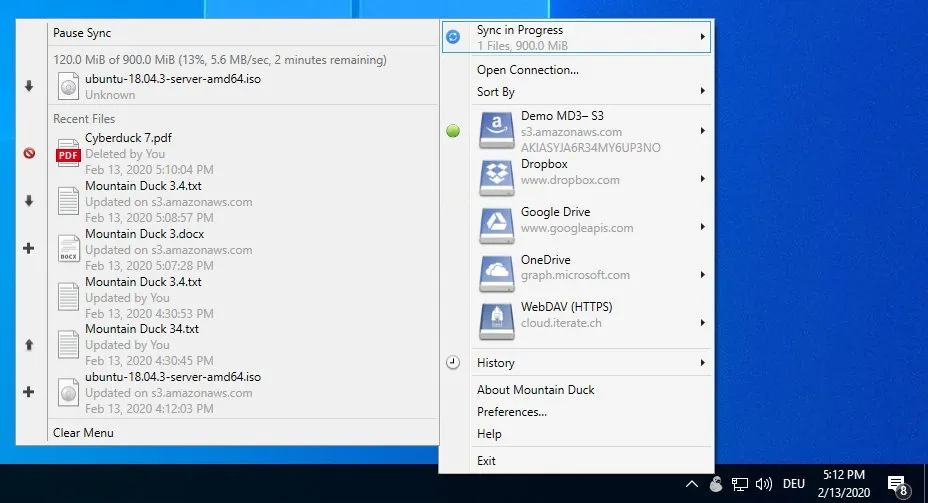
Mount an S3 bucket in Finder, or any of 16 services
Mountain Duck is built on the engine of Cyberduck, the long-running free transfer client from the same developer, so it speaks the same long list of protocols:
Servers: SFTP, FTP, WebDAV, SMB, Nextcloud and ownCloud.
Object storage: Amazon S3, Google Cloud Storage, Microsoft Azure, OpenStack Swift, Backblaze B2 and Wasabi.
Cloud drives: Dropbox, Google Drive, OneDrive, SharePoint and Box.
What the Finder menu adds
Right-click any file or folder and Mountain Duck's own menu appears: keep it offline on the local disk, delete the local copy to free space, copy or open its web URL, create a download or upload share link, browse earlier versions, or create an encrypted vault. In Integrated mode, remote files are also indexed by Spotlight on the Mac and Windows Search on the PC, so search finds them like local files.
Integrated, Online or Smart Sync: the three connect modes
In short
Each bookmark runs in one of three modes. Integrated, the default for new connections since Mountain Duck 5 shipped in August 2025, uses Apple's File Provider framework on the Mac and the Cloud Files API on Windows. That means no device driver, no kernel extension and no network mount; files appear as placeholders until you open them.
Integrated: placeholders, offline pinning, Spotlight and Windows Search indexing, faster writes and copies. The pick for most people.
Online: nothing is kept locally; a change uploads as soon as an app finishes saving the file.
Smart Synchronization: files are copied to a local cache for speed and synced with the server in the background, with a custom cache location.
The two older modes mount through NFS on macOS and a device driver on Windows. They are not available in the Windows Store build, so Windows users who want them should install from mountainduck.io.
Encryption, sharing and file locking
In short
Three extras matter once a drive holds client work. Cryptomator vaults encrypt files on your machine before they reach the server, and other Cryptomator apps can open them. Share links come straight from the Finder menu. Office documents lock on WebDAV servers, so a colleague opening the same file gets a read-only copy instead of overwriting yours.
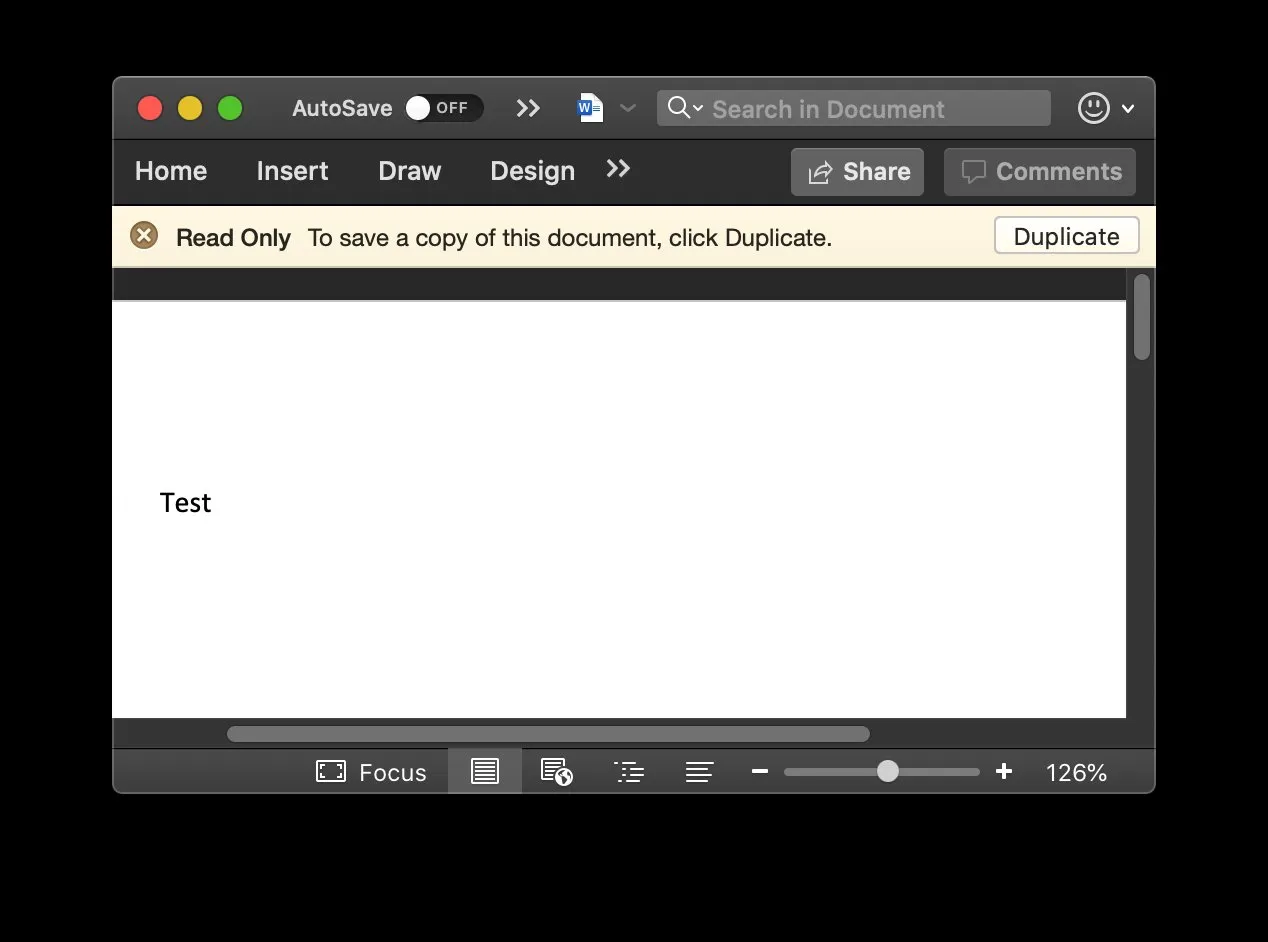
Locking also works on other servers through lock-owner files. On providers that support them, such as S3, Azure and Backblaze B2, share links can expire on their own. On a versioned S3 bucket, the Versions menu lists earlier copies of a file and restores one.
What $49 buys, and the App Store catch
In short
A licence from mountainduck.io costs $49 (or €42) for one user, paid once. It covers that person on any number of Macs and PCs and is valid for one major version, currently Mountain Duck 5. When version 6 arrives, your licence keeps working with 5, and moving up is a discounted upgrade priced by when you bought.
Direct licence
$49 once
Covers
One major version
Trial
14 days
Platforms
macOS + Windows
Requires
macOS 13+, Win 10 1809+
Kernel extension
None (Integrated)
The Mac App Store build is a subscription
Mountain Duck is also on the Mac App Store as a free download, but there the only way to unlock it is $5.99 a month or $59.99 a year. That build also lists macOS 15 or later. To pay once, buy the licence on mountainduck.io and install the direct download.
Teams get volume pricing: five seats are $193 and ten are $348. Cyberduck key holders and academic users can ask for a 30% coupon, as can owners of Transmit Disk, ExpanDrive or NetDrive who are switching.
Mountain Duck vs ExpanDrive, CloudMounter, SteadyMount and rclone
In short
Mountain Duck is not the cheapest way to see a server in Finder. ExpanDrive is free for personal use, rclone is free for anyone at ease in the terminal, and SteadyMount costs $27.99 for SFTP, WebDAV and FTP on the Mac. Mountain Duck's case is the widest protocol list on both Mac and Windows, Cryptomator built in, and a licence you buy once.
| App | Price | Buy once? | Platforms | Covers | How it mounts |
|---|---|---|---|---|---|
Mountain Duck this one this article | $49 per major version | Yes, direct licence | Mac, Windows | Servers, S3, cloud drives, SMB | File Provider / Cloud Files |
ExpanDrive cloud drive mounter | Free personal; $29/mo Business | Personal is free | Mac, Windows, Linux | Servers, S3, cloud drives | Finder / Explorer drive |
CloudMounter cloud drive mounter | $74 lifetime or $29/yr | Yes, lifetime option | Mac (Windows sold apart) | Servers, S3, cloud drives | Finder mount |
SteadyMount Mac App Store | $27.99; 1 connection free | Yes | Mac (macOS 14+) | SFTP, WebDAV, FTP | File Provider |
rclone open source | Free | Nothing to buy | Mac, Windows, Linux | Servers, S3, cloud drives | Command line + macFUSE, FUSE-T or NFS |
Finder built in | Free | Built in | Mac | SMB, NFS, WebDAV; FTP read-only | Network mount |
An ExpanDrive alternative you buy once
If you only mount your own Dropbox or a personal server, start with free ExpanDrive. If you only need SFTP on a Mac, SteadyMount does it for less. If you script everything, rclone is free and flexible. Mountain Duck fits when one licence has to cover a Mac and a Windows PC, when files need Cryptomator encryption, or when a business wants to pay once instead of $29 a month.
Who Mountain Duck suits, and who should skip it
In short
It suits developers, designers, photographers and small teams who edit files on servers, buckets or Nextcloud every day and want to use their normal apps for it. Skip it for the occasional upload, where free Cyberduck is enough, or if a monthly App Store subscription suits your budget better than $49 up front.
Few store ratings: the US Mac App Store has too few ratings to show an average, and one recent review reports high CPU use and SFTP disconnects. Use the trial on your own servers before you buy.
Per major version: the licence does not include the next major release; budget for a discounted upgrade when it ships.
Two install routes: the App Store build and the direct download differ in price model and in which connect modes they offer, so pick before you set up bookmarks.
Before you buy
Request the 14-day trial, add your busiest server or bucket in Integrated mode, pin one working folder offline, and do a normal day of edits from your usual apps. If you never open a transfer window, the $49 is worth it. Prices were verified on 1 November 2026.
Frequently asked questions
Is Mountain Duck a one-time purchase or a subscription?
Both exist, so pick the right store. The licence sold on mountainduck.io is a one-time $49 (US price on 1 November 2026) for one user, valid for the current major version, Mountain Duck 5. The Mac App Store build is a subscription at $5.99 a month or $59.99 a year. Buy direct if you want to pay once.
Is Mountain Duck worth $49 when ExpanDrive is free for personal use?
For personal use alone, try ExpanDrive first: it costs nothing. Mountain Duck earns its price if you want Cryptomator encryption built in, a choice of three connect modes, SMB support, or business use without a monthly bill, since ExpanDrive Business is $29 a month for up to 10 users.
Do I need macFUSE or a kernel extension for Mountain Duck?
No. Integrated mode, the default for new connections since Mountain Duck 5, uses Apple’s File Provider framework on the Mac and the Cloud Files API on Windows, the same kind of system integration iCloud Drive uses. The older Online and Smart Synchronization modes mount through NFS on macOS, also without macFUSE.
Can I use one Mountain Duck licence on my Mac and my Windows PC?
Yes. A licence is per user, not per machine, and covers any number of computers as long as the same person uses them, on both macOS and Windows.
What happens to my licence when Mountain Duck 6 comes out?
Your licence keeps working with Mountain Duck 5. Each licence is valid for one major version, and moving to the next one is a discounted upgrade whose size depends on when you bought.
Is Mountain Duck the cheapest way to mount SFTP on a Mac?
No. rclone is free if you are fine with the command line, and SteadyMount is $27.99 once for SFTP, WebDAV and FTP on the Mac. Mountain Duck costs more because it also covers S3, cloud drives, SMB and Windows.
Sources
- 1
Supported protocols and services; Integrated connect mode; Smart Synchronization; online-only files; Cryptomator vaults; share links; Office file locking; S3 versions; current version 5.3.2.
- 2
Per-seat licence valid for one major version; volume seats; 30% coupons. The page’s price calculator returned $49 (USD) and €42 for one user on 1 November 2026.
- 3
Mountain Duck licensing (docs)
One licence per user on any number of computers; one major version; 14-day trial licence; 30% academic discount.
- 4
Mountain Duck connect modes (docs)
Integrated, Online and Smart Synchronization modes; NFS on macOS and a device driver on Windows for the older modes.
- 5
Mountain Duck installation (docs)
Mountain Duck 5 requires macOS 13 or later and Windows 10 1809 (17763) or later.
- 6
Integrated Connect Mode (Cyberduck blog)
12 August 2025: File Provider and Cloud Files integration, placeholders, offline pinning, Spotlight and Windows Search.
- 7
Mountain Duck on the Mac App Store
Free download with Monthly $5.99 and Yearly $59.99 in-app purchases; version 5.3.2 (25 August 2026); macOS 15.0 or later; 188.2 MB; Data Not Collected; too few ratings for an average.
- 8
Server address formats in Finder (Apple macOS User Guide)
Connect to Server takes SMB, NFS and WebDAV addresses; from the Finder, FTP servers are read-only.
- 9
Free for personal use; Business $29 a month for up to 10 users; macOS, Windows and Linux.
- 10
Personal: $29 a year or $74 lifetime for one Mac. Team: $99 a year or $249 lifetime for five Macs. 7-day trial on yearly plans.
- 11
SteadyMount on the Mac App Store
SFTP, WebDAV and FTP through File Provider; 30 usage-day trial, one connection free afterwards; $27.99 one-time unlock; macOS 14 or later.
- 12
Free, open-source command-line tool; on macOS it mounts through macFUSE, FUSE-T or its own NFS server.
- 13
Transmit Disk, the Finder-mount feature, was dropped from Transmit 5 as of version 5.6.0.

Mountain Duck
Mount server and cloud storage as a disk in the Finder or File Explorer
once
macOS · Windows
More apps worth a look: browse the desktop