
Marked QL: Formatted Markdown in Quick Look on Your Mac
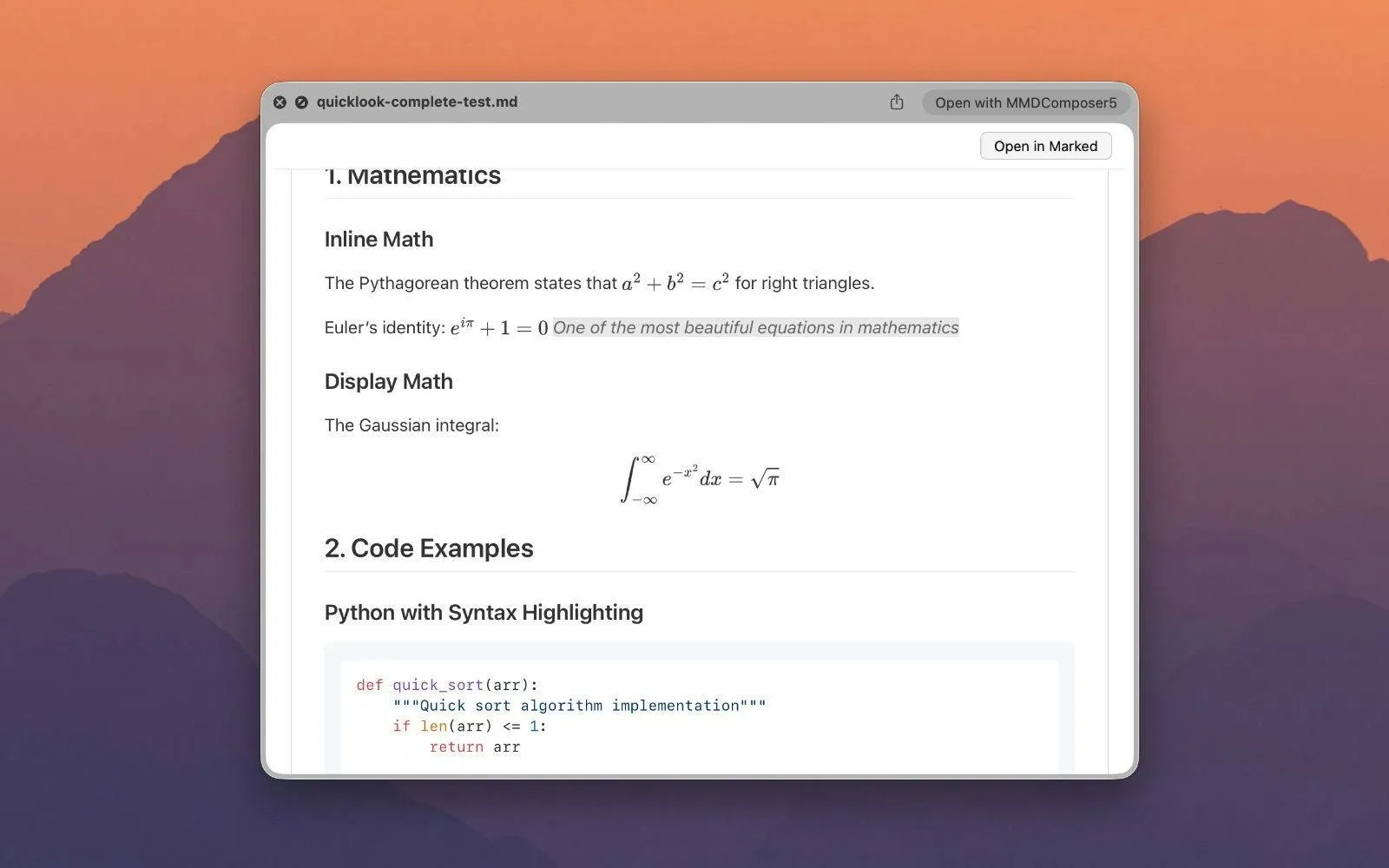
Press Space on a README, a note or an agent instruction file in Finder and macOS shows you pound signs, asterisks and raw pipes. Marked QL replaces that with the rendered document: headings, tables, highlighted code, LaTeX math and Mermaid diagrams, without opening an editor. This piece covers what it renders, how to set it up, and how it compares with the other Markdown previewers for Quick Look.

OneTimePay.app
6 min read
How do I get Quick Look to show formatted Markdown on my Mac?
macOS shows .md files as raw text, so install a Quick Look extension. Marked QL ($9.99 once) renders Markdown, math, Mermaid diagrams, highlighted code and Quarto files when you press Space in Finder. Free QLMarkdown covers the basics.
On this page
How do I get Quick Look to show formatted Markdown on my Mac?
In short
Quick Look has no Markdown renderer of its own, so it falls back to plain text. A Quick Look extension takes over that preview. With Marked QL installed, selecting a .md file and pressing Space shows the rendered document, with an Open in Marked button if you want the full app.
Preview Markdown in Finder: setup in two minutes
Install it: buy it on the Mac App Store, or download the free trial from markedapp.com and buy through the developer later. It needs macOS 13 or later.
Open the app once. That registers the extension with macOS. Then check it is switched on under Quick Look extensions in System Settings.
Press Space on any Markdown file in Finder. Optional shell functions let you type ql README.md in Terminal to open the same preview.
When another app wins the Spacebar
Only one Quick Look extension can own Markdown files at a time. If an editor or an older previewer still answers the Spacebar, the developer's free Quick Look Doctor utility sets the preferred handler, and his troubleshooting page covers the Terminal checks. The ql helper wraps macOS's own qlmanage tool, so it only shows Marked QL's output once Marked QL is the registered viewer.
Price
$9.99 once
Requires
macOS 13+
Trial
Free, direct
App Store version
1.0.24
What Marked QL renders: math, Mermaid, code and more
In short
The engine is Apex, Brett Terpstra's Markdown processor. Its unified mode reads CommonMark, GitHub Flavored Markdown, MultiMarkdown and Kramdown in the same file, so a note written for one tool still renders correctly when you preview it.
Structure: tables, footnotes, task lists, callouts and definition lists.
Code: syntax highlighting through highlight.js, with a choice of syntax themes.
Long documents: a table of contents for navigation and dark mode that follows the system appearance.
Quick Look Mermaid diagrams and LaTeX math
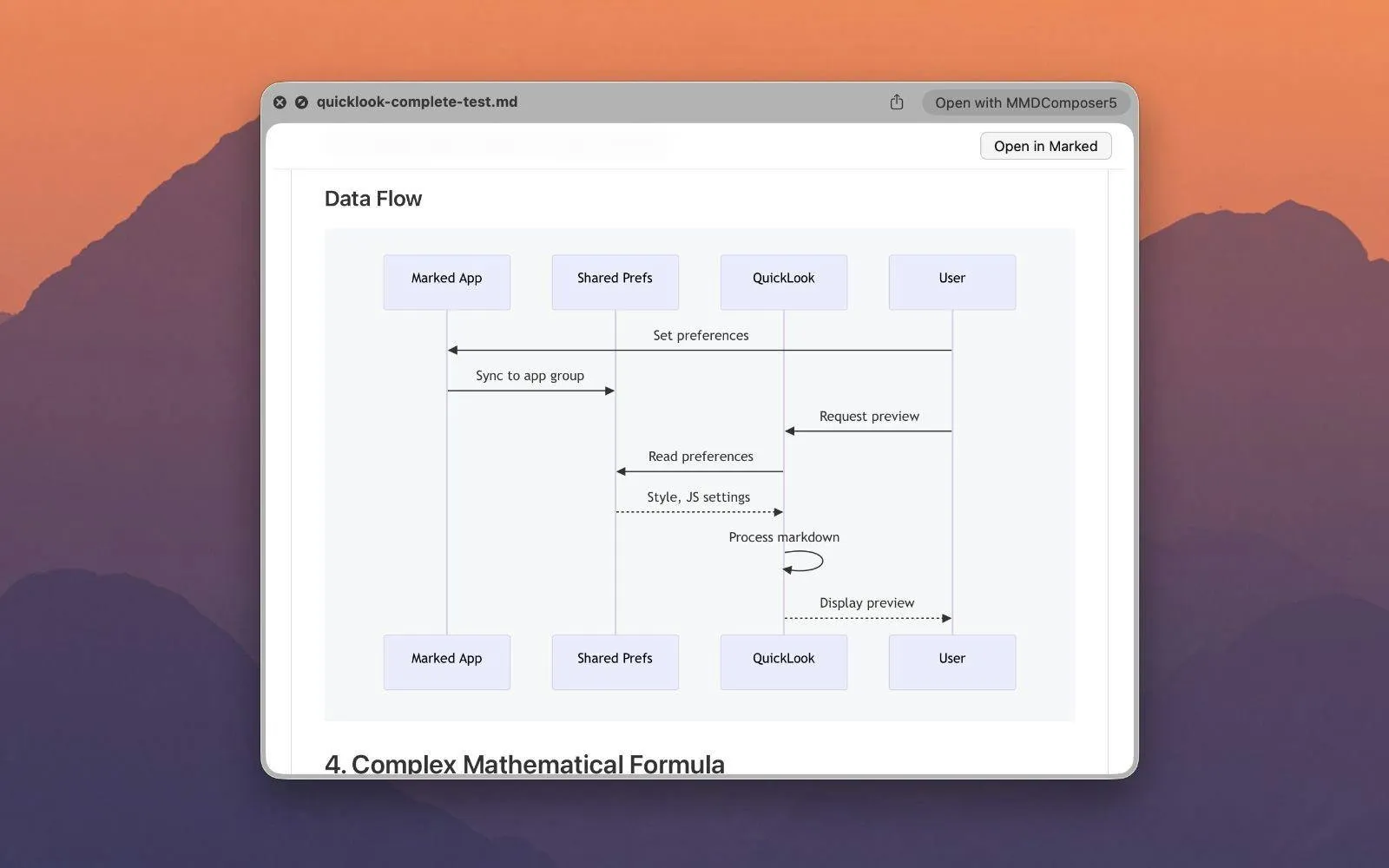
Math renders through MathJax, inline and as display equations. Mermaid code blocks turn into real diagrams in the preview, such as flowcharts and sequence diagrams. Each has its own switch, so you can turn either off if your files never use it.
Quarto files and front matter
Quarto .qmd files preview through Apex's Quarto mode, which helps people who keep research notes or reports in Quarto. YAML front matter, common in static-site and note files, can be shown, hidden or styled instead of appearing as a block of raw keys at the top.
Settings, styles and Marked QL vs Marked 3
In short
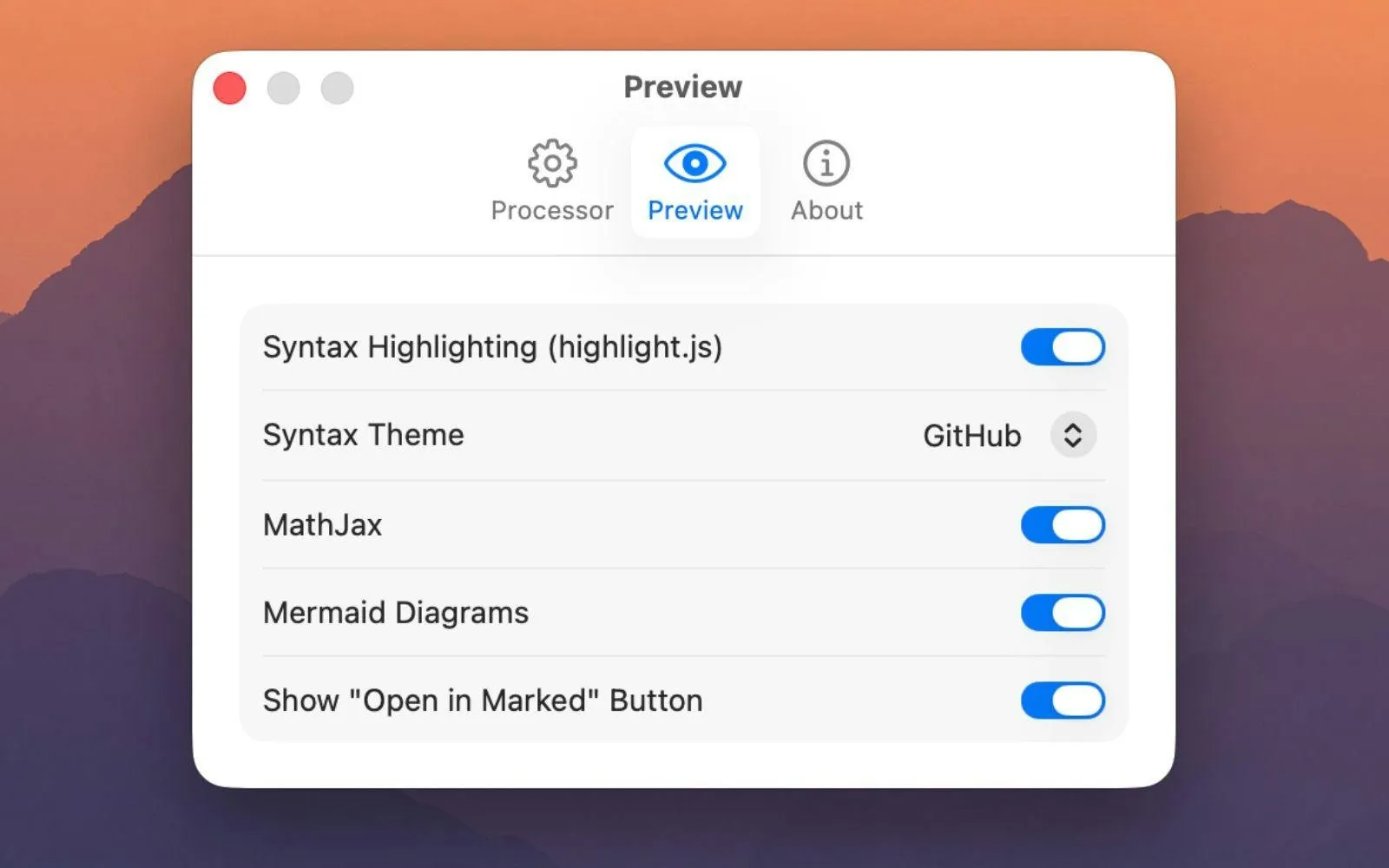
The settings window has two panes. Processor picks the Apex mode, a preview style such as GitHub, and optional custom CSS. Preview holds switches for syntax highlighting, the syntax theme, MathJax, Mermaid and the Open in Marked button.
Marked QL works without anything else installed. Marked 3 is a separate, larger app from the same developer for live preview while you write, export, proofreading and editor integration. If you own both, they share preview styles, so a file looks the same in Finder as it does in Marked. Marked QL is the reader; Marked 3 is the workbench.
QLMarkdown alternative? Every Markdown previewer, compared
In short
Marked QL is not the cheapest way to see formatted Markdown, and it is not the only one with math and diagrams. QLMarkdown is free and open source with optional MathJax and Mermaid. Anybox's Markdown Preview costs $1.99 and renders KaTeX and Mermaid. PreviewMarkdown costs $2.99 and covers the basics. Marked QL costs $9.99 once.
| App | Price | Math | Mermaid | Beyond GitHub style | Source |
|---|---|---|---|---|---|
Marked QL this one this article, direct or App Store | $9.99 once | MMD, Kramdown, Quarto | Closed | ||
QLMarkdown sbarex, GitHub or Homebrew | Free | Optional | Optional | Not stated | GPL-3.0 |
Markdown Preview Anybox, Mac App Store | $1.99 | KaTeX | MDX, TextBundle | Closed | |
PreviewMarkdown Mac App Store | $2.99 | YAML front matter | Public on GitHub | ||
Marked 3 full app, not a Quick Look extension | $2.99/mo or $69.99 | Many | Closed | ||
macOS default Quick Look with no extension | Free | Plain text only | Apple |
The difference that is unique to Marked QL is the processor. Apex understands MultiMarkdown and Kramdown syntax, callouts and definition lists in one pass, adds Quarto mode and a table of contents, and matches Marked 3's styles. If your notes are plain GitHub-style Markdown, a free or $2 previewer shows them just as well.
What you pay
QLMarkdown
$0
free
Markdown Preview
$1.99
once
PreviewMarkdown
$2.99
once
Marked QL
$9.99
once
US prices on 16 October 2026. All four are one-time or free; Marked 3, the full app, is $2.99 a month or a $69.99 unlock.
Who Marked QL suits, and who should skip it
In short
It suits people who flip through many Markdown files with math, diagrams, MultiMarkdown or Kramdown syntax or Quarto, and Marked 3 owners who want matching previews in Finder. Skip it if your notes are plain GitHub-style Markdown or your Mac runs macOS 12 or older.
It is a young app: the App Store listing does not yet have enough ratings to show an average, and releases have come quickly, with version 1.0.24 on 7 October 2026. It comes from Brett Terpstra, the developer of Marked and of the Apex processor it runs on. Setapp members get it as part of that subscription; everyone else pays once.
Try it on your hardest file
Download the free trial, open it once, and press Space on the file with the most math, diagrams or footnotes you have. If it renders the way you expect, buy it once. Everything here was verified on 16 October 2026.
Frequently asked questions
Is there a free Quick Look extension for Markdown on Mac?
Yes. QLMarkdown is free and open source under GPL-3.0, installs with brew install --cask qlmarkdown, and has optional MathJax and Mermaid support. It is the right pick for plain GitHub-style notes. Marked QL has a free trial and then costs $9.99 once; it adds the Apex processor for MultiMarkdown and Kramdown syntax, Quarto files and a table of contents.
Can Quick Look show Mermaid diagrams and LaTeX math in Markdown files?
Not out of the box: macOS shows a .md file as plain text. With an extension it can. Marked QL renders LaTeX through MathJax and Mermaid diagrams, each with its own switch in settings. QLMarkdown and Anybox’s Markdown Preview can render both too.
Why does my Mac still show raw Markdown after installing a previewer?
Open the previewer app once so macOS registers its extension, then check it is switched on under Quick Look in System Settings. If another app still wins the Spacebar, only one handler can own Markdown: Brett Terpstra’s free Quick Look Doctor sets the preferred one, and qlmanage -r in Terminal reloads Quick Look.
Do I need Marked 3 to use Marked QL?
No. Marked QL works on its own. If you also own Marked 3, the two share preview styles, and an optional Open in Marked button jumps from the preview to the full app for live preview, export and proofreading.
Is Marked QL a subscription?
No. It is $9.99 once, either direct with a free trial or on the Mac App Store. It is also part of Setapp, which is a subscription, but you do not need Setapp to buy it.
Sources
- 1
Quick Look extension by Brett Terpstra. $9.99 one-time direct (Paddle, free trial) or Mac App Store, also on Setapp. macOS 13.0 or later. Apex processor, MathJax, Mermaid, highlight.js, Quarto mode, table of contents, front matter display, Quick Look Doctor for conflicts.
- 2
Marked QL on the Mac App Store
$9.99, version 1.0.24 dated 7 October 2026, requires macOS 13.0, not enough ratings yet to show an average.
- 3
The full live-preview app. $2.99 a month or a $69.99 Permanent Unlock (labelled intro price), direct or on the Mac App Store. macOS 11 or newer.
- 4
Free, GPL-3.0, brew install --cask qlmarkdown. Optional MathJax and Mermaid, Highlight-based code coloring, selectable CSS themes. Latest release 1.5.7.
- 5
Markdown Preview (Anybox) on the Mac App Store
$1.99, macOS 12.0 or later. KaTeX, Mermaid, code highlighting, TextBundle and MDX, switch between preview and source.
- 6
PreviewMarkdown on the Mac App Store
$2.99, macOS 11.5 or later, version 2.4.3. Tables, code highlighting, YAML front matter, preview plus thumbnail extensions. No math or Mermaid listed.

Marked QL
Instant rendered Markdown previews in Finder Quick Look
once
macOS
More apps you buy once: browse the desktop