
A Mac Sleep Timer That Waits for Your Movie to End
You put a film on in bed, wake at 3am, and the MacBook is still glowing. SleepBar is a small menu bar app that ends that: it puts the Mac to sleep after a timer, at a clock time, or when the video playing ends. This piece covers what it does, the free Terminal way to get the same result, how it compares with the other sleep timers, and where it falls short.

OneTimePay.app
6 min read
How do I get my Mac to sleep by itself after I fall asleep watching something?
Use a menu bar sleep timer. SleepBar sleeps the Mac after 15, 30, 60 or 120 minutes, at a set time, or when the playing video ends, and warns you a minute first. It costs $4.20 once after a 7-day trial. Terminal's built-in pmset does a plain timed sleep for free.
On this page
How do I get my Mac to sleep by itself after I fall asleep watching something?
In short
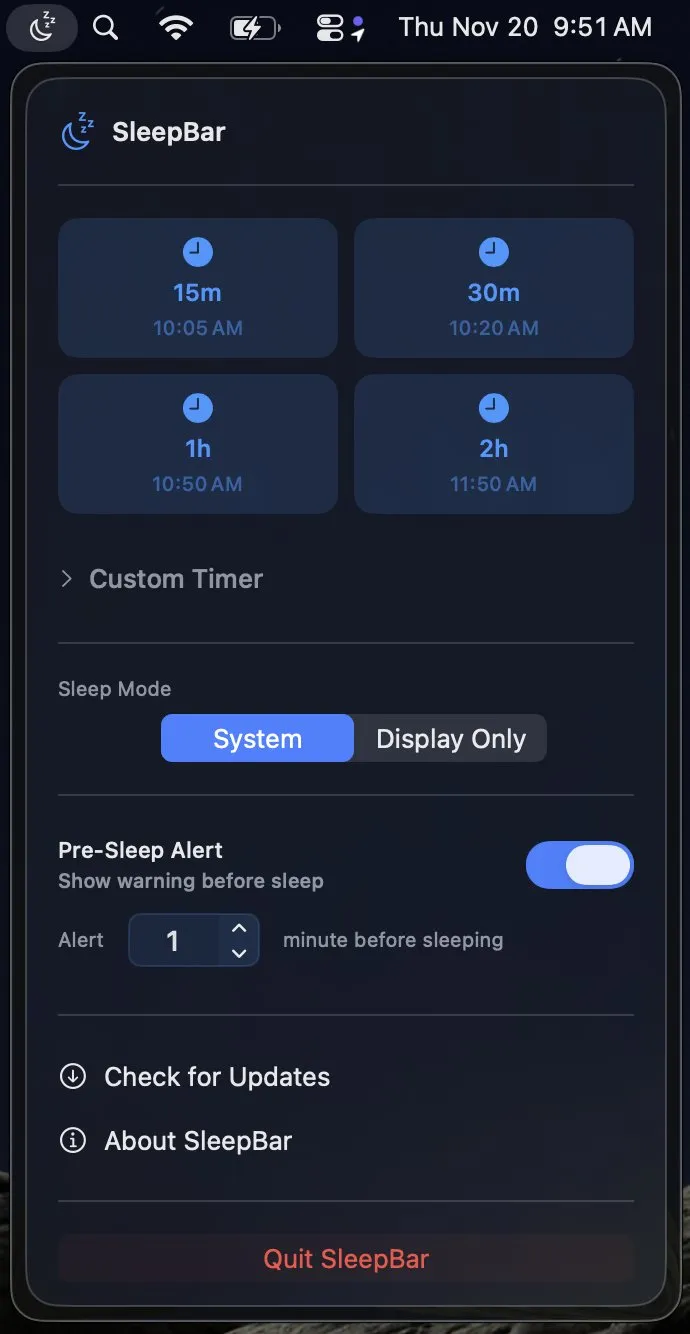
Set a sleep timer before you settle in. SleepBar lives in the menu bar and offers one-click presets of 15, 30, 60 and 120 minutes, each showing the clock time it will fire. Open Custom Timer for any hours and minutes, or pick a specific time such as 00:30.
Sleep the Mac when the movie ends
A fixed timer guesses how long the film has left. Version 1.3.0, released on 20 September 2026, added a third trigger: when media ends. The developer's README says it sleeps the Mac when “the video or track playing in any app finishes”. We have not tested it against every player, so try it in the trial with the apps you use, whether that is a browser tab, a podcast or a local video.
A warning before it fires
By default an alert appears 1 minute before sleep, and you can set a longer lead time or turn it off. From the alert you can snooze, cancel, or sleep now. Since version 1.0.5 the alert can be moved out of the way, and the app remembers your last-used settings.
Price
$4.20 once
Trial
7 days, no card
Needs
macOS 14 Sonoma+
Latest
1.3.0, 20 Sep 2026
System sleep or just the display
In short
SleepBar has two modes. System puts the whole Mac into low power, which is what you want at bedtime. Display Only turns the screen off and keeps the Mac running.
A turn-off-display timer for downloads and renders
Display Only is the mode for an overnight download, a backup or an export: the bright screen goes dark on schedule and the job keeps going. In System mode SleepBar can also eject external drives before the Mac sleeps, a feature added in version 1.0.3 at a Reddit user's request, so a disk is not left mounted while the Mac goes to sleep.
Scheduling Mac sleep since Ventura removed the Energy Saver schedule
In short
macOS Ventura took the sleep schedule out of System Settings. What remains is Terminal: sudo pmset repeat sleep MTWRF 23:30:00 sleeps the Mac every weeknight at 23:30, pmset -g sched shows what is set, and sudo pmset repeat cancel clears it.
That is free and built in, and for a fixed nightly bedtime it is arguably the better tool. It also asks for an admin password, gives no warning before it fires, and has no idea when your film ends. A plain timer works too (sleep 1800; pmset sleepnow), as long as you keep the Terminal window open. SleepBar puts the same jobs behind a click and adds the alert.
SleepBar vs Sleepr, Sleep Utility, Watch Me While I Fall Asleep and pmset
In short
SleepBar is not the cheapest way to sleep a Mac on a timer: pmset and Watch Me While I Fall Asleep are free, and Sleep Utility is $2.99. Sleepr costs $4.99 and adds recurring schedules but needs macOS 26. Of the five, only SleepBar lists sleeping when the playing media ends.
| App | Price | Needs | When media ends | Recurring schedule | Get it from |
|---|---|---|---|---|---|
SleepBar this one this article | $4.20 once | macOS 14 | GitHub, Homebrew | ||
Sleepr menu bar timer | $4.99 once | macOS 26 | Mac App Store | ||
Sleep Utility also shuts down | $2.99 once | macOS 14 | Mac App Store | ||
Watch Me While I Fall Asleep camera check | Free | macOS 15, Apple silicon | Bedtime window | GitHub | |
pmset built into macOS | Free | Terminal, admin | Already on your Mac |
Sleepr and Sleep Utility
Sleepr is the closest match: presets, a custom bedtime, a floating alert to extend or cancel, Shortcuts and Siri, and recurring schedules such as every weeknight at 11 PM. It needs macOS 26 Tahoe, while SleepBar runs on Sonoma and later. Sleep Utility is cheaper and also shuts down, restarts or logs out after a timeout, but lists no warning before it fires. Lullaby, a $1.99 timer you may find in older guides, was last updated in 2012.
What you pay
pmset
$0
built in
Watch Me While I Fall Asleep
$0
free
Sleep Utility
$2.99
once
SleepBar
$4.20
once
Sleepr
$4.99
once
US prices on 11 October 2026. None of these is a subscription.
Trial, license and what the app sends
In short
SleepBar is not on the Mac App Store. You download a notarized DMG from GitHub or run brew install --cask nateships/tap/sleepbar, then use it free for 7 days with no card. A $4.20 license, sold through Lemon Squeezy, unlocks it on up to 3 Macs with lifetime updates.
What leaves your Mac
The privacy policy lists three things. Anonymous usage events (a random device ID, app and macOS version, license status, events such as timer started) go to the developer's CloudKit container; this is on by default and you can switch it off in the About window. Activating a license sends your key and a machine identifier to Lemon Squeezy, and Sparkle checks for updates.
The source is public
The full Swift source is on GitHub under GPL-3.0, so you can read exactly what the timer does before you trust it with your Mac. The trial and license check are part of that code, and the SleepBar name and icon are not covered by the license.
Who SleepBar suits, and who should skip it
In short
SleepBar suits people who fall asleep to films, podcasts or music on a Mac running Sonoma or later and want one menu for timers, clock times and the end of a video. Skip it if you want a repeating nightly schedule, App Store billing, or are happy typing pmset.
It is also a small, young project: one developer, a first release on 3 November 2025, and nine releases since, the latest (1.3.0) on 20 September 2026. If updates ever stop, the public source still lets anyone read and build the last version.
Check before you rely on it
SleepBar is $4.20 once after a 7-day trial, for up to 3 Macs, on macOS 14 or later. It is sold outside the Mac App Store. The when-media-ends trigger is new in version 1.3.0, so test it with your own player during the trial. Everything here was verified on 11 October 2026.
Frequently asked questions
How do I schedule my Mac to sleep now that the Energy Saver schedule is gone?
Use Terminal or an app. In Terminal, sudo pmset repeat sleep MTWRF 23:30:00 sleeps the Mac every weeknight at 23:30, and pmset -g sched shows what is set; it asks for an admin password and gives no warning. SleepBar sets a one-off clock time from the menu bar instead and warns you before it fires.
Can I turn off just my Mac's screen on a timer and keep a download running?
Yes. Switch SleepBar to Display Only before you start a timer. The screen goes dark and the Mac keeps running, so downloads, backups and renders carry on. The free route is Terminal: sleep 1800; pmset displaysleepnow turns the display off after 30 minutes.
Is SleepBar the cheapest way to put a Mac to sleep on a timer?
No, and it does not claim to be. pmset is built into macOS and costs nothing, and Watch Me While I Fall Asleep is free and open source. Sleep Utility is $2.99 on the Mac App Store. SleepBar is $4.20 once and Sleepr is $4.99.
Can SleepBar repeat the same bedtime every night?
Not as a listed feature. You start a timer or pick a clock time each time you need one. If you want "every weeknight at 11 PM" set once, pmset repeat in Terminal does that for free.
Does SleepBar send any data off my Mac?
Some, and its privacy policy lists it. Anonymous usage events (a random device ID, app and macOS version, license status, events such as timer started) go to the developer’s CloudKit container by default; you can turn that off in the About window. License checks send your key and a machine identifier to Lemon Squeezy, and Sparkle checks for updates.
Is SleepBar open source?
Its source is public on GitHub under GPL-3.0, so anyone can read or build it. The 7-day trial and the license check are part of that code, so a self-built copy behaves like the download. The SleepBar name and icon are not covered by the license.
Sources
- 1
The developer’s site: presets of 15, 30, 60 and 120 minutes, custom durations, a specific clock time, System or display-only sleep, a warning 1 minute before sleep, macOS 14.0 Sonoma or later, a 7-day free trial with no credit card, and $4.20 once with lifetime updates on up to 3 Macs.
- 2
Source for "When Media Ends: sleep when the video or track playing in any app finishes", the configurable pre-sleep alert with snooze and Sleep Now, the notarized DMG and Homebrew cask, the GPL-3.0 license (name and icon excluded), and the note that the trial and Lemon Squeezy license check are in the public code.
- 3
SleepBar releases and changelog
First release 1.0.1 on 3 November 2025; drive ejection before sleep in 1.0.3; opt-out analytics and the privacy policy in 1.1.0 (8 March 2026); Open at Login in 1.2.0; sleep when the current media item ends in 1.3.0 on 20 September 2026.
- 4
Effective 8 March 2026. Anonymous usage data (random device ID, app and macOS version, license status, usage events) to Apple CloudKit, on by default and switchable off in the About window; license key and machine identifier to Lemon Squeezy; update checks through Sparkle.
- 5
Sleepr App on the Mac App Store
$4.99 on the US store, macOS 26.0 or later, version 3.0.2 (1 July 2026) with recurring schedules, a floating alert to extend or cancel, and Shortcuts and Siri support.
- 6
Sleep Utility on the Mac App Store
$2.99 on the US store, macOS 14.0 or later, version 2.3.1 (6 June 2026); sleeps, shuts down, restarts or logs out after a timeout typed as "90m" or "2.5h".
- 7
Watch Me While I Fall Asleep on GitHub
Free and open source under Apache 2.0, macOS 15 or later on Apple silicon; a countdown timer plus an optional camera check for closed eyes, analysed on the Mac with no video stored.
- 8
iBoysoft: how to change macOS sleep settings
The Terminal route after Ventura removed the schedule: sudo pmset repeat sleep MTWRF 11:30:00, pmset -g sched to check, sudo pmset repeat cancel to clear.
- 9
Macworld: how to schedule your Mac to turn off and on
Confirms Ventura removed the scheduling options from System Settings and that Terminal’s pmset is the remaining way.
- 10
$1.99, last updated (version 1.0.3) on 13 September 2012.
SleepBar
A simple sleep timer for macOS that schedules your Mac to sleep automatically
once
macOS
More apps you buy once: browse the desktop