
Surf: A Mac Menu Bar Browser That Keeps Sites on Top
You want a tutorial, a chat or a live chart visible while you work in another app, and macOS has no switch to keep a window on top. Surf is a small menu bar browser that does exactly that. This piece covers what it does, the free tools built into your Mac, how it compares with the other floating browsers, and one big caveat: it has not been updated since 2021.

OneTimePay.app
6 min read
How can I keep a website or video floating on top while I work on my Mac?
Use Safari's Picture in Picture for a video, or a floating browser for a whole site. Surf keeps your sites in the menu bar and pins any of their windows always on top, for $11.99 once. It has not been updated since January 2021, so test it on your Mac first.
On this page
How can I keep a website or video floating on top while I work on my Mac?
In short
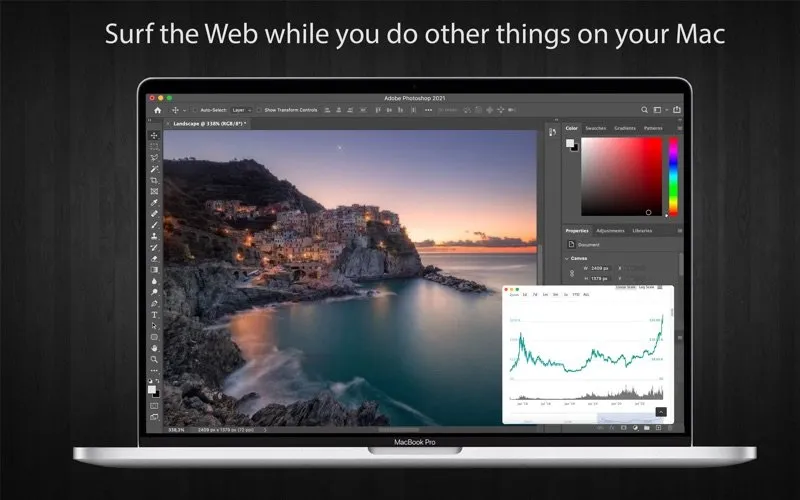
macOS has no always-on-top switch for app windows. Surf adds one for web pages: open a saved site in its own window and that window stays above everything else, so a tutorial, a chat or a stock chart stays in view while you work in Photoshop, Xcode or a spreadsheet.
Floating video window on Mac
For video alone, try the free route first. Safari's Picture in Picture pops a playing web video into a small window that floats over other apps, stays put when you switch Spaces, and can be resized. It shows only the video, though, not the page around it, and not every site offers it.
Always on top browser windows
Surf pins the whole page, so you keep the comments, the chat box or the chart controls. The listing also says you can log in to more than one account on the same site by opening each one in a new always-on-top window.
Price
$11.99 once
Needs
macOS 10.12+
Latest
1.0.1, 8 Jan 2021
Privacy label
Data Not Collected
Your sites in the menu bar
In short
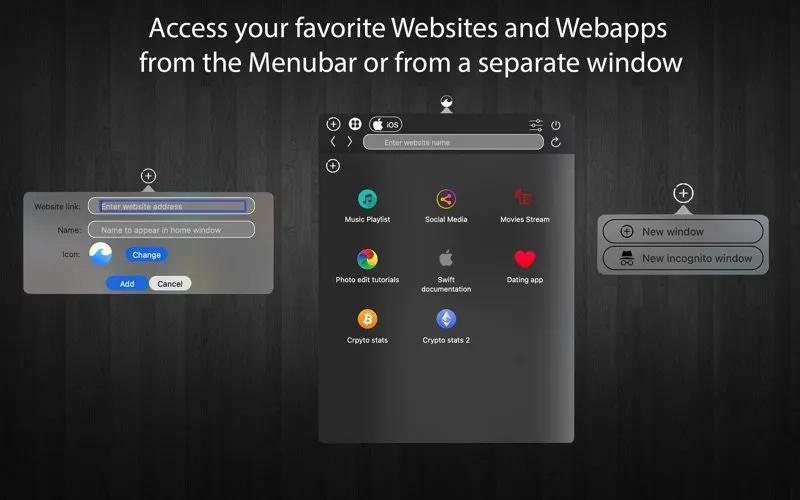
Surf lives in the menu bar. You add a site with its address, a name and an icon, and it appears as a tile in a grid. One click opens it in a popover you can resize by dragging its edges, or in a separate window.
Turn a website into an app on Mac
The tiles work like a launcher of small web apps: a music playlist, a docs page, a dashboard you check twenty times a day. The window menu also offers a New incognito window for a quick look without leaving cookies behind. If you want a site as a Dock app instead, Safari on macOS Sonoma and later does that free with Add to Dock.
Switch between mobile and desktop versions
In short
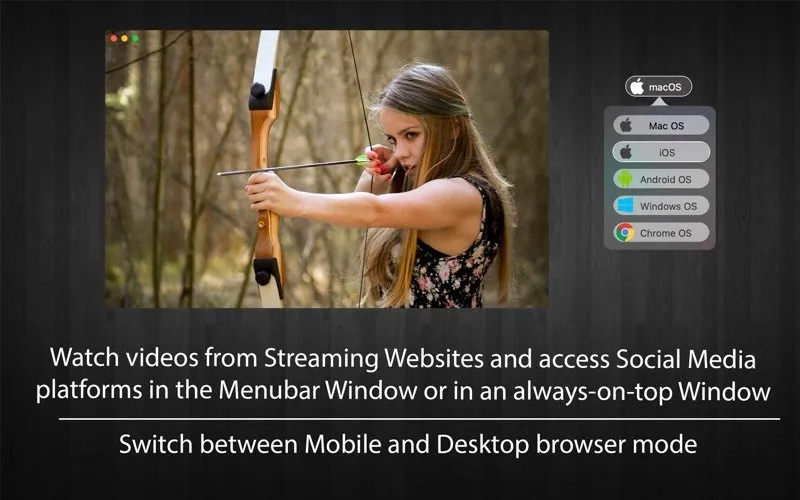
Surf can load a page as macOS, iOS, Android, Windows or Chrome OS. Social sites and many web apps serve a lighter phone layout to iOS and Android, and that layout fits a small floating window far better than the desktop page.
Surf vs MenubarX, Unite, Fluid and Safari
In short
Surf is not the cheapest way to float a site on a Mac. Safari's web apps and Picture in Picture are free, Fluid is free, and MenubarX covers menu bar sites, pinned windows and user-agent switching for free, with a $4.99 lifetime Pro license. Unite Pro costs more, at $39.99 once.
| App | Price | Needs | Menu bar | Stays on top | Mobile site switch |
|---|---|---|---|---|---|
Surf this one this article | $11.99 once | macOS 10.12 | |||
MenubarX updated April 2025 | Free, Pro $4.99 once | macOS 14 | |||
Unite Pro site-specific apps | $39.99 once | macOS 15 | |||
Fluid Dock apps | Free, license $5 | macOS 10.12 | With license | ||
Safari web apps + PiP built into macOS | Free | macOS 14 | Video only |
MenubarX is the one to compare first
MenubarX overlaps Surf almost feature for feature: web pages in the menu bar, a pinned window, a user-agent switcher and a device simulator. It is free to try, its Pro license is cheaper than Surf, and its last update (1.7.6) came on 15 April 2025, while Surf's last update was in January 2021. MenubarX needs macOS 14; Surf lists macOS 10.12, which matters on an older Mac.
Unite, Fluid and Helium
Unite Pro builds full site-specific apps, including menu bar and sidebar apps, with a user-agent manager, but costs $39.99 for one Mac and needs macOS 15. Fluid makes Dock apps free and charges $5 to put them in the menu bar. Helium, a free floating browser many older guides recommend, was archived in February 2022.
What you pay
Safari web apps
$0
built in
MenubarX Pro
$4.99
once, direct
Fluid License
$5
once
Surf
$11.99
once
Unite Pro
$39.99
once, 1 Mac
US prices on 12 October 2026. None of these is a subscription, though Unite is also offered inside the Setapp subscription.
Who Surf suits, and who should skip it
In short
Surf suits people who want a handful of sites one click away in the menu bar, a window that stays on top, and a one-time App Store purchase with nothing to sign up for. Skip it if you want an actively updated app, a free tool, or only need to float a video.
The age is the real trade-off. Surf came out on 30 December 2020 and its only update, 1.0.1, followed on 8 January 2021. It has no ratings on the US store yet, and the listing does not say whether it is a native Apple silicon build. On the plus side, the App Store privacy label reads Data Not Collected (declared by the developer, not checked by Apple).
Check before you buy
Surf is $11.99 once on the Mac App Store and lists macOS 10.12 or later. It has not been updated since January 2021, so try the free options first and, if you buy, test it on your macOS version straight away. Everything here was verified on 12 October 2026.
Frequently asked questions
How do I turn a website into an app on my Mac?
On macOS Sonoma or later, open the site in Safari, click the Share button and choose Add to Dock. The web app gets its own icon and window and keeps its cookies separate from Safari, for free. Surf takes a different route: it keeps your sites in the menu bar and can pin their windows on top.
How do I see the mobile version of a website on my Mac?
Change the user agent the site sees. Surf has a menu that loads a page as iOS, Android, Windows, Chrome OS or macOS, so you can flip a site to its phone layout in one click. In Safari you can do the same per tab from the Develop menu once developer features are turned on.
Is Surf the cheapest way to keep a website on top on a Mac?
No. Safari web apps and Picture in Picture are free and built in, Fluid is free, and MenubarX is free with a $4.99 lifetime Pro license. Surf is $11.99 once. Unite Pro costs more, at $39.99 once for one Mac.
Is Surf still updated?
Not recently. Version 1.0.1 shipped on 8 January 2021, about two weeks after the first release, and the App Store shows no update since. It may still work well, but test it on your macOS version before you rely on it.
Does Surf collect any data?
Its App Store privacy label reads Data Not Collected. That label is declared by the developer and is not verified by Apple.
Sources
- 1
Surf - Web to App & Browser on the Mac App Store
$11.99 on the US store, by Lucian Boiangiu. Version 1.0.1 on 8 January 2021 (first release 30 December 2020), macOS 10.12 or later, about 11 MB, no ratings yet, privacy label Data Not Collected. Lists named, icon-tagged site shortcuts, a resizable menu bar popover, separate always-on-top windows, and Mac, iOS, Android, Windows and Chrome OS user agents.
- 2
Free with a $6.99 MenubarX Pro in-app purchase; version 1.7.6 on 15 April 2025; macOS 14 or later; lists pinned windows, user-agent switching and a device simulator.
- 3
A Lifetime Pro License for $4.99 bought direct, adding unlimited tabs and bookmarks, a custom home page and custom site icons.
- 4
$39.99 once for 1 Mac, $59.99 for 3, $99.99 for 5, with optional paid major upgrades; macOS 15 or later; also on Setapp.
- 5
Free to make Dock apps from any website; a $5 Fluid License adds menu bar (status bar) apps, userscripts, userstyles and full screen; Mac OS 10.12 or later.
- 6
Apple Support: Use Safari web apps on Mac
Web apps arrived in macOS Sonoma 14; each runs independently of Safari and does not share cookies, history or website data with it.
- 7
Apple Support: Play web videos in Safari on Mac
Picture in Picture plays a web video in a movable, resizable window that floats on top of other windows.
- 8
A free, MIT-licensed floating browser window with a click-through translucency mode; archived on 6 February 2022 and marked as no longer maintained.

Surf - Web to App & Browser
Menu bar Mac browser that turns websites into apps and pins video windows on top
once
macOS
More apps you buy once: browse the desktop