
Mac Command Palette With File and Image Tools: Snap Deck HQ
Renaming a folder of photos, turning a PNG into a JPEG or digging up something you copied an hour ago usually means opening three different apps. Snap Deck HQ puts those jobs in the same search bar you use to launch apps. This piece covers what the free version does, what Pro adds, what the lifetime unlock costs, and where Spotlight, Raycast or Alfred is the better choice.

OneTimePay.app
6 min read
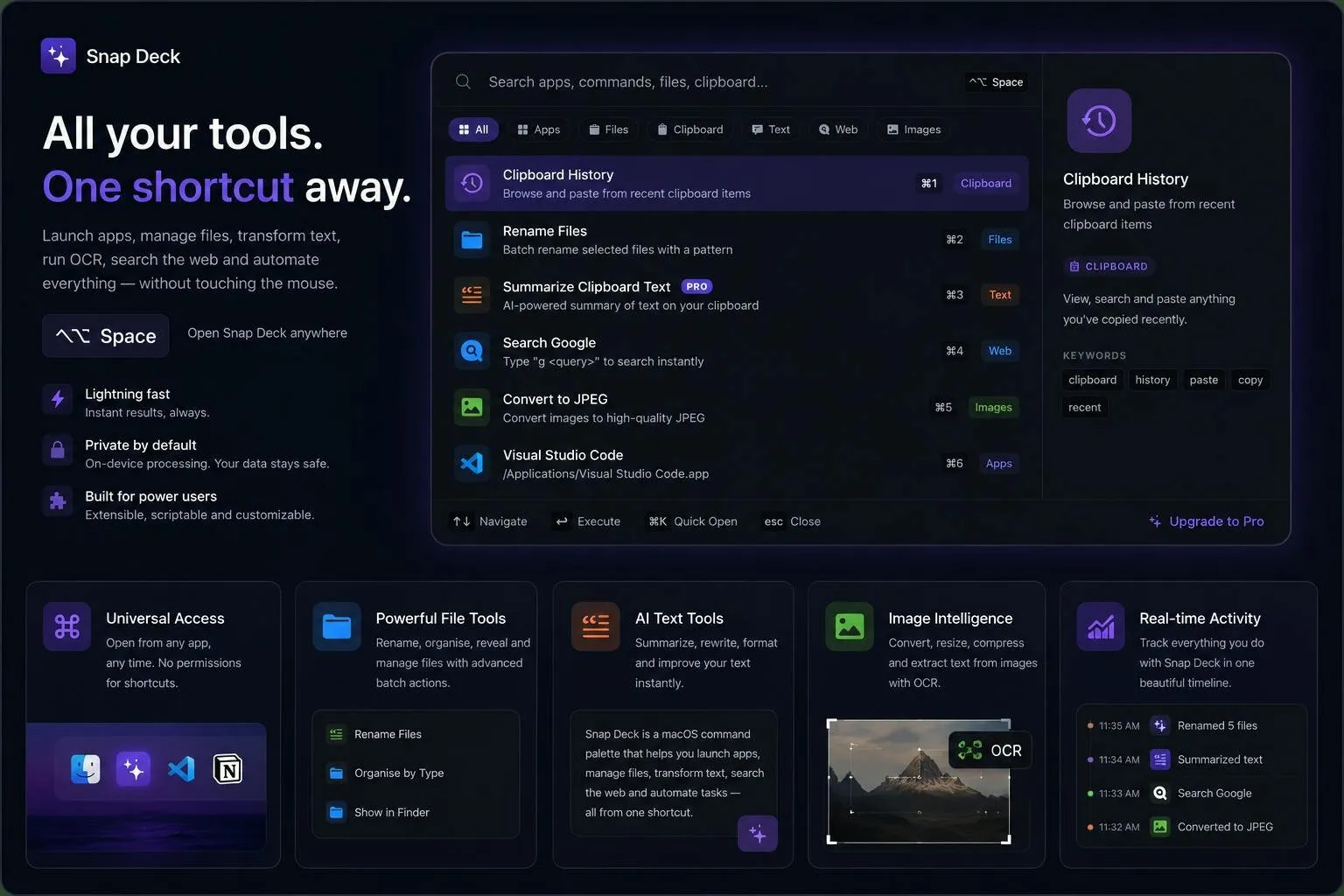
Is there a Mac launcher that can also rename files and convert images?
Yes. Snap Deck HQ opens from one shortcut to launch apps, batch rename and organise files, convert and resize images, search your clipboard history and search the web. Pro adds OCR and AI summaries for $49.99 once or $2.99 a month. It needs macOS 26.4 or later.
On this page
Is there a Mac launcher that can also rename files and convert images?
In short
Yes. Snap Deck HQ is a command palette that lives in the menu bar. A global shortcut opens a search bar with tabs for Apps, Files, Clipboard, Text, Web and Images. Besides launching apps, it renames, moves and organises files in bulk, converts and resizes images, searches clipboard history and runs inline calculations, all in the free version.
Batch rename files on a Mac from the palette
Select files in Finder, open the palette and run Rename Files with a pattern. The developer's example turns photo 1.jpg into photo_1_2024-05-10.jpg using an index and a date token. Other file commands organise files by type, move them and reveal them in Finder. Image commands sit next to them: Convert to JPEG takes a batch of images and shows each one ticking off.
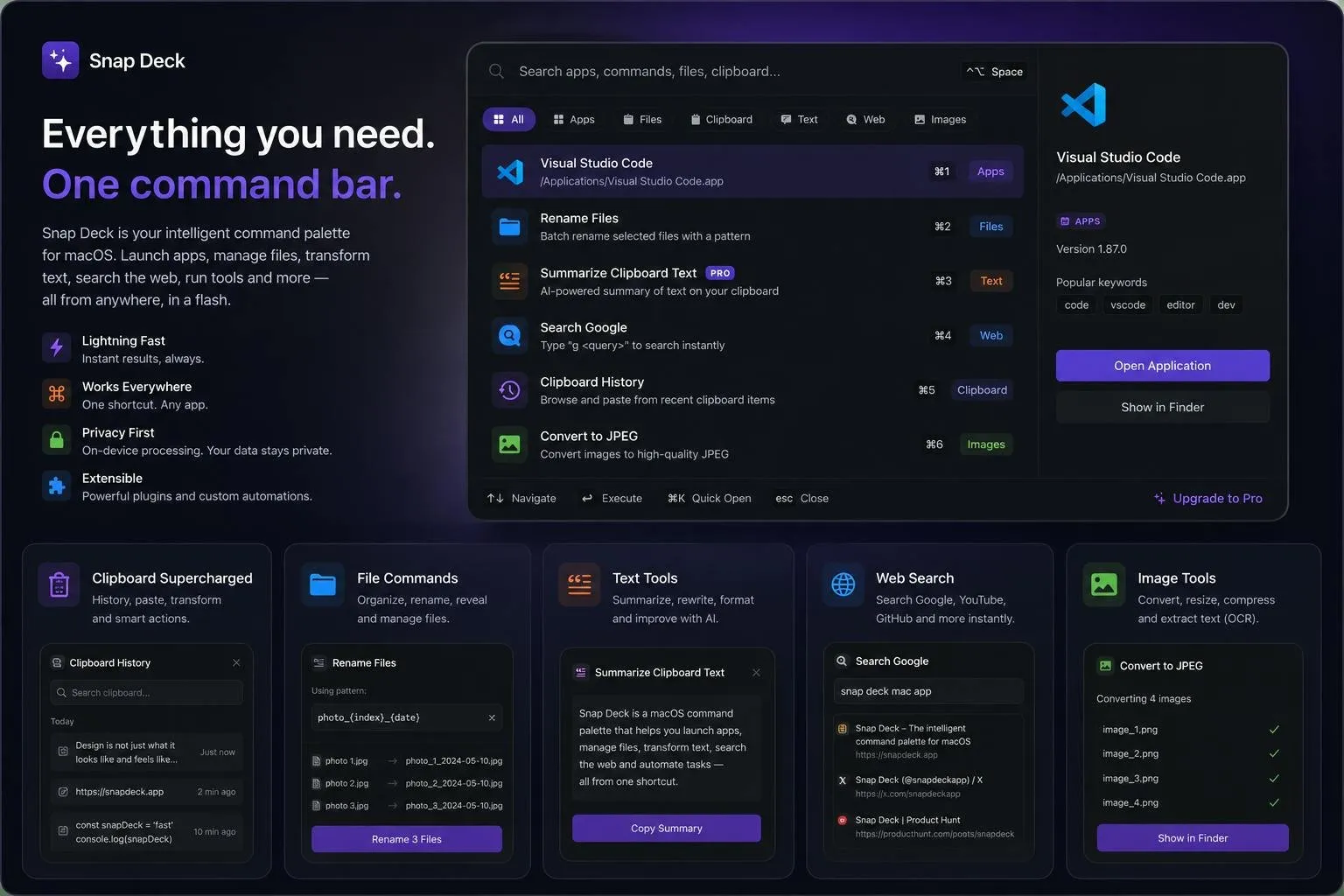
Mac launcher with clipboard history
Clipboard: search and re-paste anything you copied recently, from the same bar.
Web: type a prefix such as “g” and a query to search Google; YouTube and GitHub searches are built in too. Results open in your default browser.
Maths: type a sum and get the answer without opening Calculator.
Keyboard first: arrow keys to move, Return to run, Command plus a number to pick a result, Escape to close.
What Pro adds: OCR, AI summaries and workspaces
In short
Pro unlocks five extras: OCR that pulls text out of any image or screenshot, an AI summariser for clipboard text, batch compression and conversion to HEIC or WebP, resizing to a custom width, height and quality, and saving a workspace of open apps to restore later.
The App Store page says everything runs on-device and its privacy label reads Data Not Collected, with no account to create. The support page adds one exception: AI commands send your text to the AI provider you have configured. The app also asks for Accessibility access, which it uses to see which app is in front so it can offer context-aware commands.
Lifetime unlock vs the monthly plan
In short
The download is free, and Pro is an in-app purchase in three forms: $2.99 a month, $29.99 a year, or $49.99 once for lifetime access. The lifetime unlock equals about 16.7 months of the monthly plan, or about 1.7 years of the yearly one.
Try the free tier first: launching, clipboard, file renaming and image conversion all work without paying, so you will know within a week whether the palette sticks. If you then want OCR or AI summaries for more than a year and a half, the lifetime unlock is the cheaper route.
Lifetime
$49.99 once
Monthly
$2.99
Yearly
$29.99
Break-even
~17 months
Requires
macOS 26.4+
Download
1.4 MB
Snap Deck HQ vs Spotlight, Raycast and Alfred
In short
Snap Deck HQ needs macOS 26.4, so every Mac that can run it already has Spotlight with clipboard history, actions and quick keys, for free. Raycast is free with a large extension store, and its Pro tier is a subscription. Alfred's Powerpack is a one-time £34. Snap Deck HQ's case is file and image tools built in.
| App | Price | Buy once? | Clipboard history | File and image tools |
|---|---|---|---|---|
Snap Deck HQ this one this article | Free; Pro $2.99/mo or $29.99/yr | Yes, $49.99 lifetime Pro | Yes, free tier | Built in: batch rename, convert, resize; OCR in Pro |
Spotlight built into macOS | Free | Nothing to buy | Yes, in macOS Tahoe | Through Shortcuts actions |
Raycast free + subscription | Free; Pro $10/mo or $96/yr | No | Yes, 3 months free; unlimited in Pro | Through community extensions |
Alfred Powerpack licence | Free; Powerpack £34 | Yes, £34 or £59 with lifetime upgrades | Powerpack only | Through workflows |
A Raycast alternative with a one-time purchase
If you want the biggest ecosystem of extensions, Raycast is the stronger pick, and its free plan is generous. If you want a mature launcher you pay for once, Alfred has been sold that way for years. Snap Deck HQ makes sense if you want renaming, image conversion and OCR in the box, with no extensions to find and set up, and a lifetime price.
Who Snap Deck HQ suits, and who should skip it
In short
It suits keyboard-first Mac users who keep doing small file and image chores and want them in the launcher. Skip it if Spotlight already covers you, if you rely on extensions or scripting, or if you would rather wait for an app with a longer track record.
Snap Deck HQ is a one-person project by Sushanth Reddy. Version 1.0 came out on 18 June 2026 and had no update or App Store ratings by late October. The listing images are polished renders rather than raw screenshots, and some of them advertise plugins and automations that the App Store description does not list, so judge the app by what the free tier does on your own Mac.
Before you buy lifetime
Use the free tier for a week of real work, then decide whether OCR and AI summaries are worth $49.99. Prices were verified on 29 October 2026.
Frequently asked questions
Is Snap Deck HQ worth it now that Spotlight has clipboard history?
Only if you want the extra jobs. Snap Deck HQ needs macOS 26.4, and every Mac on that version already has Spotlight with clipboard history, app actions and quick keys for free. What Snap Deck HQ adds is batch renaming and organising files, converting and resizing images, and, with Pro, OCR, AI summaries and workspace restore, all from the same palette. If you only launch apps and paste old clips, Spotlight is enough.
Does Snap Deck HQ need a subscription?
No. The app is a free download, and the free tier launches apps, searches clipboard history, renames and moves files, converts images and searches the web. Pro is optional and comes three ways: $2.99 a month, $29.99 a year, or $49.99 once for lifetime access. The lifetime unlock pays for itself after about 17 months of the monthly plan.
Does Snap Deck HQ send my data anywhere?
Mostly no. The App Store privacy label says the developer collects no data, and there is no account. The exception is AI: when you run an AI command such as Summarize, the text goes to the AI provider you have configured. Web searches open in your default browser. The app also asks for Accessibility access so it can see which app is in front.
Which Macs can run Snap Deck HQ?
Any Mac on macOS 26.4 or later. The download is 1.4 MB and the app lives in the menu bar. There is no iPhone, iPad or Windows version.
Does Snap Deck HQ support plugins or extensions?
Not as far as its App Store description says. It lists built-in commands only, with no extension store or scripting API. If you want community extensions, Raycast and Alfred both have large ones.
Is Snap Deck HQ the only Mac launcher you can buy once?
No. Alfred is free, and its Powerpack, which adds clipboard history and workflows, is a one-time £34. Raycast is free, but its Pro tier is a subscription only. Snap Deck HQ’s difference is that file renaming, image conversion, OCR and AI summaries are built in rather than added through extensions.
Sources
- 1
Snap Deck HQ on the Mac App Store
Free and Pro feature lists; in-app purchases $2.99 monthly, $29.99 yearly, $49.99 lifetime; version 1.0; requires macOS 26.4; 1.4 MB; privacy label Data Not Collected.
- 2
Menu bar app opened by a global hotkey; categories; Accessibility access to detect the focused app; AI commands go to the AI provider you configure.
- 3
Free plan with clipboard history kept for 3 months, window management and extensions; Pro $10 a month or $96 a year, always bundled with AI.
- 4
Powerpack single licence £34, Mega Supporter £59 with free lifetime upgrades.
- 5
Alfred help: Clipboard History
Clipboard History is described as part of the Powerpack.
- 6
MacRumors: Do more with Spotlight in macOS Tahoe
Spotlight in macOS Tahoe adds clipboard history, actions and quick keys.

Snap Deck HQ
Everything you need in one native macOS command bar
once
macOS
More apps worth a look: browse the desktop