
Freshist: A Mac Cleaner That Shows Every File First
The worry with any Mac cleaner is the same: what is it about to delete? Freshist answers it by listing every cache, log and leftover file with its size before you press anything, and by moving what you approve to the Trash. This piece covers its five tools, the menu bar HUD, what it costs, and how it compares with CleanMyMac, Mole, Sensei and the free options.

OneTimePay.app
7 min read
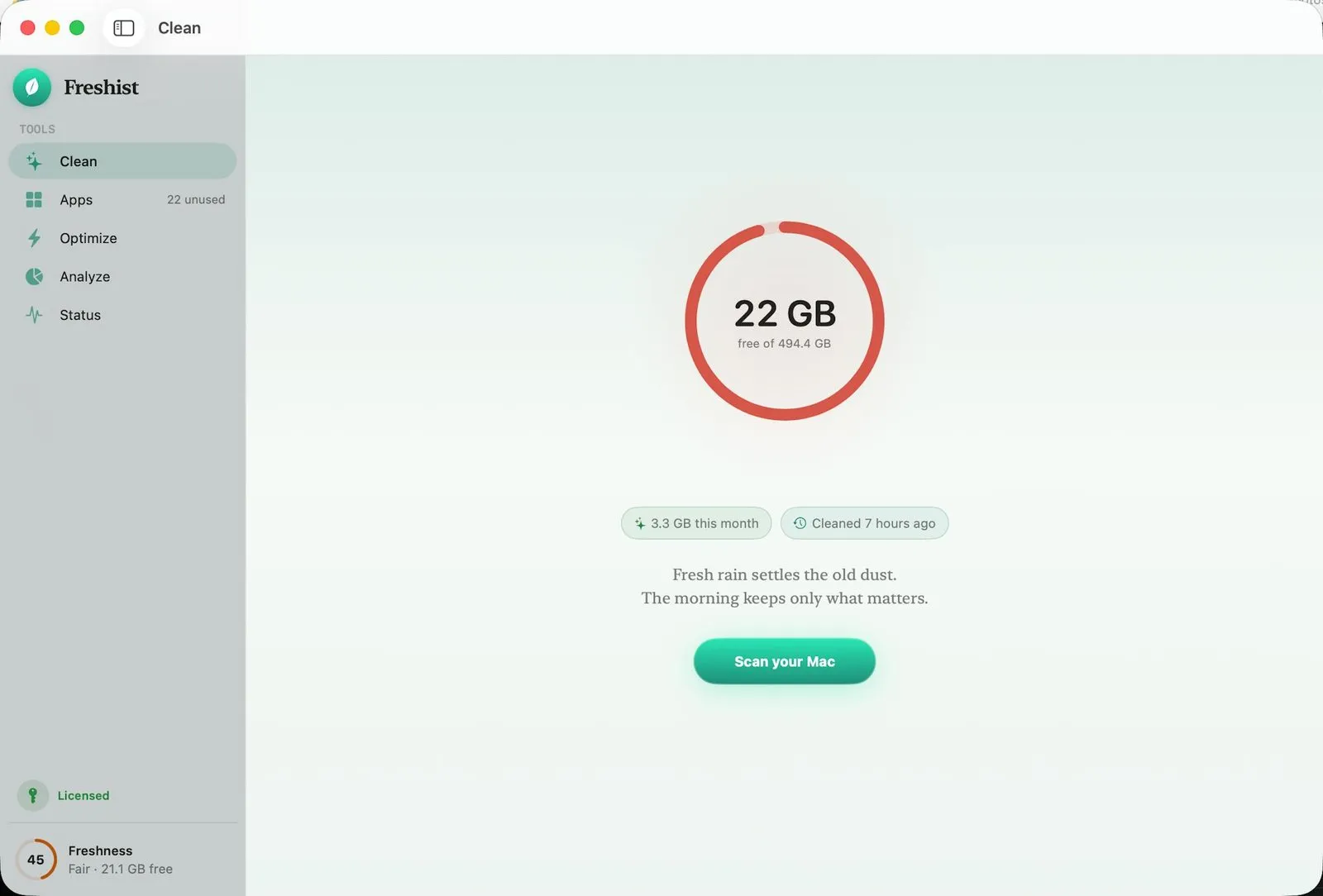
Is there a Mac cleaner that shows me what it will delete before it deletes it?
Yes. Freshist scans first and lists every cache, log and leftover file with its exact size, pre-selects only the safe ones, and flags risky items for review. Whatever you approve moves to the Trash, not straight to deletion, and a local log records it. Scanning is free; the app is $14.99 once.
On this page
Is there a Mac cleaner that shows me what it will delete before it deletes it?
In short
Freshist works scan first, delete later. Its Clean tool lists system, app and browser caches plus developer junk from Xcode, npm, pnpm and Homebrew, each with its size. Safe picks are pre-selected, risky ones are marked review and left unticked, and approved files go to the Trash.
That last step is the safety net most one-click cleaners skip. Because nothing is erased outright, a cache you turn out to need can be dragged back from the Trash. Emptying the Trash, or deleting permanently, is a separate action that asks you to confirm, and every destructive action is written to a local log on your Mac.
For developers the developer-junk group matters most: Xcode build data and package manager caches for npm, pnpm and Homebrew are often the largest regenerable folders on a Mac. If most of your space goes to Docker, Gradle or AI model caches, the deeper, developer-only DevCleaner covers more toolchains.
Uninstall Mac apps completely, leftovers included
In short
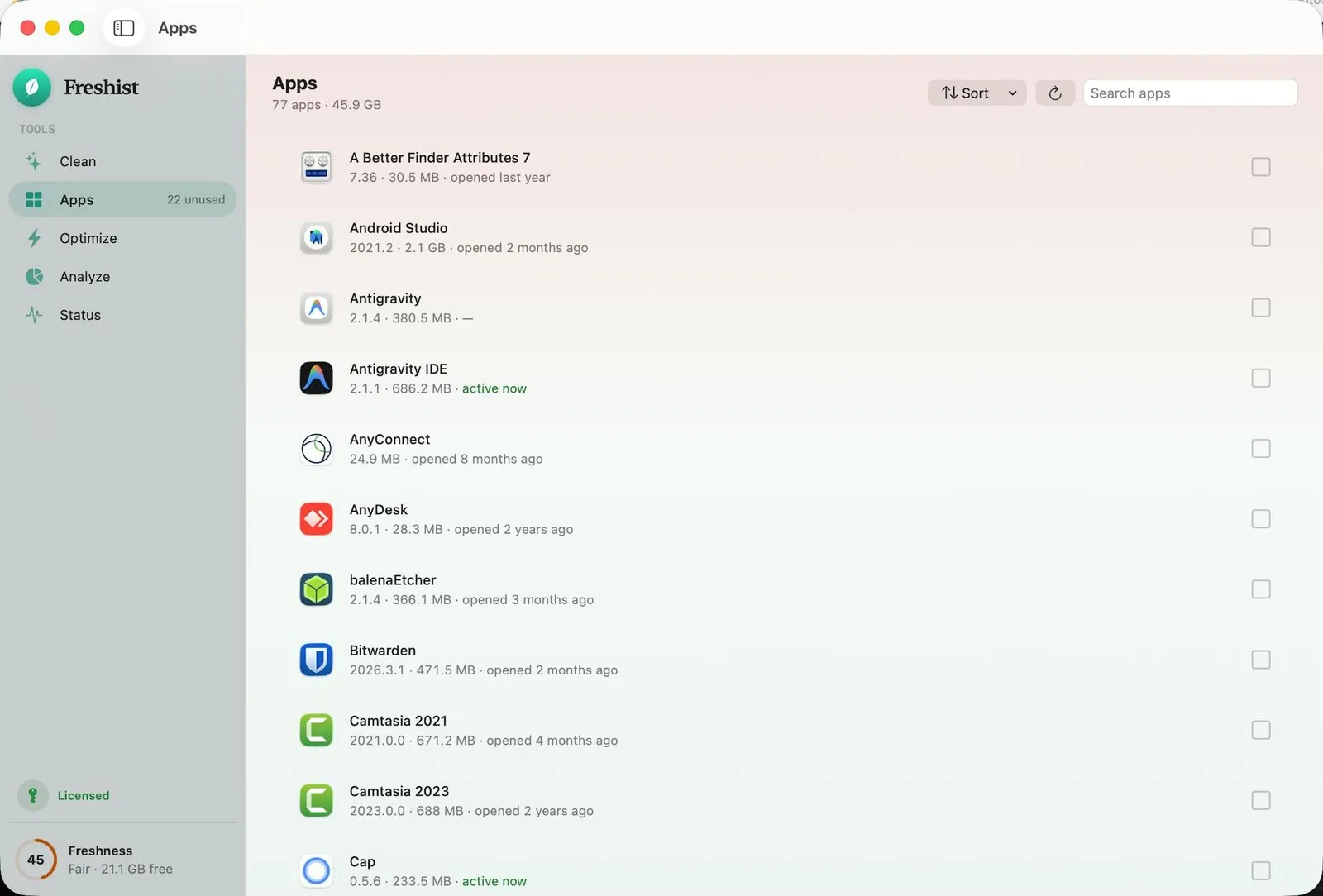
Dragging an app to the Trash leaves its caches, preferences and support folders behind. Freshist's Apps tool finds those related files for each app, shows the full list with sizes, and removes the app and its leftovers together once you have reviewed them.
Spot the apps you forgot
Each row shows the version, the size on disk and when you last opened the app, and the sidebar counts how many you have not used in a while (22 in the screenshot). The Sort menu and search make it quick to find the 2 GB IDE you installed for one project two years ago.
Optimize: named maintenance tasks, not a magic button
In short
Optimize is a checklist of named macOS maintenance jobs, each of which you can switch off. The default set leaves your files alone; tasks that need admin rights, such as flushing DNS or releasing inactive memory, run through a helper and are unticked by default.
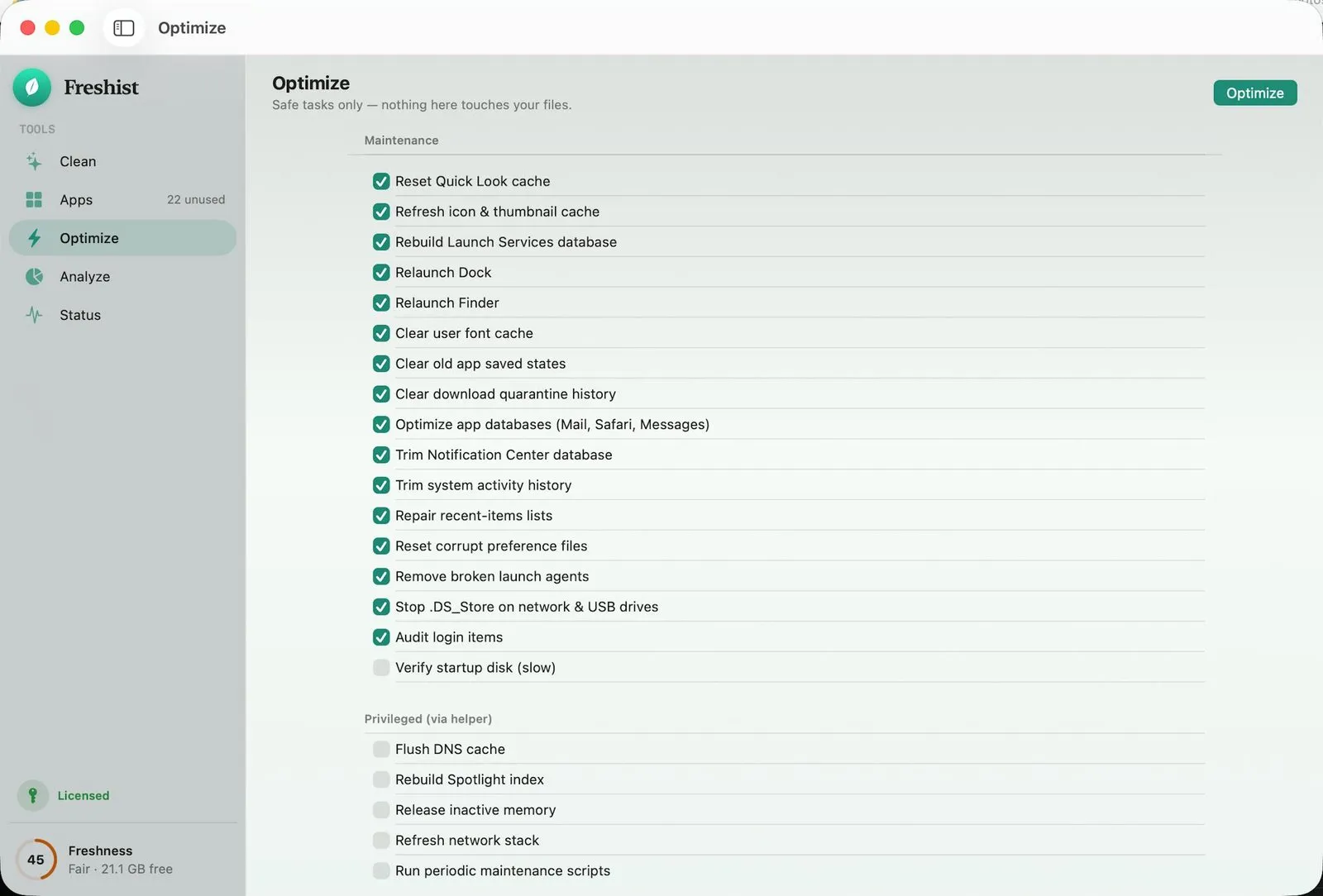
Caches and databases: reset Quick Look, icon and font caches, rebuild the Launch Services database, and trim the Notification Center and activity history.
Housekeeping: remove broken launch agents, audit login items, clear old saved app states, and stop .DS_Store files on network and USB drives.
Privileged, opt-in: flush DNS, rebuild the Spotlight index, release inactive memory, refresh the network stack, and run the periodic scripts.
See where the space went: a Mac disk space treemap
In short
Analyze draws your disk as a treemap next to a sorted folder list, so the biggest blocks are obvious at a glance. You can drill from Home into Library and below, and a Project Caches view sits one click away in the toolbar.
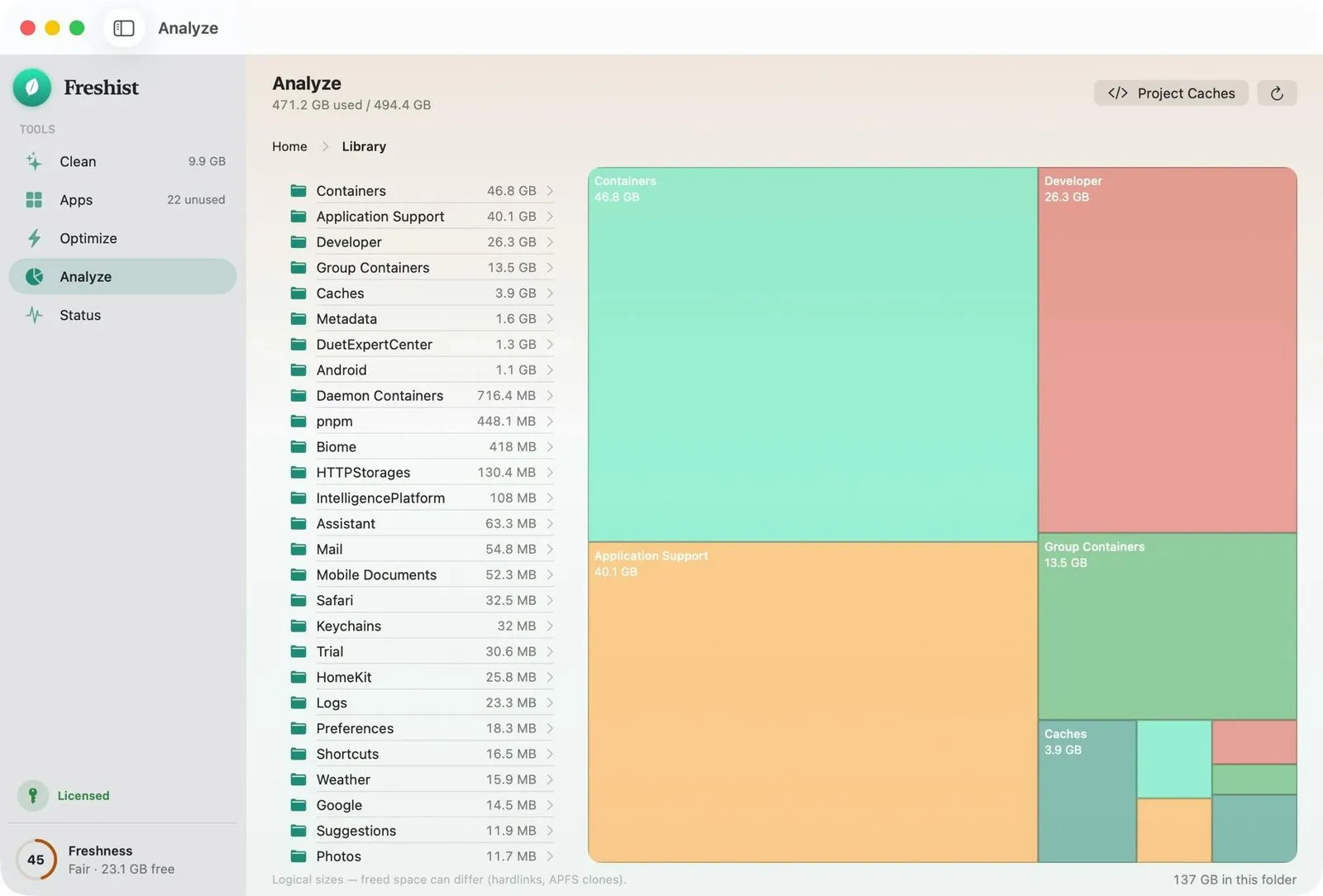
The size math counts hardlinked files once, and the footer says plainly that freed space can differ from the logical size because of hardlinks and APFS clones. That honesty matters: a cleaner that promises 40 GB and frees 12 has usually double-counted shared blocks.
Status and the menu bar HUD
In short
Status is a live dashboard for CPU, GPU, memory pressure, battery, disk, network and fans, with top processes by CPU, power and RAM. The same vitals sit in a menu bar HUD that also carries Auto, Cool and Max fan presets, Keep Screen On, and one-click Eject All.
That makes Freshist a Mac menu bar system monitor as well as a cleaner, which most cleaners leave to a second app. A few small extras round it out: Run Doctor (a one-tap checkup), Privacy Check (which apps are using the camera or microphone right now), and Clean Screen (a calm full-screen mode for wiping the display).
Every Mac cleaner you can buy once, compared
In short
Freshist is the cheapest paid all-in-one we found at $14.99 for 3 Macs. Its closest rival, Mole, has the same five tools for $19 and 2 Macs. It is not the cheapest overall: the free tools cost nothing, and DaisyDisk maps your disk for $9.99.
| App | Price | Macs | Cleans caches | Uninstaller | Disk map | Live monitor |
|---|---|---|---|---|---|---|
Freshist this one fresh.ist | $14.99 once | 3 | ||||
Mole Mac app | $19 once | 2 | ||||
Sensei Cindori | $59 once or $29/yr | 3 | Not listed | |||
CleanMyMac MacPaw, Basic | $119.95 once or $47.50/yr | 1 | ||||
DaisyDisk disk map | $9.99 once | 5 | ||||
Free tools Pearcleaner, AppCleaner, Stats, Mole CLI | Free | Any |
Mole is the one to weigh seriously: its Mac app mirrors Freshist's Clean, Optimize, Analyze and Status tools and adds an app updater, and its engine is an open-source command-line tool you can audit. Sensei adds drive health, battery health and disk benchmarks, but its lifetime license covers only versions 1 and 2. CleanMyMac is the guided suite with malware scanning, which Freshist does not offer, at roughly eight times the one-time price. A CleanMyMac alternative for free means stitching several tools together, some of them in the terminal.
Free tools
$0
free
DaisyDisk
$9.99
disk map only
Freshist
$14.99
once
Mole
$19
once
Sensei
$59
lifetime
CleanMyMac
$119.95
one-time Basic
One-time prices on 19 October 2026. CleanMyMac per Macworld, July 2026.
Price
$14.99 once
Macs
Up to 3
Trial
Free scans + 2 cleans
Refund
14 days
Requires
macOS 14+
Version
2.1.0
Who Freshist suits, and who should skip it
In short
It suits people who want a Mac cleaner without a subscription that shows its work, plus an uninstaller, disk map and system monitor in the same window. Skip it if you are on macOS 13 or older, want malware scanning, or are happy with free tools.
Cautious cleaners who have been burned by a one-click tool and want every file listed and sent to the Trash first.
Developers whose Xcode, npm, pnpm and Homebrew caches keep eating the disk.
Households with several Macs, since one license covers three.
Two things to know before you buy
Freshist is sold as a direct download from fresh.ist, not through the Mac App Store, and the license is activated with a key emailed after checkout. The no-telemetry promise is the developer's own claim; we did not audit the app's network traffic. Run a free scan first to see what it would remove on your Mac.
Frequently asked questions
How do I fully uninstall a Mac app, including the files it leaves behind?
Dragging an app to the Trash leaves its caches, preferences and Application Support folders behind. Use an uninstaller that finds those files. Freshist's Apps tool lists every app with its size and last-opened date, gathers the related files, and shows the full list before anything moves to the Trash. Pearcleaner and AppCleaner do the same job for free.
What's a CleanMyMac alternative I only pay for once?
Freshist is $14.99 once for up to 3 Macs. Mole, which has the same five tools, is $19 once for 2 Macs. Sensei has a $59 lifetime license for 3 Macs that covers versions 1 and 2. CleanMyMac itself also sells a one-time Basic license, listed by Macworld at $119.95 for one Mac.
Is Freshist a subscription?
No. It is a single $14.99 purchase with lifetime updates through the built-in updater. The license key arrives by email after checkout, and there is no account to create.
Is Freshist the cheapest way to clean a Mac?
No. AppCleaner, Pearcleaner, Stats and the Mole command-line tool are free, and DaisyDisk maps your disk for $9.99. Freshist is cheaper than the paid all-in-one suites we checked and puts cleaning, uninstalling, maintenance, a disk map and a system monitor in one app.
Does Freshist run on Intel Macs?
Yes. It needs macOS 14 Sonoma or later and runs on both Apple Silicon and Intel Macs. It is a native SwiftUI app distributed as a notarized DMG, not through the Mac App Store.
Can I try Freshist before paying?
Yes. Scanning is always free, so you can see what it would remove first, and the trial includes 2 cleans. After buying, there is a 14-day no-questions refund.
Sources
- 1
$14.99 once with lifetime updates, up to 3 Macs, macOS 14 or later on Apple Silicon and Intel, notarized DMG outside the App Store, free scanning plus 2 trial cleans, 14-day refund, version 2.1.0. No telemetry, per the developer.
- 2
The Mole Mac app: $19 once for 2 Macs, free updates, macOS 14 or later, with Clean, Software, Optimize, Analyze and Status tools.
- 3
The free, GPL-3.0 command-line version: mo clean, mo uninstall, mo optimize, mo analyze and mo status. macOS 12 or later.
- 4
Macworld: Best Mac cleaner, tested and compared
Updated 20 July 2026. Lists CleanMyMac Basic at $47.50 a year or $119.95 one time for 1 Mac, and DaisyDisk at $9.99.
- 5
$29 a year or $59 lifetime, each for up to 3 Macs. The lifetime license covers major versions 1 and 2.
- 6
$9.99 lifetime license for up to 5 personal Macs, macOS 10.13 or later. A disk map, not a cache cleaner.
- 7
Free, source-available app uninstaller with orphaned file search, macOS 13 or later. The project is marked On Hold.
- 8
Free download (donations accepted) that finds and removes the files an app leaves behind. Version 3.7 needs macOS 15.
- 9
Free, MIT-licensed menu bar monitor for CPU, GPU, memory, disk, network, battery and sensors. Fan control is in legacy mode.

More apps you buy once: browse the desktop