
Keepresso: Keep Your Mac Awake Only When It Matters
A Mac that sleeps mid-job stops your coding agent, pauses your download and drops your remote session. A Mac that never sleeps runs the battery flat. Keepresso sits between the two: it keeps the Mac awake while real work is running and lets it sleep once the work stops. This piece covers how it tracks AI agents, its triggers, lid-closed mode, and how it compares with the other keep-awake tools.

OneTimePay.app
7 min read
How do I keep my Mac from sleeping while my AI coding agent is working?
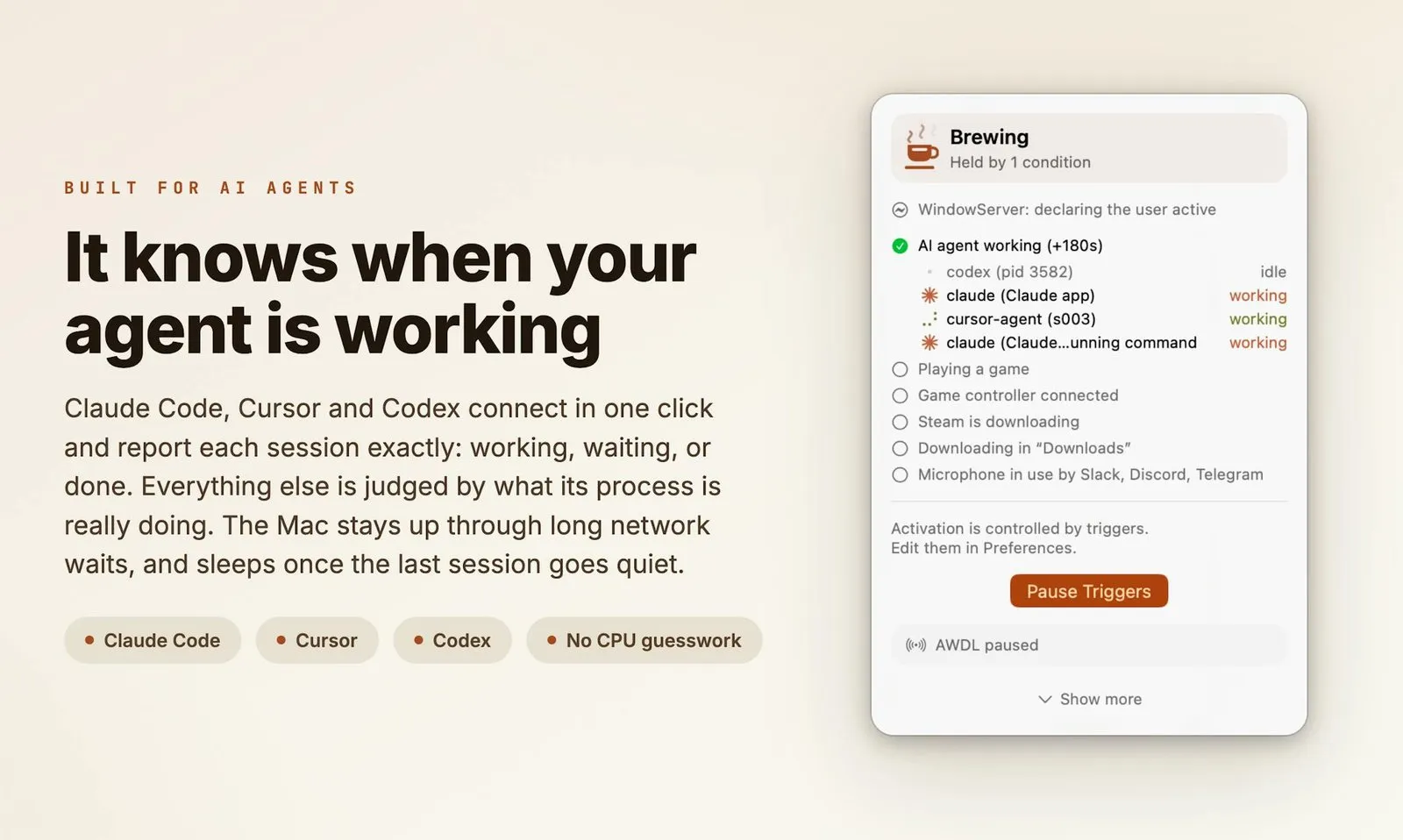
Hold a power assertion only while the agent runs. For one process, caffeinate -w with its process ID does that in Terminal. Keepresso, a free, open-source menu-bar app, tracks Claude Code, Cursor and Codex sessions, keeps the Mac awake mid-turn, and lets it sleep when the last one goes quiet.
On this page
How do I keep my Mac from sleeping while my AI coding agent is working?
In short
System sleep is what suspends a running agent; a locked screen or a dark display does not. So the fix is to block system sleep for exactly as long as the agent works. Keepresso adds an “AI agent is working” condition that does this and lets the Mac sleep after a grace period you choose once every session is idle.
Keep Mac awake for Claude Code, Cursor and Codex
Claude Code, Cursor, Codex, Grok and Antigravity can report their state exactly through an opt-in hook you connect in one click. A session counts as working when the tool says so, a pending permission prompt counts as working (the Mac waits for your answer), and background subagents count too. Agents without a hook, such as Gemini, Aider, Goose or OpenCode, are judged by their transcript on disk or by the CPU of their processes against each session's own idle level. The menu lists every session as working or idle.
Automation leases for scripts and other agents
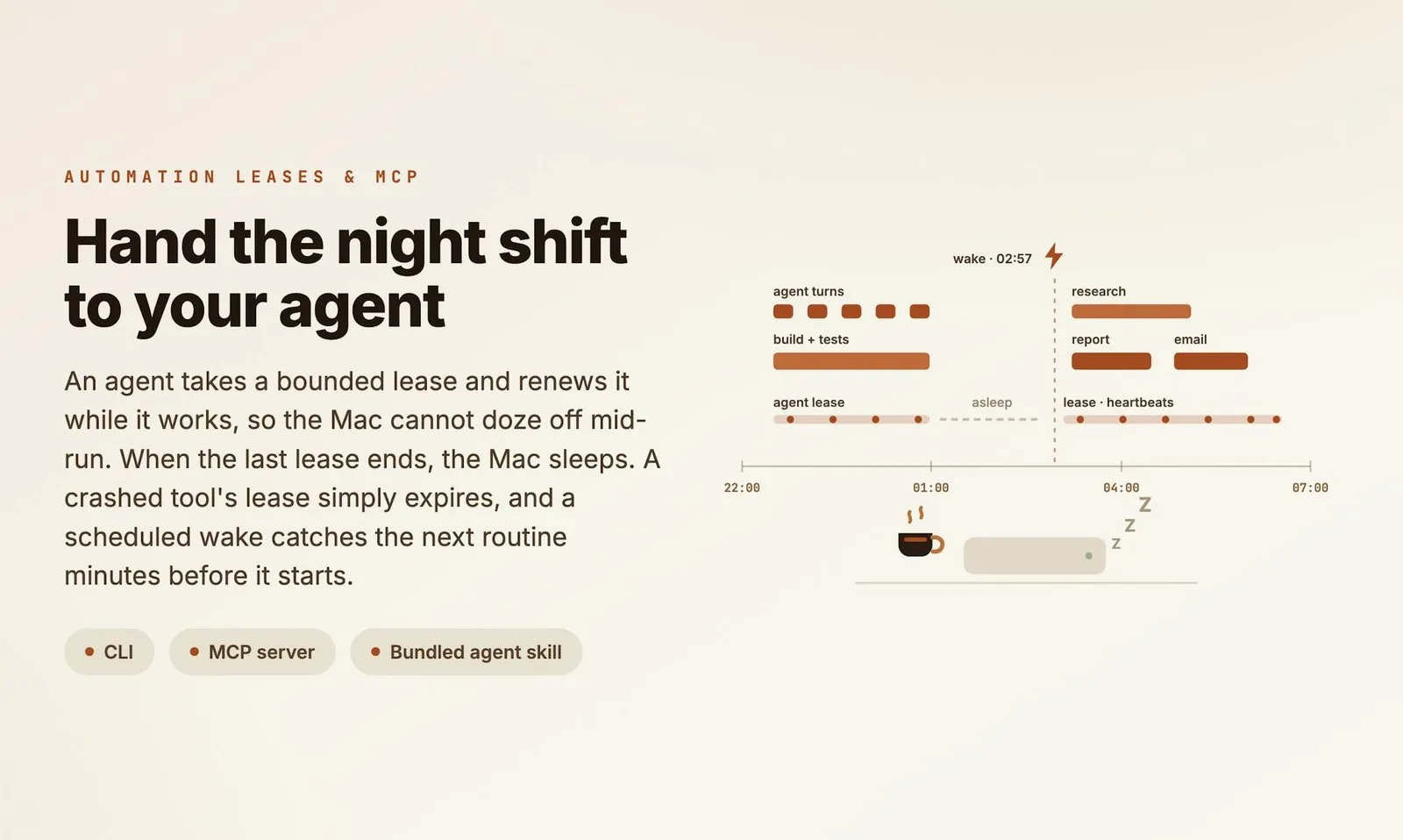
For long jobs, the agent can ask instead of being watched. A script or agent runs keepresso lease acquire with a time limit, renews it with heartbeats while it works and releases it at the end. If the tool crashes, the lease expires and the Mac sleeps again. No lease can live longer than 7 days. The same protocol is offered as an MCP server, and the app ships an agent skill that teaches it, which you install from Preferences.
Price
Free · GPL-3.0
Requires
macOS 14+
Languages
15
Latest release
1.27.0
Smart triggers: awake only while something is running
In short
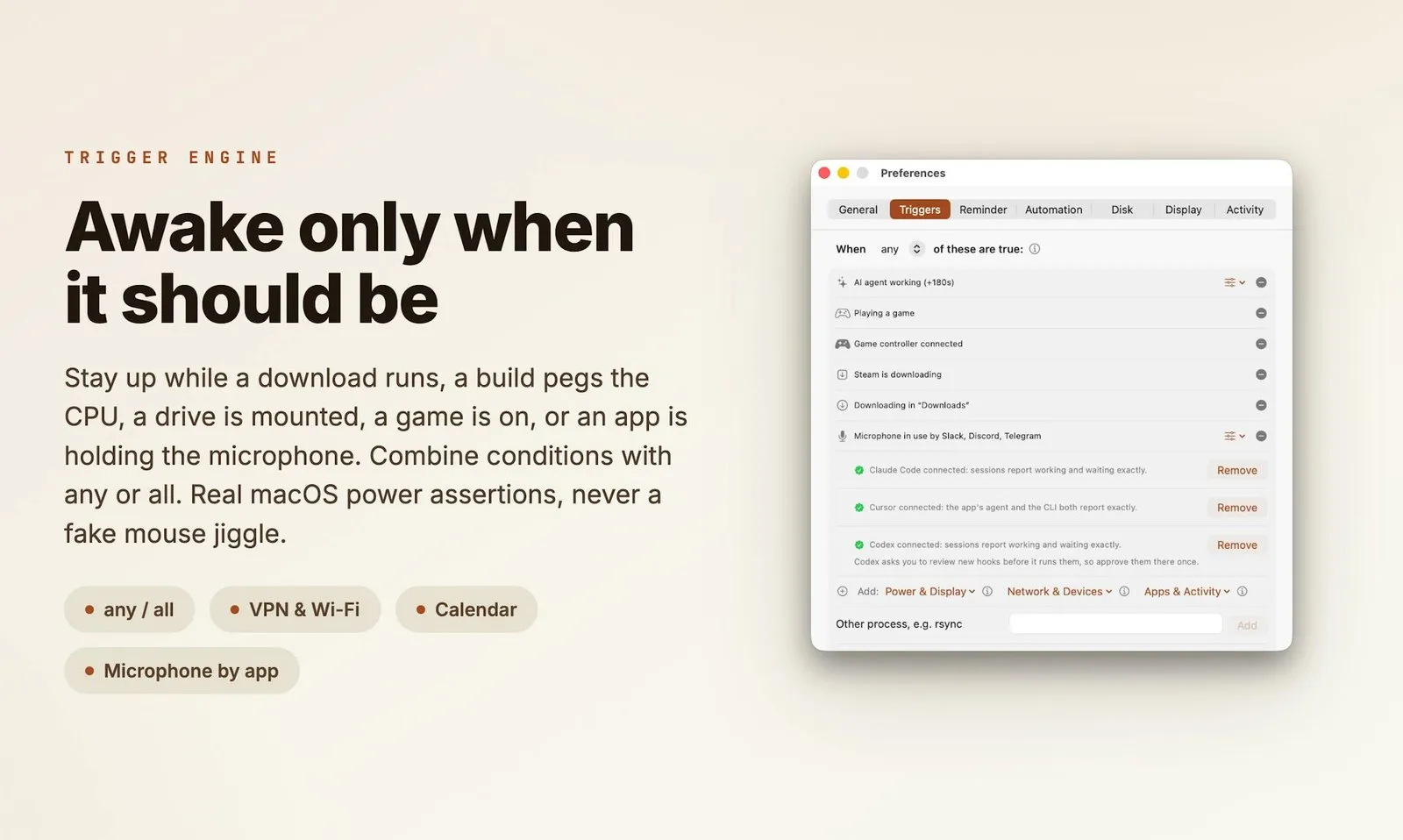
Agents are one condition among many. Keepresso holds the Mac awake while any (or all) of your chosen conditions are true, and drops the hold the moment they stop, so you never have to remember to switch it off.
Work in progress: CPU above a threshold (builds, renders), network throughput above a threshold, a download in a folder you pick, a Steam download.
Calls and media: camera or microphone in use (browser calls included, read from the in-use signal, no camera permission), optionally scoped to one app, or audio playing.
Where you are: on power or battery, an external display, a Wi-Fi network, a VPN, a Bluetooth device, a mounted volume.
When: a calendar event in progress, a time window such as weekdays 9:00 to 18:00, or a specific app or process running.
Presets for meetings, gaming, backups and renders
Built-in presets apply a bundle of conditions in one click: AI Agent, Gaming, Cloud Gaming, Meetings, Remote Control, On AC Power, External Display Connected, Remote Session (SSH), Backup Running and Media Render. You can save your own. For manual use there are timed sessions, “until 18:00” sessions, quick “Stop in 15” buttons, a global hotkey, Shortcuts actions and a keepresso:// URL scheme for Raycast or Alfred.
Keep MacBook awake with lid closed
In short
Closed-display mode keeps a MacBook running with the lid shut, on battery or power, with no external display. With “Only while brewing” on, the override starts and ends with the keep-awake session, so normal lid sleep comes back when the job is done.
The override changes a system setting, so macOS asks for an administrator password once per app run. The optional administrator helper, approved once under Login Items, removes that prompt. You choose whether the screen turns off (the default), stays on at zero brightness for remote desktop, or is left alone.
Heat and battery
A closed Mac under load runs warmer. Keep it on a hard, ventilated surface, never in a bag. Keepresso can pause the session when macOS reports thermal pressure, boost the fans first through the helper, switch on Low Power Mode while the lid is shut, and let the Mac sleep once the battery drops below a level you set.
Amphetamine alternative? Every keep-awake option, compared
In short
Most keep-awake tools for the Mac cost nothing, so price will not decide this. caffeinate ships with macOS, KeepingYouAwake and Caffeine are open source, and Amphetamine is free on the App Store. Lungo costs $4 and Agent Awake $7 once. What separates them is what can start and stop the hold, and whether it survives a closed lid.
| App | Price | Source | Automatic triggers | Knows AI agents | Lid closed, battery |
|---|---|---|---|---|---|
Keepresso this one this article, DMG or Homebrew | Free | GPL-3.0 | Many, any/all | Hooks + CPU + leases | |
Amphetamine Mac App Store, last update Nov 2023 | Free | Closed | Many | ||
KeepingYouAwake GitHub or Homebrew | Free | MIT | Basic | ||
Caffeine iannuttall, GitHub | Free | MIT | Agents only | Claude Code + Codex hooks | Best effort |
Agent Awake menu-bar app | $7 once | Closed | Agents only | By CPU | Not stated |
Lungo Mac App Store, macOS 26+ | $4 | Closed | |||
caffeinate built into macOS, Terminal | Free | Apple | Scripts only | -w on one process |
The caffeinate command, when it is enough
For one job in one Terminal window, the built-in command is fine: caffeinate -i -w 1234 keeps the Mac awake until process 1234 exits, and caffeinate -t 3600 holds it for an hour. It does not override lid-close sleep, -s only works on AC power, and a forgotten one keeps running. An app earns its place when several things should hold the Mac awake on their own.
What you pay
Keepresso
$0
free
Amphetamine
$0
free
KeepingYouAwake
$0
free
Lungo
$4
once
Agent Awake
$7
once
US prices on 15 October 2026. None of these charges a subscription.
Who Keepresso suits, and who should skip it
In short
It suits Mac users who leave work running unattended: coding agents, builds, renders, downloads, backups, calls, or a headless Mac mini. Skip it if you only ever flip a switch by hand, if your Mac runs macOS 13 or older, or if your company allows App Store software only.
Keepresso is not on the Mac App Store, because the App Sandbox blocks the power APIs it relies on. It installs as a signed, notarized DMG or with brew install --cask gyorgysh/keepresso/keepresso, and its full source is on GitHub. It is also young: it launched in July 2026 and ships updates often, which means fast fixes but a long feature list that is still settling. The optional “Keep me active” feature, which nudges the cursor or a key so chat apps do not mark you away, is off by default and separate from the keep-awake itself.
Try it on one real job
Install it, turn on the AI Agent or Backup Running preset, and start the job you usually babysit. Check the Activity pane afterwards: it logs why each session started and stopped. Everything here was verified on 15 October 2026.
Frequently asked questions
How do I keep my MacBook awake with the lid closed?
On its own, macOS only keeps a closed MacBook running when it has power, an external display and a keyboard or mouse. To do it on battery with no display you need an app that overrides lid sleep, such as Keepresso or Amphetamine. Keepresso asks for administrator approval once per run, or never if you install its helper. Keep the Mac ventilated, never in a bag, and set a battery floor.
Is there a free open-source alternative to Amphetamine for Mac?
Yes. Keepresso is free under GPL-3.0 and covers triggers, timed sessions and lid-closed mode. KeepingYouAwake is free under MIT but is a simpler switch that does not work with the lid closed. Caffeine, also MIT, focuses on keeping the Mac awake for coding agents. Amphetamine itself is free too, but closed source and last updated in November 2023.
Does caffeinate keep a Mac awake with the lid closed?
No. caffeinate holds idle, display and system sleep, but closing the lid still sleeps the Mac unless it is in clamshell mode with power and an external display. caffeinate -s also only works on AC power.
Is Keepresso safe to install outside the Mac App Store?
Its full source is public on GitHub under GPL-3.0, and releases are signed and notarized by Apple. It is not on the App Store because the App Sandbox blocks the power APIs it uses. Features such as Keep me active or closed-display mode ask for Accessibility or administrator approval only when you turn them on.
Is Keepresso the only app that knows when an AI agent is working?
No. The open-source Caffeine app has Claude Code and Codex hooks, Agent Awake ($7 once) watches agent CPU, and caffeinate -w can follow a single process for free. Keepresso adds exact state for Claude Code, Cursor, Codex, Grok and Antigravity, leases for other tools, and other triggers in the same app.
Will keeping my Mac awake drain the battery?
Yes, a Mac held awake uses more power than a sleeping one. Keepresso limits that with timed sessions, triggers that let go when the work stops, a battery level below which it lets the Mac sleep, and optional Low Power Mode while the lid is shut.
Sources
- 1
Free, open source, native menu-bar app for macOS 14 or later, 15 languages. Smart triggers, timed sessions, closed-display mode, automation leases with an MCP server, headless-Mac toolkit.
- 2
GPL-3.0, Swift and SwiftUI, IOPMAssertion power assertions. Full trigger list, agent hooks for Claude Code, Cursor, Codex, Grok and Antigravity, presets, closed-display mode, thermal and battery safety nets. Latest release 1.27.0 on 14 October 2026.
- 3
Keepresso: automation leases for AI agents
keepresso lease acquire, heartbeat and release; TTL renewed by heartbeat, maximum lifetime capped at 7 days; MCP server and bundled keep-awake skill; leases can be switched off in Preferences.
- 4
Keepresso: keep your MacBook awake with the lid closed
Works on battery without a display; administrator helper or approval; Only while brewing; three display choices; Low Power Mode and fan floor while closed; ventilation advice.
- 5
Amphetamine on the Mac App Store
Free, no in-app purchases. Version 5.3.2 dated 10 November 2023.
- 6
MIT license, macOS 10.13 or later, brew install --cask keepingyouawake. Prevents sleep on desktop Macs and on portable Macs with the lid open only.
- 7
$4.00, version 2.8.3, requires macOS 26. Its developer notes App Store rules stop it from keeping a closed lid awake.
- 8
Caffeine (iannuttall) on GitHub
MIT, macOS 14 or later. Optional Claude Code and Codex hooks, process watching for other agents, best-effort closed-lid mode.
- 9
Agent Awake on Product Hunt (via hunted.space)
$7 one-time menu-bar app that holds the Mac awake while a coding agent is using CPU.

Keepresso
Keep your Mac awake, on your terms. Free and open source
macOS
More apps you buy once: browse the desktop