
The Night App Blocker for Android That Locks Until Morning
You get into bed to sleep and open Instagram instead, and an hour is gone before you notice. HyperSleep is an Android app that locks the social feeds you pick from bedtime through the night, so the phone stops being the reason you are still awake. By the end of this piece you will know exactly how its overnight lock works, why bedtime scrolling costs you sleep, and where a free tool or a cheaper subscription blocker fits you better than a $79.99 one-time purchase.

OneTimePay.app
10 min read
TikTok
YouTube
Bedtime
10:00 PM
Morning
Feeds open
What app blocks social media at night and won't unlock until morning?
HyperSleep, an Android app that blocks the social feeds you choose from bedtime through the night and holds the block until morning, rather than on a timer you can dismiss in a groggy second. You pick the apps and set a bedtime, and the block auto-starts each night. It is one purchase of $79.99, no subscription, though it is not the cheapest way to block apps at night.
On this page
What app blocks social media at night and won't unlock until morning?
In short
HyperSleep, an Android app, blocks the social feeds you choose at bedtime and keeps them locked through the night until morning. You choose which apps and set your bedtime, then the block holds instead of relying on a timer you can dismiss the moment you want to keep scrolling. It is sold once, with no subscription to renew.
The category it sits in is narrow: a night app blocker for Android whose whole job is to make bedtime scrolling harder than reaching for the phone. Plenty of tools can block apps. What HyperSleep does by default, out of the box, is the one thing that matters at 1am, keep the feed shut until the night is over, without you having to build a schedule inside a general-purpose blocker or trust a soft reminder you can wave away. The rest of this piece is how it holds that block, who it actually fits, and the honest places a free tool or a cheaper subscription does the job for less.
How the overnight lock keeps feeds shut
In short
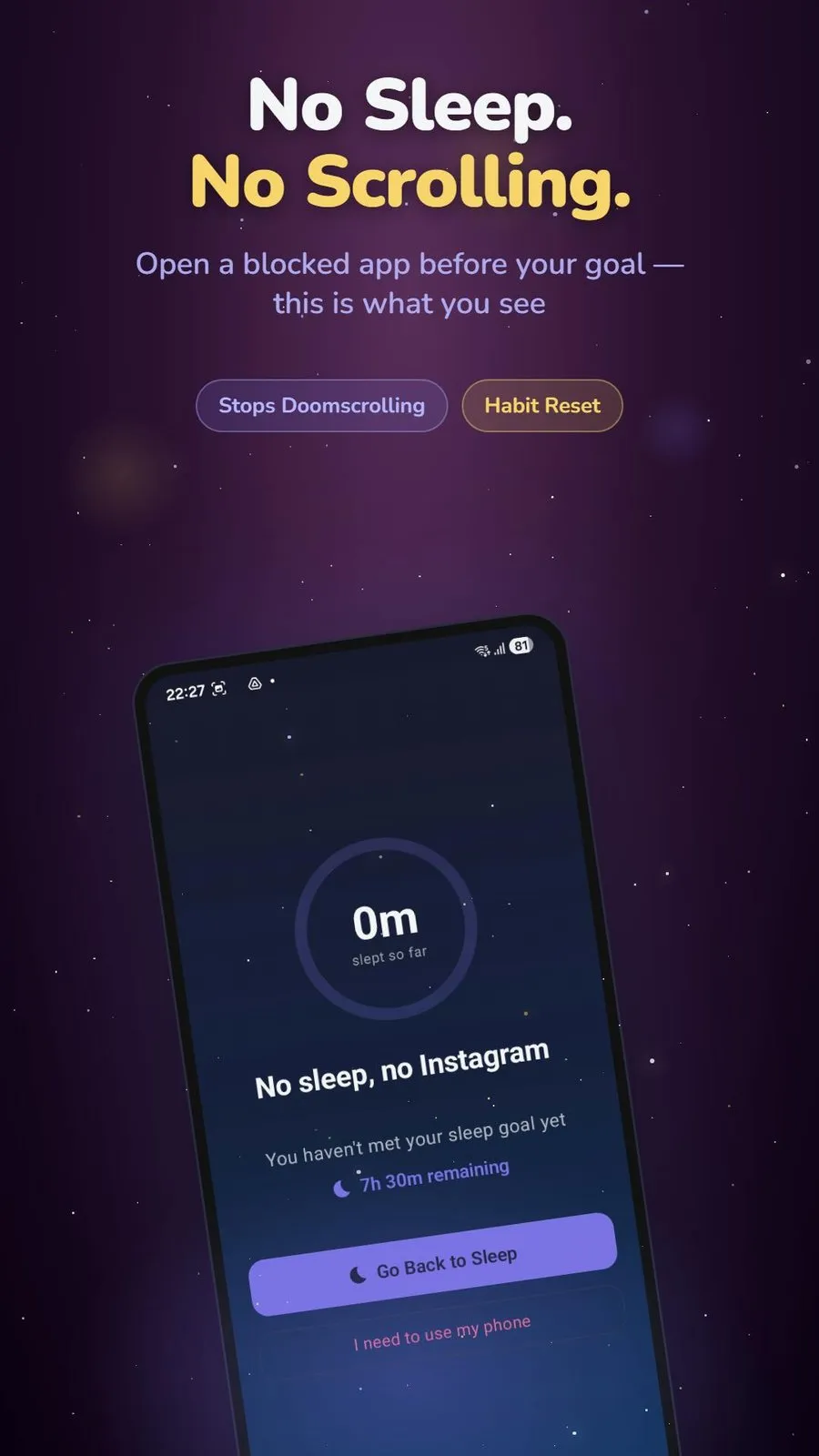
You set a bedtime and pick the apps to block, and HyperSleep holds that block through the night. It targets the social feeds you choose rather than shutting down the whole phone, so alarms, calls, and maps still work while Instagram and TikTok stay locked until morning.
A block that holds, not a timer you can dismiss
The difference between HyperSleep and a plain screen-time timer is what happens when you try to get past it. A schedule you set on yourself is only as strong as your willpower at the exact moment it fails, which is late at night, in the dark, half asleep. HyperSleep is built so the block holds through the night rather than lifting the instant a countdown ends or you tap dismiss. Practically, the feed you reach for is not there, and the friction of that is the entire point: the lock does not depend on you deciding, again, to be disciplined at 1am. It ties the block to the night itself, not to a clock you can roll forward, so moving the time or restarting the app is not the easy escape hatch it is on a basic timer.
Which social apps you can lock overnight
You decide what counts as a distraction. HyperSleep lets you choose which apps go on the blocked list, so the usual bedtime offenders, Instagram, TikTok, YouTube, Reddit, X, and the rest, stay shut while the tools you might genuinely need at night do not. Because it blocks the specific feeds you name rather than locking the entire device, the phone is still a phone overnight: the alarm goes off, a call from home still rings, and the maps app still works if you are out. It removes the apps that keep you up without turning the handset into a brick you cannot use in an emergency.
Why bedtime scrolling costs you sleep
In short
Screens near bedtime cost you sleep in two ways. Bright, blue-heavy phone light holds down melatonin, the hormone that cues sleep, and an infinite feed removes the natural stopping point that would otherwise send you to bed. A blocker helps because it targets the second problem, the one willpower keeps losing.
Blue light and melatonin
The physical half is real but often overstated, so here is the honest version. In a Harvard study, four hours of reading on a light-emitting screen before bed cut evening melatonin by about 55% compared with reading a printed book, and it pushed the body clock later. Blue-wavelength light, the kind phone screens emit heavily, suppresses melatonin more strongly than warmer light of the same brightness. The catch worth being straight about: total brightness and how long you look also matter, so dimming the screen and putting it away earlier does more than a blue-light filter alone. A night blocker is not a substitute for that, but it does force the screen out of your hands at the hour it costs you the most.
Bedtime procrastination is a willpower trap
The behavioral half is where a blocker actually earns its place. Researchers named the pattern bedtime procrastination: needlessly staying up past the time you meant to sleep, and they tie it to weak self-control at night rather than not being tired. The popular version, revenge bedtime procrastination, adds the motive many people recognize, clawing back a bit of personal time after a day that ate all of it. Either way the mechanism is the same: an endless feed has no last page, so the decision to stop never arrives on its own. That is exactly the decision HyperSleep makes for you, by removing the feed instead of asking you to close it. The evidence that this helps is modest but real: in a randomized trial, cutting off phone use 30 minutes before bed for four weeks helped people fall asleep about 12 minutes faster and sleep roughly 18 minutes longer.
Who HyperSleep fits, and who should skip it
In short
HyperSleep fits Android users who scroll in bed, lose sleep to it, and want a blocker they buy once instead of renewing every month. Skip it if you use an iPhone, if a built-in bedtime schedule already keeps you off the phone, or if you only want a gentle nudge rather than a firm overnight lock.
A fit for buy-once Android users
The clearest fit is a specific person: on Android, honest that willpower alone is not working at bedtime, and tired of software that charges a monthly fee for the privilege of blocking their own apps.
A chronic bedtime scroller who has already tried and ignored the built-in schedule, and wants a block that does not fold the moment they want to keep going.
An Android owner who dislikes subscriptions and would rather pay once for a tool this focused than rent it forever.
Someone who wants the phone to stay usable overnight, alarm, calls, and maps intact, while just the social feeds go dark.
When you should skip it
A spotlight is only worth trusting if it says when to walk away, so here are the honest cases. If you use an iPhone, HyperSleep is not for you: it is Android only, with no iOS version, and you should look at Apple's Screen Time Downtime or an iOS-specific blocker instead. If Android's free Digital Wellbeing bedtime mode already keeps you off the phone, you do not need to pay for anything. And if you want a gentle pause to think twice rather than a firm lock, a friction-style app fits you better than a block designed to be hard to get past. HyperSleep earns its price only for the person who has tried the softer options and slid past them.
How HyperSleep compares to free and subscription blockers
In short
Night blockers fall into three camps: free built-in tools like Google's Digital Wellbeing bedtime mode, subscription apps like AppBlock, One Sec, and Freedom, and a handful of buy-once options. HyperSleep sits in the buy-once camp at $79.99. Here is the whole price picture in one place, since it is the one thing worth comparing directly.
| App | Holds the block overnight | Hard to bypass | Android | Pricing | Price |
|---|---|---|---|---|---|
HyperSleep this one built for bedtime | One-time | $79.99 | |||
Digital Wellbeing bedtime mode | Free, built-in | $0 | |||
AppBlock Strict Mode | Freemium / sub | ~$4.99/mo | |||
One Sec friction pause | Freemium / sub | ~$4/mo | |||
Freedom cross-platform | Sub or lifetime | $8.99/mo · $199 once |
Free built-in: Google Digital Wellbeing bedtime mode
Start here, because it is free and already on your phone. Bedtime mode in Google's Digital Wellbeing can grey the screen, dim the wallpaper, and switch on Do Not Disturb on a schedule you set. For a lot of people that is enough, and if it is, you are done and you have spent nothing. Its limit is that it is a nudge, not a lock: nothing stops you toggling grayscale off or ignoring it entirely, so it works right up until the night you decide it does not. HyperSleep exists for the person who keeps making that decision.
Subscription blockers: AppBlock, One Sec, and Freedom
The paid mainstream is mostly subscriptions, and two of them are genuinely stronger than a soft schedule. AppBlock is an Android freemium app whose Premium tier runs about $4.99 a month, and its Strict Mode locks your blocking rules so they cannot be edited or switched off for a set window, which is a real overnight block if you set it up. Freedom is cross-platform, covering Android, iPhone, Mac, and Windows, at $8.99 a month or a one-time Forever plan listed at $199, and its locked sessions are similarly hard to quit. One Sec takes a different tack: instead of a hard block it adds a deep-breath pause before a distracting app opens, an approach it has tested with the Max Planck Institute and that cut app opens by around 57% in one study. The honest read is that AppBlock and Freedom can do the overnight job too, and cost less per month than HyperSleep costs once, but you are configuring a general-purpose blocker to do it and paying on a recurring basis. One Sec is a pause, not a lock, so it is a poor match if what you need at bedtime is the feed to simply be gone.
When $79.99 once is the better deal
Here is the money math without spin. At $79.99 one time, HyperSleep costs more than a single month of any subscription above and far more than the free built-in tool. Measured against a recurring plan, though, it breaks even fast: $79.99 is under a year of Freedom at $8.99 a month, and a bit over sixteen months of AppBlock Premium. Keep either subscription for two years and you have paid more than HyperSleep costs outright. It is also not the priciest buy-once option in the category, Freedom's Forever plan lists at $199, so $79.99 sits in the middle of the one-time field rather than the top. The case for it is narrow and specific: you want a bedtime blocker that does this one job by default, on Android, without a monthly bill, and you plan to use it for more than a year or two. If you want the cheapest possible option tonight, that is the free Digital Wellbeing schedule, and HyperSleep does not pretend otherwise.
Price
$79.99 once
Platform
Android
Blocks
Apps you pick
At bedtime
Auto-starts
Subscription
None
Product Hunt
240 upvotes
Setting HyperSleep up to lock apps until morning
In short
Setup is short: install HyperSleep on Android, pick the social apps to block, and set your bedtime. From then on the chosen apps go dark each night and the block holds until morning, without you having to arm it again before you turn out the light.
Pick the apps and your bedtime
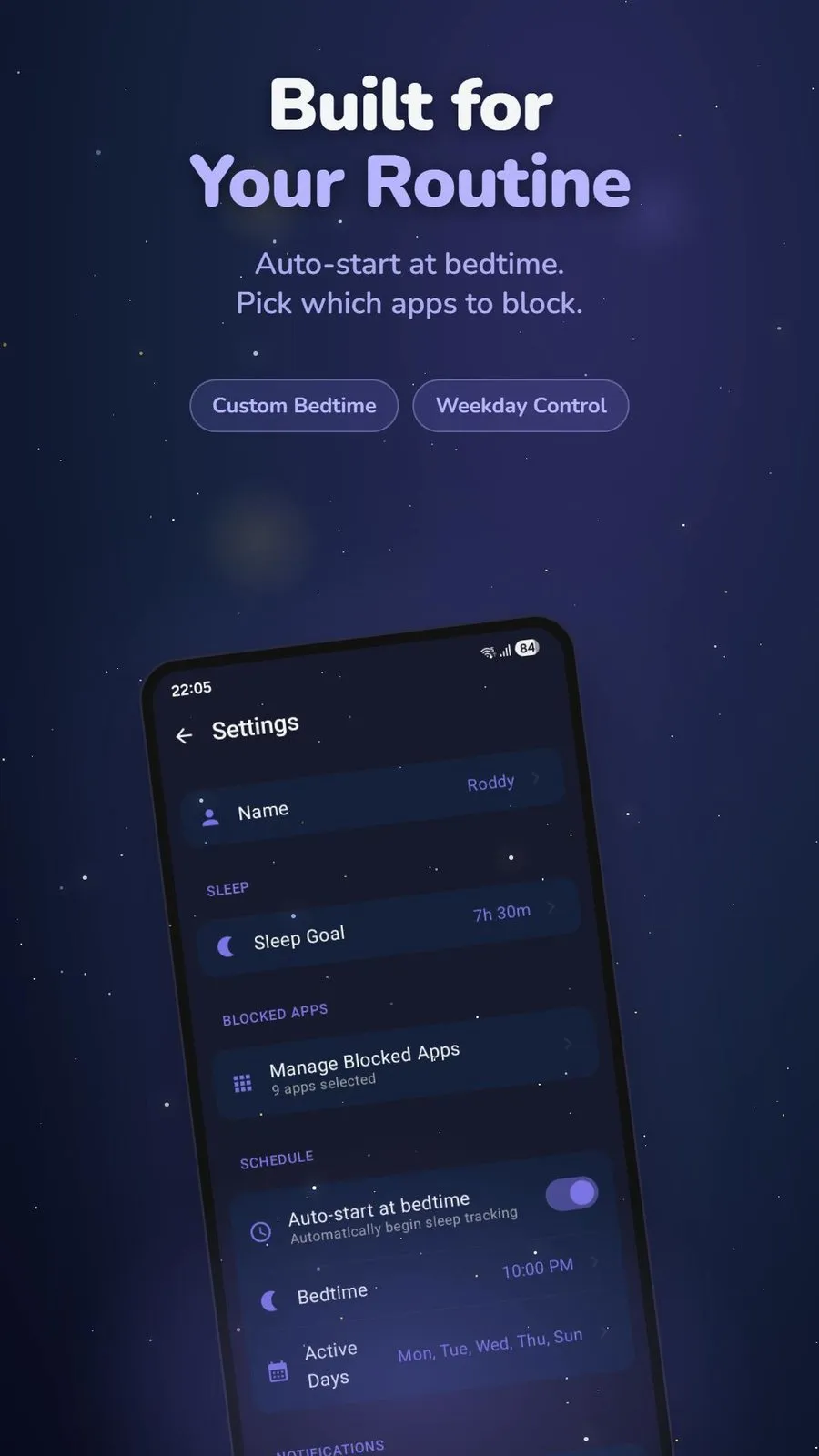
After installing from Google Play, the setup that matters is two choices. You open the blocked-apps list and tick the feeds you want gone overnight, Instagram, TikTok, YouTube, and whatever else pulls you in, and you set the bedtime the block should start from. That is the whole configuration. Because HyperSleep is a single-purpose bedtime tool rather than a general blocker, there are no rule sets, whitelists, or website filters to build first; the two things you set are the two things it needs.
Let it auto-start at bedtime
The setting that makes it stick is auto-start at bedtime. With it on, the block arms itself at the time you set, on the nights you choose, so there is no moment where you have to decide to turn it on, which is the moment a distraction usually wins. You do the thinking once, when you are awake and want to sleep better, and the app carries out that decision every night after. From there the feeds stay locked through the night and open again in the morning, and the only thing left for you to do at bedtime is put the phone down.
Frequently asked questions
Is there an Android app blocker I can pay for once instead of a monthly subscription?
Yes. HyperSleep is an Android app with a one-time $79.99 lifetime purchase, so you pay once instead of a recurring monthly fee. It also offers monthly and yearly plans, but the one-time option is the one this directory lists. A few other blockers sell buy-once plans too, and $79.99 is on the higher end, so it pays off mainly if you would otherwise carry a subscription for a year or two.
How do I keep Instagram and TikTok locked until morning on Android?
Install HyperSleep on your Android phone, add Instagram and TikTok to its blocked list, and set your bedtime and your sleep goal. From bedtime those apps stay locked, and the block holds through the night instead of lifting on a timer you can dismiss, so a groggy tap at 1am cannot pull the feed back open before morning.
Can I just use Android's built-in bedtime mode instead?
You can, and it costs nothing. Google's Digital Wellbeing bedtime mode can grey the screen, mute notifications, and switch on Do Not Disturb on a schedule, but it is easy to turn off in a few taps the moment you want to keep scrolling. A firmer blocker like HyperSleep exists for people who keep talking themselves past the built-in schedule.
Does HyperSleep work on iPhone?
No. HyperSleep is Android only and has no iOS version. iPhone users can look at Apple’s built-in Screen Time Downtime or an iOS-focused night blocker, though native Downtime is also widely reported as easy to dismiss in the moment.
Why would I pay for a blocker when free ones exist?
Free and built-in tools cover the basics and are a fine first try. People move to a stricter blocker when the free schedule turns out too easy to skip at 1am. What you pay for is a lock that actually holds overnight, not a longer feature list, so try the free route first and pay only if it fails you.
Sources
- 1
The maker's own site and Google Play listing, source for the Android-only availability, the $79.99 one-time lifetime purchase sold alongside monthly and yearly plans, the pick-your-apps blocked list, and the auto-start-at-bedtime schedule.
- 2
Chang et al., PNAS 2015: Evening use of light-emitting eReaders
The Harvard study behind the ~55% figure: four hours of reading on a light-emitting screen before bed cut evening melatonin by about 55% versus reading a printed book.
- 3
He et al., PLOS One 2020: Restricting bedtime mobile phone use
Randomized trial: cutting off phone use 30 minutes before bed for four weeks helped people fall asleep about 12 minutes faster and sleep roughly 18 minutes longer.
- 4
Kroese et al., Frontiers in Psychology 2014: Bedtime procrastination
Introduces "bedtime procrastination," delaying sleep despite being worse off for it, and ties it to weak self-control at night rather than not being tired.
- 5
Google: Set up Bedtime mode (Digital Wellbeing)
Android's free, built-in bedtime tool: on a schedule it greys the screen, dims the wallpaper, and turns on Do Not Disturb, a soft nudge you can switch off in a few taps.
- 6
Freedom: Forever and Premium pricing
Freedom is $8.99/month or a one-time "Forever" plan listed at $199 (recently discounted), across macOS, Windows, iOS, and Android, the cross-platform subscription comparison point.
- 7
AppBlock: Premium and Strict Mode
AppBlock is an Android freemium app with Premium around $4.99/month; its Strict Mode locks blocking rules so they cannot be edited or bypassed for a set window.
HyperSleep
Block social media until you've actually slept.
once
Android
More apps you buy once: browse the desktop