
HomeDeck: A HomeKit Dashboard for Apple TV and iPad
Apple TV has no Home app. It can show your cameras and run your scenes, and that is about it. HomeDeck fills the gap: your rooms, lights, climate, blinds, sensors and cameras on the TV, the same layout on an iPad on the wall, and a calm status screen in between. This piece covers what it does, what Apple already gives you, what it costs, and how it compares with the other HomeKit dashboards.

OneTimePay.app
7 min read
Can I control my HomeKit devices from my Apple TV?
Partly, out of the box: tvOS Control Center has a HomeKit tab for cameras and scenes, and it only appears if you have one of them. For rooms, lights, climate, blinds and sensors on the TV you need a dashboard app. HomeDeck shows your whole Apple Home on Apple TV and keeps time, weather and cameras on screen between taps. It is $14.99 once for Apple TV.
On this page
Can I control my HomeKit devices from my Apple TV?
In short
Apple's own option is the HomeKit tab in tvOS Control Center: live cameras, scenes, and on or off for accessories in the room you are viewing. HomeDeck adds a full room and device view on the TV, with dedicated cards for lights, climate, blinds, TVs and robot vacuums, all driven with the Siri Remote.
What Apple TV does without an app
There is still no Home app for Apple TV. Hold the TV button on the remote, open Control Center, and the HomeKit tab lets you watch several cameras at once, keep one in Picture in Picture, and run a scene such as Watching TV. Per Apple's guide, the tab only shows up if you have set up a compatible camera or created a scene. There is no room list, no thermostat card and no sensor readout.
What HomeDeck puts on the screen
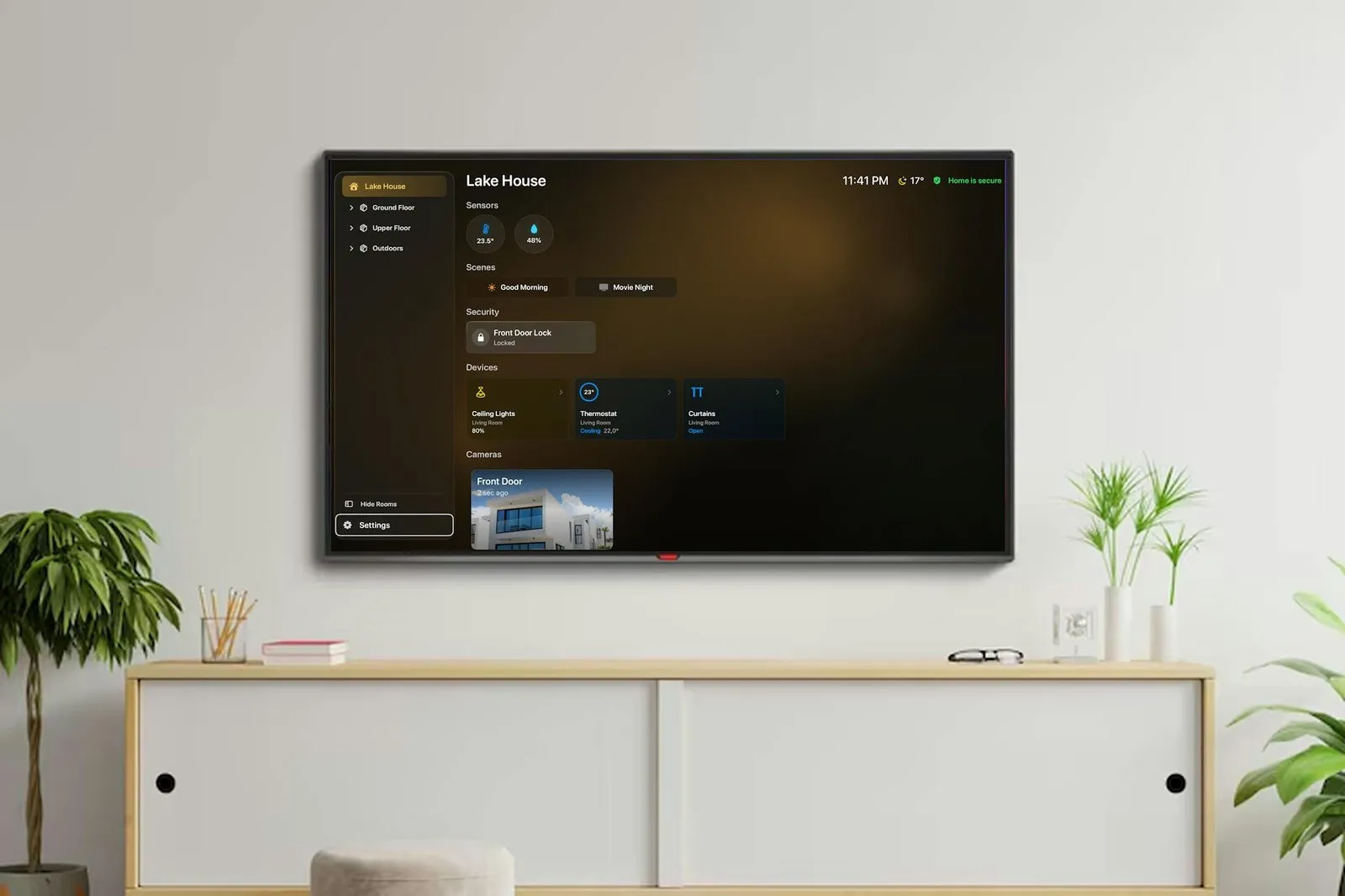
HomeDeck reads the Apple Home your Apple TV already belongs to and lays it out as a HomeKit dashboard for Apple TV: rooms grouped by floor in a sidebar, then sensors, scenes, security, devices and cameras. Selecting a device opens a card with its controls; lights get a power toggle, a brightness bar and warm or cool white presets where the bulb supports them.
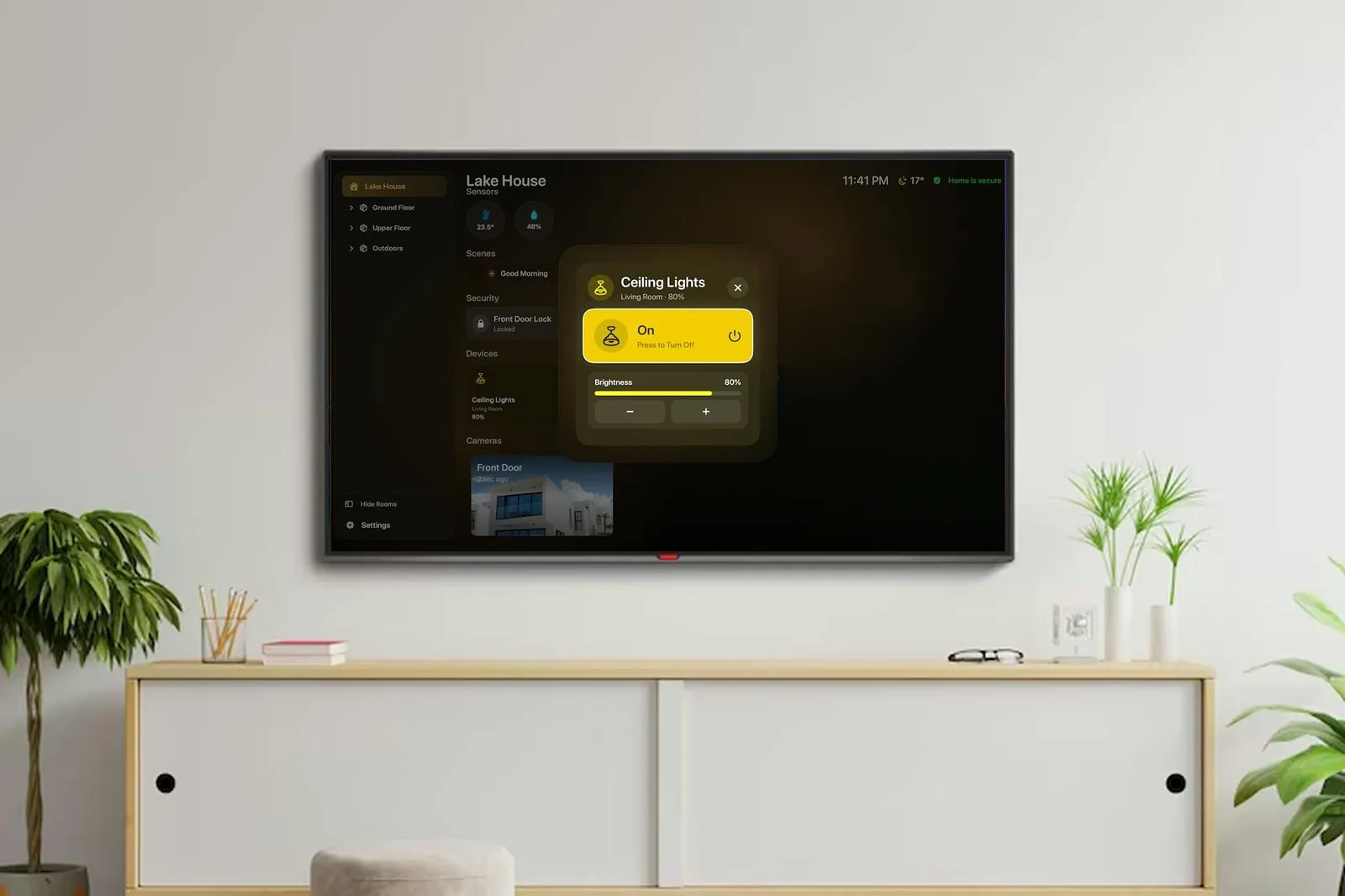
Controls are sized for a remote: directional focus, select and Back. Siri can also open rooms, run scenes and control supported devices. HomeDeck supports multiple homes, and a new events panel (version 1.9.2) adds filterable device history and home summaries.
Ambient mode: a home status screen between taps
In short
When nobody is pressing anything, HomeDeck switches to Ambient mode: a large clock, current weather with hourly or five-day forecasts, chosen sensors, camera feeds, calendar events and what is playing in Apple Music. A Home is secure badge stays in the corner.
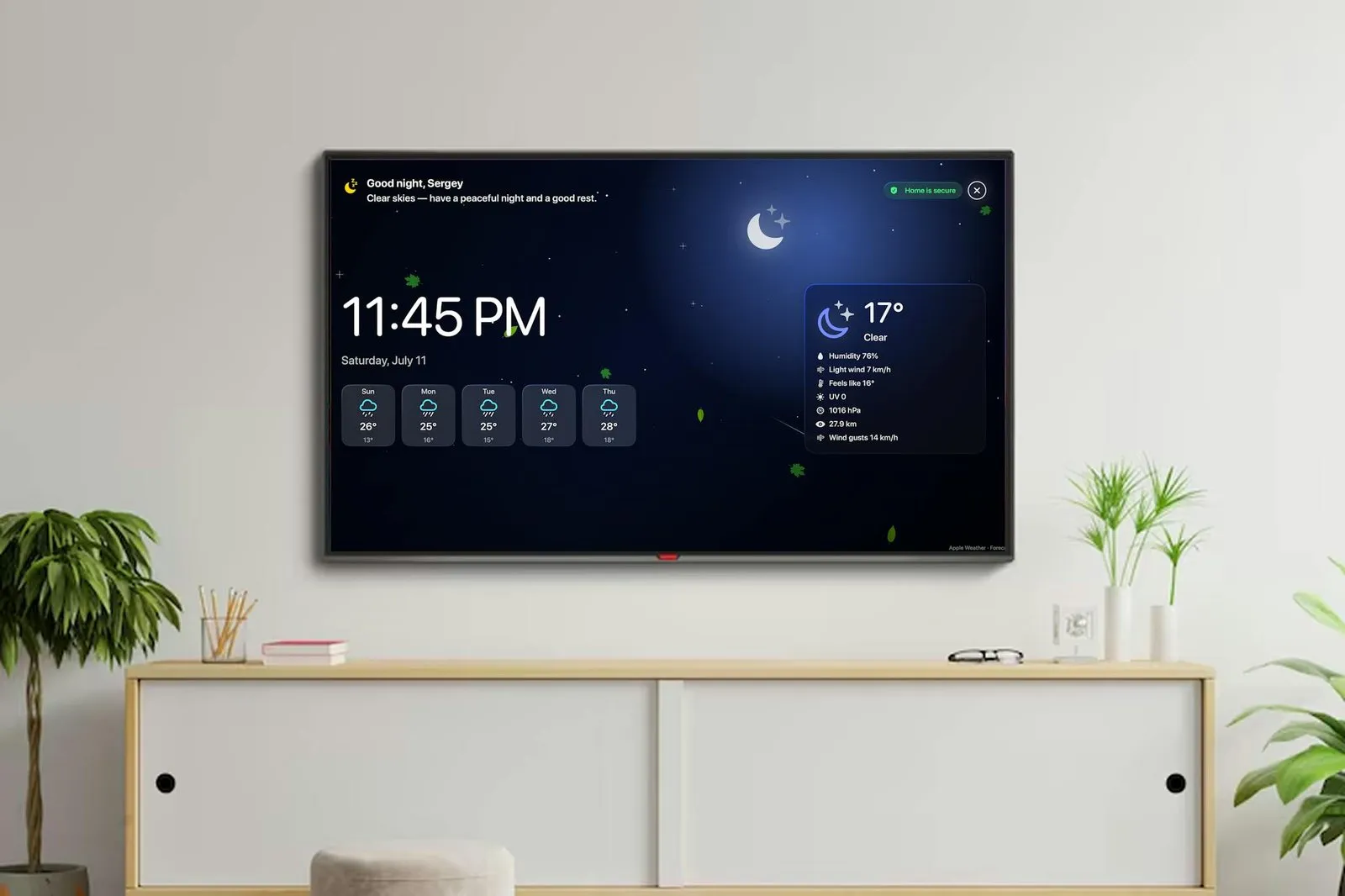
This is the part Apple's screensaver does not do. Weather comes from Apple WeatherKit, the calendar strip reads calendars already connected to the device, and the theme can follow the time of day. On a TV that is on in the kitchen or a hallway, it turns idle time into an Apple TV ambient mode for the house.
The same dashboard as a HomeKit wall panel on iPad
In short
On iPad, HomeDeck is the touch version of the same view and the place you set it up: you reorder rooms, sections, favorites, devices and cameras, hide what you do not need, and those preferences sync to the Apple TV through your own iCloud account.
That makes a spare iPad a HomeKit wall panel that matches the TV. It needs iPadOS 18 or later, so older models that stopped at iPadOS 17 cannot run it. The App Store also lists it for Apple silicon Macs as an iPad app.
Doorbell calls, security modes and guest profiles
Doorbell takeover: a compatible HomeKit doorbell call fills the iPad screen with live video or the latest snapshot, and you can answer, talk and use supported door controls.
Security modes: Home, Away and Night modes with an exit delay and a full-screen armed state, for an iPad by the front door.
Guest profiles (beta): limit a guest or child to chosen rooms, devices, cameras, sensors and scenes, with owner settings behind a four-digit PIN.
Energy: consumption, solar, grid and battery readings, through the Livoltek and Solar Inverters plugins.
Privacy, accounts and what HomeDeck cannot do
In short
There is no HomeDeck account, no ad or analytics SDK, and the App Store privacy label reads Data Not Collected, as reported by the developer. Your home data stays in Apple Home, and settings sync through your iCloud, not a server the developer runs.
tvOS limits: the developer's own FAQ says some device categories and commands are unavailable on tvOS, because third-party apps only get what Apple exposes there.
No new hub, same old rule: HomeDeck adds no hub of its own, but remote access, automations and notifications still need a HomePod or Apple TV as your Apple Home hub.
HomeKit only: it reads your Apple Home setup. It does not list Home Assistant support.
Every HomeKit dashboard for Apple TV and iPad, compared
In short
HomeDeck is $14.99 once for Apple TV, $24.99 for iPad, or $29.99 for both, after a 7-day free trial. It is the only app we found that pairs a TV dashboard and a wall iPad with one synced layout and an ambient screen. It is not the cheapest: several single-device apps cost less.
| App | Price | Apple TV | iPad | Idle screen | Cameras | Home Assistant |
|---|---|---|---|---|---|---|
HomeDeck this one homedeck.co | $14.99 TV, $24.99 iPad, $29.99 both, once | |||||
Apple Control Center built into tvOS | Free | Cameras and scenes | ||||
Couch Control Lucas Franz | $7.99 once | Not listed | Up to 9 | |||
T-Home FireFrog | $1.99 once | Not listed | ||||
HomePad Quentin Van Eylen | $8.99 once | Photo Frame | Up to 4 | |||
Controller for HomeKit acasa | Tiers from $4.99, Plus Lifetime $99.99 | Not listed | Not listed | |||
Home+ 6 Matthias Hochgatterer | $14.99 once | Not listed |
Couch Control is the one to weigh for the TV alone: it is cheaper, shows up to nine cameras, and mixes HomeKit with Home Assistant, but it has no iPad app yet. HomePad is the cheaper iPad wall panel, with Home Assistant, embedded web pages and a Photo Frame mode, but nothing for the TV. Controller for HomeKit builds the most flexible tile dashboards across every Apple device, priced as tiers rather than a single unlock. For a HomeKit dashboard without a subscription that spans both screens, HomeDeck's $29.99 bundle is the cheapest single purchase we found; Controller's Plus Lifetime also covers both, at $99.99.
Control Center
$0
built in
T-Home
$1.99
TV only
Couch Control
$7.99
TV only
HomePad
$8.99
iPad only
HomeDeck TV
$14.99
once
Home+ 6
$14.99
no TV app
HomeDeck both
$29.99
TV + iPad
Controller
$99.99
Plus Lifetime
One-time US App Store prices on 20 October 2026.
Apple TV
$14.99 once
iPad
$24.99 once
Both
$29.99 once
Trial
7 days, all features
Requires
tvOS 26 / iPadOS 18
Version
1.9.2
Who HomeDeck suits, and who should skip it
In short
It suits Apple Home households that want the whole house on the living-room TV and a matching panel on the wall, bought once. Skip it if your Apple TV cannot run tvOS 26, your devices live in Home Assistant, or cameras and scenes in Control Center are all you need.
TV-first households who keep reaching for a phone to check the thermostat or turn off the lights during a film.
Owners of a spare iPad who want a hallway panel with doorbell video and an armed-state screen.
Families with guests, since guest profiles hide the rooms and settings you do not want touched.
Two things to know before you buy
The download is free and every feature runs for 7 days, so try it on your own Apple TV before paying; what you can control depends on what Apple exposes to apps on tvOS. Our directory listing still shows $19.99; the App Store prices above are the current ones.
Frequently asked questions
Can I turn an old iPad into a HomeKit wall panel?
Yes, if it runs iPadOS 18 or later. HomeDeck turns it into a full-screen dashboard of rooms, scenes, devices, sensors and cameras. Compatible doorbell calls take over the screen, Home, Away and Night security modes have an exit delay, and guest profiles keep owner settings behind a four-digit PIN. Older iPads on iPadOS 17.6 can run HomePad instead.
Is there a HomeKit dashboard app I can buy once, without a subscription?
Yes, several. HomeDeck is $14.99 once for Apple TV, $24.99 for iPad or $29.99 for both. Couch Control is $7.99 once for Apple TV, HomePad is $8.99 once for iPad, and T-Home is $1.99 for Apple TV. Controller for HomeKit is built around paid tiers, with a Plus Lifetime option listed at $99.99.
Is HomeDeck a subscription?
No. The download is free with a 7-day trial of every feature, then a one-time in-app purchase unlocks Apple TV ($14.99), iPad ($24.99) or both ($29.99). There is no HomeDeck account to create.
Is HomeDeck the cheapest way to see HomeKit on a TV?
No. Apple's own Control Center on Apple TV shows cameras and runs scenes for free, T-Home costs $1.99 and Couch Control $7.99. HomeDeck costs more and gives you an ambient status screen, an iPad wall panel with the same layout, and device cards for lights, climate, blinds and more.
Do I need an iPad to use HomeDeck on Apple TV?
The Apple TV unlock is sold on its own, but rooms, favorites, devices and cameras are arranged on iPad, and those preferences sync to the TV through your iCloud account. The developer does not say how much of the layout you can change on the TV alone. Apple TV needs tvOS 26 or later.
Does HomeDeck work with Home Assistant?
Not that it lists. HomeDeck reads only your Apple Home (HomeKit) setup. If your devices live in Home Assistant, Couch Control on Apple TV and HomePad on iPad connect to both HomeKit and Home Assistant.
Sources
- 1
Free 7-day trial, then one-time unlocks: $14.99 Apple TV, $24.99 iPad, $29.99 both. "No subscription." iPadOS 18 or later, tvOS 26 or later.
- 2
Device cards, Ambient mode, iCloud sync of preferences to Apple TV, doorbell takeover, Home/Away/Night security modes, guest profiles with a PIN (beta), Siri.
- 3
Siri Remote navigation; FAQ: "Some device categories and commands are unavailable on tvOS."
- 4
No separate account or sync server; a HomePod or Apple TV is still needed whenever Apple Home requires a home hub.
- 5
HomeDeck for HomeKit on the App Store
Version 1.9.2, developer Serghei Eschin (Sergey Eskin), privacy label Data Not Collected, multiple homes, also runs on M1 Macs as an iPad app.
- 6
Apple Support: the HomeKit tab on Apple TV
Control Center shows live cameras and runs scenes, and turns accessories in the viewed room on or off. The tab appears only if cameras or scenes are set up.
- 7
Couch Control on the App Store
$7.99 once, Apple TV only, tvOS 18.1 or later, HomeKit and Home Assistant, up to nine camera feeds.
- 8
Independent news coverage (in German) of the Apple TV dashboard; notes an iPad version is in development.
- 9
$1.99, Apple TV only, tvOS 17 or later, version 1.7 from June 2025. The developer warns many HomeKit features are unsupported on tvOS.
- 10
$8.99 once, iPad, iPhone and Mac, HomeKit and Home Assistant, Photo Frame idle mode, up to four cameras. No Apple TV app.
- 11
Controller for HomeKit on the App Store
Free download with Essentials and Plus tiers from $4.99 and a Plus Lifetime purchase listed at $99.99. Runs on Apple TV (tvOS 18) and iPad.
- 12
$14.99 once for iPhone, iPad, Apple Watch and Vision Pro. No Apple TV app and no dashboard view listed.
HomeDeck
Your HomeKit dashboard on Apple TV
once
tvOS · iPadOS
More apps you buy once: browse the desktop