
A Habit Tracker Without Streaks, Your Week on One Screen
Most habit apps keep one number for you, and that number is the count of days you have not failed. It works until the day it breaks, and then starting again next week feels more sensible than carrying on today. SevenGrid removes the number. Its main screen is the whole week as a grid, seven days across and one row per habit, and a day you miss is just an empty cell. This piece covers how that works in practice, what the free tier includes, what one payment adds, and the two things you should know first: it is Android only today, and a free app already does part of the job.

OneTimePay.app
9 min read
No streak counter. No account. No cloud.
This week
Week 37
Mon
Tue
Wed
Thu
Fri
Sat
Sun
Morning run
3 / week
Read
6 / 7
Coffee
at most 1 a day
filled
done
empty
missed, nothing resets
stroke
skipped on purpose
Is there a habit tracker that doesn't use streaks and isn't a subscription?
Yes. SevenGrid is an Android habit tracker with no streak counter anywhere in the app, and Pro is a single in-app purchase ($9.99 on the US Google Play listing). The free tier is permanent. It is Android only today, and cheaper streak-free options exist.
On this page
Is there a habit tracker that doesn't use streaks and isn't a subscription?
In short
Yes. SevenGrid is an Android habit tracker with no streak counter anywhere in the app, and Pro is a single in-app purchase (US Google Play lists $9.99). The free tier is permanent: 3 habits, 4 weeks of history, the full week grid, CSV export, and all five widgets.
The two halves of that question usually come from two different disappointments. One is the morning you opened an app and a number you had carried for months was back at zero. The other is the email telling you that a checklist now costs $3.99 a month. Plenty of apps fix one and not the other. The streak-free ones tend to be subscriptions, and the buy-once ones tend to be built entirely around the chain you are trying to escape.
No streak counter, and not as a setting you switch off
This is the part worth being precise about, because “no streaks” usually means a toggle. In SevenGrid there is nothing to toggle. The developer states it plainly: a counter for consecutive days does not exist anywhere in the app. A habit is one row of seven boxes, one tap per day, and the week is the unit that counts. Hiding a streak counter still leaves software that cares about the number and will show it to you again later. This app never computes it, so a gap costs you the day and nothing else.
What the permanent free tier includes
The free tier is not a trial and does not expire. You get 3 habits, the last 4 weeks of history, and 2 of the 20 themes. Three things that are usually paywalled are not: the full week grid, the full CSV export, and all five home-screen widgets. The developer calls that out as deliberate, writing that your data is not a Pro feature. So you can run the app for months, decide it is not for you, and still leave with a complete file of everything you logged.
Streak counters in the app
None
Pro, US Play listing
$9.99 once
Free tier
3 habits, forever
Platform today
Android only
Android only today: the iPhone app is not shipped
Say this before anything else, because it decides whether the rest is relevant to you. SevenGrid runs on Android. The developer says the iPhone build is finished and with Apple for review, and that there is no release date, and an App Store lookup for the app returns nothing at all right now. Both versions are written in React Native, so the iOS release should be the same product rather than a thinner port. Until it appears, treat this as an Android app.
The week grid: seven columns, one row per habit
In short
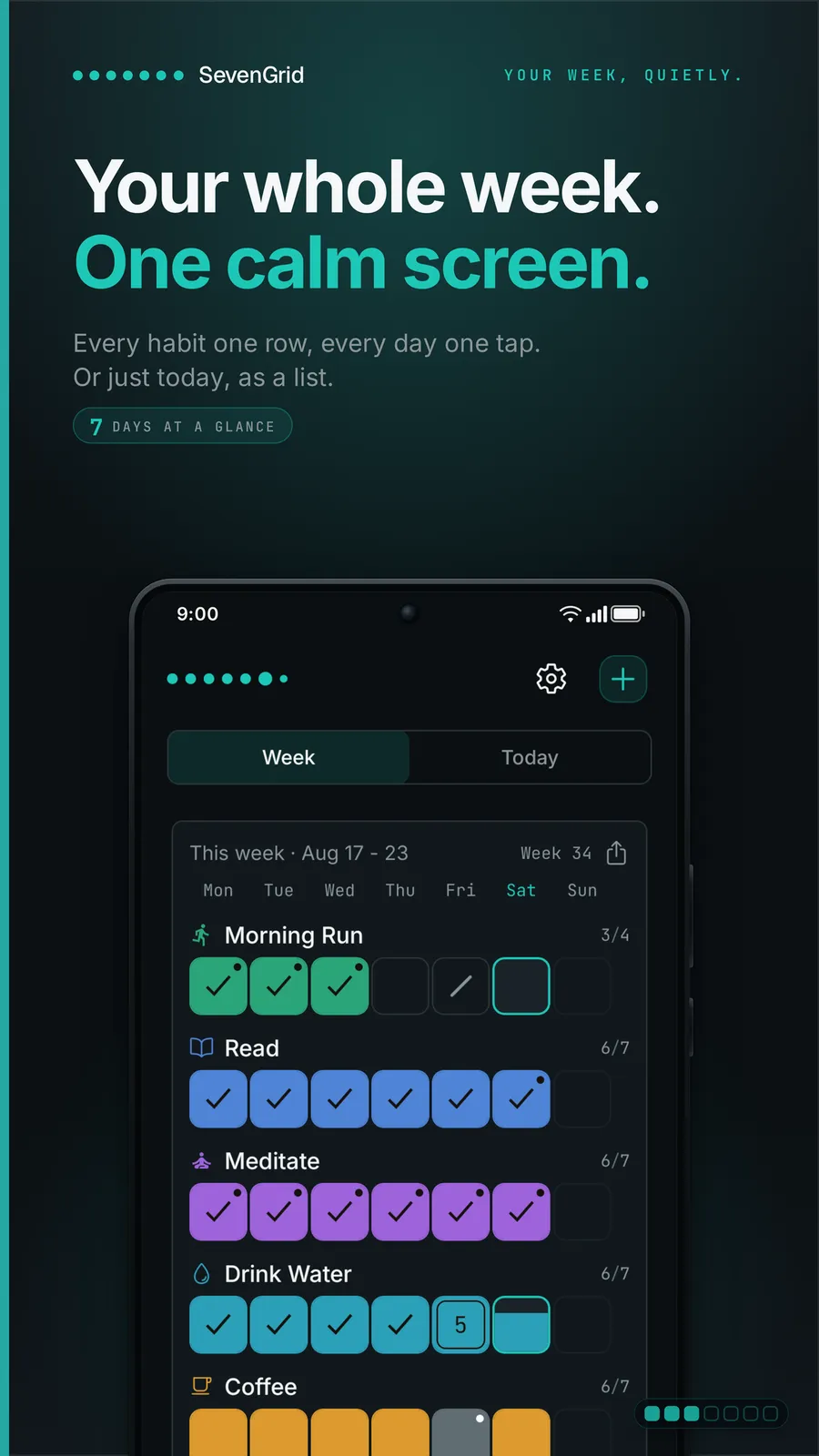
SevenGrid opens on a grid of seven day columns with one row per habit. One tap fills a cell. You see the whole week at once instead of a single day, so a light Tuesday and a heavy Saturday read as one picture. A Today list shows only what is still open.
A habit tracker weekly view on one screen
The practical difference is what you are asked to judge. A daily view asks whether today was a success. A week asks a better question, which is whether the week is going somewhere. Four runs with a gap on Wednesday is a good week, and it looks like a good week on the grid, because the three filled cells beside the empty one are still there. Each row carries its own count against its own goal, so a habit set to three times a week reads as 3/4 and not as a broken chain.
The Today list for what is still open
The second view is a plain list of what has not been done yet, and it empties as the day goes. It is the view for the actual moment of logging, where the grid is the view for understanding. You can also set the week to start on Monday or Sunday, and the grid, the stats and the widgets all follow that choice.
Five home-screen widgets, all of them free
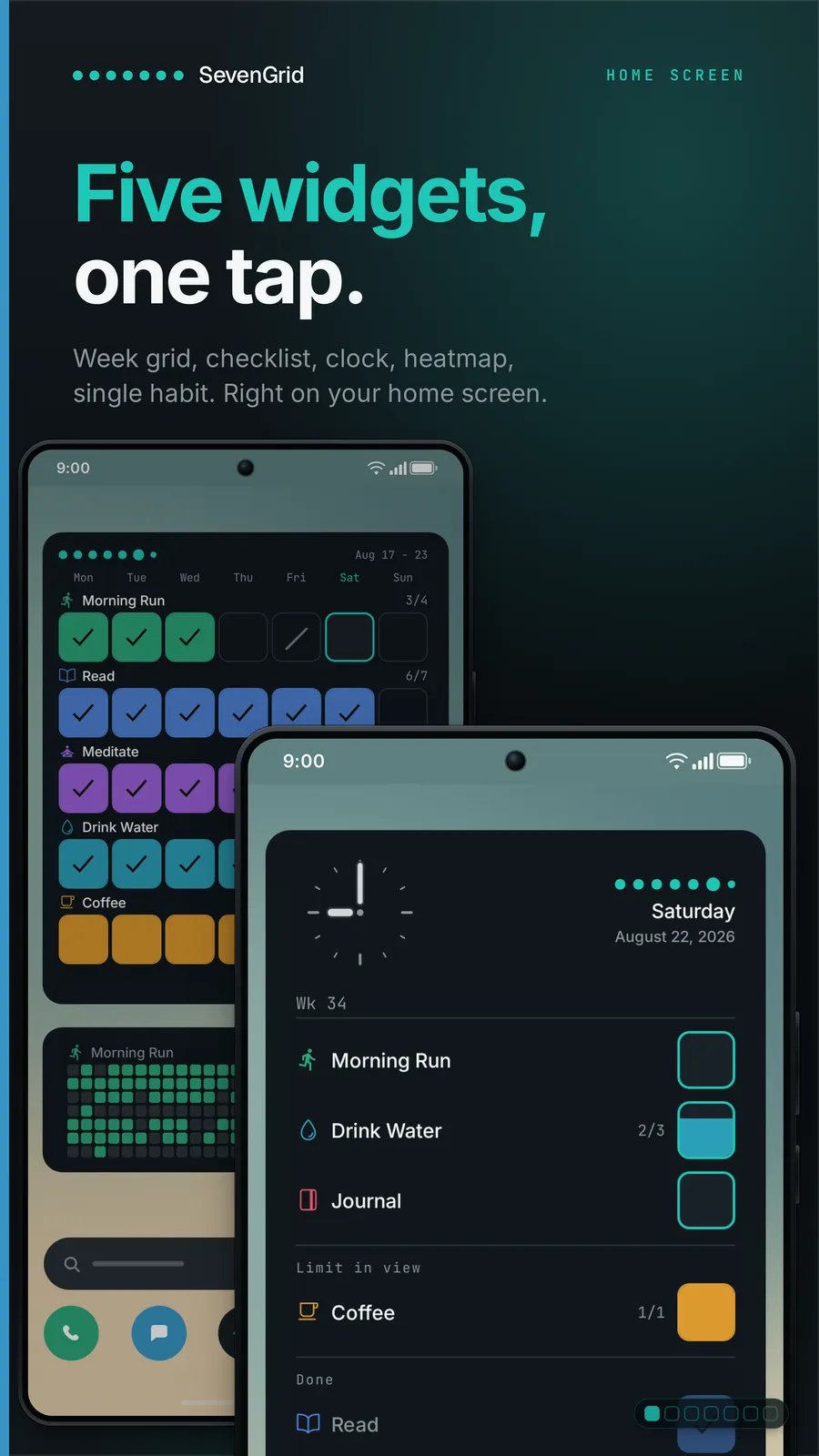
Android gets five widgets, and every one is in the free tier: the week grid, a single habit row, the Today checklist, a clock with your habits beside it, and a year heatmap. They resize, they can fade from a solid card to bare wallpaper, and you can hide habit names on a screen other people see. This is where most of the logging actually happens, because ticking a cell from the home screen costs one tap and never opens the app.
What a missed day looks like, and what a skipped day looks like
In short
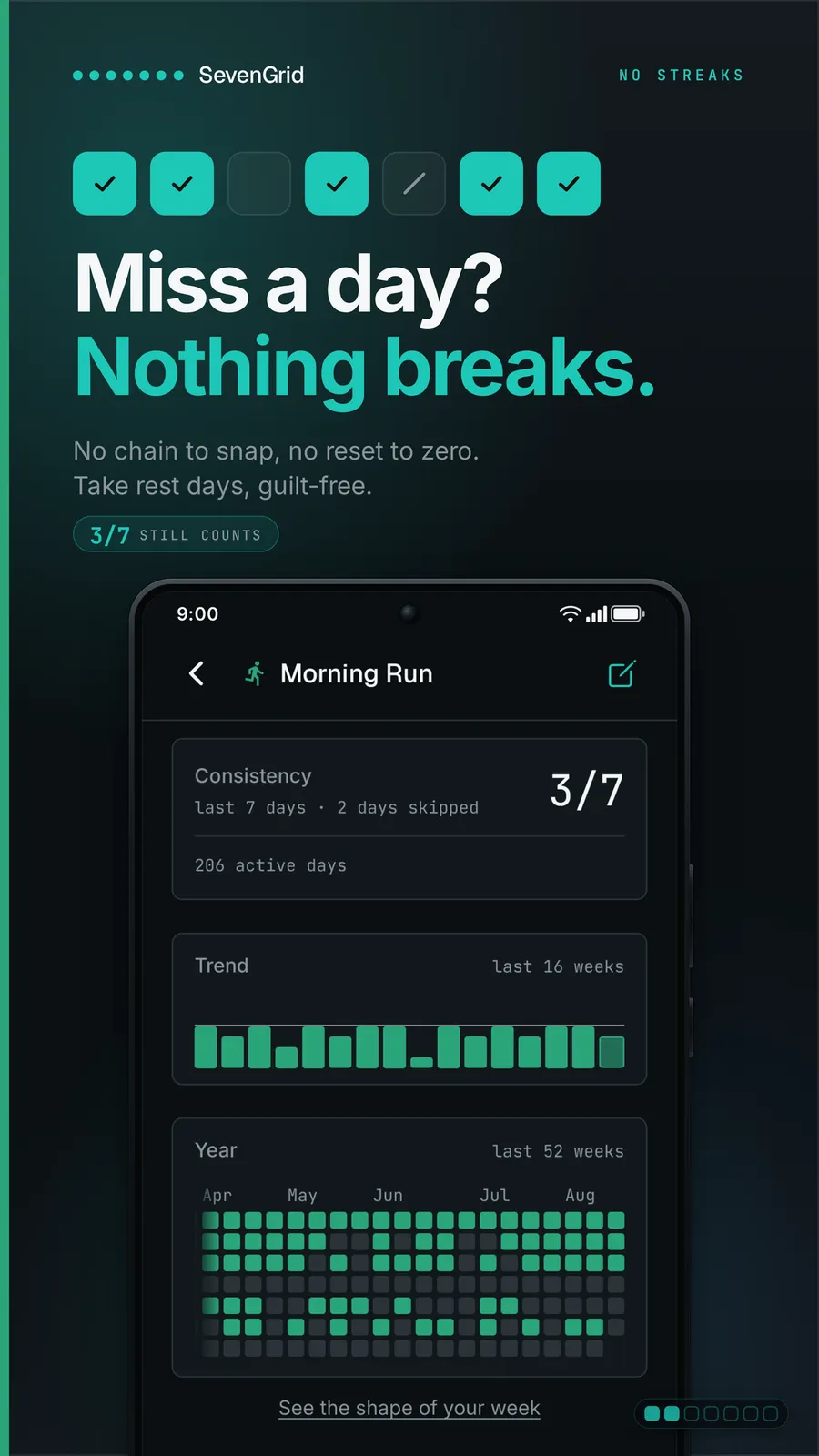
A missed day is an empty cell. Nothing resets, no number drops to zero, and no message calls it a failure. A day you skip on purpose gets a quiet diagonal stroke and pauses that habit's reminder. Standing rest days repeat weekly, so skipping every Friday is automatic.
These are two different things and the app treats them differently, which is the detail that makes the design more than a marketing line. A forgotten day and a deliberate rest day mean opposite things about your week, and a streak counter cannot tell them apart. If you only forgot to log it, you can tap the day after the fact.
Skip on purpose: the stroke and the paused reminder
Marking a day as skipped puts a thin stroke in the cell and pauses that habit's reminder for the day, so a sick Tuesday does not also produce a notification asking why you have not been to the gym. A standing rest day does the same thing on a schedule: set a habit to skip every Friday and it rests on its own from then on. For anyone whose week has a fixed shape, that is the difference between a tracker that fits the week and one you keep correcting.
What the research says about one missed day
The design has support behind it, and it is worth knowing what the studies do and do not say. In a 2023 paper in the Journal of Consumer Research, Silverman and Barasch ran seven studies on logged streaks and found that people shown an intact streak carried on more often than people shown a broken one, independently of how much they had actually done, because keeping the log becomes a goal in itself. The effect was strongest in people who blamed themselves for the break. The counter helps while it is alive and costs you when it dies.
The other half comes from Lally and colleagues in 2010, who followed 96 people forming a daily habit over 12 weeks. Automaticity plateaued after a median of 66 days, with an enormous spread of 18 to 254 days, and missing one opportunity did not materially affect the process. That is the empirical case for an empty cell. One skipped day is not a setback the research can measure, which makes resetting a counter to zero a punishment for something that did not happen.
Four goal shapes, including “At most” for habits you want less of
In short
SevenGrid supports four goal shapes: once a day, a daily target of n taps that can count past the goal, n times a week, and “At most” for habits you want less of, such as at most one coffee a day. Going over a limit is shown plainly, never in red.
Three times a week, so rest days are not failures
Not every habit is daily, and most trackers still assume it is. Setting the gym to three days a week means the other four days are not empty accusations, they are simply not part of the goal. This is the same reasoning behind the whole app: choose the rhythm per habit, and one packed Tuesday does not ruin anything.
“At most” goals for cutting something down
This is the shape most habit trackers skip entirely. Flip a goal to At most and each tap logs one occurrence: at most 1 coffee a day, takeout on at most 2 days a week. Staying at or under the limit fills the cell like any other met goal. Going over is shown as a plain number rather than a red warning, which follows the developer's stated view that shame does not change behaviour. If you have ever tried to track drinking less using an app built to celebrate doing more, you know why this matters.
Counting past the target instead of stopping at it
A daily target can be a number rather than a checkbox: meditate three times, eight glasses of water. Small targets fill the cell step by step and larger ones count up as a number. You can also let a habit count past its goal, so a 4 shows against a goal of 3, which makes the goal a floor rather than a ceiling. It is opt-in per habit. Amounts and durations can be logged too, in kilometres, reps, litres or hours, recorded for the history and never turned into a target.
The weekly reflection: three questions and a mood scale
In short
Instead of a streak number, SevenGrid asks three fixed questions once a week: what went well, what didn't, and the focus for next week, plus a mood scale. It takes about two minutes. The Sunday nudge is free, and it switches itself off if you ignore it for three weeks.
The questions never change, which is the point: a fixed prompt is easier to answer than a blank page, and comparable week to week. Skipping a week breaks nothing, and there is no backlog of missed entries waiting for you. Old entries resurface now and then, which is what turns a pile of notes into something you actually read. Over time the app also charts mood against active days, so you can see the two move together without being handed a verdict.
The developer cites a 2014 Harvard Business School working paper for this: call-centre trainees at Wipro who spent 15 minutes at the end of each day writing about what they had learned scored 22.8% better on the final assessment than a group that spent the same time practising. Worth stating the limit honestly, since the app does not: that study measured performance in training, not whether anyone kept a habit. It is a reason to think written reflection is useful, not proof that a weekly journal makes you exercise more.
No account, no cloud, and exactly two network calls
In short
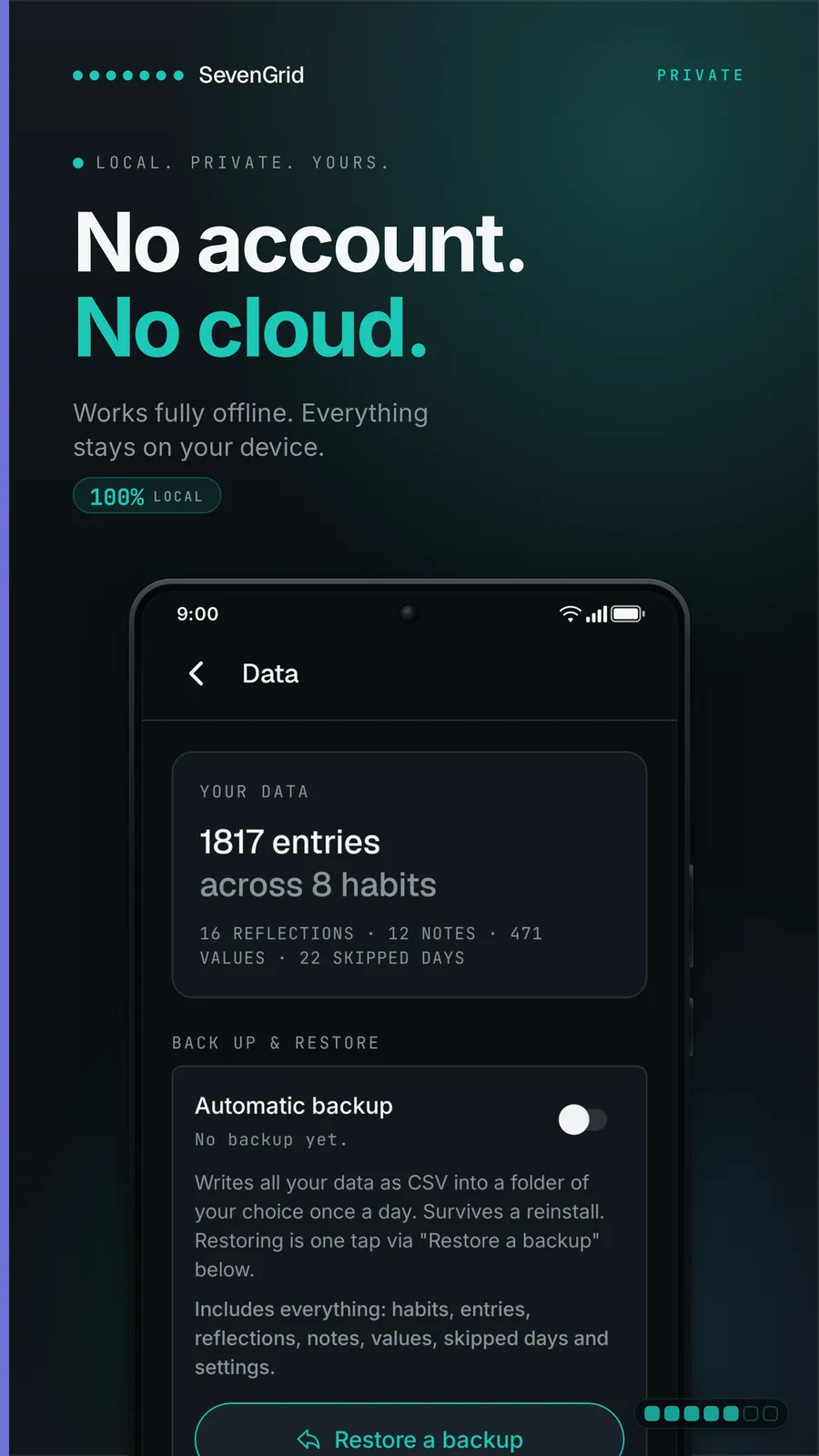
SevenGrid asks for no account and no sign-up. There is no cloud sync, no ads, and no usage tracking, and it runs in airplane mode. Exactly two network calls exist: validating a Pro purchase through RevenueCat, and optional anonymous crash reports to Sentry on EU servers, which you can switch off.
An offline habit tracker with widgets and no account
Nothing about setup asks who you are. There is no email field, no sign-in, no sync, and no profile. What you type lives in the app's own storage on the phone, and turning on airplane mode changes nothing about how it works. For a category where the usual pattern is an account before you can tick your first box, that is the whole feature. You can also lock the app behind a fingerprint, Face ID or the device code, with screenshot protection, and both arrive switched off.
The asterisk on “fully offline”
One honest caveat. Buying Pro validates the purchase over the network, so that step needs a connection. Daily use does not. The other call is the crash reporter, which is anonymous, runs on EU servers and has an off switch in settings. The developer links an independent Exodus Privacy scan reporting exactly one tracker, that crash reporter, though that is the vendor's own citation rather than something confirmed here. Google's data-safety panel separately declares no data shared with third parties.
Not open source, and built by one person
SevenGrid is closed source, made by a single developer trading as ByteSide.io in Gerstetten, Germany, and funded by the one-time purchase rather than ads or investors. That funding model is why there is nothing to profile you for. It also means you are trusting one person to keep going, which is the trade the last section of this article deals with.
Getting your history out before you need it
In short
Full CSV export ships in both Free and Pro from day one, plus a single-file JSON export with an open schema. SevenGrid imports its own backups and other apps' files once you map the columns, reporting errors row by row. An optional daily local backup writes to a folder you pick.
The habit tracker CSV export format, and what it covers
Two formats, both complete. CSV is the one to plan around, because anything that reads a spreadsheet can open it and the schema is published rather than guessed at. JSON comes as a single file for the whole history. Neither is behind the paywall, which is unusual enough to be the strongest argument for trying the app at all: the exit is built before the entrance. A free tracker that will not export is one bad update away from holding two months of your life hostage.
Moving in from another habit app, column by column
Import runs the same path in reverse. SevenGrid reads its own CSV and backup files back in with history, notes and reflections intact, so changing phone is one folder and a couple of minutes. Data from another app comes along once you map its columns onto the open schema, and a file that does not fit produces row-by-row errors rather than a silent failure. That last detail is what makes a migration fixable instead of a guess.
The automatic daily backup, which is Android only
Switch it on and the app writes CSV into a folder you choose once a day, on the device. It survives a reinstall and restores on a new phone with no cloud involved, and Android's own Google backup deliberately leaves the habit database out so it stays where you typed it. Note the platform limit: this is Android only, and the developer says that on iPhone there is no automatic backup and you export through the share sheet instead.
How it compares with Loop, Yawma and the subscriptions
In short
SevenGrid is neither the cheapest streak-free habit tracker on Android nor the only one. Loop Habit Tracker is free and open source. Yawma costs $4.99 once and also ships without streaks. SevenGrid is $9.99 once, and what it buys is the week-first grid, At most goals, skip days, reflection and per-habit reminders.
Here is the whole competitive picture in one place. Two facts in this table are the ones worth arguing with before you spend anything: a free app covers the basics, and a cheaper paid app makes the same no-streaks promise.
| App | Price | Streak counter | Platform | Offline, no account | Export |
|---|---|---|---|---|---|
SevenGrid this one this article | $9.99 once | None at all | Android | CSV + JSON | |
Yawma cheaper, also no streaks | $4.99 once | None at all | Android | Backup file | |
Loop Habit Tracker free, open source | Free | Shows one | Android | CSV + SQLite | |
Gentle Habits anti-streak by design | $19.99 once | None at all | Android, iOS | Not stated | |
Habitica subscription | $47.99/yr | Shows one | Android, iOS, web | Not stated |
Loop Habit Tracker: free, open source, and the default answer
Loop deserves more than a mention, because for a lot of readers it is the right answer. It is free and ad-free, open source under GPL-3.0, runs entirely offline with no account, ships Android widgets and reminders, exports CSV and its raw SQLite database, and caps nothing. It is also the established one, with 5M+ downloads and a 4.7 rating from more than 63,000 reviews, which is a different universe of scrutiny from SevenGrid's 500-odd installs. If money is your only constraint, install Loop and stop reading here.
One correction worth making, because it gets repeated: Loop is not streak-free. It shows a current streak. What softens it is that the headline number is a habit-strength score rather than the chain, so a missed day dents the score instead of zeroing a counter. That is a gentler streak, not the absence of one. SevenGrid differs in shape too. Loop's home screen is a list of habits with per-habit charts behind them, where SevenGrid's is the week itself, and Loop has no At most goal direction, no deliberate skip mark or standing rest day, no weekly reflection, no weekday-specific reminder times and no JSON export.
A pay once habit tracker on Android is rarer than it looks
The buy-once trackers people recommend are overwhelmingly iOS apps. Streaks, the one every roundup leads with, is $5.99 and Apple-only, and the same is true of most of the lifetime tiers you will read about. On Android the genuine one-time set is thin, and two of its members compete with SevenGrid directly. Yawma is $4.99 as a single purchase, runs offline with no account, has widgets, and states its own version of the pitch: there is no streak to break. It is the honest bargain here, and the trade is that it deliberately ships no reminders at all. Gentle Habits is $19.99 once, anti-streak by design, offline, and runs on both Android and iOS, which matters if you expect to switch phones.
So the case for SevenGrid over the cheaper two is specific rather than general: the seven day grid as the default screen rather than a list, four goal shapes including At most for habits you want less of, skip days and standing rest days as distinct marks, the two minute weekly reflection, weekday-specific per-habit reminders, and a documented CSV plus JSON export with an importer that reports errors row by row. If none of those is the thing you are missing, buy the cheaper one.
Loop Habit Tracker
$0
free, but shows a streak
Yawma
$4.99
once, no streaks, no reminders
SevenGrid Pro
$9.99
once, US Play price
Gentle Habits
$19.99
once, Android and iOS
What the streak-free options on Android cost, at US store prices checked on 12 September 2026. Every one of these is paid once or not at all. For scale, the subscriptions in the same category run $47.99 a year for Habitica and $49.99 for TickTick, which is roughly $240 and $250 across five years.
What a subscription costs over five years
The other side of the market is where the money actually goes. Habitica is $47.99 a year and TickTick is $49.99, which is roughly $240 and $250 across five years, and neither sells a perpetual tier at any price. A single $9.99 payment is still $9.99 in year five. The comparison that matters is not the first month, because the habit outlives it: in the Lally study automaticity took a median of 66 days to plateau and as long as 254 days at the far end. The honest asterisk cuts both ways, though. A subscription keeps funding development across those five years, while SevenGrid guarantees updates for at least 24 months and Loop depends on volunteers.
Before you install: the limits worth knowing
In short
Four things. It is Android only today. The track record is small: 500+ downloads and a 5.0 rating from 58 to 59 reviews on the German listing. Updates are guaranteed for at least 24 months, not forever. And it is closed source, built by one person.
A very small sample, and no independent reviews
Google Play shows 500+ downloads, which is Google's own bucket rather than a real number, and the 5.0 rating comes from 58 to 59 reviews on the German listing. A perfect score from that few people tells you almost nothing, and there are no independent reviews of this app anywhere yet. Treat the rating as a signal that early users like it, not as evidence it will hold up for you.
24 months of guaranteed updates, and one developer
The update promise is specific, which is better than vague: at least 24 months from purchase, described as planned for considerably longer. It is still a promise with an end date, from one person, on a closed-source app that nobody else could pick up. The mitigation is the export, and it is a real one: full CSV and JSON on an open schema, in the free tier, so your history leaves with you whatever happens next.
Who should install it today, and who should wait
Install it if you are on Android, you have quit a habit app over a broken chain, and you want the week rather than the day as your unit. Try the free tier first, because three habits with the full grid and full export is enough to know within a month. Wait if you are on iPhone, since there is no App Store listing yet. Start with Loop instead if you want proven and free and can live with a streak on screen, or with Yawma at $4.99 if you want the no-streaks promise for half the money and do not need reminders.
Check the price and the platform before you buy
SevenGrid Pro is a single in-app purchase shown as $9.99 on the US Google Play listing, and the developer publishes no price, pointing to Play for your own country instead, so confirm what you are quoted. It is Android only today: the iPhone app is with Apple for review with no release date. The five widgets and the automatic daily backup are Android features. Loop Habit Tracker is free and covers the streak-free basics. Everything here was verified on 12 September 2026, and app pricing moves.
Frequently asked questions
Which habit tracker shows my whole week on one screen instead of daily streaks?
SevenGrid on Android. Its main screen is a grid of seven day columns with one row per habit, so a full week of every habit is visible at once and one tap fills a cell. A separate Today view lists only what is still open. No streak counter exists anywhere in the app, so nothing resets when a cell stays empty. The vendor is blunt about it: "a counter for consecutive days does not exist anywhere in the app." That is the part most rivals cannot match, because hiding a streak counter still leaves an app that cares about the number.
Which habit tracker exports my history as CSV I can open and move elsewhere?
SevenGrid exports full CSV in both the free tier and Pro, from day one, with no account required. It also writes a complete single-file JSON export on an open schema, and it reads its own CSV and backup files back in, history, notes and reflections included. Loop Habit Tracker also exports CSV for free, plus its raw SQLite database, and Way of Life writes CSV or JSON on Android. Check the column layout before you rely on any of them for a migration: SevenGrid reports import errors row by row, so a bad column is something you fix and re-run rather than guess at. Keep the original export until you have spot-checked a few weeks against the old app.
Is SevenGrid the cheapest habit tracker without streaks?
No, and it is not the only one either. Yawma is $4.99 as a single purchase on Android, runs offline with no account, has widgets, and makes the same promise in its own words: there is no streak to break. Gentle Habits is anti-streak by design at a $19.99 lifetime tier and ships on Android and iOS. And Loop Habit Tracker is free and open source, though it does display a current streak, so it is gentler rather than streak-free. If price is your only constraint, install Loop. If you specifically want no streaks for less, Yawma is half of SevenGrid’s $9.99 and its trade is that it ships no reminders at all. SevenGrid earns the difference only if you want the week grid as the default screen, "At most" goals for habits you want less of, skip days and standing rest days as separate marks, the weekly reflection, weekday-specific per-habit reminders, and a documented CSV plus JSON export.
Does SevenGrid work on iPhone?
Not today. SevenGrid is Android only. The vendor says the iPhone app "is finished and with Apple for review" and that "Android came first, and there is no release date yet", and an App Store lookup for the app currently returns nothing. Both apps are built in React Native, so the iOS version should land as the same product, but there is no date to plan around. Two things will stay Android-only differences at launch: the five home-screen widgets, and the automatic daily local backup (on iPhone the vendor says you export through the share sheet instead). If you are on iOS, wait for a shipped App Store listing.
Can I use it fully offline with no account?
Almost, and the asterisk is worth knowing. There is no account, no sign-up, no email, no cloud sync, no ads and no usage tracking, and the app works with airplane mode on. The vendor lists exactly two network calls: validating the Pro purchase through RevenueCat, and optional anonymous crash reports to Sentry on EU servers, which you can switch off in settings. So buying Pro needs a connection once. Daily use does not. The developer also links an Exodus Privacy scan reporting one tracker, the crash reporter; that is the vendor’s citation rather than something confirmed here, though the Play data-safety panel separately declares no data shared with third parties.
What does a habit tracker subscription cost over five years compared with paying once?
A $9.99 one-time purchase is still $9.99 in year five. A tracker billed at $30 to $50 a year runs $150 to $250 over the same stretch, and a $3 a month plan lands near $180. That gap is the whole argument for buying once, but run it against the price you are actually quoted, because habit-tracker pricing moves and the US Play price is not the price everywhere. The comparison that matters is not the first month. In the Lally study habit automaticity took a median of 66 days to plateau, with a range of 18 to 254 days, so the app you keep outlives every free trial and most of the first year.
How do I move my history from another habit app into SevenGrid?
Export from the old app as CSV, then import into SevenGrid and map its columns onto the open schema: habit, date and state. The importer checks the file and reports what is wrong row by row rather than failing silently, so a mismatched column is a fix-and-re-run rather than a guess. Its own backups come back in whole, notes and reflections included, which is what makes a phone swap a folder and a couple of minutes. Keep the original export file until you have compared a few weeks of imported cells against the old app, because nobody validates an import they cannot check.
Is SevenGrid safe to depend on for years?
Judge it on the numbers rather than the pitch. It is a solo-developer app from Gerstetten, Germany, with 500+ downloads on Google Play, which is Google’s own bucket rather than a real figure, and a 5.0 rating from 58 to 59 reviews on the German listing. That is a very small sample, and there are no independent reviews of it anywhere. It is not open source, so nobody else can pick it up if the developer stops. Updates are guaranteed for at least 24 months from purchase, described as planned for considerably longer, which is a promise with an end date. The honest mitigation is the export: full CSV and JSON on an open schema, in the free tier, so your history leaves with you whatever happens to the app.
Sources
- 1
The app itself. Source for the week grid and Today view, the absence of any streak counter ("a counter for consecutive days does not exist anywhere in the app"), the empty-cell and skip-stroke marks, standing rest days, the four goal shapes including "At most", the three-question weekly reflection, the Free versus Pro table (3 habits, 4 weeks of history, 2 of 20 themes, with the full grid, full CSV export and all five widgets in Free), the two network calls, the CSV and JSON export, the import path, the app lock, the accessibility statement, and the "guaranteed for at least 24 months" update promise. It publishes no price, pointing to Google Play instead, and its FAQ states the iPhone app is with Apple for review with no release date.
- 2
Primary source for the price and the track record: one in-app product at $9.99 on the US listing, 500+ downloads (Google’s own bucket, not an exact count), last updated 11 August 2026, developer ByteSide.io / Stefan Andreas Rosskopf in Gerstetten, Germany. The German listing carries the 5.0 rating from 58 to 59 reviews. The data-safety panel declares no data shared with third parties, with app info, performance and device identifiers as the categories that may be collected.
- 3
The free alternative this article names as the default answer. Source for its habit-strength score (so a missed day dents the number rather than zeroing it), CSV and SQLite export, offline operation with no account ("Loop doesn’t require an Internet connection or online account registration"), reminders, home-screen widgets, and the GPL-3.0 licence. Also the source for the scale gap: 4.7 from 63.2K reviews and 5M+ downloads. Note the correction this article makes: Loop does display a current streak, so it is not streak-free, only gentler about it. Android only.
- 4
Yawma: Automatic Habit Tracker
The cheaper streak-free rival, verified on the US Play listing as a single in-app product at $4.99 with the claim stated outright: a one-time purchase with no subscription, and "No streaks... there is no streak to break." Runs offline with no account, has widgets and a file backup, and deliberately ships no reminders, which is the trade against SevenGrid.
- 5
The other verified anti-streak one-time tracker, at a $19.99 lifetime tier, offline with no account and with widgets. Unlike SevenGrid and Yawma it ships on both Android and iOS today, which is the reason it is in the comparison table.
- 6
The subscription reference point in the cost comparison: $4.99 a month or $47.99 for twelve months, with no perpetual or lifetime tier on either store, and an account required because progress is server-side. Used for the five-year figure of roughly $240.
- 7
Silverman and Barasch, On or Off Track: How (Broken) Streaks Affect Consumer Decisions
Journal of Consumer Research 49(6), 2023, pp. 1095-1117. Seven studies on logged streaks. Intact streaks raise later engagement relative to broken ones, independently of the actual past behaviour, because people treat maintaining the log as a goal in itself. The effect is amplified when people blame themselves for the break and attenuated when the streak can be repaired. This is the study SevenGrid cites for its own design decision.
- 8
Lally, van Jaarsveld, Potts and Wardle, How are habits formed
European Journal of Social Psychology 40(6), 2010. 96 volunteers tracked a daily behaviour for 12 weeks. Automaticity plateaued after a median of 66 days, with a range of 18 to 254 days. The finding that matters here: missing a single opportunity to perform the behaviour did not materially affect the habit-formation process.
- 9
Di Stefano, Gino, Pisano and Staats, Learning by Thinking
Harvard Business School working paper 14-093, 2014. Call-centre trainees at Wipro who spent 15 minutes at the end of each day writing about what they had learned scored 22.8% better on the final assessment than those who spent the time practising. Cited here with its limit stated: it measures training performance, not habit adherence.

SevenGrid
Your whole week on one screen. No streaks. No subscription.
once
iOS · Android
More apps you buy once: browse the desktop