
Turn a GitHub Repo Into a Podcast You Can Listen To
Some codebases you need to read line by line. Others you just need the gist of: what does this project do, how is it laid out, is it worth adopting. Reading the docs for that is slow, and not every moment is a screen moment. GitPodcast takes the shortcut literally. Paste a GitHub repo link, or swap the word “hub” for “podcast” in the URL, and it turns the repository into a short audio walkthrough you can listen to on a walk. It is free and open source. This piece covers how it works, the honest caveats (including that it looks inactive), and how it compares to NotebookLM and the other repo tools.

OneTimePay.app
7 min read
githubpodcast.com/facebook/react
facebook/react
A podcast walkthrough · ~6 min
Listen
0:00 / 6:12
How do I turn a GitHub repo into a podcast?
Use GitPodcast, a free, open-source (MIT) web app. Paste the repo URL, or swap “hub” for “podcast” in the GitHub link (github.com to gitpodcast.com), and it generates a short spoken walkthrough of the project, about 5 to 10 minutes. The hosted site needs no API key. One caveat: the project looks inactive.
On this page
How do I turn a GitHub repo into a podcast?
In short
Use GitPodcast, a free, open-source web app. Paste the repo URL, or swap “hub” for “podcast” in the GitHub link, and it generates a short spoken walkthrough, about 5 to 10 minutes. The hosted site needs no API key. It is the audio cousin of gitingest and GitDiagram.
There is a small family of tools that all work the same way: take a GitHub URL, change one word, and get the repository back in a form that is easier to digest. gitingest turns it into a text digest, GitDiagram into an architecture diagram, DeepWiki into a wiki. GitPodcast is the one that gives you audio. It is the simplest way to turn github repo into podcast form and listen instead of read, and it is made by BandarLabs, which credits the gitingest and GitDiagram projects for the idea and the look.
The URL-swap trick, and what you actually get
In short
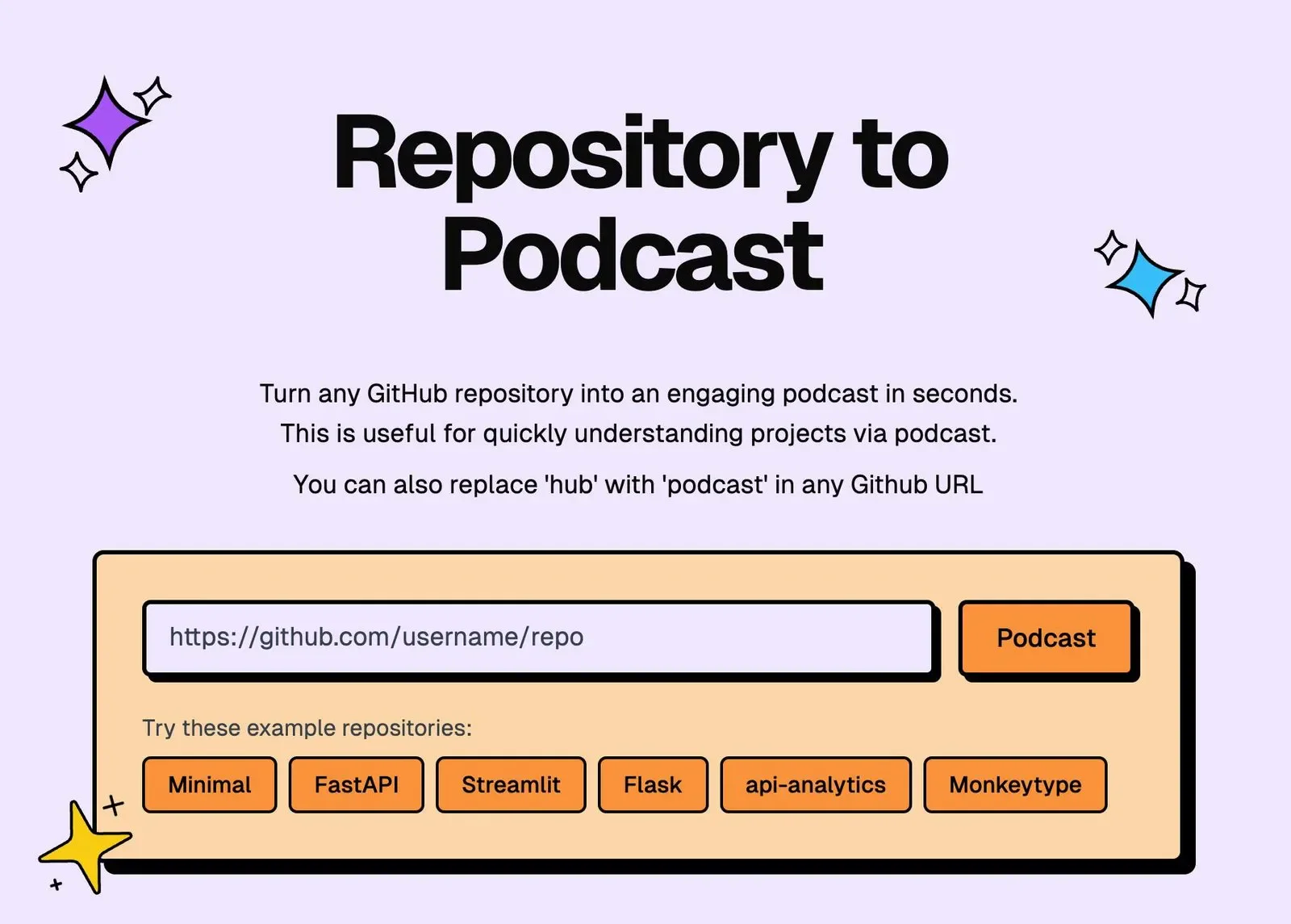
Change github.com to gitpodcast.com in any repo link and it starts generating. You get a basic podcast of about 5 minutes, or an in-depth one of about 10 minutes after a free sign-in. Under the hood it uses Gemini or GPT to write the script and Azure for the voice.
Paste a link or swap hub for podcast
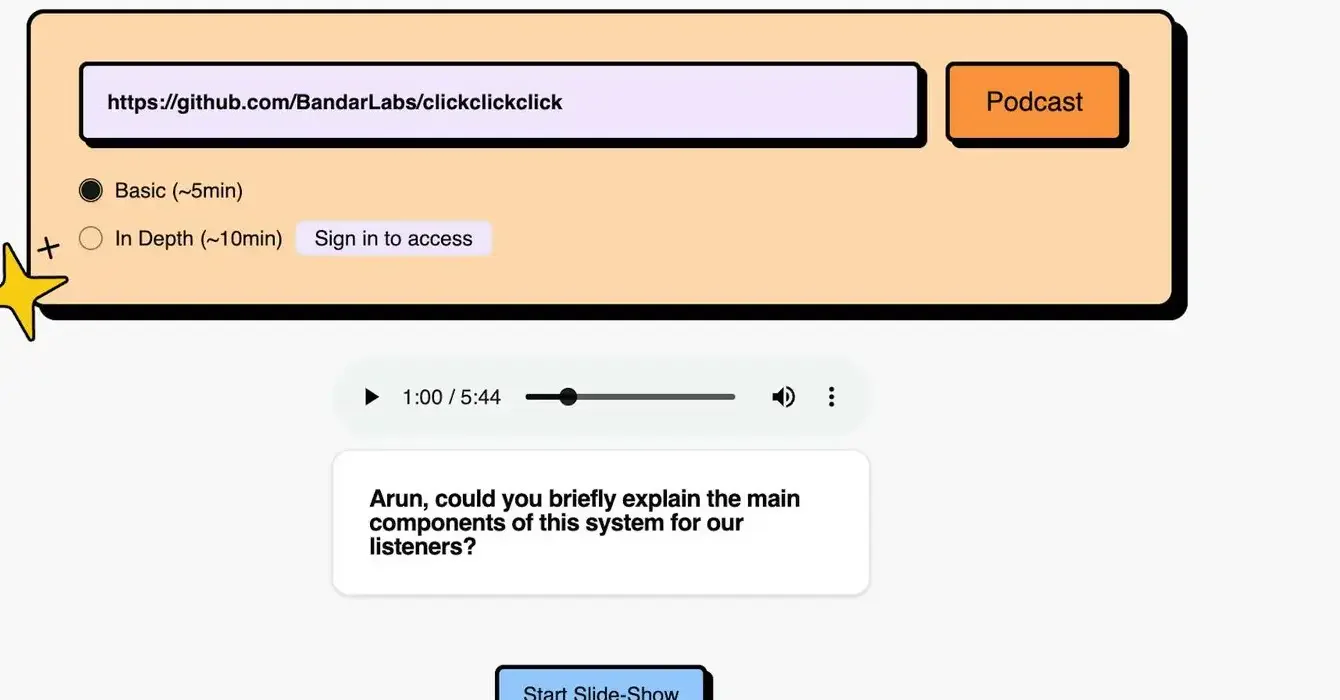
Both routes lead to the same place. You can drop a full repo URL into the box on the site, or you can edit the address bar on any GitHub page and replace “hub” with “podcast”, the same muscle memory as gitingest's hub-to-ingest swap. From there it reads the project and generates the episode. The way it converts a github repo to audio is a spoken script plus a synced slide-show of the code structure, so you can glance at the outline while it talks.
Basic and in-depth lengths
There are two lengths: a basic episode of roughly 5 minutes, and an in-depth one of about 10 minutes that requires a free sign-in. The generated result is an audio player with a transcript, written as a conversational walkthrough rather than a dry list, and it does reference the project's real directories and modules, not only its README.
Understand a codebase by listening
In short
The point is hands-free orientation. Instead of reading a wall of docs, you listen to a spoken tour of what the project is and how it is organized, on a walk or a commute. It is a first-pass overview, not a code review, so treat it as a way in rather than the whole map.
A first pass, not a deep read
The honest way to use it is as a warm-up. A 5 to 10 minute episode gets you the shape of a project: its purpose, its main pieces, roughly how they fit. That is genuinely useful before you open the code, and it is a real way to understand a codebase by listening when you cannot sit and read. What it is not is a substitute for reading the parts that matter. Like any LLM summary, it can smooth over detail or get something wrong, so use the codebase audio overview to know where to look, then look.
Good for commutes and sizing up a project
The two moments it fits best are the commute and the evaluation. On a walk or a drive you can queue up the podcast for a repo you are curious about and arrive already oriented. And when you are deciding whether an open-source library is worth adopting, a spoken overview is a fast way to size it up before you spend real time in the source.
Free, open source, and self-hostable
In short
GitPodcast is MIT-licensed and free to use on the hosted site, with no API key required there. You can also run it yourself, but self-hosting needs your own keys: OpenAI or Gemini for the script and Azure Speech for the voice, plus Docker and Postgres.
What free actually covers
On gitpodcast.com you do not pay and you do not bring an API key; the maker's own keys run it, within rate limits. That is what makes it an easy first thing to try. Because it is a free open source repo to podcast tool under the MIT license, you can also read the code and see exactly what it does with a repo, which is a stronger guarantee than a promise on a landing page.
Self-hosting and private repos
If you would rather run it on your own machine, the repo ships a self-host path with Docker and Postgres. The trade is that you supply the keys it uses: an OpenAI or Gemini key for the script generation and an Azure Speech key for the voice. Private repositories are supported through a Private Mode that launched in August 2025, though the sign-in details for it are not spelled out in the docs.
The honest caveats
In short
Two things to know before you rely on it. It looks inactive: the last commit was around August 2025, so it works but is not being actively developed. And it is a short, structure-level overview of roughly 5 to 10 minutes, not the deep, two-host production that NotebookLM makes.
It looks like it is on pause
This is the big one, and it is only fair to lead with it. The GitHub repo has a healthy history, around 813 stars, but its most recent commit is from about August 2025, and there are open issues sitting unaddressed. It is not archived, and the hosted site still works, so this is not a dead link. But you should treat it as a useful tool that is currently on pause rather than something actively maintained, and not count on fixes or new features soon.
A short overview, not a deep dive
The depth is set by the format. A few minutes of audio can orient you, but it cannot walk every module, and the script is generated by an LLM, with the usual risk of a confident wrong detail. Voice customization is still marked work-in-progress on the repo. None of this makes it useless, it is genuinely handy for a first pass, but buy into it for what it is: a quick spoken orientation, free, that you double-check against the real code.
How GitPodcast compares to NotebookLM, RepoRadio, and the read-only tools
In short
NotebookLM and Podcastfy make richer two-host audio but do not take a repo directly. RepoRadio is a CLI that needs your own API key. gitingest, DeepWiki, and GitDiagram swap the URL like GitPodcast but give you text, a wiki, or a diagram to read, not audio. GitPodcast is the free, one-click, audio one.
| App | Price | One-click in browser | Output | Open source |
|---|---|---|---|---|
GitPodcast this one this article | Free | Audio | MIT | |
RepoRadio CLI | Free + your key | Audio (CLI) | Unclear | |
NotebookLM | Free · 3/day | Audio · 2 hosts | No | |
Podcastfy general input | Free + your keys | Audio · 2 hosts | Apache-2.0 | |
DeepWiki read-only cousin | Free · public | Wiki to read | No |
The audio tools: RepoRadio, NotebookLM, Podcastfy
NotebookLM makes the best-known podcast-style audio, a polished two-host discussion, and it is actively maintained by Google. The catch is that it does not know what a GitHub repo is: you feed it files or a URL as sources. Podcastfy is the open-source (Apache-2.0) version of that idea, also two-host, but likewise general-purpose rather than repo-aware. RepoRadio does target repos and makes narrated episodes, but it is a command-line tool that runs on your own OpenAI API key. GitPodcast's niche between them is being the one that takes a repo in a single browser click and costs nothing to try.
The read-only cousins: gitingest, DeepWiki, GitDiagram
These share GitPodcast's exact URL-swap trick but not its output. gitingest gives you a clean text digest of the repo for feeding to an LLM. DeepWiki, from the makers of Devin, generates a browsable wiki with architecture diagrams and a chat. GitDiagram renders an interactive architecture diagram. All three are excellent and actively maintained, but all three are things you read or look at. If you specifically want to listen, GitPodcast is the one in the family that produces audio.
Price
Free
License
MIT (open source)
Input
Paste repo URL
Length
~5–10 min
Engine
Gemini/GPT + Azure
Status
Looks inactive
Who it fits, and who should look elsewhere
GitPodcast fits a developer who wants a free, no-friction way to get the gist of a repo by ear, on a commute or before evaluating a library, and who is fine with a short, imperfect overview from a tool that is not currently maintained. If you want the most polished audio and do not mind feeding in sources yourself, NotebookLM is the better listen. If you want a repo-aware tool you control, RepoRadio (CLI) or self-hosting GitPodcast fits. And if you would rather read than listen, its own cousins, gitingest, DeepWiki, and GitDiagram, are the actively maintained picks. For a quick, free, spoken orientation to a codebase, GitPodcast is still the easiest way in.
Check that it still works and fits before you rely on it
GitPodcast is free and MIT-licensed, produces a roughly 5 to 10 minute audio overview, and appears to be an inactive project (last commit around August 2025). Rival details here come from each maker's own site in August 2026: NotebookLM (free, two-host, no direct repo ingest), Podcastfy (Apache-2.0), RepoRadio (CLI plus your API key), and the read-only gitingest, DeepWiki, and GitDiagram. Statuses and features change, so check the source before you commit.
Frequently asked questions
Is there a free, open-source tool that turns a GitHub repo into a podcast?
Yes: GitPodcast. It is MIT-licensed and free to use on the hosted site, with no API key needed there, and you can self-host it with your own OpenAI or Gemini and Azure Speech keys. One honest note: the project looks inactive, with its last commit around August 2025, so it works but is not being actively maintained.
Can I listen to an unfamiliar codebase hands-free during my commute?
Yes, that is the main use case. GitPodcast generates a roughly 5 to 10 minute spoken overview of a repo that you can play on a walk or a commute, so you get oriented to what a project does and how it is laid out without staring at a screen. Treat it as a first pass to decide where to dig in, not a full code review.
Is GitPodcast still maintained, or is it abandoned?
Be realistic: it appears to be on pause. The GitHub repo (BandarLabs/gitpodcast) has around 813 stars but its last commit was about August 2025, and it has open issues. It is not archived and the hosted site still works, but there is no recent development, so do not expect fixes or new features soon.
Does it read the whole codebase, and how accurate is it?
It produces a structure-level overview rather than a line-by-line reading of every file, though its own sample does reference real directories and modules, not just the README. Expect a short, plain-language tour generated by an LLM, with the usual caveat that AI summaries can miss nuance or get details wrong. Use it to orient yourself, then confirm specifics in the code.
How is GitPodcast different from NotebookLM for understanding a repo?
NotebookLM makes a polished, maintained two-host audio discussion, but it does not take a GitHub repo directly: you have to feed it the files or a URL yourself. GitPodcast takes the repo in one click (paste the link or swap hub for podcast) and is open source and free, but its output is shorter and, importantly, the project looks inactive. Different trade-offs.
Does it work on private repositories, and do I need an API key?
Private repositories are supported (a Private Mode launched in August 2025), though the exact sign-in flow is not documented. On the hosted site you do not need your own API key; the maker’s keys are used within rate limits. You only need your own OpenAI/Gemini and Azure Speech keys if you self-host the app.
Sources
- 1
The app itself. Source for the URL-swap mechanism (replace hub with podcast), the basic (~5 min) and in-depth (~10 min, sign-in) lengths, and the example repos on the homepage.
- 2
GitPodcast on GitHub (BandarLabs/gitpodcast)
The maker’s repo and README. Source for the MIT license, the free hosted service, the Gemini/GPT + Azure Speech engine, the self-hosting requirements, the credit to gitingest and GitDiagram, and the star count and last-commit date used for the "looks inactive" caveat (~813 stars, last commit around August 2025).
- 3
NotebookLM Audio Overview (Google support)
Documents NotebookLM’s two-host audio overview and length options, and that it works from sources you add (text, PDFs, URLs) rather than ingesting a GitHub repository directly.
- 4
An open-source (Apache-2.0) two-host audio generator, the "open-source alternative to NotebookLM." Cited to show it is general-purpose (websites, PDFs, text) and does not take a GitHub repo natively.
- 5
A command-line tool that turns a repo into narrated audio episodes. Cited for the comparison point that it is CLI-first and runs on your own OpenAI API key, rather than a one-click browser flow.
- 6
The text member of the same URL-swap family (replace hub with ingest), MIT-licensed. Used to represent the read-only cousins, gitingest (text), DeepWiki (wiki), and GitDiagram (diagram), which produce output you read rather than audio.
GitPodcast
Generate an engaging podcast to understand a GitHub repo
Web
More apps you buy once: browse the desktop