
AndroidFileSync: Free Android File Transfer for Mac
Plug an Android phone into a Mac and nothing shows up in Finder. Google dropped the link to its own Android File Transfer app from Android.com in February 2024, and most guides now push a paid app or a cloud upload. AndroidFileSync takes a different route: a free, native Mac window onto the phone's storage, over a cable or Wi-Fi. This piece covers what it does, the one-time phone setup, the extras, and how it compares.

OneTimePay.app
7 min read
Is there a free app to browse my Android phone's files on a Mac?
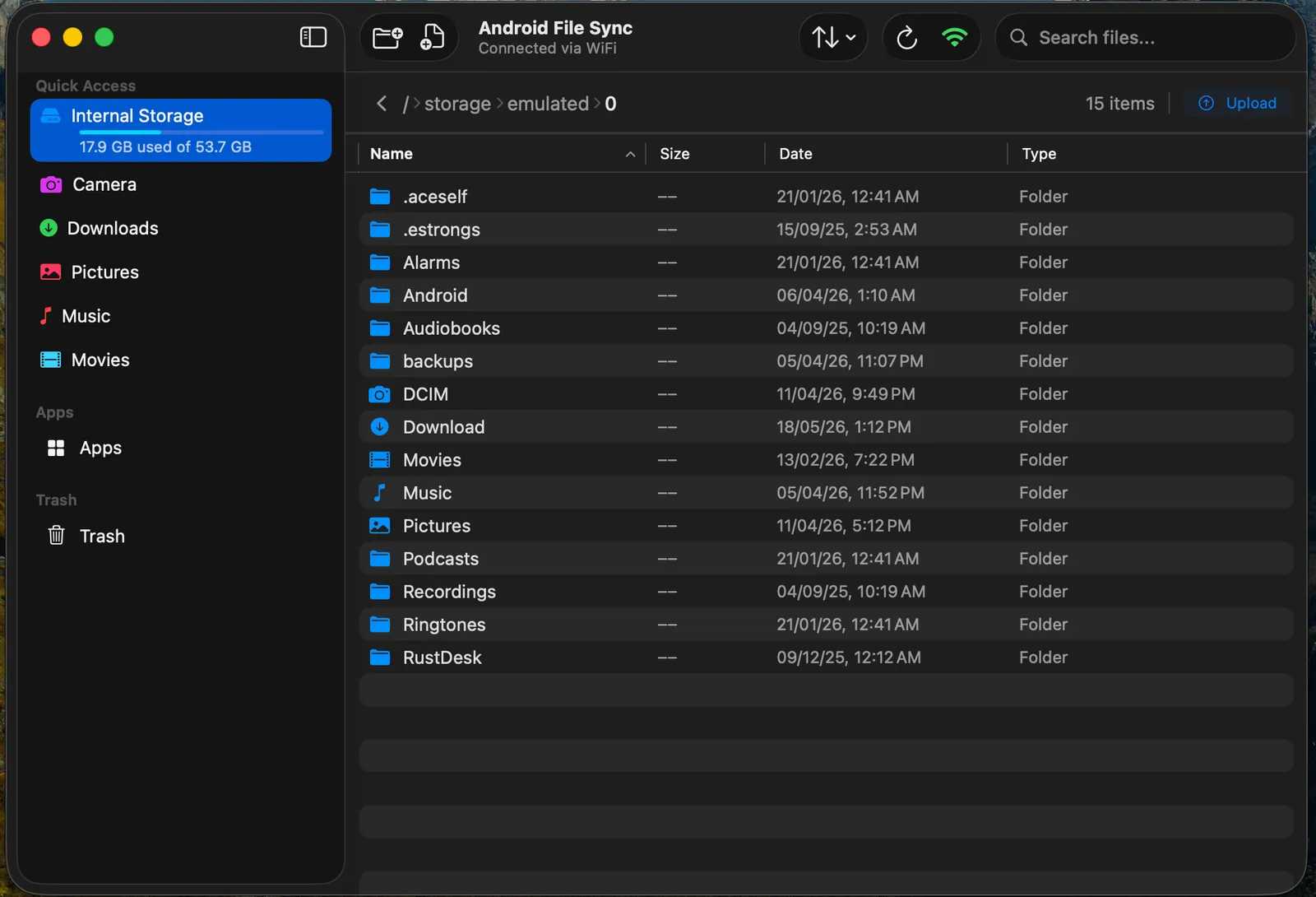
Yes. AndroidFileSync is a free, open-source macOS app that shows your phone's storage in a Finder-style window over USB or Wi-Fi. Drag files both ways, preview them with Quick Look, and manage apps. It needs USB debugging turned on, but no app on the phone.
On this page
Is there a free app to browse my Android phone's files on a Mac?
In short
Yes. AndroidFileSync opens your phone's internal storage and SD card in a Mac window with a sidebar of shortcuts (Camera, Downloads, Pictures, Music, Movies), a breadcrumb path, search and sortable columns. A bar under Internal Storage shows how full the phone is. It is a native Mac app, not an Electron wrapper.
What the file browser does
Preview without downloading: press Space or double-click to see photos, PDFs and documents. Since version 2.3.3, videos play inline in the preview panel.
Real thumbnails: photo and video folders show actual thumbnails, and a tile view (also new in 2.3.3) gives large previews for camera rolls.
Move on the phone: copy, cut and paste between folders on the device without routing files through the Mac, and batch-rename or change extensions in bulk.
Transfer files from Android to Mac and back
Drag files from a Finder window into AndroidFileSync to upload them, or drag them out to download. Several transfers run in parallel with live progress in a collapsible panel. If a file with the same name already exists, the app asks whether to skip or replace it, and every destructive action gets a confirmation dialog first.
USB or Wi-Fi: the one-time phone setup
In short
AndroidFileSync talks to the phone over ADB, the debugging bridge built into Android. That means one setup step: open About phone, tap Build Number seven times to unlock Developer Options, then turn on USB Debugging. Nothing gets installed on the phone, and there is no account or cloud service in between.
With a cable plugged in, the phone appears on its own; Android asks once whether to trust the Mac. The developer recommends USB for the fastest transfers. This is also the main catch: some people cannot or will not enable developer settings, for example on a work-managed phone.
Transfer files Android to Mac over Wi-Fi
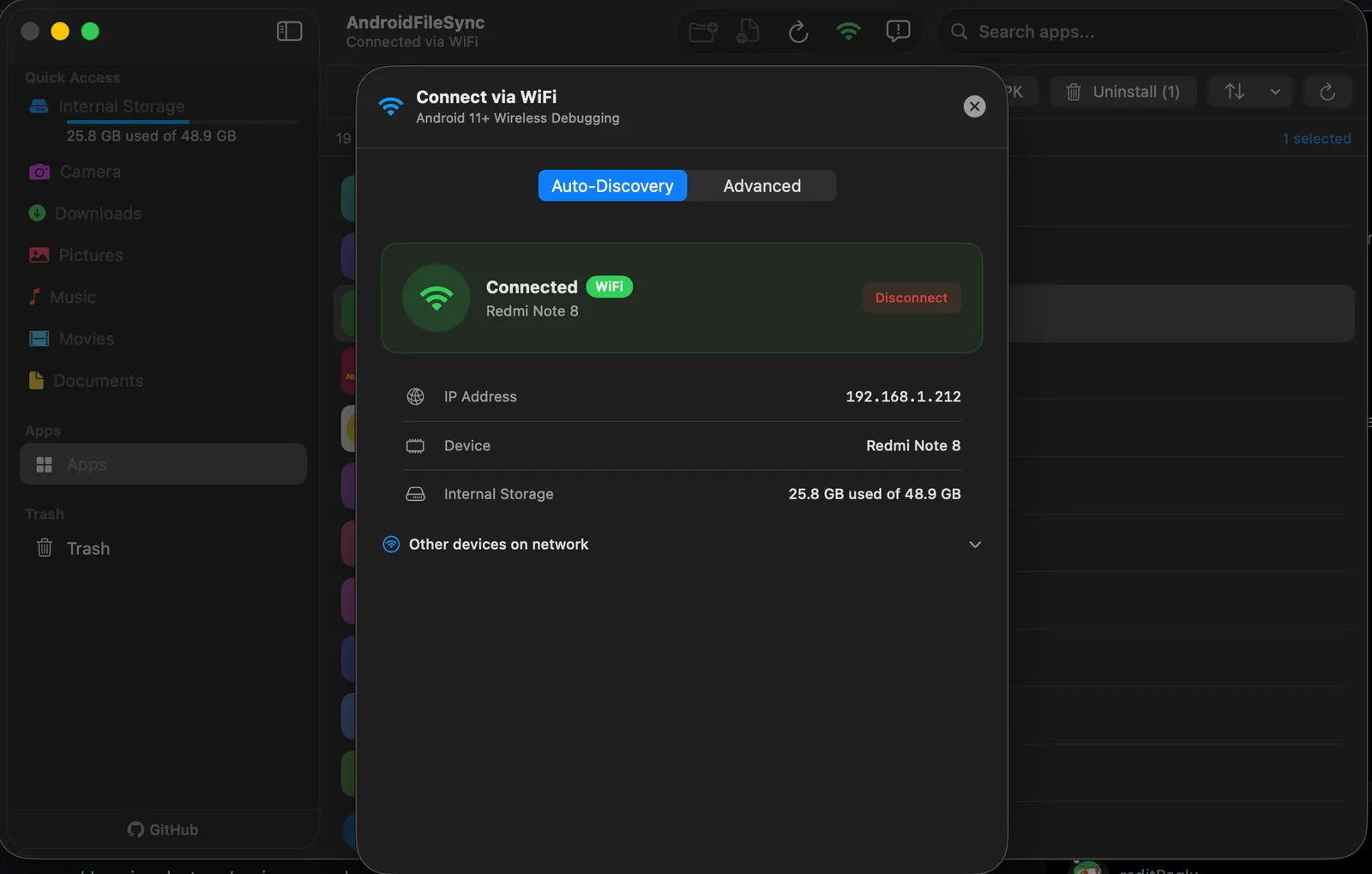
On Android 11 or later, turn on Wireless Debugging and keep both devices on the same network. AndroidFileSync can find the phone with auto-discovery or pair by scanning a QR code, with no IP address or port to type. Version 2.3.3 reconnects automatically after the phone changes address or wakes from sleep, and fixed QR pairing on macOS 27. You can also switch between several connected phones from one device picker.
More than file copying: apps, trash and batch work
In short
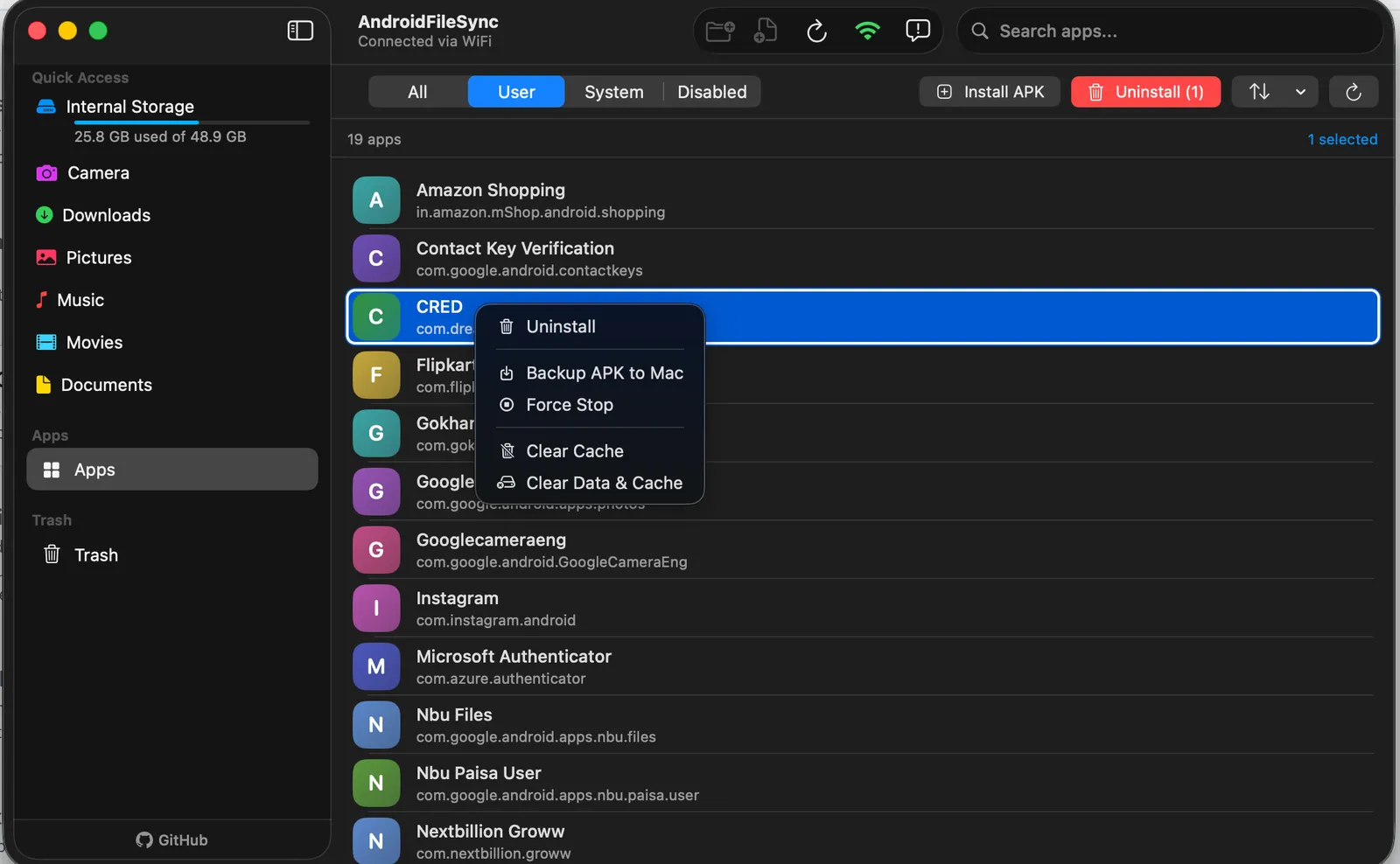
An Apps view lists user, system and disabled apps on the phone. From the Mac you can install an APK or XAPK, uninstall several apps at once, disable preinstalled bloatware, force-stop an app, clear its cache or data, or back up its APK to the Mac. Deleted files go to a trash folder on the phone first.
Price
Free (GPL-3.0)
Runs on
macOS 13 or later
Connection
USB or Wi-Fi
Wi-Fi needs
Android 11 or later
Latest version
2.3.3, Nov 2026
Phone app
None
Actively developed, with one install wrinkle
AndroidFileSync has shipped a release or beta roughly every month since July 2026, with v2.3.3 landing on 8 November 2026. The downloadable DMG asks you to run an xattr -cr command in Terminal before macOS will open it; installing with Homebrew skips that step. The developer says nothing leaves your cable or local network and there is no telemetry. We did not run it on a Mac; everything here was checked on 21 November 2026.
Android file transfer apps for Mac, compared
In short
AndroidFileSync and OpenMTP are both free and open source; OpenMTP needs no developer setup but works over USB only. MacDroid copies Android to Mac for free and charges $19 a year or $34 lifetime for two-way transfers. Commander One PRO is $29.99 once. LocalSend is free but needs an app on both devices.
| App | Price | Connection | Phone setup | Manages apps |
|---|---|---|---|---|
AndroidFileSync this one this article | Free, open source | USB or Wi-Fi | USB debugging, no app | Yes |
OpenMTP open source | Free, open source | USB only | File transfer mode | No |
MacDroid PRO | Free one way; $19/yr or $34 lifetime | USB or Wi-Fi | MTP or ADB mode | No |
Commander One PRO | $29.99 once | USB (MTP) | File transfer mode | No |
LocalSend open source | Free, open source | Wi-Fi only | LocalSend app on phone | No |
Android file transfer alternative: which one fits
If you want to plug in and copy photos without touching developer settings, OpenMTP is the simplest free choice, and it handles cameras and other MTP devices too. MacDroid mounts the phone in Finder itself, which suits people who live in Finder, but two-way transfers need PRO. Commander One PRO makes sense if you also want a dual-pane file manager with FTP and cloud drives. LocalSend is the pick for quick sends between any devices, but it moves files rather than letting you browse the phone. AndroidFileSync is the one to choose when you want Wi-Fi, a full browser and app management without paying.
Who AndroidFileSync suits, and who should skip it
In short
Mac users who move files to and from an Android phone often, want Wi-Fi as well as a cable, and are fine enabling USB debugging. Developers and tinkerers who sideload APKs get the most out of it. Skip it if you cannot turn on Developer Options, or if your Mac runs anything older than macOS 13.
It fits someone clearing a full camera roll onto a Mac, pushing music or documents the other way, or cleaning bloatware off a new phone from a proper keyboard and screen. Because it is free, the only cost of trying it is the phone setup, which the developer puts at under two minutes.
Frequently asked questions
Do I need to install anything on my Android phone to use AndroidFileSync?
No app, but one setting. AndroidFileSync uses ADB, the debugging bridge built into Android, so you turn on Developer Options (tap Build Number seven times in About phone) and then USB Debugging. The first time you connect, the phone asks you to allow the Mac. Nothing is installed on the phone.
Can AndroidFileSync transfer files over Wi-Fi instead of a cable?
Yes, on Android 11 or later. Turn on Wireless Debugging, keep the Mac and phone on the same Wi-Fi network, and pair by scanning a QR code or letting auto-discovery find the phone. Version 2.3.3 reconnects on its own after the phone changes IP address or wakes from sleep. A cable is still the faster option for large video files.
Is AndroidFileSync really free?
Yes. It is open source under the GPL-3.0 licence, and the developer’s FAQ says there are no trials, no premium version and no in-app purchases. The source code is on GitHub.
Is it safe to leave USB debugging turned on?
It is a trade-off. USB debugging lets a computer you have approved read files and install or remove apps, which is exactly what AndroidFileSync needs. Android asks you to approve each new computer, so a stranger’s Mac cannot connect without your tap. If you only transfer files now and then, you can switch USB debugging off when you are done and back on next time.
Why does macOS block AndroidFileSync when I first open it?
The release notes for the downloadable DMG tell you to run an xattr -cr command in Terminal before the app opens, which points to a build that is not notarized by Apple. Installing with the Homebrew cask skips that step, according to the same notes.
Is AndroidFileSync the best Android file transfer app for Mac?
Not for everyone. It is the only free option in our comparison that does Wi-Fi, two-way transfers and app management together. OpenMTP is also free and needs no developer setup, but works over USB only. MacDroid copies Android to Mac for free and charges $19 a year or $34 lifetime for two-way transfers, Commander One PRO is $29.99 once, and LocalSend is free but needs an app on the phone.
Sources
- 1
AndroidFileSync, developer site and FAQ
Free and open source (GPL-3.0), no trials, premium version or in-app purchases; macOS 13 or later, Apple Silicon and Intel; ADB with Developer Options and USB Debugging; Wi-Fi on Android 11+; Homebrew install command.
- 2
AndroidFileSync releases on GitHub
v2.3.3 on 8 November 2026: inline video playback, photo and video thumbnails, tile view, auto-reconnect after IP change or sleep, QR pairing fix for macOS 27; DMG install asks for xattr -cr, Homebrew does not.
- 3
Free and open-source MTP app for macOS 10.14 or later; USB only; phone set to File transfer, no Wi-Fi setup or account.
- 4
Free version copies Android to Mac only; PRO adds two-way transfers and editing: $19 per year or $34 lifetime (list $49); USB or Wi-Fi, MTP or ADB mode.
- 5
Commander One PRO on the Mac App Store
Dual-pane file manager, $29.99; lists MTP device support among its features; version 3.18 on 25 September 2026.
- 6
Free, open-source, cross-platform sharing over the local network; installed on both devices.
- 7
9to5Google: Android File Transfer link removed from Android.com
February 2024 report that Google dropped the Android File Transfer for Mac link from the Android.com footer.
AndroidFileSync
Browse Android on your Mac like Finder
macOS
More apps worth a look: browse the desktop