
Export YouTube Comments With Replies: YouTube Comments Exporter
You want a video's comment section in a spreadsheet: to pick a giveaway winner, collect viewer questions, or read what people said about a competitor's launch. YouTube has no download button, and most free exporters stop at 50 to 200 comments. YouTube Comments Exporter pulls every thread and every reply from a public video in a browser tab. This piece covers how it works, which export to use, what leaves your browser, and when another route is the better pick.

OneTimePay.app
6 min read

How can I download all the comments and replies from a YouTube video into a spreadsheet?
Paste the video link into YouTube Comments Exporter and press Extract. It pages through every comment thread and its replies through YouTube's own API, then exports CSV or JSON for Excel or Google Sheets. It is free, needs no signup, and has no comment cap of its own.
On this page
How can I download all the comments and replies from a YouTube video into a spreadsheet?
In short
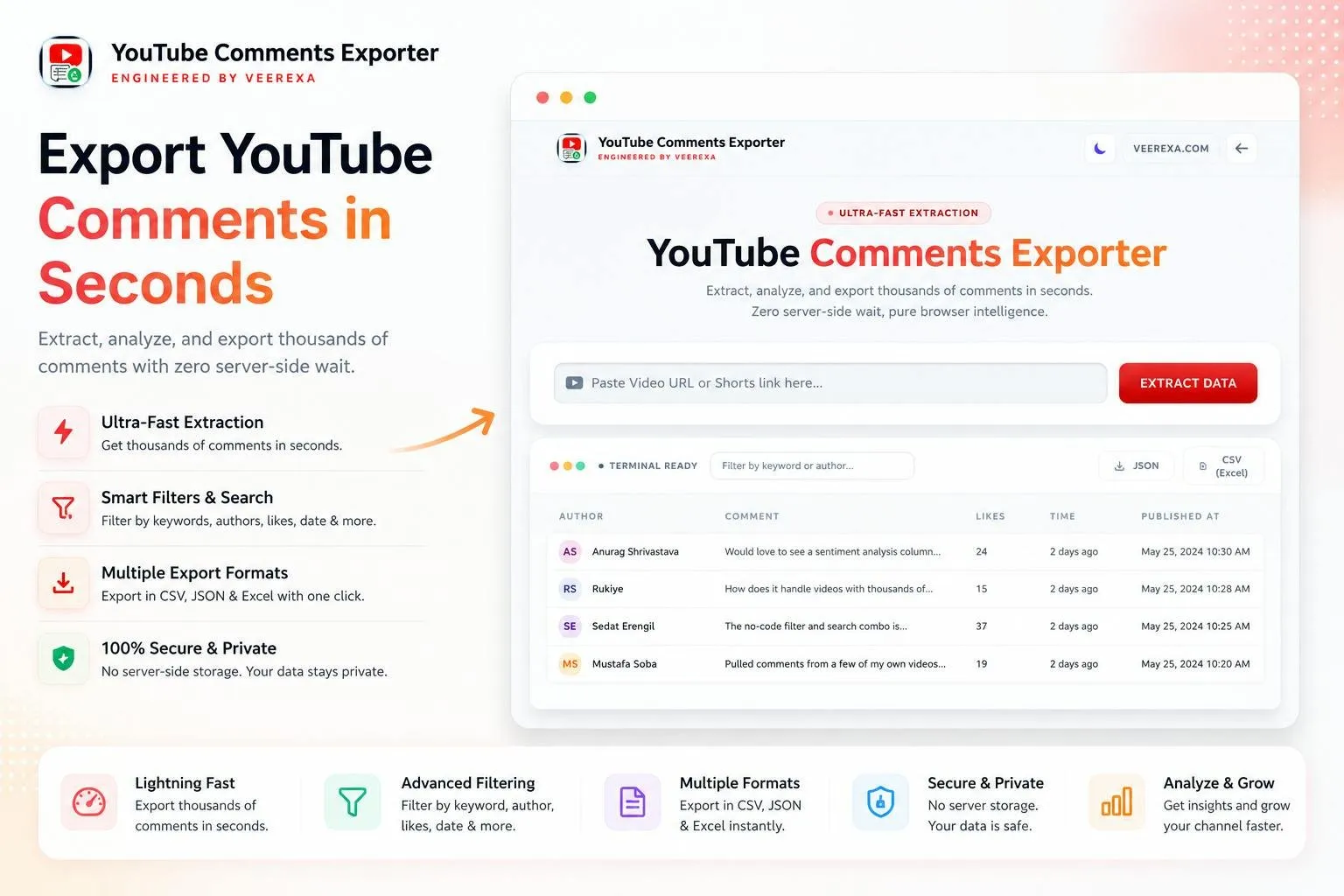
YouTube Comments Exporter is a single web page. Your browser asks the official YouTube Data API for the video's comment threads, 100 at a time, and for each thread that has replies it fetches those too. Rows appear in a live table as they arrive, with running counts of comments and replies.
Export YouTube comments in three steps
1. Paste a link. Any YouTube URL that contains the 11-character video ID works, including Shorts links. The video must be public with comments on.
2. Press Extract. The thumbnail and a progress bar appear while the table fills, and the page says Completed with the total once the last page is in. A viral video with tens of thousands of comments takes much longer than a small one.
3. Export. Click CSV (Excel) or JSON. In Excel or Google Sheets, use File, Import, and choose comma as the delimiter.
What leaves your browser
The comments themselves never touch Veerexa's servers: they come from Google into your tab, and the files are built in memory. The page does log usage, though. Its code sends the video link, the video ID and the number of comments fetched to veerexa.com at the start and end of every extraction. The page copy says “no data tracking”, so treat that claim as covering the comments, not your activity.
YouTube comment analysis without a spreadsheet
In short
Switch to the Analytics Dashboard tab and the same pull becomes a set of quick answers: who comments most, which comments got the likes, when the conversation peaked, and which words keep coming up. For a giveaway or a feedback scan you may never need Excel.
Totals: records, replies, unique authors, total and average likes, and the oldest and newest comment.
Charts: a comments timeline by hour, day, week or month, and replies against top-level comments.
Lists: top authors by volume, top keywords with a minimum word length, the 10, 25 or 50 most-liked comments, and the most-used emojis.
Threads and filters: a conversation tree, plus filters for date range, likes range, comment type and threads with replies, with their own CSV and JSON export.
Price
Free, no signup
Runs in
Any browser
Per request
100 comments
Replies
All, per thread
Exports
CSV and JSON
Comment cap
None of its own
YouTube comments to CSV: which export to pick
In short
There are two CSV buttons, and they are not the same. The main table's CSV keeps four columns: username, comment, likes and date. It includes replies but does not mark which rows are replies. When the thread structure matters, use one of the other two exports.
Main CSV: Username, Comment, Likes, Date. Fine for counting, keyword searches and random picks.
Analytics CSV: Username, CommentText, LikesCount, IsReply, ReplyToAuthor, PublishedAt, limited to whatever your filters show.
JSON: every field, including isReply, replyTo, a threadId shared by a comment and its replies, and the reply count of each top-level comment.
YouTube Comments Exporter vs Comment Picker, yt-dlp, Apify and your own API key
In short
YouTube Comments Exporter is not the only free route: yt-dlp and a YouTube Data API key of your own cost nothing either, but both need a terminal or some code. Comment Picker is free up to 50 comments and $9.99 a month beyond that. Apify bills from $0.90 per 1,000 comments.
| App | Price | Free limit | Replies | Formats | Setup |
|---|---|---|---|---|---|
YouTube Comments Exporter this one this article | Free | None of its own; shared API quota | Yes, all | CSV, JSON | Paste a link |
Comment Picker web tool | Free; Premium $9.99/mo | 50 comments, 1 export a day, 3 a month | Optional | CSV, XLSX | Paste a link |
yt-dlp open source | Free (Unlicense) | None | Yes | JSON (info file) | Command line |
Apify YouTube Comments Scraper cloud | From $0.90 per 1,000 comments | Pay per result | Yes | JSON, CSV, Excel and more | Account, run an actor |
YouTube Data API your own key | Free | 10,000 units a day (1 unit per 100 comments) | Yes, via comments.list | Whatever you write | Google Cloud project, code |
A free YouTube comment scraper with a shared quota
The catch with YouTube Comments Exporter is the API key. It is built into the page and shared by every visitor, so a busy day or one huge video can use up the daily quota for everyone. If you pull large comment sections often, your own API key or yt-dlp gives you a quota of your own; for one video at a time, the browser tab is the quickest path.
Who it suits, and who should skip it
In short
It suits creators running a giveaway or a Q&A, marketers reading feedback on their own or a competitor's video, and students who need one video's comments for a class project. Skip it for batches of videos, scheduled pulls, or research that needs a documented, repeatable collection method.
One video at a time: there is no batch mode, no saved history and no resume if a large pull stops partway.
Large videos can stall: a Product Hunt reviewer reported rate-limiting stalls on high-volume viral videos.
Small, young project: launched on Product Hunt in 2026 by Veerexa, whose site also sells school management software; 11 points and two 5-star reviews on 4 November 2026.
A quick first run
Open the tool, paste the link of a video with a few hundred comments, press Extract, and when it says Completed, open the Analytics tab and export the filtered CSV so replies are marked. Facts were verified on 4 November 2026.
Frequently asked questions
Is YouTube Comments Exporter really free, and is there a comment limit?
Yes, it is free with no account and no paid tier. The tool sets no comment cap of its own. The real limit is YouTube: the page fetches through one shared YouTube Data API key, so every visitor draws on the same daily quota, and a very large video can stall or stop when that quota or a rate limit is hit.
Does YouTube Comments Exporter send my data to its servers?
The comments do not: your browser fetches them straight from Google and builds the CSV or JSON locally. The site does log usage, though. Its code sends the video link, the video ID and the number of comments fetched to veerexa.com at the start and end of each extraction, even though the page says there is no tracking.
Why did my extraction stop partway through?
Most likely the shared API quota or a YouTube rate limit. The page shows the API error, and there is no resume, so export what you already have, then run the video again later, ideally after Google resets the daily quota.
Can it export comments from private videos or videos with comments turned off?
No. It reads what the public YouTube Data API returns, so it works on public videos and Shorts with comments enabled.
How do I keep replies attached to their parent comment?
Skip the main CSV, which has only username, comment, likes and date. Use the JSON export, where each reply carries isReply, replyTo and a shared threadId, or the CSV in the Analytics tab, which adds IsReply and ReplyToAuthor columns.
Is YouTube Comments Exporter the cheapest way to export YouTube comments?
It ties for cheapest: it is free, as are yt-dlp and calling the YouTube Data API with your own key, which both need some technical setup. Comment Picker is free only up to 50 comments and charges $9.99 a month for its Premium plan. Apify bills from $0.90 per 1,000 comments.
Sources
- 1
YouTube Comments Exporter (Veerexa)
Free, no registration; vendor FAQ on batches of 100, no client-side limit, CSV import into Excel or Sheets, and the "no data tracking" claim. API calls, the shared page key, export columns and the /youtube_comments/track request are read from the shipped youtube_comments and analytics controllers on 4 November 2026.
- 2
YouTube Comments Exporter on Product Hunt
Launched in 2026 by Kapil Dev Pal; listed as free; 11 points and 5.0 from 2 reviews on 4 November 2026; one review notes rate-limiting stalls on viral videos.
- 3
YouTube Data API: getting started (Google)
Default quota of 10,000 units a day; a list request usually costs 1 unit.
- 4
The endpoint the tool pages through, up to 100 threads per request.
- 5
Comment Picker: Export YouTube comments
Free up to 50 comments, 1 export a day and 3 a month; replies optional; CSV or XLSX; Premium $9.99 a month removes the cap.
- 6
Free, Unlicense; --write-comments places video comments in the info JSON.
- 7
YouTube Comments Scraper on Apify (Streamers)
Pay per event, from $0.90 per 1,000 comments; JSON, CSV, Excel and more.
- 8
How to export YouTube comments to Excel (AllyHub)
Background survey of five methods; free extension tiers of 50 to 200 comments per video.

YouTube Comments Exporter
Export and analyze YouTube comments in seconds
Web
More apps worth a look: browse the desktop