
The Mac Notch App That Works With or Without a Notch
Notch apps turn the camera cutout on a MacBook into an iPhone-style Dynamic Island: a small black pill that opens into music controls, your next meeting, a file tray. Most of them are built around that cutout, which leaves out every Mac mini, iMac, Intel MacBook and external monitor. Aurora Notch does not need one. This piece covers what it puts at the top of your screen, how it behaves on a Mac with no notch, where it keeps your clipboard and notes, what it costs against the alternatives, and the limits you should know first.

OneTimePay.app
8 min read
Same panel. Notch optional.
MacBook with a notch
panel grows from the notch
Mac mini, iMac, external display
panel grows from the top edge
Is there a Dynamic Island app for Mac that works without a notch?
Yes. Aurora Notch turns the notch, or the top screen edge on notch-less Macs, Intel Macs and external displays, into media, calendar, clipboard and notes controls that it keeps on your Mac. It costs €24.99 once or €2.99 a month, with a 72-hour free trial.
On this page
Is there a Dynamic Island app for Mac that works without a notch?
In short
Yes. Aurora Notch is a native Swift app that turns the notch, or the top edge of the screen on a Mac without one, into a drop-down workspace. The developer says it runs on Apple silicon and Intel Macs from macOS 13.5, which covers a Mac mini, an iMac, an older MacBook and an external display.
The question exists because of how the category started. The notch arrived on the 2021 MacBook Pro, developers noticed it looked like the iPhone's Dynamic Island, and the first wave of apps treated the cutout as the anchor. On a Mac that has no cutout, many of them either do nothing, draw a fake notch as a workaround, or say nothing about it at all. Aurora treats the notch as optional: the panel opens from the notch where there is one and from the top edge where there is not.
Needs a notch
No
Macs supported
Apple silicon + Intel
Lifetime licence
€24.99 once
Free trial
72 hours, no card
Native, small, and asks before it touches anything
It is a single native Swift app, an 11.6 MB universal download, rather than a web wrapper. It follows the macOS Reduce Motion setting, and it asks for each permission only when you turn on the feature that needs it: Automation when you want it to control Spotify, Calendar when you connect a calendar, Camera when you add the camera preview widget. For something that sits on your screen all day, those are the details that decide whether you keep it.
What Aurora Notch puts at the top of your screen
In short
Six tools in one panel: media controls for Spotify, Apple Music and supported Chrome playback, clipboard history, Quick Notes, a Google and iCloud calendar that can create events, a Focus timer with Pomodoro and Meeting Mode, and a widget shelf for files, camera, audio output, devices and system stats.
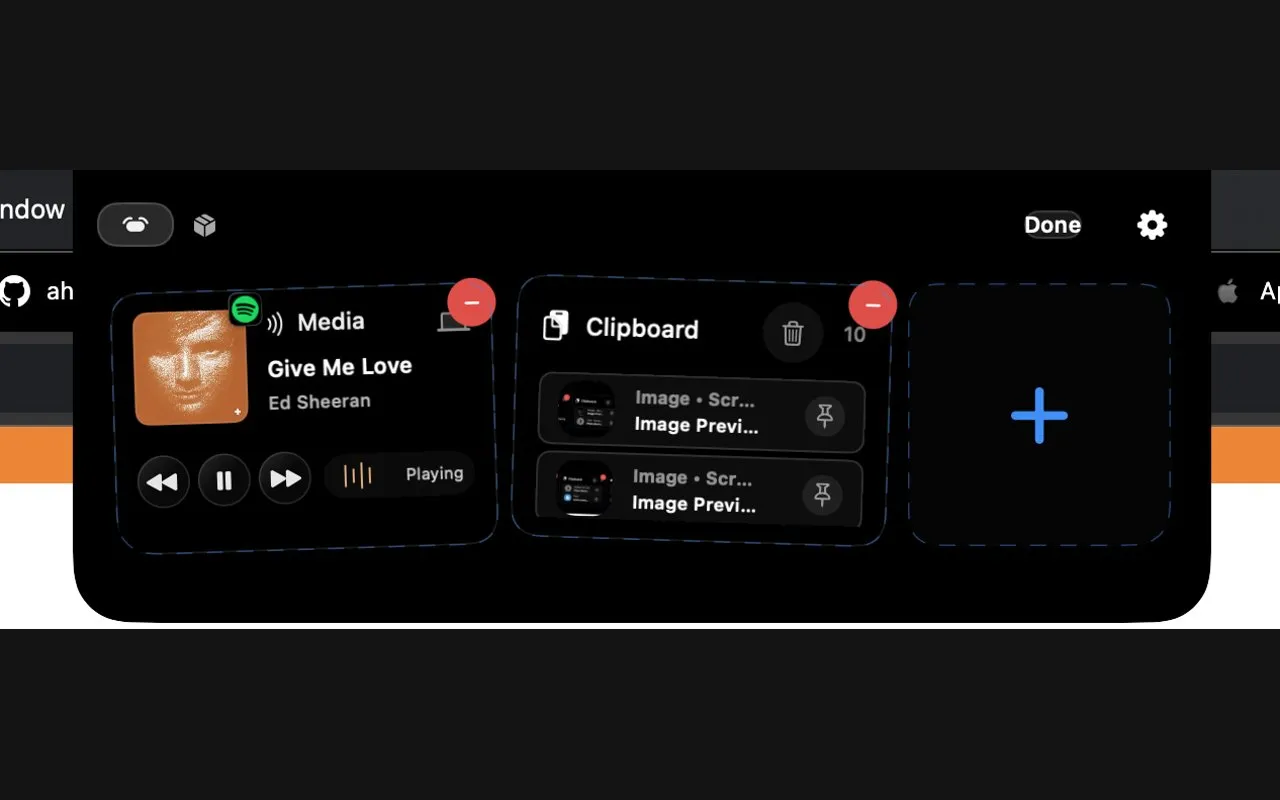
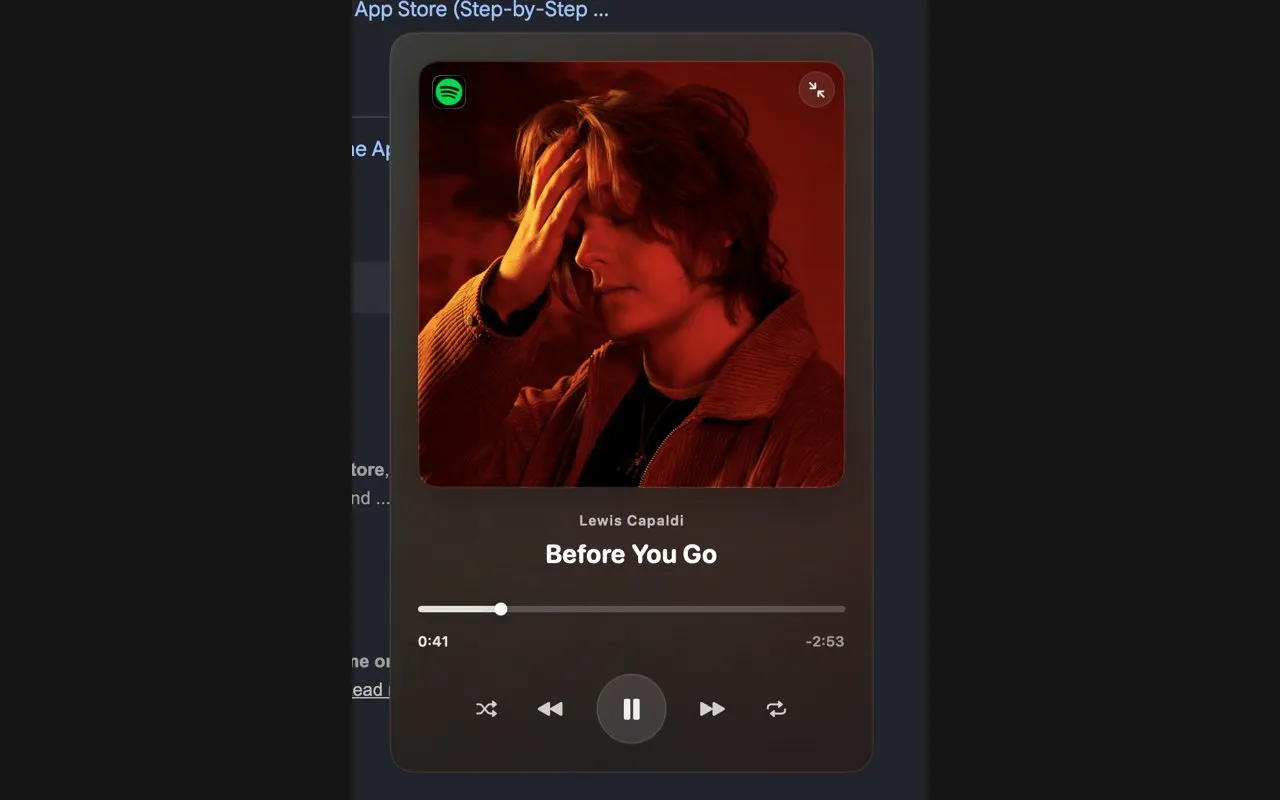
Media, clipboard and Quick Notes
Media starts as a compact pill with the track and play controls, and expands into a full Now Playing view with artwork and a scrubber when you want it. It reads Spotify, Apple Music and supported Chrome web playback. The clipboard keeps a history you can pin, copy from and reuse, and Quick Notes catches a thought without opening a notes app. Those two are the tools most notch apps skip, and they are the reason to choose this one over a music-only alternative.
Calendar, Focus timer and Meeting Mode
The calendar shows Google and iCloud events together, including several Google accounts at once, with your next meeting and a countdown in view. You can add an event from the panel with a title, location, notes, an all-day toggle and a reminder. Focus runs a timer or Pomodoro cycles with a session history, and Meeting Mode quiets the panel during calls. The developer calls the calendar a tool for quick capture rather than heavy calendar management, which is a fair description.
Widget shelf and on-device writing help
The shelf is the part you arrange yourself: a file tray, camera preview, audio output switching, connected devices, system stats and quick toggles, dragged into the order you want. Writing help adds three actions to the clipboard and notes: summarise, extract action items, and suggest a title. It runs only when you trigger it, on Apple's on-device model. That model needs an Apple silicon Mac with Apple Intelligence, so Intel Macs get everything except the writing help.
A notch app without notch hardware: Mac mini, iMac and external displays
In short
On a Mac with no notch, Aurora uses the top edge of the screen instead, so a Mac mini, an iMac, an Intel MacBook or an external monitor gets the same panel and the same tools. What you should check for yourself is how it behaves across several displays, and the 72-hour trial covers that test.
Notch app external display behavior
The developer's own wording is that Aurora adapts its placement to the top screen edge on supported Macs without a notch, external displays included. What it does not spell out is which screen the panel follows when you have two, or how it behaves when an app is full screen. That matters most for the common setup this article is about: a MacBook closed on a desk and driving a monitor, where the notch you paid for is not on the screen you look at. Plug in your actual setup during the trial and watch for exactly that.
Intel Macs and macOS 13.5 support
The floor is macOS 13.5 Ventura, which is lower than most of the category. Several rivals need macOS 14 Sonoma or macOS 15 Sequoia, which rules out Intel Macs that stopped getting upgrades. Combined with the universal build, that makes Aurora one of the few full-featured notch apps an older Intel MacBook can run, minus the writing help described above.
Where your clipboard history and notes are stored
In short
On your Mac. The developer says notes, clipboard history and calendar data stay on the device wherever possible, there is no account, and the settings screen shows sync as “Local only”. Likely passwords and tokens can be masked in the clipboard history and deleted after about 90 seconds.
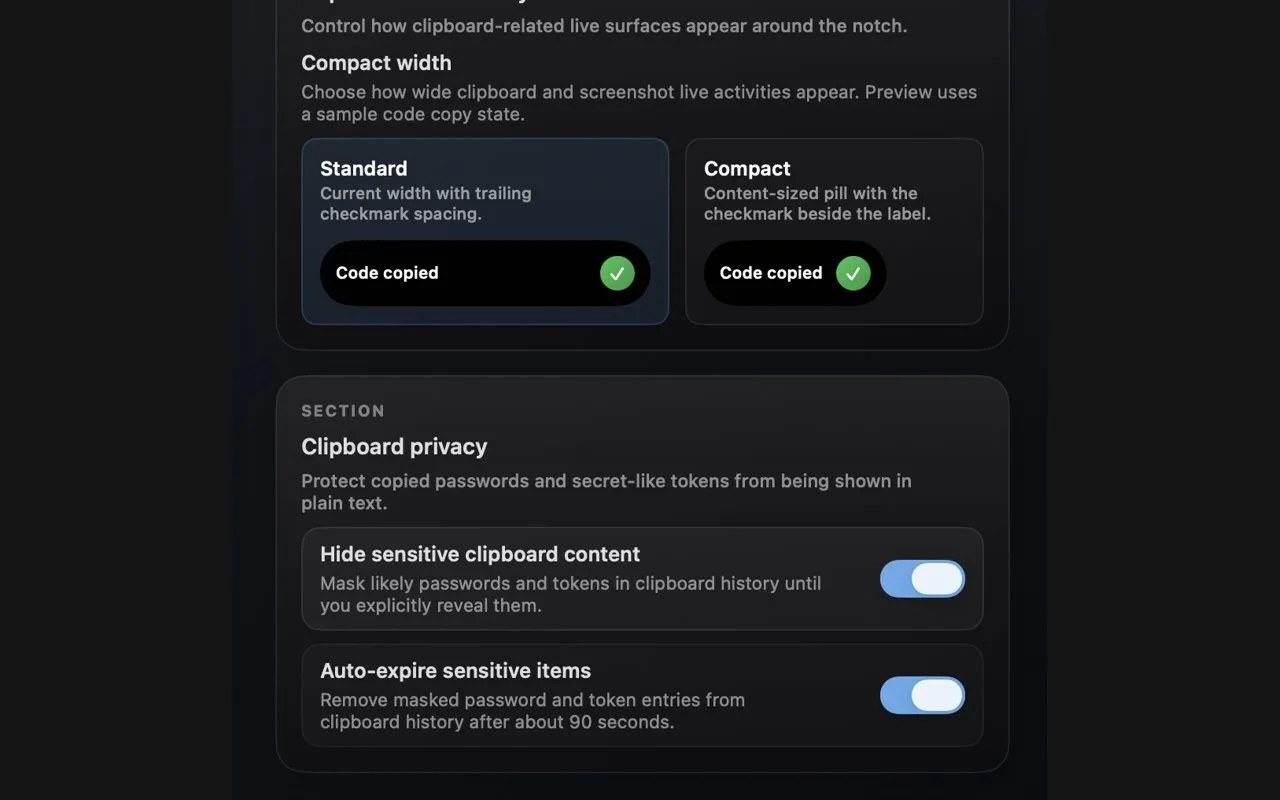
What Local only sync means in practice
A clipboard history is the most sensitive thing a utility like this holds, because it collects everything you copy: passwords from a password manager, one-time codes, private messages. Aurora keeps it on the Mac and does not sync it anywhere, and its settings say iCloud preference sync is disabled in this build. The masking switch hides strings that look like secrets until you reveal them, and the auto-expire switch drops them from the history after roughly a minute and a half.
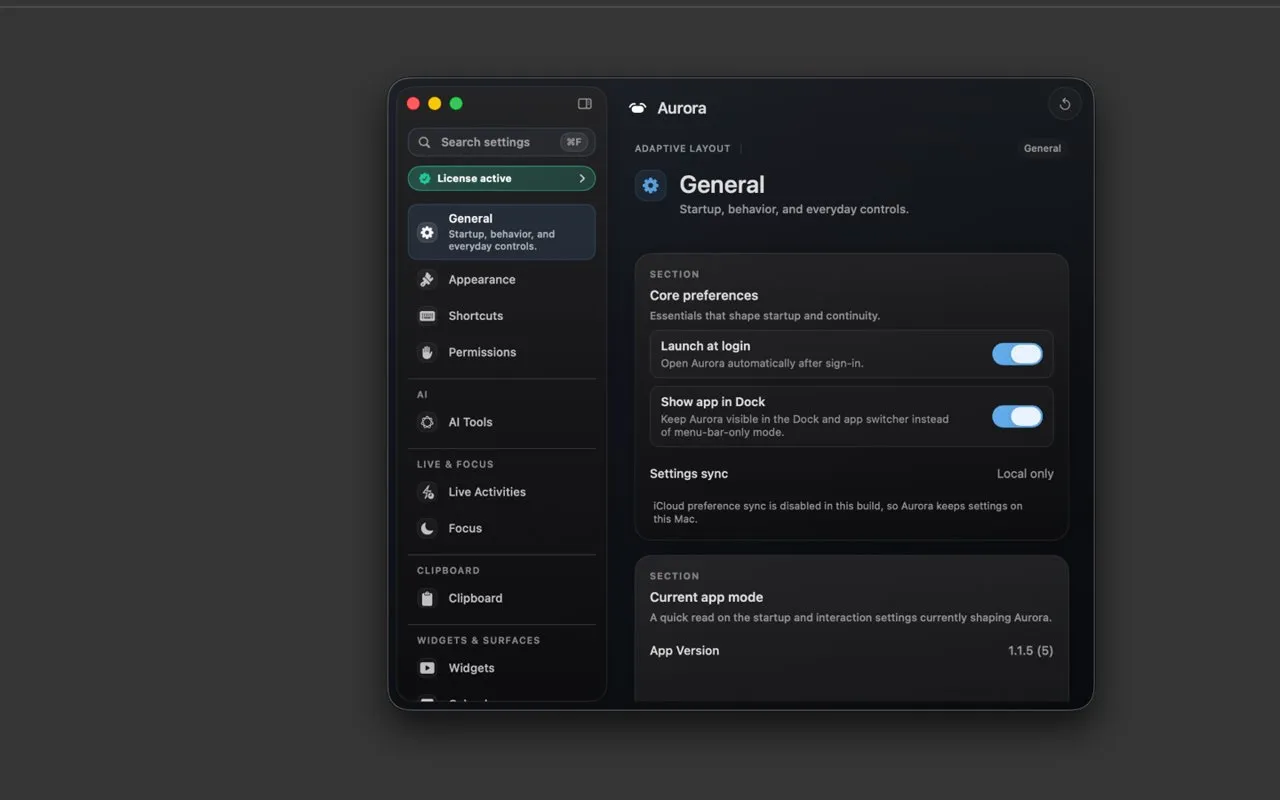
How to check the local-only claim yourself
Local-first is not the same as offline, and it is worth being exact about it. The app still uses the network to check your licence, fetch updates, and talk to Google Calendar if you connect it. We did not run a network audit, so the storage claim above is the developer's, backed by its own settings screens. If it matters to you, run the trial with a network monitor such as Little Snitch or LuLu, and compare the permissions it requests against the features you actually turned on.
How it compares with Boring Notch, Alcove and the other notch apps
In short
Aurora is not the cheapest notch app. Boring Notch is free, VibeNotch is $3.99, and DynamicLake Pro and Alcove are around $14 once. Aurora Pro Lifetime is €24.99 for 2 Macs, or €2.99 a month. What it buys is clipboard history, notes and calendar in one panel, and macOS 13.5 support on Intel.
Here is the whole field in one place, checked on 8 October 2026. The column most articles leave out is the one this one is about: whether the app says anything at all about Macs without a notch.
| App | Price | Without a notch | Clipboard + notes | Needs |
|---|---|---|---|---|
Aurora Notch this one this article | €24.99 once or €2.99/mo | Yes, top edge | macOS 13.5, Intel ok | |
Boring Notch free, open source | Free | Not stated | macOS 14, Intel ok | |
Alcove Live Activities and HUDs | $14.99 once | Not stated | macOS 15 | |
DynamicLake Pro file tray and plugins | $13.99 once | Not stated | Not stated | macOS 14 |
MediaMate HUD replacement | €6.99 | Yes, all Macs | macOS 13 | |
VibeNotch Mac App Store | $3.99 | Yes, Bubble Mode | macOS 14 | |
NotchNook not currently sold | Unavailable | Unverified | Unverified | Unverified |
NotchNook alternative you can buy once
Most comparisons still start with NotchNook at $25 once or $3 a month. That is out of date. As of 8 October 2026 its product page returns an error, its Setapp listing is gone, and its developer's homepage apologises to customers who lost access after a company dispute in July 2026 and announces a rebuilt successor called NOOTCH. If you were looking for a NotchNook alternative, you now need one, and every app in the table above except Aurora's monthly plan is a single payment or free.
Notch app one-time purchase: Lifetime vs Monthly
Aurora sells both, with the same features in each. Monthly is €2.99 and Lifetime is €24.99, so Monthly overtakes the one-time price in the ninth month, and a notch utility is something you leave running for years. The trade is the usual one: a subscription keeps paying the developer, a lifetime licence depends on the developer keeping going without that income. The licence covers 2 Macs, fewer than Alcove's 3 or MediaMate's 5.
Boring Notch
$0
free, unsigned
VibeNotch
$3.99
Mac App Store
MediaMate
€6.99
HUDs only
DynamicLake Pro
$13.99
once
Alcove
$14.99
once, macOS 15
Aurora Pro Lifetime
€24.99
once, 2 Macs
What a notch app costs if you pay once, checked on 8 October 2026. Aurora is the most expensive of the six, and the only one that documents clipboard history, notes and a calendar in the same panel. Aurora Pro Monthly is €2.99, or about €36 a year.
When a free or cheaper rival is the better pick
If you mostly want music controls and a file shelf on a notched MacBook, Boring Notch does that for free under an open-source licence, though it is unsigned, so you install it through Homebrew or by clearing a macOS security warning. If you want nicer volume and brightness pop-ups, MediaMate does only that and runs on every Mac. If you are on macOS 15 and want Live Activities and lock screen widgets, Alcove costs less. Aurora is worth the extra when you want the clipboard, notes and calendar in the same place, or when your Mac has no notch, or is an Intel Mac.
Try Aurora Notch for 72 hours before you pay
In short
Every Pro feature is unlocked for 72 hours from first launch, with no account and no card. After that the app needs a licence: there is no permanent free tier. Use the three days to test your displays, connect your calendar, and live with the clipboard history for a working day.
Three things to test in the trial
First, every screen you own, including the external monitor with the laptop closed, and one full-screen app. Second, the calendar with your real accounts, since that is the one feature that leaves the Mac. Third, the clipboard over a normal day with the masking switch on, to see whether it catches the secrets you copy. If all three hold up, the choice between Monthly and Lifetime is a question of how long you expect to keep it.
A young app from a single shop
Be clear about the track record. The first public download and the signed update feed went live on 22 June 2026, and the app is sold only from its own site through Lemon Squeezy, not on the Mac App Store or Setapp. There is a public changelog with dated releases, which is the best sign of maintenance you will get this early. Refunds are case by case, for technical problems reported within 14 days.
Check the price and your Mac before you buy
Aurora Pro Lifetime is €24.99 once and Aurora Pro Monthly is €2.99 a month, both before VAT, which Lemon Squeezy adds at checkout for your country. One licence covers 2 Macs. The writing help needs an Apple silicon Mac with Apple Intelligence. NotchNook cannot currently be bought from its official site. Everything here was verified on 8 October 2026, and app pricing moves.
Frequently asked questions
Which NotchNook alternatives can I buy once instead of paying a subscription?
Several, and some cost less than Aurora. VibeNotch is $3.99 on the Mac App Store, MediaMate is €6.99 on Gumroad, DynamicLake Pro is $13.99 once and Alcove is $14.99 once with updates included. Aurora Pro Lifetime is €24.99 once for up to 2 Macs, next to a €2.99 monthly plan with the same features. Boring Notch and NotchDrop are free and open source. NotchNook itself cannot currently be bought: its official product page returns an error and the developer says customers lost access after a company dispute in July 2026. Everything here was checked on 8 October 2026.
Which Mac notch apps keep my clipboard history and notes stored only on my Mac?
Aurora Notch says clipboard history, Quick Notes and calendar data stay on your Mac wherever possible, it needs no account, and its settings screen shows sync as "Local only". It can also mask likely passwords and tokens in the clipboard history and delete them after about 90 seconds. That is the vendor’s claim plus its own screenshots, not a network audit we ran. Licence checks, updates and Google Calendar still use the network. Most rivals either have no clipboard and notes features at all (Alcove, MediaMate, NotchDrop) or do not document where that data lives, so check each app’s privacy page and the permissions it requests.
Does Aurora Notch work on Intel Macs and Macs without a notch?
The vendor says yes to both: it requires macOS 13.5 or later, ships as an 11.6 MB universal download for Apple silicon and Intel, and uses the top edge of the screen on supported Macs that have no notch, including Mac mini, iMac and external displays. One feature does not carry over to Intel: the writing help runs on Apple’s on-device model, which needs an Apple Intelligence capable Apple silicon Mac.
Is Aurora Pro Lifetime different from the monthly plan?
No. The vendor states there is no feature difference between Aurora Pro Monthly and Aurora Pro Lifetime, and both cover up to 2 Macs per licence. Monthly is €2.99 and Lifetime is €24.99 once, so Monthly costs more than Lifetime from the ninth month onward. VAT is added at checkout by Lemon Squeezy.
Is there a free version of Aurora Notch?
Not a permanent one. Every Pro feature is unlocked for 72 hours from first launch with no account and no card, and after that the app needs an active Monthly or Lifetime licence. If you want a free notch app, Boring Notch is free and open source, though it has no clipboard history or notes and is unsigned, so you install it through Homebrew or clear a macOS security warning.
What happened to NotchNook?
As of 8 October 2026 it is not sold from its official site. The product page at lo.cafe/notchnook returns a 404, notchnook.app returns an error, and its Setapp page no longer lists it. The developer’s homepage says that after a company dispute in July 2026 customers lost access, apologises to them, and announces a rebuilt successor called NOOTCH with a discount for existing lifetime licence holders. Until that is resolved, older articles quoting NotchNook’s price are out of date.
Sources
- 1
The app itself. Source for the six everyday tools (media, clipboard, calendar, Quick Notes, Focus, widget shelf), the macOS 13.5 requirement, the 72-hour trial with no account and no card, and the local-first statement that notes, clipboard and calendar stay on the Mac wherever possible.
- 2
Primary source for the price: Aurora Pro Monthly €2.99 a month and Aurora Pro Lifetime €24.99 one-time, with "no feature difference" between them, up to 2 Macs per licence, VAT added at checkout by Lemon Squeezy, and the statement that after the 72-hour trial Pro features require an active licence.
- 3
Aurora Notch: honest comparison
Source for "works on every Mac, notch or not", Apple Silicon or Intel, the 11.6 MB universal DMG, Reduce Motion support, per-feature permission prompts, and the vendor’s own break-even line that Lifetime pays for itself in under nine months.
- 4
Aurora Notch: privacy and permissions
Source for what each permission is for (Accessibility, Automation, Screen Recording, Calendar and Google Calendar, Camera and Microphone), that writing help runs only when triggered and uses Apple’s on-device model when available, and that Lemon Squeezy handles payment.
- 5
Source for the release history: version 1.1.4 on 15 May 2026, the public 1.1.6 DMG and signed Sparkle update feed on 22 June 2026, and the July 2026 Meeting Notes update.
- 6
Apple: Apple Intelligence requirements
Why Aurora’s writing help is not available on every Mac: Apple’s on-device model needs an Apple silicon Mac with Apple Intelligence support, so Intel Macs run Aurora without that feature.
- 7
The free alternative: GPL-3.0, macOS 14 Sonoma or later, Apple Silicon or Intel, music controls, calendar, a file shelf with AirDrop and a HUD replacement. The app is unsigned, so it is installed through Homebrew or by clearing a macOS security warning.
- 8
Source for Alcove’s $14.99 one-time price with future updates included, the 72-hour trial, and up to 3 devices per licence. Alcove focuses on Live Activities, notifications and HUDs and lists no clipboard history or notes.
- 9
Source for DynamicLake Pro at $13.99 as a one-time payment and the macOS Sonoma 14.0 requirement.
- 10
Source for MediaMate’s macOS 13 requirement and "All macs are supported". It replaces the volume, brightness and Now Playing HUDs and sells for €6.99 on Gumroad.
- 11
VibeNotch on the Mac App Store
Source for VibeNotch at $3.99, macOS 14 or later, and its Bubble Mode for displays without a notch.
- 12
lo.cafe (NotchNook’s developer)
Checked 8 October 2026. The developer’s homepage apologises to everyone who lost access to NotchNook after a company dispute in July 2026 and announces a successor called NOOTCH. The NotchNook product page at lo.cafe/notchnook returns a 404, and its Setapp page redirects to Setapp’s app list.

Aurora Notch
A private notch workspace for every Mac
once
macOS
More apps you buy once: browse the desktop