
A Bedtime Brain Dump App That Reminds You Tomorrow
You switch off the light and your head starts reading out tomorrow: the email you owe, the form that is due, the room you said you would clean. Dotomo is a small free iPhone app made for that moment. You type the tasks, it brings them back the next day. This piece covers what it does, the research behind writing tomorrow down, how it compares with Apple Reminders and the paid to-do apps, and the limits you should know before you rely on it.

OneTimePay.app
8 min read
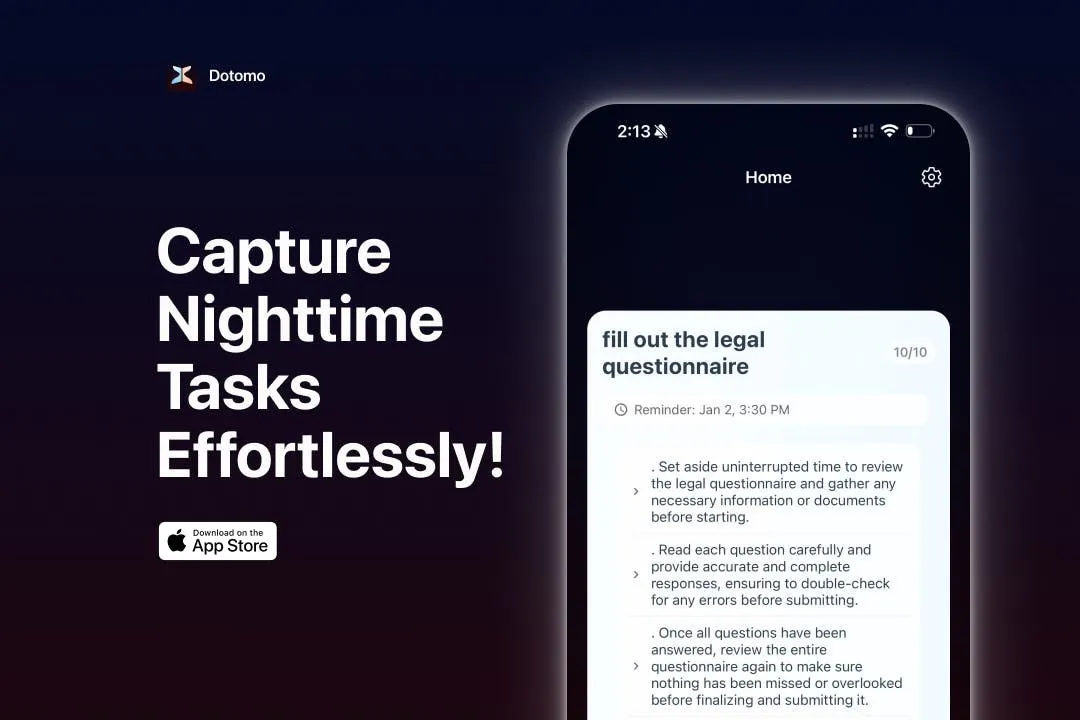
Can't sleep because I keep thinking about tomorrow's to-dos, is there an app for that?
Yes. Dotomo is a free iPhone app with no account: type tomorrow's tasks in plain language at bedtime, and it reminds you the next day at times that follow your sleep schedule, with AI-written steps under each task. Caveats: it has not been updated since January 2025, and Apple Reminders covers basic reminders for free.
On this page
Can't sleep because I keep thinking about tomorrow's to-dos, is there an app for that?
In short
Yes. Dotomo is a free iPhone app built for exactly that moment. You type tomorrow's tasks the way you would say them, it schedules each one as a reminder for the next day, and it writes a short list of steps under every task. It needs no account, shows no ads, and holds the list until morning.
The point is not organising your life. It is getting the loop out of your head so it stops running. A general to-do app asks you to choose a project, a list, a priority and a due date before it lets you go. Dotomo opens on capture: one text field, a task, a reminder time, done. The morning takes care of the rest, because the notification arrives whether or not you remember you wrote anything.
Price
Free, no ads
Account
None
Runs on
iPhone, iOS 15.1+
Last update
26 Jan 2025
Why writing tomorrow down helps you fall asleep
In short
In a 2018 Baylor sleep-lab study, people who spent five minutes writing a to-do list fell asleep in about 15.8 minutes on average, against about 25.1 minutes for people who wrote about tasks they had already finished. The more specific the list, the faster they fell asleep.
What the study measured, and what it did not
Michael Scullin's team put 57 healthy adults aged 18 to 30 in a sleep lab, gave half of them five minutes to list what they had to do over the next few days, and measured sleep with polysomnography rather than a questionnaire. The gap of roughly nine minutes was statistically significant. Three limits matter for an app: everyone wrote with paper and pencil, the experimenter took the sheet away afterwards, and people with insomnia were screened out. So the study supports the habit. It does not prove that typing the list on a phone works as well.
Plan tomorrow the night before, but be specific
The useful detail in the paper is specificity. “Work stuff” is a worry. “Send Anna the signed contract by 10” is a task with an owner and a time, and it is the kind of entry the study linked to faster sleep. That is also the kind of entry a reminder app can act on, which is where Dotomo comes in.
How Dotomo turns a bedtime brain dump into tomorrow's reminders
In short
Three moves. You type a task in plain language, Dotomo schedules a reminder for the next day, and its AI adds a short step-by-step breakdown under the task. A sleep schedule and work hours in Settings steer when reminders land, and an Analytics screen counts what you finished.
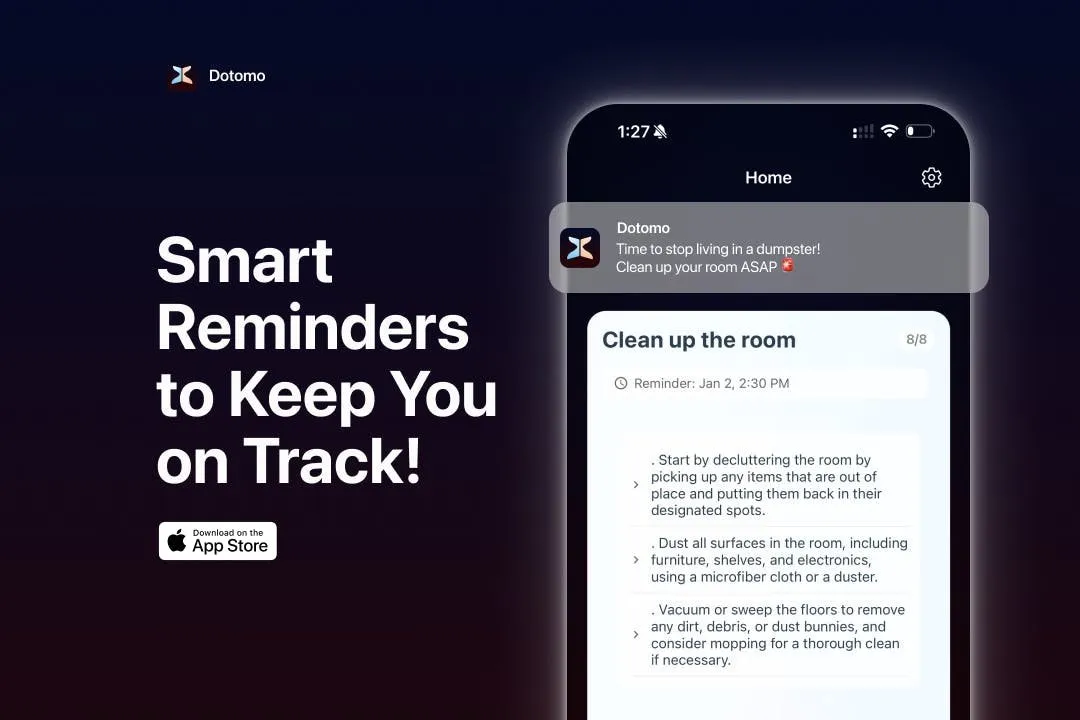
The AI step list under each task
Each task gets a few short steps. “Clean up the room” becomes declutter, dust, vacuum. “Fill out the legal questionnaire” becomes gather the documents, answer carefully, review before you submit. That is the part Apple Reminders does not do, and it is aimed at the morning version of you who reads “questionnaire” and does not know where to start. The steps are generic, so treat them as a nudge rather than a plan.
Sleep schedule and work hours shape the timing
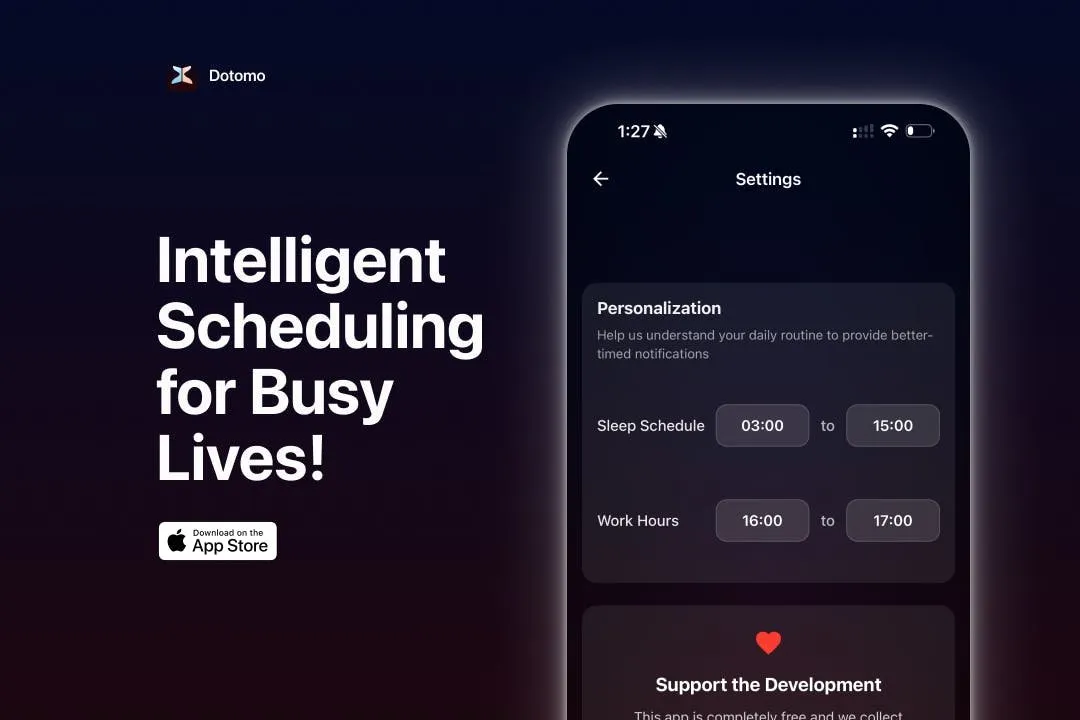
In Settings you enter when you sleep and when you work, and the developer says Dotomo uses that to place reminders at better moments. The screenshots show the fields but not the rule behind them, so check during your first week that reminders arrive when you expect.
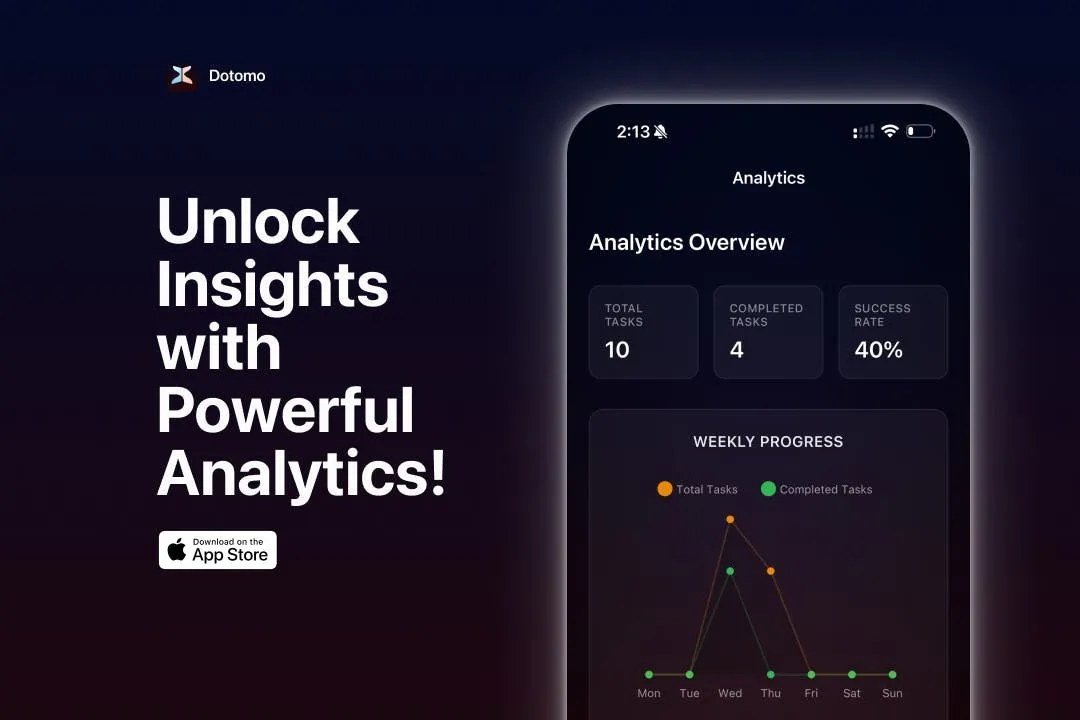
Nagging notifications and the Analytics screen
The notifications tease you on purpose: “Time to stop living in a dumpster!” is the app's own example. Whether that motivates you or annoys you is personal. The Analytics screen shows total tasks, completed tasks, a success rate and a weekly chart, which is enough to see whether the habit is sticking.
A to-do list app without account, ads or sign-in
In short
Dotomo opens straight to capture: no sign-up, no sign-in, no ads. Its App Store privacy label reads “Data Not Collected”, though that is the developer's own declaration, which Apple has not verified. The privacy policy does not say where the AI step lists are generated.
The open question: where does the AI run?
The linked privacy policy is a generic template, last updated 30 December 2024, that mentions usage data and unnamed service providers. Writing steps for a task usually means sending its text to a language model, and the policy neither confirms nor rules that out. We did not run a network audit. Until the developer says, write “call the doctor” rather than the diagnosis.
Dotomo vs Apple Reminders, Todoist, TickTick, Goblin Tools and Things 3
In short
Apple Reminders is free and Siri understands plain language, but it writes no steps. Todoist and TickTick parse plain language and need an account, with paid tiers sold by subscription; Todoist's AI breakdown is Pro-only and not in its iPhone app. Goblin Tools breaks tasks into steps for $1.99 but lists no reminders. Things 3 is $9.99 once and has no AI. Dotomo is the free one that combines all three jobs.
| App | Price on iPhone | Account | Plain-language reminders | AI step list |
|---|---|---|---|---|
Dotomo this one this article | Free, optional $4.99 tip | None | ||
Apple Reminders built in, with Siri | Free | Apple ID | ||
Todoist free plan + Pro | Free or $6.99/mo, $59.99/yr | Required | Pro, not on iPhone | |
TickTick free + Premium | Free or $4.99/mo, $49.99/yr | Required | ||
Goblin Tools Magic ToDo, Compiler | $1.99 once | None | ||
Things 3 iPhone app | $9.99 once | Optional | Dates only |
Natural language reminders on iPhone: Siri already does the basics
Be honest with yourself here. If all you want is “remind me to call the plumber at 9”, say it to Siri and Apple Reminders will do it, free, synced through iCloud, and maintained by Apple. Dotomo earns its place only if you want a capture-first screen you can type into without talking out loud in a dark bedroom, the step list under each task, and timing that knows when you sleep.
Reminder app with no subscription: who actually qualifies
Of the six, four never ask for a recurring payment: Dotomo, Apple Reminders, Goblin Tools and Things 3. Goblin Tools is the closest rival in spirit, since its Compiler turns a messy brain dump into a list of actions and Magic ToDo breaks each one into steps, but it does not schedule reminders, so the list does not come back to you on its own.
Dotomo
$0
free
Apple Reminders
$0
built in
Goblin Tools
$1.99
once
Things 3
$9.99
once, iPhone
TickTick Premium
$49.99
per year
Todoist Pro
$59.99
per year
What a year costs on iPhone, checked on 9 October 2026. Todoist and TickTick also have free plans; the bars show their paid tiers.
Where Dotomo falls short
In short
Dotomo is a small indie app with real gaps. Its last update, version 1.0.9, shipped on 26 January 2025, it has a single rating on the US App Store, it is English only, and its AI processing is undocumented. There is no sync between devices.
No updates for more than a year and a half is the biggest risk. The app still installs and runs on current iPhones, but nothing guarantees it will survive the next major iOS release, and there is no paid tier funding further work, only the optional tip. One rating is not a track record either. Use it for what it is good at, the five minutes before sleep, and keep anything with real consequences in Apple Reminders or your calendar as well.
Try this five-minute bedtime routine with Dotomo
In short
Set your sleep schedule and work hours once. Each night, turn the brightness down, type every task still circling as a specific action with a time, glance at the steps, close the app and put the phone face down. Keep the whole thing to about five minutes.
Five minutes is the dose the study used, and the limit matters more on a phone than on paper: the risk is not the list, it is opening something else afterwards. Write “email Anna the contract at 10”, not “contract”. Then leave the phone out of reach. If a new thought arrives, it can wait for the morning notification like the others.
Check before you rely on it
Dotomo is free, with an optional $4.99 tip that unlocks nothing. It needs iOS 15.1 or later and also runs on Apple silicon Macs and Apple Vision Pro. Its last update was 26 January 2025, and its privacy label is self-reported. Everything here was verified on 9 October 2026.
Frequently asked questions
Does writing tomorrow’s to-do list on my phone before bed still help me fall asleep faster?
Probably, but nobody has tested it. The study behind the advice, Scullin and colleagues at Baylor in 2018, had 57 healthy adults write for five minutes with paper and pencil, and the experimenter took the sheet away afterwards. The to-do list group fell asleep in about 15.8 minutes on average against about 25.1 minutes for people who wrote about tasks they had already finished, and more specific lists went with faster sleep. A phone adds light and the pull of everything else on it. If you use one, keep it to the list: about five minutes, low brightness, specific tasks, then put the phone down.
Which iPhone reminder app understands plain language like ‘call mom at 9’ without an account or subscription?
Apple Reminders, through Siri, is the free answer and needs nothing beyond the Apple ID you already have: Apple’s own example is "Remind me to feed the dog every day at 7:30 a.m." Dotomo also takes tasks typed the way you would say them, with no account and no subscription, and adds an AI-written step list under each task and reminder timing that follows the sleep schedule and work hours you set. Todoist and TickTick parse plain language well too, but both need an account and sell a subscription for their paid tiers.
Is Dotomo really free?
Yes. Dotomo costs nothing, shows no ads and asks you to sign in to nothing. The only in-app purchase is a $4.99 "Support the Development" tip, which unlocks no features. That also means there is no paid tier funding the developer, which is worth knowing next to the update history below.
Does Dotomo send my tasks to a server for the AI step breakdown?
It does not say. The App Store privacy label reads "Data Not Collected", but that is the developer’s own declaration, which Apple notes it has not verified. The linked privacy policy is a generic template that mentions usage data and service providers and never says where the AI step lists are generated. Until the developer answers that, keep medical, legal or other sensitive details out of your tasks.
Is Dotomo still maintained?
Not visibly. Version 1.0.9, released on 26 January 2025, is the latest, and nothing has shipped since. It runs on iOS 15.1 or later, and it has one rating on the US App Store. Treat it as a small indie app that works today rather than one with a roadmap, and keep anything important in Apple Reminders as well.
Will a bedtime brain dump help if I have insomnia?
The evidence does not cover it. The Baylor study screened out people with insomnia and other sleep disorders, so it only shows an effect in healthy young adults on one night in a sleep lab. Writing tomorrow down is cheap to try, but if racing thoughts keep you awake most nights, talk to a doctor. An app is a habit aid, not a treatment.
Can I use Dotomo on a Mac?
Yes, on an Apple silicon Mac. The App Store lists it for iPhone, Apple silicon Macs with macOS 12 or later, and Apple Vision Pro. There is no account, so do not expect your tasks to sync between devices.
Sources
- 1
Dotomo AI Task Reminder on the App Store
Source for the price (free), the single $4.99 "Support the Development" in-app purchase, version 1.0.9 on 26 January 2025, the first release on 9 January 2025, iOS 15.1 or later plus Apple silicon Macs and Apple Vision Pro, English only, one 5.0 rating, and the developer-reported "Data Not Collected" privacy label that Apple says it has not verified.
- 2
The developer’s page: "Bedtime Notes Reminded Tomorrow" and "Dotomo is 100% free and ad-free", with sample notifications in the app’s teasing tone. It links the privacy policy, a public GitHub repository and the App Store listing.
- 3
The policy linked from the website, last updated 30 December 2024. It is a generic template that mentions usage data and service providers and does not say where the AI step breakdown is processed.
- 4
Scullin et al. (2018), Journal of Experimental Psychology: General
The bedtime writing study: 57 healthy adults aged 18 to 30, five minutes of writing with paper and pencil before a night of polysomnography. Sleep onset averaged 15.82 minutes after a to-do list and 25.09 minutes after a list of completed tasks (p = 0.02), and more specific to-do lists went with faster sleep. People with sleep disorders were screened out.
- 5
Apple Support: Use Reminders on your iPhone
Source for creating reminders with Siri in plain language, including Apple’s example "Remind me to feed the dog every day at 7:30 a.m."
- 6
The free Beginner plan lists task reminders and Smart Quick Add, and a limited number of Ramble voice sessions. Pro adds custom reminders and Task Assist, the AI that breaks a task into sub-tasks, which Todoist runs on web and desktop rather than its iOS app. The in-app prices on the US App Store are $6.99 a month or $59.99 a year.
- 7
Free to download, with TickTick Premium at $4.99 a month or $49.99 a year as in-app purchases on the US App Store.
- 8
Source for the $1.99 price, Magic ToDo (breaks tasks into steps) and Compiler (turns a messy brain dump into a list of actions), and the optional Goblin Tools Pro at $3.99 a month or $39.99 a year for sync, templates and sharing. No reminders are listed.
- 9
Source for the $9.99 one-time price of the iPhone app from Cultured Code.
More apps you buy once: browse the desktop