
Hides: Hide Other Apps on Mac Automatically
A Mac with a dozen apps open puts a dozen windows behind the one you are working in. Option-Command-H hides them, but only once: switch apps and they are back, and you press it again. Hides is a small menu bar utility that applies that hide on every switch, for every app or only the ones you choose. This piece covers how its Focus Mode works, the hotkeys and settings, its limits, and how it compares.

OneTimePay.app
6 min read
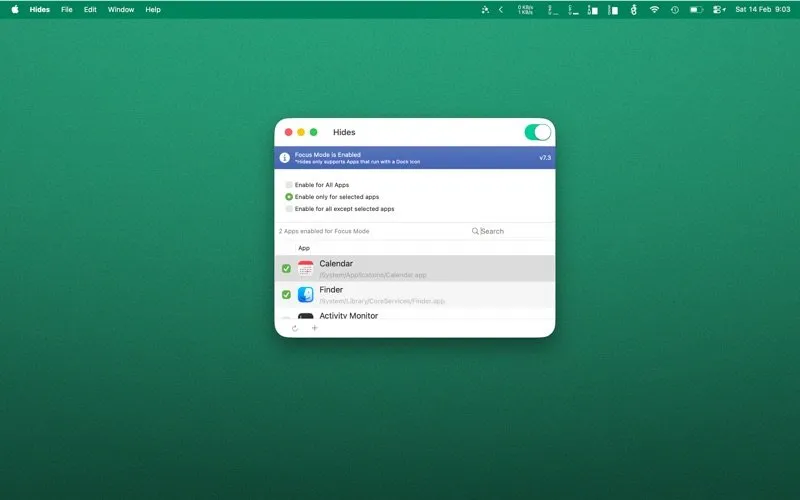
Can my Mac automatically hide other apps when I switch to one?
Not on its own: macOS only has Option-Command-H, which you press each time. Hides adds a Focus Mode that hides every other app the moment you click into one, for all apps or only the ones you pick. It costs $9.99 once.
On this page
Can my Mac automatically hide other apps when I switch to one?
In short
Not natively. Option-Command-H hides the other apps once, and Stage Manager groups windows into a side strip rather than hiding apps. Hides runs in the menu bar and, with Focus Mode on, hides every other app whenever you click a Dock icon or a window. The apps keep running; they are hidden, not quit.
What Focus Mode does on each switch
One app on screen: click into Safari and every other app with a Dock icon disappears; click Mail in the Dock and Safari goes too.
Nothing is closed: Hides uses the standard macOS hide, the same as Command-H, so documents, tabs and unsaved work stay exactly where they were.
Getting apps back: click a Dock icon or use Command-Tab, as with any hidden app. Turning Focus Mode off simply stops the automatic hiding.
Hide all apps except active on Mac, on demand
Focus Mode is optional. Hides also has two one-shot commands in its menu: Hide All Apps, which clears the screen entirely (useful before a screen share or when someone walks up to your desk), and Hide All Apps except Active, the same job as Option-Command-H. Both can sit on their own global hotkeys.
Pick which apps trigger Focus Mode
In short
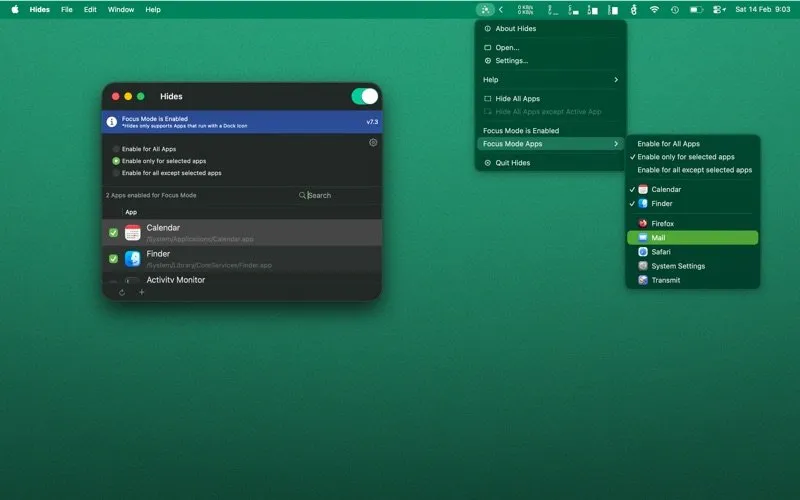
Focus Mode has three scopes: all apps, only selected apps, or all apps except selected ones. You tick apps in a searchable list in the main window, or straight from the menu bar's Focus Mode Apps submenu. A hotkey adds or removes the app you are in without opening any window.
The scopes cover different habits. “Only selected apps” suits someone who wants a clean screen in a writing app or an editor but a normal desktop everywhere else. “All except selected”, added in version 7.1, suits the reverse: hide on every switch, but leave a reference app such as a calendar or a chat window alone.
Hotkeys, the trigger delay and the menu bar
In short
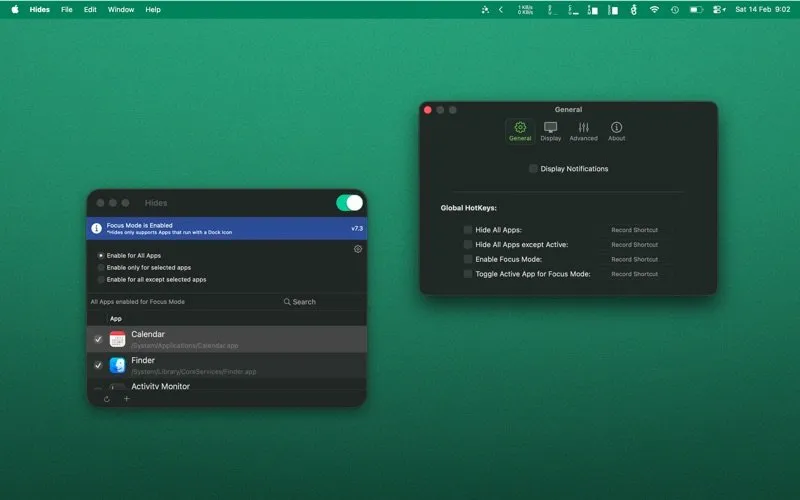
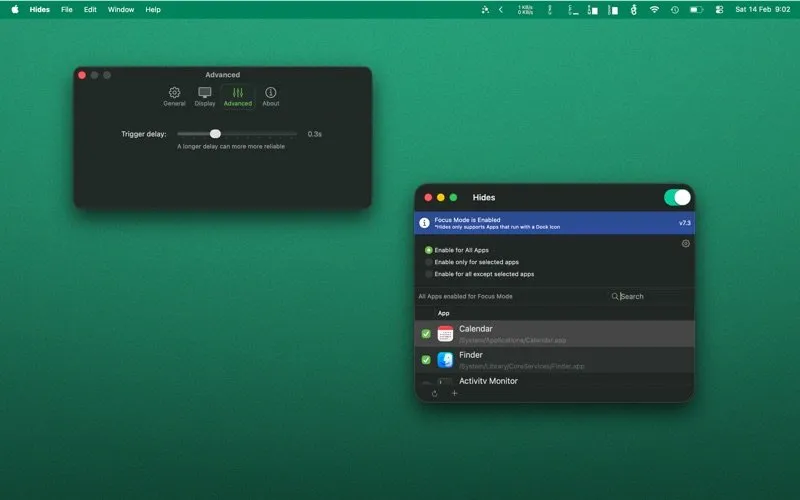
Four global hotkeys cover Hide All Apps, Hide All Apps except Active, Enable Focus Mode and Toggle Active App for Focus Mode. An Advanced tab sets the trigger delay, the pause before other apps are hidden (0.3 seconds in the developer's screenshot). The app can show a Dock icon or live only in the menu bar.
The delay setting arrived in version 7.3 and was refined again in 7.4.1. The app's own hint under the slider reads that a longer delay can be more reliable, which suggests the trade-off: a very short delay feels instant, a longer one avoids hiding an app you only passed through on the way somewhere else.
Price
$9.99 once
Trial
2 weeks (direct)
Runs on
macOS 14+ (site)
Hides
Dock-icon apps
Latest version
7.4.1, Nov 2026
Data collected
None (App Store)
Long-lived and still updated, with two caveats
Hides has been on the Mac App Store since 2012 and shipped version 7.4.1 on 5 November 2026, after 7.4 in September and 7.3 in February. Two caveats: it only hides apps that have a Dock icon, so menu bar utilities stay put, and the developer's site says macOS 14 or later while the App Store listing says 12.0 or later. We did not run it on a Mac; everything here was checked on 22 November 2026.
Ways to hide background apps on Mac, compared
In short
Hides is $9.99 once and hides other apps on every switch. Option-Command-H and Stage Manager are free and built in, but manual or different. Dissolv is free and hides apps after an idle timer. FocalPoint dims other windows for free. HokusFokus dims and tidies, with its full mode at $1.99 a month or $14.99 a year.
| App | Price | Trigger | Effect | Per-app rules |
|---|---|---|---|---|
Hides this one this article | $9.99 once | Every app switch, or hotkey | Hides other apps | Yes |
Option-Command-H built in | Free | Press it each time | Hides other apps | No |
Stage Manager built in | Free | Always on when enabled | Groups windows in a strip | No |
Dissolv Mac App Store | Free | Idle timer | Hides unused apps | Yes |
FocalPoint Mac App Store | Free; $4.99 multi-monitor | Click | Dims other windows | No |
HokusFokus Mac App Store | Free; $1.99/mo or $14.99/yr | Focus Mode hotkey | Fades windows, hides desktop | Exclusions |
Hocus Focus alternative: which one fits
Hocus Focus, the free idle-timer hider many people remember, has left the Mac App Store, which is why forum threads still ask for a modern equivalent. Dissolv is the closest like-for-like: free, and it hides apps you have not touched for a set time. If you only need a clean screen now and then, Option-Command-H costs nothing. If you would rather see other windows dimmed than gone, FocalPoint does that for free. Hides is the pick when you want the hide to happen on every switch, with rules per app, and are happy to pay once for it.
Who Hides suits, and who should skip it
In short
People on a single laptop screen who want one app at a time, writers and programmers who lose focus to whatever is behind their editor, and anyone who shares their screen often. Skip it if the clutter you want gone is menu bar icons, if you prefer dimming to hiding, or if a free idle-timer app already does the job.
The two-week trial of the direct download is the easy test: turn Focus Mode on for all apps for a day, then narrow it to the apps where it helps. If your desktop clutter is files and folders rather than windows, our spotlight on hiding desktop icons with one hotkey covers that side.
Frequently asked questions
Does Hides work with menu bar apps?
No. The app’s own banner says it only supports apps that run with a Dock icon. Menu bar utilities and background helpers are left alone, so Hides clears app windows, not the icons along the top of the screen.
Is Hides a one-time purchase or a subscription?
A one-time purchase. Hides costs $9.99 on the developer’s store, where the licence is emailed to you, and $9.99 on the Mac App Store, which lists no in-app purchases and supports Family Sharing. The direct download runs as a free two-week trial first.
Does Hides quit the apps it hides?
No. It uses the standard macOS hide, the same thing Command-H does. Hidden apps keep running, keep their windows and state, and come back when you click their Dock icon or switch to them with Command-Tab.
How is Hides different from pressing Option-Command-H?
Option-Command-H hides the other apps once, and you have to press it again after every switch. Hides’ Focus Mode applies the same hide every time you click into an app, and you can limit it to selected apps or exclude some.
What version of macOS does Hides need?
The developer’s site says macOS 14 or later, while the Mac App Store listing says macOS 12.0 or later. If you are on macOS 12 or 13, try the free direct download first to confirm it runs. Version 7.2 added support for macOS Tahoe in September 2025.
Is Hides the best app to hide other apps on a Mac?
Not for everyone. It is the one in our comparison that hides other apps on every switch with per-app rules. Dissolv is free but hides apps after an idle timer instead. FocalPoint dims other windows for free, with a $4.99 multi-monitor add-on. HokusFokus dims and tidies but its full mode is $1.99 a month or $14.99 a year. Option-Command-H is free and built in, but manual.
Sources
- 1
$9.99 direct and on the Mac App Store (JSON-LD offers); free two-week trial download; Focus Mode, Hide All Apps and Hide All Apps except Active; global hotkeys; macOS 14 or later; English, Dutch, German and Chinese.
- 2
7.4.1 (hide delay calculation), 7.4 (menu bar icon fix), 7.3 (configurable hide delay), 7.2 (macOS Tahoe), 7.1 (Focus Mode for all apps except selected ones), 7.0 (UI overhaul).
- 3
$9.99, no in-app purchases listed, Family Sharing, macOS 12.0 or later, no data collected; 7.4.1 on 5 November 2026, 7.4 on 7 September 2026.
- 4
Apple Support: Mac keyboard shortcuts
Option-Command-H views the front app but hides all other apps; Command-H hides the front app.
- 5
9to5Mac: a toggle for hiding other apps
December 2023: Option-Command-H is not a toggle, and restoring the hidden apps has to be done by hand.
- 6
Free, no in-app purchases listed; hides apps not activated for a set period, with per-app rules; version 1.2.0, February 2026.
- 7
HokusFokus on the Mac App Store
Free download; Full Focus in-app purchase $1.99 monthly or $14.99 yearly; fades inactive windows and hides desktop files; macOS 14.6 or later.
- 8
FocalPoint on the Mac App Store
Free; masks all other windows with a translucent overlay; $4.99 in-app purchase for multi-monitor mode; version 3.12.
- 9
MacRumors forum: modern equivalent of Hocus Focus
Users looking for a Hocus Focus replacement; Dissolv’s developer introduces it there; Vanish reported as crashing.

Hides
Focus Mode and app hider for Mac
once
macOS
More apps worth a look: browse the desktop